Iceberg Needed by Equipment Compare 1.3.13
requiredMatching file found Matched file: 1.3.2

Modrinth · Minecraft mod
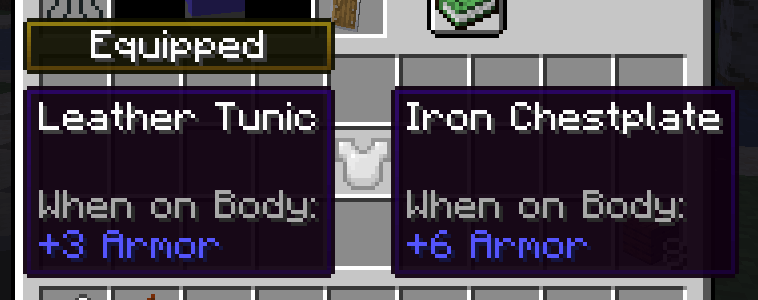
Makes it easier to compare equipment by showing a tooltip for what you're already wearing.
Quick answer
Equipment Compare 1.3.13 targets 1.21.1 with Forge. It must be installed on the client. Do not install it on the dedicated server. All 1 required mods have matching files.
Where it goes
It must be installed on the client. Do not install it on the dedicated server.
This file is marked client-only.
1.3.13. Change the file and its required mods may change too.
Install Iceberg first. We found matching files for this game-version and loader setup.
We only count dependency files that match this setup. A file for another loader does not fill the gap.
Before you install it
Built for Equipment Compare 1.3.13. Pick another file and the loader, install side or required mods may change.
Use 1.3.13. It targets 1.21.1 with Forge; another release may have different loader, side or dependency requirements.
Install Iceberg first. We found matching files for this game-version and loader setup.
It must be installed on the client. Do not install it on the dedicated server.
Use the “Get this file” button beside 1.3.13. It opens that exact file at the source.
About this project
Equipment Compare is a configurable client-side mod that simply makes it easier to compare equipment at a glance. Highly useful in a modded environment with lots of unique items to compare!
This mod works differently than most tooltip "comparison" mods--it just shows a tooltip for what you're already wearing next to the tooltip for what you're hovering over. By doing it this way, there is much wider support for new stats and features added by other mods.
All versions besides the 1.12.2 version require Iceberg, you can download it here.
This mod is fully client-side.
By default, you can show comparison tooltips by holding the shift key and hovering over an item. This is configurable as a keybind in the inventory section of the controls menu.
The configuration file for the mod also has options to reverse this behavior (always show comparisons unless the key is held), as well as color and text options for the "equipped" badge that shows above tooltips.
Additionally, you can specify a list of item IDs to blacklist if you'd like to disable comparisons for certain items.
You are free to use this mod in modpacks.

Problems, feature request, something else? Join us on Discord!
Project description from Modrinth.
Pick your setup
Choose the version and loader you play, then open the matching release.
Showing the newest 12 of 21 game versions. Older files are in the list below.
Check the dependencies, then try the file in a copied instance before changing a world you care about.
Recent files
EquipmentCompare-1.21.1-forge-1.3.13.jar
1 Apr 2025
EquipmentCompare-1.21.1-neoforge-1.3.13.jar
1 Apr 2025
EquipmentCompare-1.21.1-fabric-1.3.13.jar
1 Apr 2025
EquipmentCompare-1.21.4-forge-1.3.12.jar
7 Feb 2025
EquipmentCompare-1.21.4-neoforge-1.3.12.jar
7 Feb 2025
EquipmentCompare-1.21.4-fabric-1.3.12.jar
7 Feb 2025
EquipmentCompare-1.21.3-forge-1.3.12.jar
17 Dec 2024
EquipmentCompare-1.21.3-neoforge-1.3.12.jar
17 Dec 2024
EquipmentCompare-1.21.3-fabric-1.3.12.jar
17 Dec 2024
EquipmentCompare-1.21-neoforge-1.3.12.jar
2 Aug 2024
EquipmentCompare-1.21-forge-1.3.12.jar
2 Aug 2024
EquipmentCompare-1.21-fabric-1.3.12.jar
2 Aug 2024
Looking for an older file? The official Modrinth project page is in Resources.
 mod
modImproves Minecrafts weather by making clouds volumetric and weather effects localalized!
 mod
modA collection of configurable music/sound features!
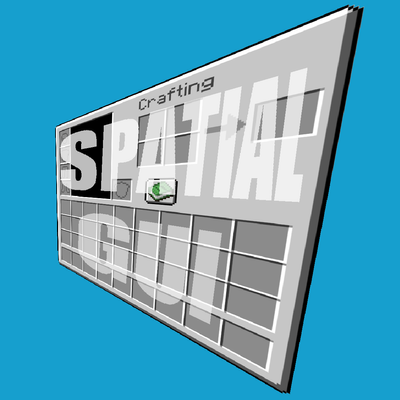 mod
modA client-side mod that renders inventory & container screens as a 3D plane.