
Minecraft version
Back to mods 
Modrinth · Minecraft mod
Mc2Discord
Link your Minecraft server chat with your Discord (integration, bridge)
Choose a version Pick your version below, then grab the matching file.
Quick answer
Which Mc2Discord release matches 26.2 Forge?
Best match for your filters 4.4.0
Game version 26.2, 26.1.2, 26.1.1
Loader Forge
Mc2Discord 4.4.0 targets 26.2, 26.1.2, 26.1.1 with Forge. Do not install it on the client. It must be installed on the dedicated server. No extra mods listed for this file.
Where it goes
Is Mc2Discord required on the client, server, or both?
Do not install it on the client. It must be installed on the dedicated server.
Client Not supported
Dedicated server Required
Loader for this release Forge
Required install it here Optional supported, not mandatory Not supported do not install here Source doesn’t say do not assume
This file is marked server-only.
What else does Mc2Discord 4.4.0 need?
4.4.0 on 26.2 Forge. Every mod below is checked against that same setup.
This file does not list any required mods. Do not add a library just because a different file uses it.
This file does not list any required or optional mods.
Before you install it
Add Mc2Discord without breaking your instance.
Built for Mc2Discord 4.4.0 on 26.2 Forge. Pick another file and the loader, install side or required mods may change.
- 01
Stick to this file
Use 4.4.0. It targets 26.2, 26.1.2, 26.1.1 with Forge; another release may have different loader, side or dependency requirements.
- 02
Bring the mods it needs
This file does not list any required mods. Do not add a library just because a different file uses it.
- 03
Put it on the correct side
Do not install it on the client. It must be installed on the dedicated server.
- 04
Pick the file you checked
Use the “Get this file” button beside 4.4.0. It opens that exact file at the source.
About this project
What does Mc2Discord add?
Link your Minecraft server chat with your Discord
/!\ This mod needs configuration to work properly. Please take a look to the wiki: https://github.com/DenisD3D/Mc2Discord/wiki
Features
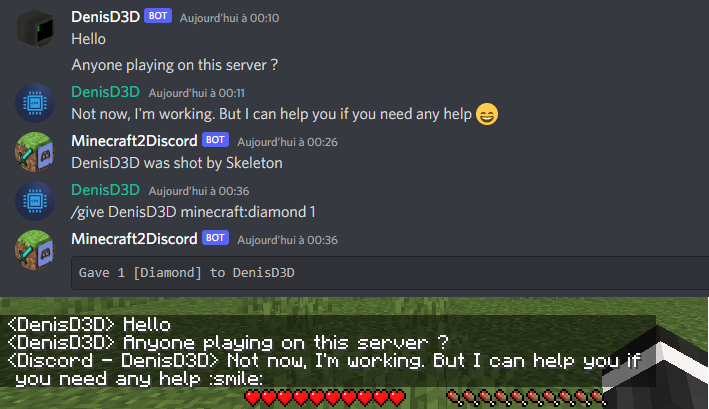
- Send Minecraft chat message to your Discord server
- Send message in your Discord server to the Minecraft chat
- Send game events message to Discord (player join, player leave, death, etc.)
- Display player's head as profile picture in Discord thanks to webhook mode
- Execute Minecraft commands on Discord
- Customize bot presence (eg: playing at xxx) and channel name / topic
- Provide an invitation link to your Discord server with the /discord command
- Forward the server console to discord (useful for admins)
- Hide player on Discord (useful for admins, integrate with VanishMod)
- Account linking (forced or optional)
- Fully customizable, easy configuration (messages, behavior, etc.)
- Relay others mods announcements
- Works with Emojiful to display emojis ingame
Try without installing
Join the official demo server hosted by MtxServ
- Join the demo discord channel #access-demo
- Start the sever with /start command (server is usually stopped)
- Connect to m2d-demo.denisd3d.fr with minecraft 1.20.2 Vanilla
Installation
A quick configuration is mandatory for the mod to work. Steps are described on the wiki: https://github.com/DenisD3D/Mc2Discord/wiki
If you need any help or want new features, you can join the Discord support server
You can also watch the video tutorial:
Misc
Links
- Discord (Support): https://discord.gg/rzzd76c
- CurseForge (Download): https://www.curseforge.com/minecraft/mc-mods/mc2discord/
- Modrinth (Download): https://modrinth.com/mod/mc2discord
- Github (Source): https://github.com/DenisD3D/Mc2Discord
- Wiki: https://github.com/DenisD3D/Mc2Discord/wiki
Project description from Modrinth.
Pick your setup
Mc2Discord by Minecraft version and loader
Choose the version and loader you play, then open the matching release.
Minecraft version
26.2
4 loader buildsMinecraft version
26.1.2
4 loader buildsMinecraft version
26.1.1
4 loader buildsMinecraft version
26.1
4 loader buildsMinecraft version
1.21.11
4 loader buildsMinecraft version
1.21.10
4 loader buildsMinecraft version
1.21.6
3 loader buildsMinecraft version
1.21.5
3 loader buildsMinecraft version
1.21.4
3 loader buildsMinecraft version
1.21.3
3 loader buildsMinecraft version
1.21.2
3 loader buildsShowing the newest 12 of 25 game versions. Older files are in the list below.
Check the dependencies, then try the file in a copied instance before changing a world you care about.
Recent files
Mc2Discord versions and loaders
4.4.0
mc2discord-forge-26.2-4.4.0.jar
7 Nov 2026
Client Not supported Server Required Dependencies No extras listed Listed on Release listing
Check the 26.2 · Forge setup 26.226.1.226.1.126.1 release
4.3.1
mc2discord-forge-26.2-4.3.1.jar
19 Sept 2026
Client Not supported Server Required Dependencies No extras listed Listed on Release listing
Check the 26.2 · Forge setup 26.126.1.126.1.226.2 release
4.3.0
mc2discord-forge-26.2-4.3.0.jar
5 Sept 2026
Client Not supported Server Required Dependencies No extras listed Listed on Release listing
Check the 26.2 · Forge setup 26.126.1.126.1.226.2 release
4.2.8
mc2discord-forge-26.2-4.2.8.jar
24 Jul 2026
Client Not supported Server Required Dependencies No extras listed Listed on Release listing
Check the 26.2 · Forge setup 26.2Forge release
Looking for an older file? The official Modrinth project page is in Resources.
 mod
Modrinth · Minecraft
Bird Zoom
A simple zoom mod that fixes common issues with other zoom mods. You can also scroll to zoom in and out. The sensitivity lowers the further you zoom in allowing for more accurate zooming on a subject. Allows for zooms up to 500x
 mod
Modrinth · Minecraft
Nexa AI Chat
The Mod/Plugin Introduces Nexa Ai Agent into the Minecraft. Your sidekick in minecraft! Accessible from the chat. You can talk to it anytime, even ask it to do actions. it has all context of you and environment so when it talks, you better listen.
 mod
CurseForge + Modrinth · Minecraft
SimpleVoiceChat Broadcast
Broadcast audio to everyone