Minecraft version
Back to mods 
Modrinth · Minecraft mod
CPSDisplay
CPSDisplay (or CPSMod) shows your in-game cps and allows you to customize many things
Choose a version Pick your version below, then grab the matching file.
Quick answer
Which CPSDisplay release should I use?
Latest stable file 2.2.2
Game version 1.8.9
Loader Forge
CPSDisplay 2.2.2 targets 1.8.9 with Forge. It must be installed on the client. Do not install it on the dedicated server. No extra mods listed for this file.
Where it goes
Is CPSDisplay required on the client, server, or both?
It must be installed on the client. Do not install it on the dedicated server.
Client Required
Dedicated server Not supported
Loader for this release Forge
Required install it here Optional supported, not mandatory Not supported do not install here Source doesn’t say do not assume
This file is marked client-only.
What else does CPSDisplay 2.2.2 need?
2.2.2. Change the file and its required mods may change too.
This file does not list any required mods. Do not add a library just because a different file uses it.
This file does not list any required or optional mods.
Before you install it
Add CPSDisplay without breaking your instance.
Built for CPSDisplay 2.2.2. Pick another file and the loader, install side or required mods may change.
- 01
Stick to this file
Use 2.2.2. It targets 1.8.9 with Forge; another release may have different loader, side or dependency requirements.
- 02
Bring the mods it needs
This file does not list any required mods. Do not add a library just because a different file uses it.
- 03
Put it on the correct side
It must be installed on the client. Do not install it on the dedicated server.
- 04
Pick the file you checked
Use the “Get this file” button beside 2.2.2. It opens that exact file at the source.
About this project
What does CPSDisplay add?
CPS Display [1.8.9 - 1.12.2] & 1.20.x
1.20+ are in delevopment (alpha) there is only custom text, text color & scaling available
CPS Display/CPS Mod is a forge mod for displaying your Clicks Per Seconds.
Links
I am making this mod in my free time, so if you want to help me, pay me a drink.
What you NEED to know
To configurate the mod hit P key (can be changed) or execute /cpsdisplay
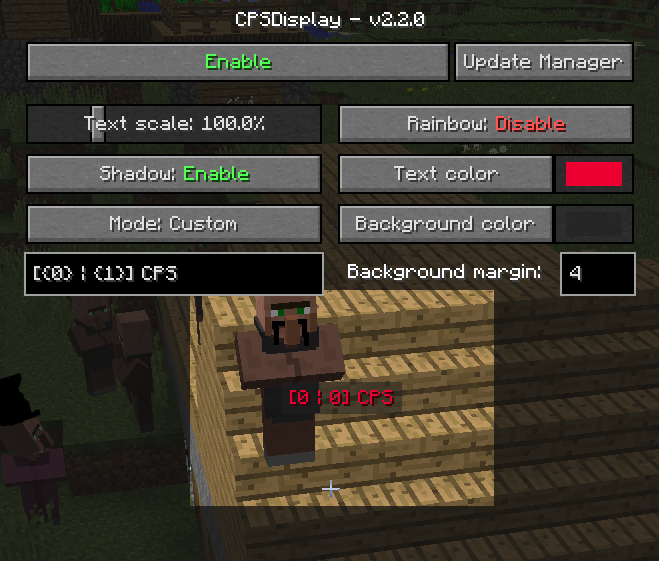
The mod offers a high level of customization and is automatically updated
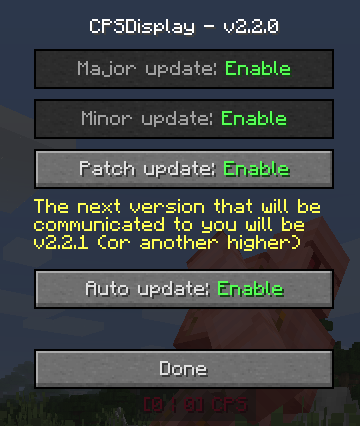
The mod features a built-in color selector for easy choice of the ideal color in the style of minecraft, but you can use resource packs for change its appearence.
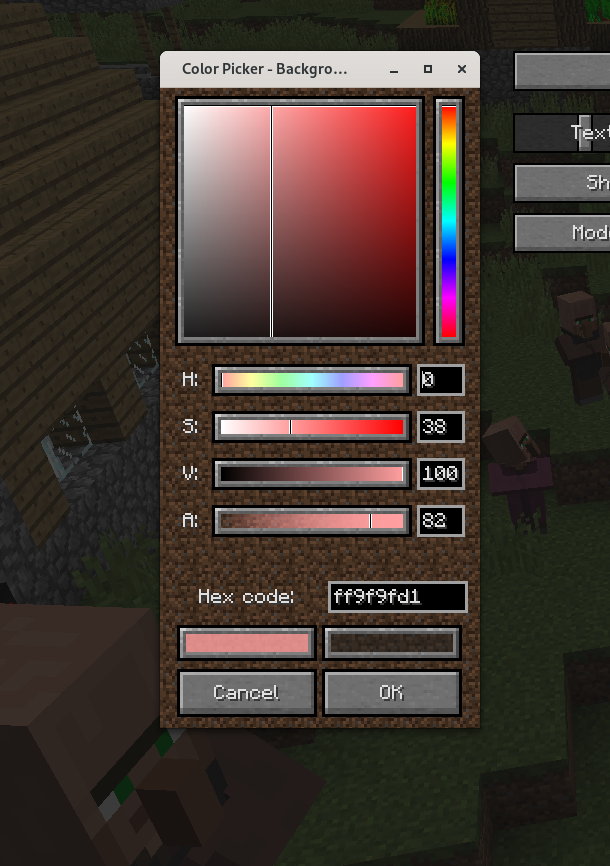
More about all the settings
Move
To move the text you simply need to hold click on the text and drag our mouse where you want.
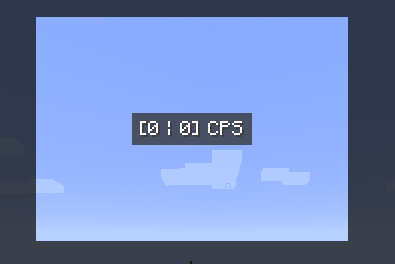
The GUI background is cut out around the text, so you can see what the text will look like during play.
Text shadow
You can enable or disable it
Text scale
From 10% to 400%
Text color
Click on the button to open the color selector and select the color you want (no opacity available, minecraft limitation).
Text mode
There are 4 different modes:
- Left
- Right
- Left & Right
- Custom
The first 3 modes have a default text, but can be redefined in the mod's lang files using resource packs.
Custom text
You have 999 characters available. {0} will be replaced by left clicks, {1} by right clicks.
You can use minecraft formatting (instead of § use &) and do things like this
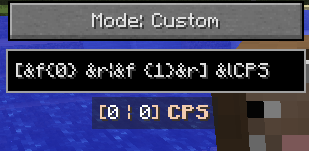
Rainbow
I usually call this the "epileptic mode" - the text color changes over time. Custom color is therefore not available, but you can use minecraft formatting as a workaround.
Background color
Same as text color, but this time alpha channel is available.
Background margin
How big is the background. Min: 0; Max: 99
And that's it
There is nothing more, but if you want more, you have 2 solutions:
- Join the discord server and create a new post about the idea you have in the suggestion channel
- If you have programming skills, feel free to fork the github project to add what you want and create a pull request for everyone to enjoy
Thanks
Project description from Modrinth.
Pick your setup
CPSDisplay by Minecraft version and loader
Choose the version and loader you play, then open the matching release.
Minecraft version
1.20.4
1 loader buildMinecraft version
1.20.3
1 loader buildMinecraft version
1.20.2
1 loader buildMinecraft version
1.20.1
1 loader buildMinecraft version
1.20
1 loader buildMinecraft version
1.12.2
1 loader buildMinecraft version
1.11.2
1 loader buildMinecraft version
1.10.2
1 loader buildMinecraft version
1.9.4
1 loader buildMinecraft version
1.8.9
1 loader buildCheck the dependencies, then try the file in a copied instance before changing a world you care about.
Recent files
CPSDisplay versions and loaders
3.0.0.a5
cpsdisplay-3.0.0-a5.jar
21 Jul 2025
Client Required Server Not supported Dependencies No extras listed Listed on Release listing
Check the 1.20.5 · Forge setup 1.201.20.11.20.21.20.3 alpha
3.0.0.a4
CPSDisplay v3.0.0-a4.jar
26 Jun 2025
Client Required Server Not supported Dependencies No extras listed Listed on Release listing
Check the 1.20.5 · Forge setup 1.201.20.11.20.21.20.3 alpha
3.0.0.a3
cpsdisplay-3.0.0-a3.jar
26 Jul 2024
Client Required Server Not supported Dependencies No extras listed Listed on Release listing
Check the 1.20.5 · Forge setup 1.201.20.11.20.21.20.3 alpha
3.0.0.a2
cpsdisplay-1.20.x-3.0.0-a2.jar
17 Feb 2024
Client Required Server Not supported Dependencies No extras listed Listed on Release listing
Check the 1.20.4 · Forge setup 1.201.20.11.20.21.20.3 alpha
3.0.0.a1
cpsdisplay-mc1.20.1-3.0.0-a1.jar
18 Dec 2023
Client Required Server Not supported Dependencies No extras listed Listed on Release listing
Check the 1.20.1 · Forge setup 1.20.1Forge alpha
3.0.0.a1
cpsdisplay-mc1.20.2-3.0.0-a1.jar
28 Oct 2023
Client Required Server Not supported Dependencies No extras listed Listed on Release listing
Check the 1.20.2 · Forge setup 1.20.2Forge alpha
2.2.2
cpsdisplay-mc1.8.9-2.2.2.jar
22 Oct 2023
Client Required Server Not supported Dependencies No extras listed Listed on Release listing
Check the 1.8.9 · Forge setup 1.8.9Forge release
2.2.2
cpsdisplay-mc1.9.4-2.2.2.jar
22 Oct 2023
Client Required Server Not supported Dependencies No extras listed Listed on Release listing
Check the 1.9.4 · Forge setup 1.9.4Forge release
2.2.2
cpsdisplay-mc1.10.2-2.2.2.jar
22 Oct 2023
Client Required Server Not supported Dependencies No extras listed Listed on Release listing
Check the 1.10.2 · Forge setup 1.10.2Forge release
2.2.2
cpsdisplay-mc1.11.2-2.2.2.jar
22 Oct 2023
Client Required Server Not supported Dependencies No extras listed Listed on Release listing
Check the 1.11.2 · Forge setup 1.11.2Forge release
2.2.2
cpsdisplay-mc1.12.2-2.2.2.jar
22 Oct 2023
Client Required Server Not supported Dependencies No extras listed Listed on Release listing
Check the 1.12.2 · Forge setup 1.12.2Forge release
2.2.1
cpsdisplay-mc1.8.9-2.2.1.jar
19 Jul 2023
Client Required Server Not supported Dependencies No extras listed Listed on Release listing
Check the 1.8.9 · Forge setup 1.8.9Forge release
Looking for an older file? The official Modrinth project page is in Resources.
 mod
mod Modrinth · Minecraft
Integrated Dynamics
A mod to take full and automated control of your appliances
 mod
mod Modrinth · Minecraft
LazyTrade
It adds a GUI which helps you get any trade you want from villagers.
 mod
mod Modrinth · Minecraft
ALOH (at least one hp)
A Fabric mod for Minecraft 1.21.1+ that prevents selected players from dying by keeping their health at a minimum of half a heart.