Architectury API Needed by ElytraHUD 1.1.0
requiredMatching file found Matched file: 20.1.15+neoforge

Modrinth · Minecraft mod
Minimalist elytra HUD — durability, rockets, and flight speed at a glance. Fully customizable with a live preview.
Quick answer
ElytraHUD 1.1.0 targets 26.1.2 with NeoForge. It must be installed on the client. Do not install it on the dedicated server. All 1 required mods have matching files.
Where it goes
It must be installed on the client. Do not install it on the dedicated server.
This file is marked client-only.
1.1.0. Change the file and its required mods may change too.
Install Architectury API first. We found matching files for this game-version and loader setup.
We only count dependency files that match this setup. A file for another loader does not fill the gap.
Before you install it
Built for ElytraHUD 1.1.0. Pick another file and the loader, install side or required mods may change.
Use 1.1.0. It targets 26.1.2 with NeoForge; another release may have different loader, side or dependency requirements.
Install Architectury API first. We found matching files for this game-version and loader setup.
It must be installed on the client. Do not install it on the dedicated server.
Use the “Get this file” button beside 1.1.0. It opens that exact file at the source.
About this project

A clean, minimalist HUD that keeps the one thing that matters while flying — how much elytra you have left — right where you can see it, without cluttering your screen. At a glance it shows your elytra durability, how many firework rockets you are carrying, and your current flight speed, all in a single compact row.
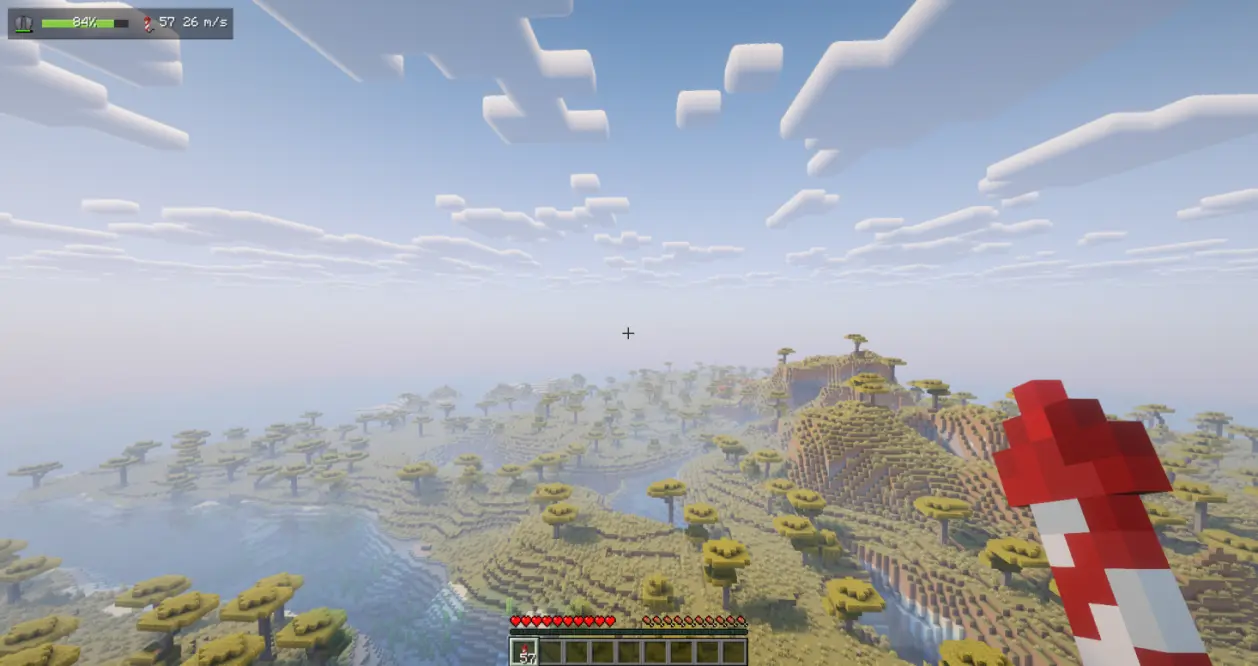
Client-side only (no server installation required). Fully compatible with singleplayer and multiplayer.
Dependencies: Fabric & NeoForge require Architectury API (and Fabric API on Fabric). Forge still needs only Forge.
Free to use in any modpack — public or private, no permission needed.
All HUD elements are fully customizable with a live in-settings preview — what you configure is exactly what you get in game. Choose when it appears (Always, only When Equipped, or only While Gliding), place it in any of six screen positions from a visual grid, with free offsets and 50–200% scaling, toggle each element (icon, bar, rockets, speed), switch durability text between percent, value, or hidden, and tune background opacity, color-by-durability, and the low-durability warning.
Open the settings screen with the /elytrahud command (alias /ehud) or a customizable hotkey. On NeoForge you can also open it from the in-game mod list.
config/elytrahud.json).Please report any bugs, errors, or feature suggestions on Discord: https://discord.gg/HTkn94BXmA
Project description from Modrinth.
Pick your setup
Choose the version and loader you play, then open the matching release.
Check the dependencies, then try the file in a copied instance before changing a world you care about.
Recent files
elytrahud-neoforge-26.1.2-1.1.0.jar
18 Sept 2026
elytrahud-fabric-26.1.2-1.1.0.jar
18 Sept 2026
elytrahud-neoforge-26.3-1.1.0.jar
16 Sept 2026
elytrahud-fabric-26.3-1.1.0.jar
16 Sept 2026
elytrahud-neoforge-26.2-1.1.0.jar
3 Sept 2026
elytrahud-neoforge-1.21.11-1.1.0.jar
3 Sept 2026
elytrahud-neoforge-1.21.1-1.1.0.jar
3 Sept 2026
elytrahud-forge-1.21.11-1.1.0.jar
3 Sept 2026
elytrahud-forge-1.21.1-1.1.0.jar
3 Sept 2026
elytrahud-forge-1.20.1-1.1.0.jar
3 Sept 2026
elytrahud-forge-1.19.2-1.1.0.jar
3 Sept 2026
elytrahud-fabric-26.2-1.1.0.jar
3 Sept 2026
Looking for an older file? The official Modrinth project page is in Resources.
 mod
modAdd a new tree with a new type of wood and food
 mod
modThrow your torches! Left‑click to hurl a torch that arcs through the air and sticks wherever it lands.
 mod
modKeeps your lapis lazuli inside the enchanting table when you close the UI