Polymer Needed by pbwarps 1.5.0+26.3-rc-1
requiredMatching file found Matched file: 0.18.0+26.3-rc-1
Modrinth · Minecraft mod
A simple, but flexible admin-defined warp mod
Quick answer
pbwarps 1.5.0+26.3-rc-1 targets 26.3-rc-1 with Fabric. Do not install it on the client. It must be installed on the dedicated server. All 2 required mods have matching files.
Where it goes
Do not install it on the client. It must be installed on the dedicated server.
This file is marked server-only.
1.5.0+26.3-rc-1. Change the file and its required mods may change too.
Install Polymer, Fabric API first. We found matching files for this game-version and loader setup. 1 comes through another mod in the chain.
1 extra mod was pulled in by another dependency. Indented rows show who needs each one. We only count dependency files that match this setup. A file for another loader does not fill the gap.
Before you install it
Built for pbwarps 1.5.0+26.3-rc-1. Pick another file and the loader, install side or required mods may change.
Use 1.5.0+26.3-rc-1. It targets 26.3-rc-1 with Fabric; another release may have different loader, side or dependency requirements.
Install Polymer, Fabric API first. We found matching files for this game-version and loader setup. 1 comes through another mod in the chain.
Do not install it on the client. It must be installed on the dedicated server.
Use the “Get this file” button beside 1.5.0+26.3-rc-1. It opens that exact file at the source.
About this project
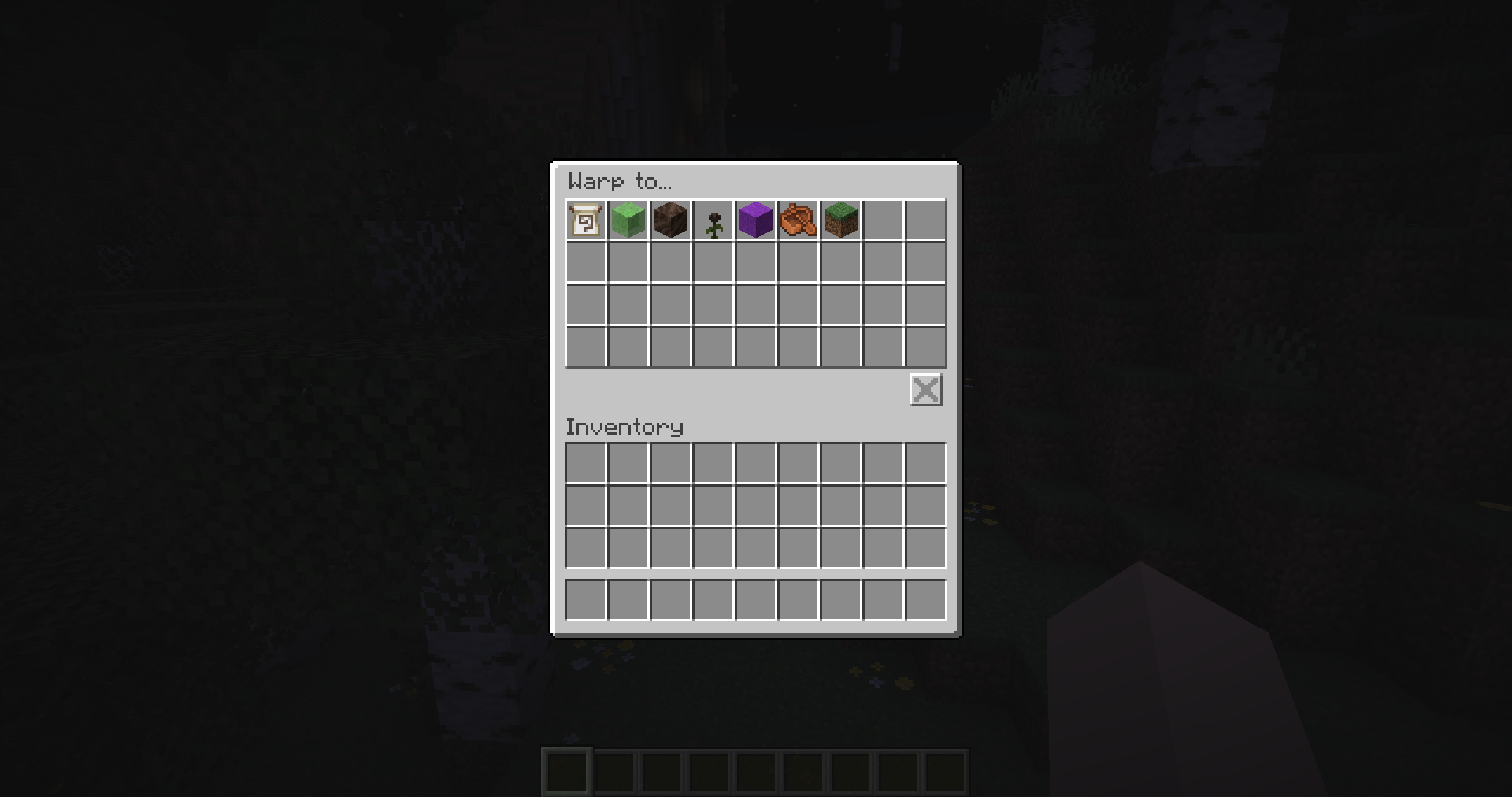
This is a simple, admin-defined warp mod for Fabric servers, allowing you to define areas players should have quick access to.
Player's can easily use it by running /warp NAME to teleport to selected warp or just run /warp to open an ui to select
from all available ones.
Warps can have a custom formatted name, icons, positions/rotation and predicate, limiting who can use it.
This mod has support for using polymer resource packs for nicer looking ui.
All admin commands are found under /warps command.
To create warp, you use /warps create <id>. You can also supply multiple additional parameters to configure it.
You can also modify existing warps by using /warps modify <id> ... and all of it's subcommands.
The predicates use Predicate API, for which format is described here: https://github.com/Patbox/PredicateAPI/blob/1.21.2/BUILTIN.md
Only difference being, that the predicate type is passed as it's own argument before predicate data.
You can display info about the warp by using /warps info <id> or remove the warp with /warps remove <id> command.
To teleport other players or to skip the predicate checks, you can use /warps teleport <id> command.
Project description from Modrinth.
Pick your setup
Choose the version and loader you play, then open the matching release.
Showing the newest 12 of 13 game versions. Older files are in the list below.
Check the dependencies, then try the file in a copied instance before changing a world you care about.
Recent files
pbwarps-1.5.0+26.3-rc-1.jar
12 Sept 2026
pbwarps-1.4.0+26.2.jar
19 Jun 2026
pbwarps-1.3.1+26.1.2.jar
15 May 2026
pbwarps-1.3.0+26.1.jar
27 Mar 2026
pbwarps-1.2.0+1.21.11.jar
10 Dec 2025
pbwarps-1.1.0+1.21.9.jar
30 Sept 2025
pbwarps-1.0.0+1.21.6.jar
20 Jun 2025
pbwarps-1.0.0+1.21.5.jar
21 Apr 2025
pbwarps-0.2.0+1.21.1.jar
4 Apr 2025
pbwarps-0.1.0+1.21.1.jar
16 Mar 2025
Looking for an older file? The official Modrinth project page is in Resources.
 mod
modA simple mod that adds different animations for chunks!
 mod
modServer-side mod that hides player nametags through walls
 mod
modConfigurable Minecraft-themed cursors