Fabric Language Kotlin Needed by Colorful Anvils 1.2.0+1.20.x
requiredMatching file found Matched file: Fabric Language Kotlin 1.14.2+kotlin.2.4.21

CurseForge · Minecraft mod
🎨 Use large variety of colors in anvils
Quick answer
Colorful Anvils 1.2.0+1.20.x targets 1.20.1, 1.20 with Fabric, Quilt. The project page does not say whether this file belongs on the client, dedicated server, or both. All 2 required mods have matching files.
Where it goes
The project page does not say whether this file belongs on the client, dedicated server, or both.
The source does not explicitly classify this release as client-only or server-only.
1.2.0+1.20.x. Change the file and its required mods may change too.
Install Fabric Language Kotlin, Fabric Language Kotlin first. We found matching files for this game-version and loader setup.
We only count dependency files that match this setup. A file for another loader does not fill the gap.
Before you install it
Built for Colorful Anvils 1.2.0+1.20.x. Pick another file and the loader, install side or required mods may change.
Use 1.2.0+1.20.x. It targets 1.20.1, 1.20 with Fabric, Quilt; another release may have different loader, side or dependency requirements.
Install Fabric Language Kotlin, Fabric Language Kotlin first. We found matching files for this game-version and loader setup.
The project page does not say whether this file belongs on the client, dedicated server, or both.
Use the “Get this file” button beside 1.2.0+1.20.x. It opens that exact file at the source.
About this project
This mod uses PlaceholderAPI by @Patbox which allows you to format text with support for RGB colors, gradients, and many more! Simply rename item using tags.
Starting from mod version 1.0.2 you are able to use permissions to control player ability to use formatting. By default colorfulanvils.use permission is set to true for all players. You can disable it via any permissions manager mod to prevent text formatting.
No problems are known at this moment, but be aware because this mod uses mixins to modify original Minecraft anvil code and this may cause issues with mods that do the same thing!
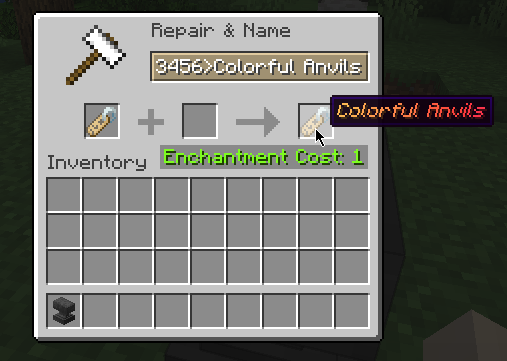
Project description from CurseForge.
Pick your setup
Choose the version and loader you play, then open the matching release.
Check the dependencies, then try the file in a copied instance before changing a world you care about.
Recent files
colorfulanvils-1.2.0+1.20.x.jar
15 Jun 2023
colorfulanvils-1.1.1+1.19.x.jar
15 Jun 2023
colorfulanvils-1.1.0+1.18.x.jar
20 Apr 2023
colorfulanvils-1.1.0+1.19.x.jar
20 Apr 2023
colorfulanvils-1.0.2+1.19.1.jar
6 Aug 2022
colorfulanvils-1.0.1+1.19.jar
14 Jun 2022
28 May 2022
Looking for an older file? The official CurseForge project page is in Resources.
 mod
The Ultimate Tool to monitor Minecraft player activity! Bukkit/Sponge/Bungee/Velocity support.
 mod
(Play Note Block Songs In Minecraft!) NBS SONGS!! Original mod is Disc Jockey. This project just upgraded it and added some features. 原作品为 Disc Jockey,此项目只是对它进行了升级,加装了一些功能。 仅此而已
 mod
Ki costs, shots left and form time, right next to your hotbar