Minecraft version
Back to mods 
Modrinth · Minecraft mod
Sky Artifacts (Change Weather & Time)
Change Time, Freeze Time, Stop and Start Rain & Thunder with powerful Artifacts!
Choose a version Pick your version below, then grab the matching file.
Quick answer
Which Sky Artifacts (Change Weather & Time) release should I use?
Latest stable file 2.3+mod
Game version 1.21, 1.21.1
Loader Fabric, Forge, Quilt
Sky Artifacts (Change Weather & Time) 2.3+mod targets 1.21, 1.21.1 with Fabric, Forge, Quilt. Installation on the client is optional. Installation on the dedicated server is optional. No extra mods listed for this file.
Where it goes
Is Sky Artifacts (Change Weather & Time) required on the client, server, or both?
Installation on the client is optional. Installation on the dedicated server is optional.
Client Optional
Dedicated server Optional
Loader for this release Fabric, Forge, Quilt
Required install it here Optional supported, not mandatory Not supported do not install here Source doesn’t say do not assume
The source marks this as usable on both the client and server.
What else does Sky Artifacts (Change Weather & Time) 2.3+mod need?
2.3+mod. Change the file and its required mods may change too.
This file does not list any required mods. Do not add a library just because a different file uses it.
This file does not list any required or optional mods.
Before you install it
Add Sky Artifacts (Change Weather & Time) without breaking your instance.
Built for Sky Artifacts (Change Weather & Time) 2.3+mod. Pick another file and the loader, install side or required mods may change.
- 01
Stick to this file
Use 2.3+mod. It targets 1.21, 1.21.1 with Fabric, Forge, Quilt; another release may have different loader, side or dependency requirements.
- 02
Bring the mods it needs
This file does not list any required mods. Do not add a library just because a different file uses it.
- 03
Put it on the correct side
Installation on the client is optional. Installation on the dedicated server is optional.
- 04
Pick the file you checked
Use the “Get this file” button beside 2.3+mod. It opens that exact file at the source.
About this project
What does Sky Artifacts (Change Weather & Time) add?

Sky Artifacts adds powerful Artifacts that will allow you and your Friends to change Weather & Time!
💧Rainstone
The Rainstone is crafted with Lapis Lazuli and a Water Bucket: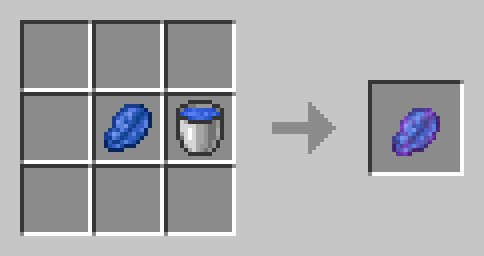
It can be used to Toggle the rain. Use it to stop the Rain if its Raining, or to make it rain for 5 Minutes when its not Raining. It will be consumed upon use. Perfect for building in clear Weather or powering up your Trident with Rain!
⚡Thunderstone
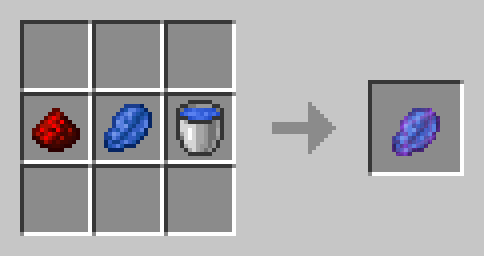
A Thunderstone is a Rainstone that has been infused with the Energy of Redstone. It has the same Functionality as the Rainstone, but instead of starting Rain it will start Thunder!
🧊Frozen Clock
Craft the Frozen Clock with a Clock and an Ice Block:
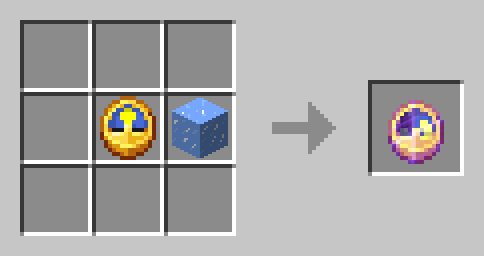
Use the Frozen Watch to Stop the passage of Time (The Day and Night cycle) for 10 minutes (it will be consumed). You can use this to extend the Night or to take Screenshots in the same Setting.
⌛Timestones
An empty Timestone is crafted with a Clock and a piece of Clay:
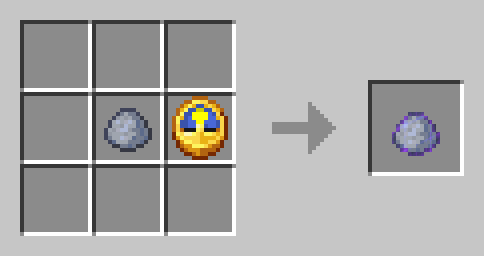
Use an Empty Timestone to funnel time Energy into it. It will save the exact current time and turn from an Gray, Empty Timestone into a colored one. Rightclick a colored Timestone to set the time to the time of the right click. Meaning, if you use a Empty Timestone at Night and then use the resulting Timestone at day, the time will be set to the time of Night when you funneled Energy into it and the Timestone will be consumed. The color of a Timestone indicates which Time it has saved:
- Purple = Early Sunrise
- Lightblue = Morning
- Yellow = Day
- Orange = Early Sunset
- Red = Sunset
- Black = Night
How to copy Timestones
To copy a Timestone, put it in your Offhand. Use an Empty Timestone and it will become an exact copy of the Timestone you are holding in your Offhand.
🛠️Installation
Datapack Installation Guide
Copy the .zip archive into the ".minecraft/saves/yourworldname/datapacks" folder, where yourworldname is the name of your world.
Mod installation Guide
Copy the .jar archive into the folder your Mod Loader of choice provides.
⚙️Compatibility
Do not use an "Unlock all achievements" datapack after having installed this datapack!
❕Issues & Suggestions
If you encounter any Issues with this Datapack/Mod, please report them on my Discord
Project description from Modrinth.
Pick your setup
Sky Artifacts (Change Weather & Time) by Minecraft version and loader
Choose the version and loader you play, then open the matching release.
Minecraft version
1.21
4 loader buildsMinecraft version
1.20.6
4 loader buildsMinecraft version
1.20.5
4 loader buildsCheck the dependencies, then try the file in a copied instance before changing a world you care about.
Recent files
Sky Artifacts (Change Weather & Time) versions and loaders
2.3+mod
sky-artifacts-2.3.jar
9 Aug 2024
Client Optional Server Optional Dependencies No extras listed Listed on Release listing
Check the 1.21.1 · Fabric setup 1.211.21.1FabricForge release
2.3
skyArtifacts1.21.zip
9 Aug 2024
Client Optional Server Optional Dependencies No extras listed Listed on Release listing
Check the 1.21.1 · datapack setup 1.211.21.1datapack release
2.3+mod
sky-artifacts-2.3.jar
9 Aug 2024
Client Optional Server Optional Dependencies No extras listed Listed on Release listing
Check the 1.20.6 · Fabric setup 1.20.51.20.6FabricForge release
2.3
skyArtifacts1.20.5-6.zip
9 Aug 2024
Client Optional Server Optional Dependencies No extras listed Listed on Release listing
Check the 1.20.6 · datapack setup 1.20.51.20.6datapack release
2.2+mod
sky-artifacts-2.2.jar
23 Jun 2024
Client Optional Server Optional Dependencies No extras listed Listed on Release listing
Check the 1.21.1 · Fabric setup 1.211.21.1FabricForge release
2.2
skyArtifacts1.21.zip
23 Jun 2024
Client Optional Server Optional Dependencies No extras listed Listed on Release listing
Check the 1.21.1 · datapack setup 1.211.21.1datapack release
2.2+mod
sky-artifacts-2.2.jar
23 Jun 2024
Client Optional Server Optional Dependencies No extras listed Listed on Release listing
Check the 1.20.6 · Fabric setup 1.20.51.20.6FabricForge release
2.2
skyArtifacts1.20.5-6.zip
23 Jun 2024
Client Optional Server Optional Dependencies No extras listed Listed on Release listing
Check the 1.20.6 · datapack setup 1.20.51.20.6datapack release
2.1+mod
sky-artifacts-2.1.jar
14 Jun 2024
Client Optional Server Optional Dependencies No extras listed Listed on Release listing
Check the 1.21 · Fabric setup 1.21FabricForgeQuilt release
2.1
skyArtifacts1.21.zip
14 Jun 2024
Client Optional Server Optional Dependencies No extras listed Listed on Release listing
Check the 1.21 · datapack setup 1.21datapack release
2.1+mod
sky-artifacts-2.1.jar
12 Jun 2024
Client Optional Server Optional Dependencies No extras listed Listed on Release listing
Check the 1.20.6 · Fabric setup 1.20.51.20.6FabricForge release
2.1
skyArtifacts1.20.5-6.zip
12 Jun 2024
Client Optional Server Optional Dependencies No extras listed Listed on Release listing
Check the 1.20.6 · datapack setup 1.20.51.20.6datapack release
Looking for an older file? The official Modrinth project page is in Resources.
 mod
CurseForge + Modrinth · Minecraft
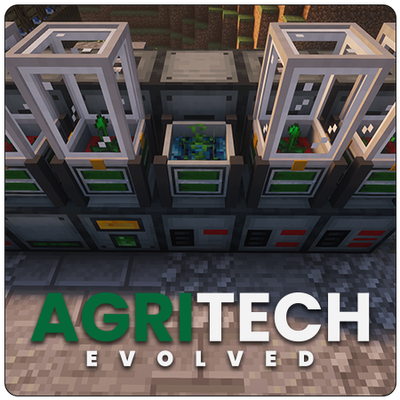
Agritech: Evolved (ATE)
Farming automation mod with planters, machines, modules, and power gen.
 mod
CurseForge + Modrinth · Minecraft
Rune Enchanting
Replace the enchanting system with a rune system. Find runes in the world and apply them to items
 mod
CurseForge · Minecraft
Primal Artifice
Primal Artifice is a Thaumaturge port of Planar Artifice by Leppaisawesome. It adds alkimium, eight kinds of glass, the Aura Meter and Starving Chests.