Quick answer
Which IngameIME Vintage release should I use?
Latest stable file 1.0.3
Game version 1.12.2
Loader Forge
IngameIME Vintage 1.0.3 targets 1.12.2 with Forge. It must be installed on the client. Do not install it on the dedicated server. All 1 required mods have matching files.
Where it goes
Is IngameIME Vintage required on the client, server, or both?
It must be installed on the client. Do not install it on the dedicated server.
Client Required
Dedicated server Not supported
Loader for this release Forge
Required install it here Optional supported, not mandatory Not supported do not install here Source doesn’t say do not assume
This file is marked client-only.
What else does IngameIME Vintage 1.0.3 need?
1.0.3. Change the file and its required mods may change too.
Install MixinBooter first. We found matching files for this game-version and loader setup.
Matching file found Matched file: 12.5
We only count dependency files that match this setup. A file for another loader does not fill the gap.
Before you install it
Add IngameIME Vintage without breaking your instance.
Built for IngameIME Vintage 1.0.3. Pick another file and the loader, install side or required mods may change.
- 01
Stick to this file
Use 1.0.3. It targets 1.12.2 with Forge; another release may have different loader, side or dependency requirements.
- 02
Bring the mods it needs
Install MixinBooter first. We found matching files for this game-version and loader setup.
- 03
Put it on the correct side
It must be installed on the client. Do not install it on the dedicated server.
- 04
Pick the file you checked
Use the “Get this file” button beside 1.0.3. It opens that exact file at the source.
About this project
What does IngameIME Vintage add?
IngameIME-Minecraft-1.12.2

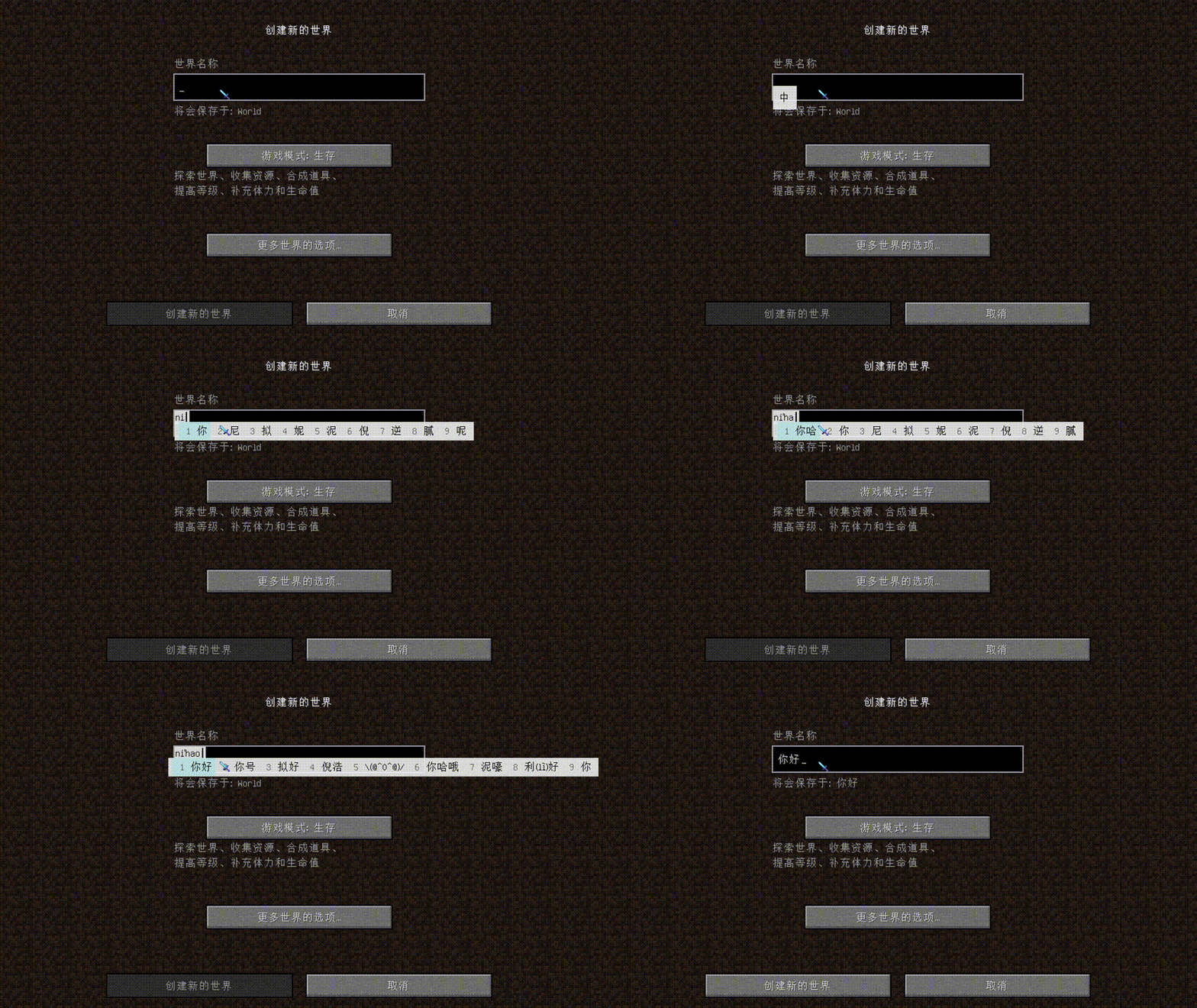
- Use
InputMethod in Full screen Minecraft!
Preview
Full screen Mode
Special Thanks
- Windmill-City:Mod founder
- Kappa-maintainer:The biggest contributor, helped with most of the bugs and provided solutions
- tttsaurus:Helped to fix the bug of InGameInfoXML
- Andrea FredericaPatched a possible unknown crash issue with LoliASM(maybe
- Live-Block:Provides 1.17 UI and cursor following port
- There will be more in the future :)
Bug
- Unable to enter in the search box of JEI/HEI(Fixed in 0.0.7)
- Unable to enter text in Xaero's Minimap interface(Fixed in 0.0.9)
- Can't type text into Minecraft signs(Fixed in 0.1.0)
- Mixin errors will occur when used with RandomPatches (please use Universal Tweaks instead of this mod's functionality, or set patchMinecraftClass=false in config/randompatches.cfg
| Platform |
Supported |
| Windows |
√ |
| Linux |
× |
| MacOS |
× |
Project description from Modrinth.
Pick your setup
IngameIME Vintage by Minecraft version and loader
Choose the version and loader you play, then open the matching release.
Minecraft version
1.12.2
1
loader build Minecraft version
1.7.10
1
loader build Check the dependencies, then try the file in a copied instance before changing a world you care about.
Recent files
IngameIME Vintage versions and loaders
ingameime-1.0.3.jar
24 Sept 2026
Client Required Server Not supported Dependencies 1 required · matched Listed on Release listing
Check the 1.12.2 · Forge setup → ingameime-1.0.2.jar
3 Aug 2026
Client Required Server Not supported Dependencies 1 required · 1 unchecked Listed on Release listing
Check the 1.12.2 · Forge setup → ingameime-1.0.1.jar
14 Jun 2026
Client Required Server Not supported Dependencies 1 required · 1 unchecked Listed on Release listing
Check the 1.12.2 · Forge setup → ingameime-1.0.0.jar
14 Jun 2026
Client Required Server Not supported Dependencies 1 required · 1 unchecked Listed on Release listing
Check the 1.12.2 · Forge setup → ingameime-1.7.10-1.0.0-RC3.jar
22 Mar 2026
Client Required Server Not supported Dependencies 1 required · 1 unchecked Listed on Release listing
Check the 1.7.10 · Forge setup → ingameime-1.0.0-RC2.jar
22 Mar 2026
Client Required Server Not supported Dependencies 1 required · 1 unchecked Listed on Release listing
Check the 1.12.2 · Forge setup → ingameime-1.0.0-RC1.jar
22 Feb 2026
Client Required Server Not supported Dependencies No extras listed Listed on Release listing
Check the 1.12.2 · Forge setup → ingameime-0.2.2.jar
20 Feb 2026
Client Required Server Not supported Dependencies 1 required · 1 unchecked Listed on Release listing
Check the 1.12.2 · Forge setup → ingameime-0.2.1.jar
15 Feb 2026
Client Required Server Not supported Dependencies 1 required · 1 unchecked Listed on Release listing
Check the 1.12.2 · Forge setup → ingameime-1.7.10-0.2.1.jar
31 Jan 2026
Client Required Server Not supported Dependencies 1 required · 1 unchecked Listed on Release listing
Check the 1.7.10 · Forge setup → ingameime-1.7.10-0.2.0.jar
25 Jan 2026
Client Required Server Not supported Dependencies 1 required · 1 unchecked Listed on Release listing
Check the 1.7.10 · Forge setup → 
 mod
 mod
 mod