Quick answer
Which MasterCutter release should I use?
Latest stable file 1.8.1-mc26.3+mod
Game version 26.3
Loader Fabric, Forge, NeoForge
MasterCutter 1.8.1-mc26.3+mod targets 26.3 with Fabric, Forge, NeoForge. Installation on the client is optional. Installation on the dedicated server is optional. No extra mods listed for this file.
Where it goes
Is MasterCutter required on the client, server, or both?
Installation on the client is optional. Installation on the dedicated server is optional.
Client Optional
Dedicated server Optional
Loader for this release Fabric, Forge, NeoForge
Required install it here Optional supported, not mandatory Not supported do not install here Source doesn’t say do not assume
The source marks this as usable on both the client and server.
What else does MasterCutter 1.8.1-mc26.3+mod need?
1.8.1-mc26.3+mod. Change the file and its required mods may change too.
This file does not list any required mods. Do not add a library just because a different file uses it.
This file does not list any required or optional mods.
Before you install it
Add MasterCutter without breaking your instance.
Built for MasterCutter 1.8.1-mc26.3+mod. Pick another file and the loader, install side or required mods may change.
- 01
Stick to this file
Use 1.8.1-mc26.3+mod. It targets 26.3 with Fabric, Forge, NeoForge; another release may have different loader, side or dependency requirements.
- 02
Bring the mods it needs
This file does not list any required mods. Do not add a library just because a different file uses it.
- 03
Put it on the correct side
Installation on the client is optional. Installation on the dedicated server is optional.
- 04
Pick the file you checked
Use the “Get this file” button beside 1.8.1-mc26.3+mod. It opens that exact file at the source.
About this project
What does MasterCutter add?
MasterCutter v1.8
The stonecutter is now more useful than ever with 500+ new recipes including woodcutting, enhanced base stonecutting, recycling, and un-crafting!
This presentation refers to the latest Data Pack release: Version 1.8.x.
For previous releases, check the "Older Versions" section, at the bottom of the page.
📥How to Install
Choose if you want to download the pure Data Pack version or the Mod version and follow the steps accordingly.
Data Pack
- 1) Download the Datapack
- 2) Chose the world you want to install the Data Pack in and navigate to its "datapacks" folder
- 3) Copy the downloaded Data Pack file (MasterCutter) into this folder
- 4) Join the world and run
/reload command
Mod
- 1) Download the Mod
- 2) Navigate to your
mods folder (for the vanilla launcher the path is .minecraft/mods
- 3) Put the downloaded .jar file (MasterCutter) into this folder
- 4) Join the world and run
/reload command
The Mod version of this Data Pack is compatibile with Fabric, Forge and Quilt loader
📖Features
MasteCutter adds over 500 new and useful recipes to the stonecutter! It also provides some quality-of-life features, such as the possibility to switch between variants of the same block (eg. form polished to base), the ability to cut deepslate and stone into their cobbled forms and/or direct derivatives and so much more! Discover all the new and enhanced recipes in the menus below!
🪓WoodCutting
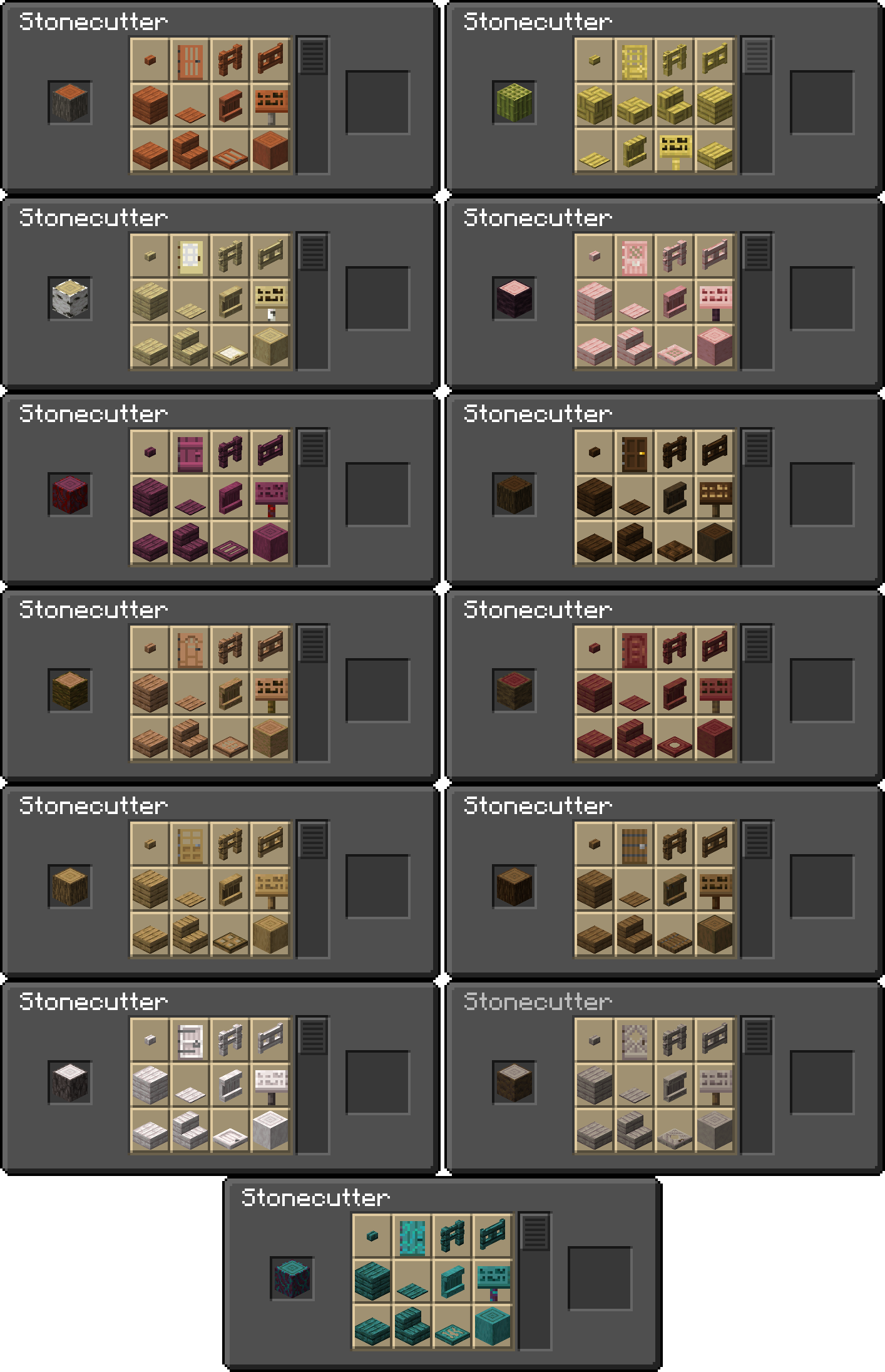
| Input -> Output |
Visual Recipes |
1 Log/Wood/Stem/Hyphae
(stripped variants included) 🔻 - 4 buttons
- 2 doors
- 4 fences
- 1 fence gate
- 4 planks
- 2 pressures
- 1 Shelf
- 2 signs
- 8 slabs
- 4 stairs
- 4 trapdoors
- 1 stripped counterpart
1 Bamboo Block(stripped variant included) 🔻 - 2 buttons
- 1 door
- 2 fences
- 1 fence gate
- 2 planks / mosaic
- 4 slabs / mosaic
- 2 stairs / mosaic
- 1 pressure
- 1 Shelf
- 1 sign
- 2 trapdoors
- 1 stripped counterpart
|
 |
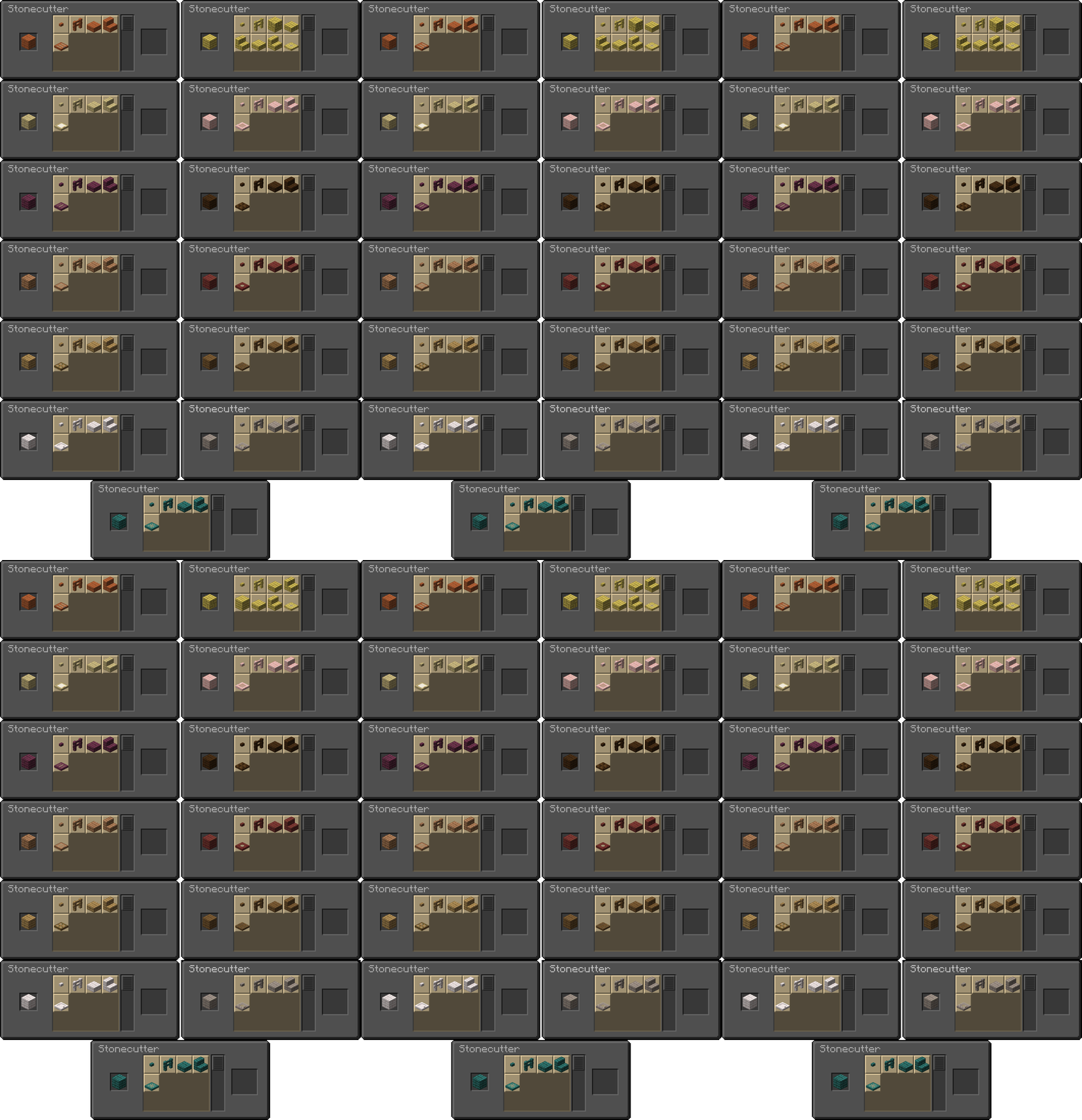
| Input -> Output |
Visual Recipes |
| 1 Planks(any wood type) 🔻 - 1 button
- 1 fence
- 2 slabs
- 1 stair
- 1 trapdoor
1 Bamboo Plank 🔻 - 1 button
- 1 fence
- 1 bamboo mosaic
- 2 bamboo mosaic slabs
- 1 bamboo mosaic stair
- 2 bamboo slabs
- 1 bamboo stair
- 1 trapdoor
1 Bamboo Mosaic 🔻 - 1 button
- 1 fence
- 2 bamboo mosaic slabs
- 1 bamboo mosaic stair
- 1 bamboo planks
- 2 bamboo slabs
- 1 bamboo stair
- 1 trapdoor
|
 |
❗Note that the Bamboo Blocks give half the result compared to log/wood/stem/hyphae since they are worth half. The only result that is not halved is the fence gate. A Block of Bamboo will still give you 1 fence gate.
🔮Enhanced Base StoneCutting
| Features List |
Visual Recipes |
This DataPack also enhances the base stonecut-ability:
🔻
Stone Type Blocks- Stone can now be cut directly into cobblestone and its derivatives
- Deepslate can now be cut directly into cobbled deepslate and its derivatives
- Mossy variants of cobblestone and stone bricks can be converted back to their standard counterparts
- Polished blocks (slab, stairs and walls included) can now be turned back to their unpolished forms
Copper Blocks and Cut Copper Blocks (any oxidation level and waxed variant) can now be cut in a more efficient way!
🔻
🔸1 Copper Block now can also produce: - 24 Bars
- 8 Chains
- 2 Doors
- 4 Trapdoors
- 4 Lighting Rods
🔸1 Cut Copper Block now can also produce: - 6 Bars
- 2 Chains
- 1 Trapdoor
- 1 Lighting Rod
|
 |
♻Recycling
| Features List |
Visual Recipes |
The Recycling Feature allows to cut some block derivatives such as stairs, door and trapdoors etc...
🔸1 Stair(any wood type):- 1 Full Block
- 1 Slab
- 1 Trapdoor
- 1 Button
- 1 Fence
🔸1 Stair(any stone like material):- 1 Full Block
- 1 Slab
- 1 Wall (if present for the material)
🔸1 Cut Copper Stair(any variant):- 1 Chiseled Block
- 6 Bars
- 2 Chains
- 1 Trapdoor
- 1 Slab
- 1 Full Block
- 1 Lightning Rod
🔸1 Chiseled Copper(any variant):- 6 Copper Bars
- 2 Chains
- 1 Trapdoor
- 1 Full Cut Block
- 2 Slabs
- 1 Stair
- 1 Lighting Rod
🔸1 Copper Grate(any variant):🔸1 Copper Door(any variant):🔸1 Door(any wood type):- 2 Buttons
- 2 Fences
- 1 pressure
- 1 Sign
- 1 Slab
- 2 Trapdoors
🔸1 Trapdoor(any wood type):🔸1 Fence(any wood type):🔸1 Fence Gate(any wood type):🔸1 Iron Door:🔸1 Iron Trapdoor:- 1 Heavy Weighted Pressure Plate
|

|
🔨Un-crafting
| Input -> Output |
Visual Recipes |
| Input (one block/item) | Output |
|---|
Amethyst Block | 4 Amethyst Shards | |
| Prismarine | 4 Prismarine Shards |
| Prismarine Bricks | 9 Prismarine Shards |
| Dark Prismarine | 8 Prismarine Shards |
| Quartz Block | 4 Nether Quartz |
| Chiseled Quartz | 4 Nether Quartz |
| Quartz Pillar | 4 Nether Quartz |
| Smooth Quartz | 4 Nether Quartz |
| Sandstone | 4 Sand |
| Chiseled Sandstone | 4 Sand |
| Smooth Sandstone | 4 Sand |
| Cut Sandstone | 4 Sand |
| Red Sandstone | 4 Red Sand |
| Chiseled Red Sandstone | 4 Red Sand |
| Smooth Red Sandstone | 4 Red Sand |
| Cut Red Sandstone | 4 Red Sand |
| Bricks | 4 Brick |
| Mud Bricks | 1 Packed Mud |
| End Stone Bricks | 1 End Stone |
| Nether Bricks | 4 Nether Brick |
| Red Nether Bricks | 4 Nether Brick |
| Flower Pot | 3 Brick |
| Bucket (Empty Only) | 3 Iron Ingot |
| Minecart | 5 Iron Ingot |
| Hopper | 5 Iron Ingot |
| Cauldron | 7 Iron Ingot |
Signs
(Any Wood Type) | 1 Button, 2 Planks
or 1 Pressure |
Hanghing Signs
(Any Wood Type) | 2 Stripped
Log/Stem/Block
or 3 Iron Nugget |
| Rail | 3 Iron Nugget |
| Powered Rail | 5 Gold Nugget |
| Detector Rail | 5 Iron Nugget |
| Activator Rail | 5 Iron Nugget |
 |
🕸Miscellaneous
| Features List |
Visual Recipes |
These are some miscellaneous features that don't fit in any specific category, but are still useful:
🔻 - Mushroom Stems and Blocks can now be "stripped" like logs, exposing the pores textures
- Cobwebs can be cut to obtain 9 strings
White wool can be cut to obtain 4 strings (the same amount used for creating a white wool block)- Iron Blocks can now be cut in the StoneCutter, providing a more convenient option to otain it's derivatives:
1 Iron Block
🔻 - 8 Iron Chains
- 24 Iron Bars
- 4 Irons Doors
- 3 Iron Trapdoors
- You can also un-craft it like you would in a normal crafting grid
|
 |
📤How to Uninstall
Data Pack
To uninstall the Data Pack version you can just run /function mastercutter:uninstall command. When the uninstallation process is completed a confirmation message will be sent in the chat.
Mod
To uninstall the Mod version you need to run /function mastercutter:uninstall command. Then you close the game and remove the jar file from your .minecraft/mods folder.
🔗External links


💾Older Versions
Version 1.7.0 and below for Minecraft 1.21.11 to 26.2
This version of the pack includes every recipe mentioned in the main description above, except for, obviously, poplar and concrete.
Version 1.5.2 and below for Minecraft 1.20 to 1.21.8
🪓WoodCutting
| Input -> Output |
Visual Recipes |
1 Log/Wood/Stem/Hyphae
(stripped variants included) 🔻 - 4 buttons
- 2 doors
- 4 fences
- 1 fence gate
- 4 planks
- 2 pressures
- 2 signs
- 8 slabs
- 4 stairs
- 4 trapdoors
- 1 stripped counterpart
1 Bamboo Block(stripped variant included) 🔻 - 2 buttons
- 1 door
- 2 fences
- 1 fence gate
- 2 planks / mosaic
- 4 slabs / mosaic
- 2 stairs / mosaic
- 1 pressure
- 1 sign
- 2 trapdoors
- 1 stripped counterpart
|
 |
| Input -> Output |
Visual Recipes |
| 1 Planks(any wood type) 🔻 - 1 button
- 1 fence
- 2 slabs
- 1 stair
- 1 trapdoor
1 Bamboo Plank 🔻 - 1 button
- 1 fence
- 1 bamboo mosaic
- 2 bamboo mosaic slabs
- 1 bamboo mosaic stair
- 2 bamboo slabs
- 1 bamboo stair
- 1 trapdoor
1 Bamboo Mosaic 🔻 - 1 button
- 1 fence
- 2 bamboo mosaic slabs
- 1 bamboo mosaic stair
- 1 bamboo planks
- 2 bamboo slabs
- 1 bamboo stair
- 1 trapdoor
|
 |
❗Note that the Bamboo Blocks give half the result compared to log/wood/stem/hyphae since they are worth half. The only result that is not halved is the fence gate. A Block of Bamboo will still give you 1 fence gate.
🔮Enhanced Base StoneCutting
| Features List |
Visual Recipes •1 |
This DataPack/Mod also enhance the base stonecut-ability:
🔻
Stone Type Blocks- Stone can now be cut directly into cobblestone and its derivatives
- Deepslate can now be cut directly into cobbled deepslate and its derivatives
- Mossy variants of cobblestone and stone bricks can be converted back to their standard counterparts
- Polished blocks (slab, stairs and walls included) can now be turned back to their unpolished forms
Copper Blocks (all variants)
- Copper Blocks can now be cut
in a more efficient way! 1 Copper block (any variant) now can also produce: - 4 Copper Door
- 4 Copper Trapdoor
|
 |
| Visual Recipes •2 (Copper Blocks-All Variants) |
 |
♻Recycling
| Features List |
Visual Recipes |
The Recycling Feature allows to cut some block derivates such as stairs, door and trapdoors etc...
🔸1 Stair(Any Wood Type):- 1 Full Block
- 1 Slab
- 1 Trapdoor
- 1 Button
- 1 Fence
🔸1 Stair(Any Stone Like Material):- 1 Full Block
- 1 Slab
- 1 Wall (if present for the material)
🔸1 Cut Copper Stair(All Variants):- 1 Full Block of the corresponding variant
- 1 Slab of the corresponding variant
- 1 Trapdoor of the corresponding variant (1.21+)
🔸1 Chiseled Copper(All Variants):- 1 Full Block of the corresponding variant
- 1 Stair of the corresponding variant
- 2 Slabs of the corresponding variant
- 1 Trapdoor of the corresponding variant (1.21+)
🔸1 Copper Grate(All Variants):- 1 Trapdoor of the corresponding variant (1.21+)
🔸1 Copper Door(All Variant):- 2 Trapdoor of the corresponding variant (1.21+)
🔸1 Door(Any Wood Type):- 2 Buttons
- 2 Fences
- 1 pressure
- 1 Sign
- 1 Slab
- 2 Trapdoors
🔸1 Trapdoor(Any Wood Type):🔸1 Fence(Any Wood Type):🔸1 Fence Gate(Any Wood Type):🔸1 Iron Door:🔸1 Iron Trapdoor:- 1 Heavy Weighted Pressure Plate
|
|
🔨Un-crafting
| Input -> Output |
Visual Recipes |
| Input (one block/item) | Output |
|---|
Amethyst Block | 4 Amethyst Shards | |
| Prismarine | 4 Prismarine Shards |
| Prismarine Bricks | 9 Prismarine Shards |
| Dark Prismarine | 8 Prismarine Shards |
| Quartz Block | 4 Nether Quartz |
| Chiseled Quartz | 4 Nether Quartz |
| Quartz Pillar | 4 Nether Quartz |
| Smooth Quartz | 4 Nether Quartz |
| Sandstone | 4 Sand |
| Chiseled Sandstone | 4 Sand |
| Smooth Sandstone | 4 Sand |
| Cut Sandstone | 4 Sand |
| Red Sandstone | 4 Red Sand |
| Chiseled Red Sandstone | 4 Red Sand |
| Smooth Red Sandstone | 4 Red Sand |
| Cut Red Sandstone | 4 Red Sand |
| Bricks | 4 Brick |
| Mud Bricks | 1 Packed Mud |
| End Stone Bricks | 1 End Stone |
| Nether Bricks | 4 Nether Brick |
| Red Nether Bricks | 4 Nether Brick |
| Flower Pot | 3 Brick |
| Bucket (Empty Only) | 3 Iron Ingot |
| Minecart | 5 Iron Ingot |
| Hopper | 5 Iron Ingot |
| Cauldron | 7 Iron Ingot |
Signs
(All Wood Types) | 1 Button, 2 Planks
or 1 Pressure |
Hanghing Signs
(All Wood Types) | 2 Stripped
Log/Stem/Block
or 3 Iron Nugget |
| Rail | 3 Iron Nugget |
| Powered Rail | 5 Gold Nugget |
| Detector Rail | 5 Iron Nugget |
| Activator Rail | 5 Iron Nugget |
|
🕸Miscellaneous
| Features List |
Visual Recipes |
These are some miscellaneous features that don't fit in any specific category, but are still useful:
🔻 - Mushroom Stems and Blocks can now be "stripped" like logs, exposing the pores textures (1.20.5+)
- Cobwebs can be cut to obtain 9 strings
- White wool can be cut to obtain 4 strings (the same amount used for creating a white wool block)
- Iron Blocks can now be cut in the StoneCutter, providing a more convenient option to otain it's derivates:
1 Iron Block
🔻 - 8 Chains
- 24 Iron Bars
- 4 Irons Doors
- 3 Iron Trapdoors
- You can also un-craft it like you would in a normal crafting grid
|
|
🔬Experimental Features
These features are only present if the corresponding Experimental toggle is enabled. Once an Experimental toggle becomes part of the base game, you will just need to download the matching version of MasterCutter for the Minecraft version.
🧪Update 1.21 Experiment Only for Minecraft 1.20.3-1.20.6
| Features List |
Tuff Block Set |
Compatiblity for the new 1.21
Experimental Blocks has been added!
🔻 Tuff blocks
- Tuff blocks can now be switched
from polished to normal counterparts and vice-versa
(like andesite, diorite,
granite, deepslate etc..) - Polished tuff can now be cut to obtain chiseled tuff or chiseled tuff bricks
- Tuff and polished tuff stairs can now be cut to obtain chiseled tuff or chiseled tuff bricks
Copper Blocks (all variants)
- Copper Blocks can now be cut
in a more efficient way; 1 block now can also give 2 Copper Door or 4 Copper Trapdoor - Chiseled Copper Blocks can now be recycled; 1 block can give you:
- 1 Trapdoor
- 1 Cut Copper
- 1 Cut Copper Slab
- 2 Cut Copper Stairs
- Cut Copper Stairs now can also provide 1 Copper Trapdoor, in addition to the usual Cut Copper Slab
- Copper Grates can now be cut to obtain 1 Copper Trapdoor each
- Copper Doors can now be cut to obtain 2 Copper Trapdoor each
|
 |
| New Copper Blocks |
 |
Project description from Modrinth.
Pick your setup
MasterCutter by Minecraft version and loader
Choose the version and loader you play, then open the matching release.
Minecraft version
26.3
5
loader builds Minecraft version
26.2
5
loader builds Minecraft version
26.1.2
5
loader builds Minecraft version
26.1.1
5
loader builds Minecraft version
26.1
5
loader builds Minecraft version
1.21.11
5
loader builds Minecraft version
1.21.10
5
loader builds Minecraft version
1.21.9
5
loader builds Minecraft version
1.21.8
5
loader builds Minecraft version
1.21.7
5
loader builds Minecraft version
1.21.6
5
loader builds Minecraft version
1.21.5
5
loader builds Showing the newest 12 of 24 game versions.
Older files are in the list below.
Check the dependencies, then try the file in a copied instance before changing a world you care about.
Recent files
MasterCutter versions and loaders
mastercutter-1.8.1-mc26.3.jar
11 Oct 2026
Client Optional Server Optional Dependencies No extras listed Listed on Release listing
Check the 26.3 · Fabric setup → 26.3FabricForgeNeoForge release
mastercutter-1.8.0-mc26.3.jar
20 Sept 2026
Client Optional Server Optional Dependencies No extras listed Listed on Release listing
Check the 26.3 · Fabric setup → 26.3FabricForgeNeoForge alpha
MasterCutter+v1.8.0-mc26.3.zip
20 Sept 2026
Client Optional Server Optional Dependencies No extras listed Listed on Release listing
Check the 26.3 · datapack setup → mastercutter-1.7.0-mc26.2.jar
28 Jun 2026
Client Optional Server Optional Dependencies No extras listed Listed on Release listing
Check the 26.2 · Fabric setup → 26.2FabricForgeNeoForge release
26.126.1.126.1.2Fabric release
26.126.1.126.1.2datapack release
mastercutter-1.6.1-mc26.1.jar
25 Mar 2026
Client Optional Server Optional Dependencies No extras listed Listed on Release listing
Check the 26.1 · Fabric setup → 26.1FabricForgeNeoForge beta
1.21.11FabricForgeNeoForge release