Fabric API Needed by Subtitle Mod 1.3.3
requiredMatching file found Matched file: 0.161.0+26.2

Modrinth · Minecraft mod
Subtitle system with transparent background!
Quick answer
Subtitle Mod 1.3.3 targets 26.2 with Fabric. Installation on the client is optional. Installation on the dedicated server is optional. All 2 required mods have matching files.
Where it goes
Installation on the client is optional. Installation on the dedicated server is optional.
The source marks this as usable on both the client and server.
1.3.3. Change the file and its required mods may change too.
Install Fabric API, CatoAPI first. We found matching files for this game-version and loader setup.
We only count dependency files that match this setup. A file for another loader does not fill the gap.
Before you install it
Built for Subtitle Mod 1.3.3. Pick another file and the loader, install side or required mods may change.
Use 1.3.3. It targets 26.2 with Fabric; another release may have different loader, side or dependency requirements.
Install Fabric API, CatoAPI first. We found matching files for this game-version and loader setup.
Installation on the client is optional. Installation on the dedicated server is optional.
Use the “Get this file” button beside 1.3.3. It opens that exact file at the source.
About this project

Requires CatoAPI.
This mod consists of a system, through a command, that generates a subtitle with a transparent background for all players for a set time.

It's also configurable in the client to give your subtitles a more customizable look, allowing you to change paddings, text scale, border spacing, and background color.
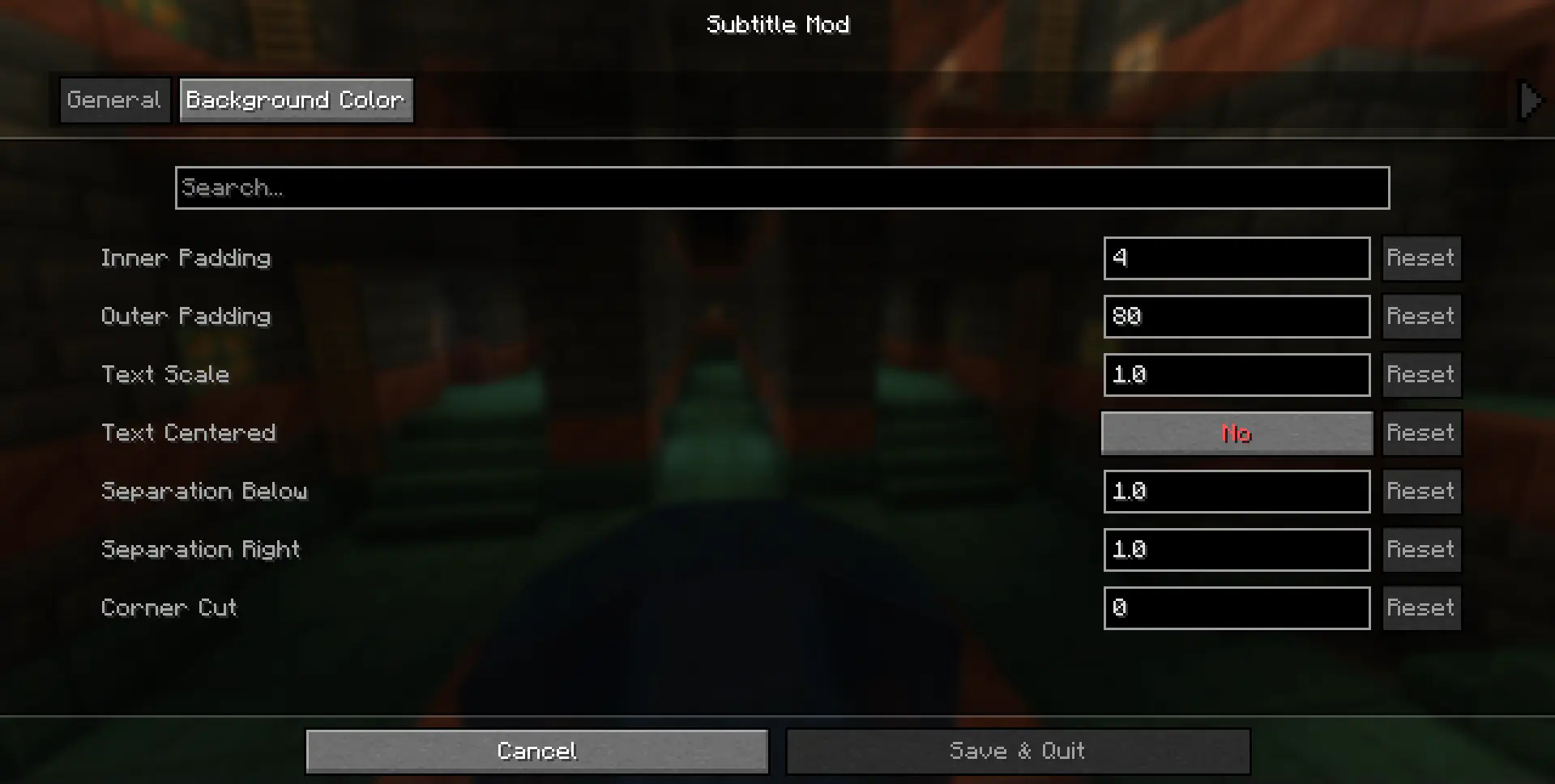

NOTE: If you send a subtitle while another one is in progress, it will overlap, changing the message and time.

If you have any problem or suggestion you can report it in the community discord (Spanish-speaking) by opening a ticket: https://discord.gg/sKRYYyVCnw
If you want to support us you can do so through:
Project description from Modrinth.
Pick your setup
Choose the version and loader you play, then open the matching release.
Showing the newest 12 of 23 game versions. Older files are in the list below.
Check the dependencies, then try the file in a copied instance before changing a world you care about.
Recent files
SubtitleMod-Fabric-26.2-1.3.3.jar
4 Sept 2026
SubtitleMod-Neoforge-26.2-1.3.3.jar
4 Sept 2026
SubtitleMod-Neoforge-26.1-1.3.3.jar
4 Sept 2026
SubtitleMod-Fabric-26.1-1.3.3.jar
4 Sept 2026
SubtitleMod-Neoforge-1.21.6-1.3.3.jar
4 Sept 2026
SubtitleMod-Fabric-1.21.6-1.3.3.jar
4 Sept 2026
SubtitleMod-Fabric-1.21.2-1.3.3.jar
4 Sept 2026
SubtitleMod-Neoforge-1.21.2-1.3.3.jar
4 Sept 2026
SubtitleMod-Fabric-1.21.11-1.3.3.jar
4 Sept 2026
SubtitleMod-Neoforge-1.21.11-1.3.3.jar
4 Sept 2026
SubtitleMod-Fabric-1.21.1-1.3.3.jar
4 Sept 2026
SubtitleMod-Neoforge-1.21.1-1.3.3.jar
4 Sept 2026
Looking for an older file? The official Modrinth project page is in Resources.
 mod
A Jojo's Bizarre Adventure mod that interprets the world and power system of the anime into the world of Minecraft. ( JJBA )
 mod
AE2 Utility enhances JEI integration by allowing direct item pulling from the ME network into machine interfaces and providing one-click pattern encoding with seamless provider uploads.
 mod
Well-rounded client-side optimization mod. Extremely compatible Vulkan backend for 1.21.11-26.1.2. By Polyfrost, best with OneClient.