Minecraft version
Back to mods 
Modrinth · Minecraft mod
Toggleable PieChart
Allows you to toggle the Debug PieChart on/off, and also change it's position and scale. Now with a selection cursor!
Choose a version Pick your version below, then grab the matching file.
Quick answer
Which Toggleable PieChart release should I use?
Latest stable file 2.1
Game version 1.21.9, 1.21.10, 1.21.11
Loader Fabric
Toggleable PieChart 2.1 targets 1.21.9, 1.21.10, 1.21.11 with Fabric. It must be installed on the client. Do not install it on the dedicated server. No extra mods listed for this file.
Where it goes
Is Toggleable PieChart required on the client, server, or both?
It must be installed on the client. Do not install it on the dedicated server.
Client Required
Dedicated server Not supported
Loader for this release Fabric
Required install it here Optional supported, not mandatory Not supported do not install here Source doesn’t say do not assume
This file is marked client-only.
What else does Toggleable PieChart 2.1 need?
2.1. Change the file and its required mods may change too.
This file does not list any required mods. Do not add a library just because a different file uses it.
This file does not list any required or optional mods.
Before you install it
Add Toggleable PieChart without breaking your instance.
Built for Toggleable PieChart 2.1. Pick another file and the loader, install side or required mods may change.
- 01
Stick to this file
Use 2.1. It targets 1.21.9, 1.21.10, 1.21.11 with Fabric; another release may have different loader, side or dependency requirements.
- 02
Bring the mods it needs
This file does not list any required mods. Do not add a library just because a different file uses it.
- 03
Put it on the correct side
It must be installed on the client. Do not install it on the dedicated server.
- 04
Pick the file you checked
Use the “Get this file” button beside 2.1. It opens that exact file at the source.
About this project
What does Toggleable PieChart add?
What it does
This mod allows users to toggle the debug piechart's visibility regardless of the F3 debug menu.
This mod also allows the user to customize the piechart's position and scale, along with easier navigation
How to use
Toggle the chart
Press the toggle key-bind to toggle the piechart
Customize the chart
Press the settings key-bind to configure it.
Navigate the chart
Use the navigation keys to navigate the chart using the selection cursor
Default toggle key-bind is P
Default settings key-bind is O
Default navigation keys are -> Up/Down (Up/Down), Enter (Select), Backspace (Go back)
Can I see :D
Yes
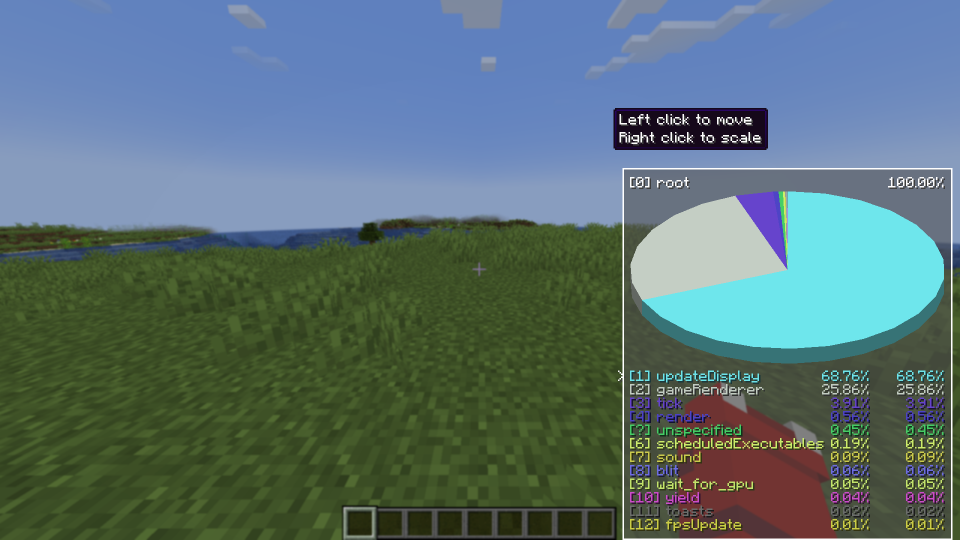
Project description from Modrinth.
Pick your setup
Toggleable PieChart by Minecraft version and loader
Choose the version and loader you play, then open the matching release.
Minecraft version
1.21.10
1 loader buildMinecraft version
1.21.9
1 loader buildMinecraft version
1.21.8
1 loader buildMinecraft version
1.21.7
1 loader buildMinecraft version
1.21.6
1 loader buildMinecraft version
1.21.5
1 loader buildMinecraft version
1.21.4
1 loader buildMinecraft version
1.21.3
1 loader buildMinecraft version
1.21.2
1 loader buildMinecraft version
1.21.1
1 loader buildMinecraft version
1.21
1 loader buildShowing the newest 12 of 17 game versions. Older files are in the list below.
Check the dependencies, then try the file in a copied instance before changing a world you care about.
Recent files
Toggleable PieChart versions and loaders
2.1
toggleable-piechart-2.1+1.21.9-1.21.11.jar
26 Mar 2026
Client Required Server Not supported Dependencies No extras listed Listed on Release listing
Check the 1.21.11 · Fabric setup 1.21.91.21.101.21.11Fabric release
2.1
toggleable-piechart-2.1+1.21.6-1.21.8.jar
1 Aug 2025
Client Required Server Not supported Dependencies No extras listed Listed on Release listing
Check the 1.21.8 · Fabric setup 1.21.61.21.71.21.8Fabric release
2.1
toggleable-piechart-2.1+1.21.4-1.21.5.jar
1 Aug 2025
Client Required Server Not supported Dependencies No extras listed Listed on Release listing
Check the 1.21.5 · Fabric setup 1.21.41.21.5Fabric release
2.0
ToggleablePieChart 2.0.jar
8 Apr 2025
Client Required Server Not supported Dependencies No extras listed Listed on Release listing
Check the 1.21.4 · Fabric setup 1.21.4Fabric release
1.2.1
ToggleablePieChart_121.jar
27 Nov 2024
Client Required Server Not supported Dependencies No extras listed Listed on Release listing
Check the 1.21.3 · Fabric setup 1.211.21.11.21.21.21.3 release
1.2.0
Toggleable-PieChart 1.20.2.jar
21 Jan 2024
Client Required Server Not supported Dependencies No extras listed Listed on Release listing
Check the 1.20.4 · Fabric setup 1.20.21.20.31.20.4Fabric release
1.2.0
Toggleable-PieChart 1.20.1.jar
21 Jan 2024
Client Required Server Not supported Dependencies No extras listed Listed on Release listing
Check the 1.20.1 · Fabric setup 1.20.1Fabric release
1.0.1
ToggleablePieChart-1.0.1.jar
1 Aug 2023
Client Required Server Not supported Dependencies No extras listed Listed on Release listing
Check the 1.20.1 · Fabric setup 1.201.20.1Fabric release
Looking for an older file? The official Modrinth project page is in Resources.
 mod
mod CurseForge + Modrinth · Minecraft
Hydrofarm
Water-tech and farm automation: clustering tanks, smart pipes, sprinklers, hydroponic crop and tree beds, animal pens, and water power — a focused set of machines, not a whole tech tree. Fabric + NeoForge from one codebase.
 mod
mod CurseForge + Modrinth · Minecraft
Create: Nowheel
A lightweight optimization mod for Create, unifying Flywheel and Entity Culling to improve frame rates, reduce micro-stutter, and fix bugs
 mod
mod Modrinth · Minecraft
Create Kinetic
An addon for Create Aeronautics and VS2, Adds many useful blocks and items, aiming to improve the experience with minimal bloat.