Minecraft version
Back to mods 
Modrinth · Minecraft mod
F34
Turn commands and actions into customizable buttons—then run them instantly without pausing your game.
Choose a version Pick your version below, then grab the matching file.
Quick answer
Which F34 release should I use?
Latest stable file 1.0.2
Game version 26.1
Loader Fabric, Quilt
F34 1.0.2 targets 26.1 with Fabric, Quilt. Installation on the client is optional. Installation on the dedicated server is optional. No extra mods listed for this file.
Where it goes
Is F34 required on the client, server, or both?
Installation on the client is optional. Installation on the dedicated server is optional.
Client Optional
Dedicated server Optional
Loader for this release Fabric, Quilt
Required install it here Optional supported, not mandatory Not supported do not install here Source doesn’t say do not assume
The source marks this as usable on both the client and server.
What else does F34 1.0.2 need?
1.0.2. Change the file and its required mods may change too.
This file does not list any required mods. Do not add a library just because a different file uses it.
This file does not list any required or optional mods.
Before you install it
Add F34 without breaking your instance.
Built for F34 1.0.2. Pick another file and the loader, install side or required mods may change.
- 01
Stick to this file
Use 1.0.2. It targets 26.1 with Fabric, Quilt; another release may have different loader, side or dependency requirements.
- 02
Bring the mods it needs
This file does not list any required mods. Do not add a library just because a different file uses it.
- 03
Put it on the correct side
Installation on the client is optional. Installation on the dedicated server is optional.
- 04
Pick the file you checked
Use the “Get this file” button beside 1.0.2. It opens that exact file at the source.
About this project
What does F34 add?



If you enjoy this mod, please consider giving it a like/heart! It helps a lot.





F34
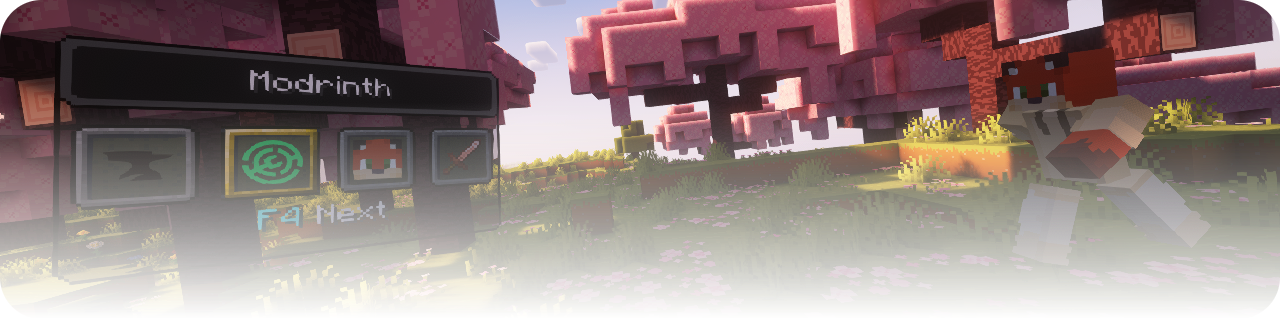
**F34 is a customizable in-game action switcher for Minecraft Java Edition.**
Create your own switcher windows, organize buttons into multiple instances, and execute commands or client-side actions without interrupting your gameplay.
Whether you frequently change game modes, run long commands, connect several commands together, leave a server, or use custom addon actions, F34 lets you access them through a compact and fully configurable interface.
Features
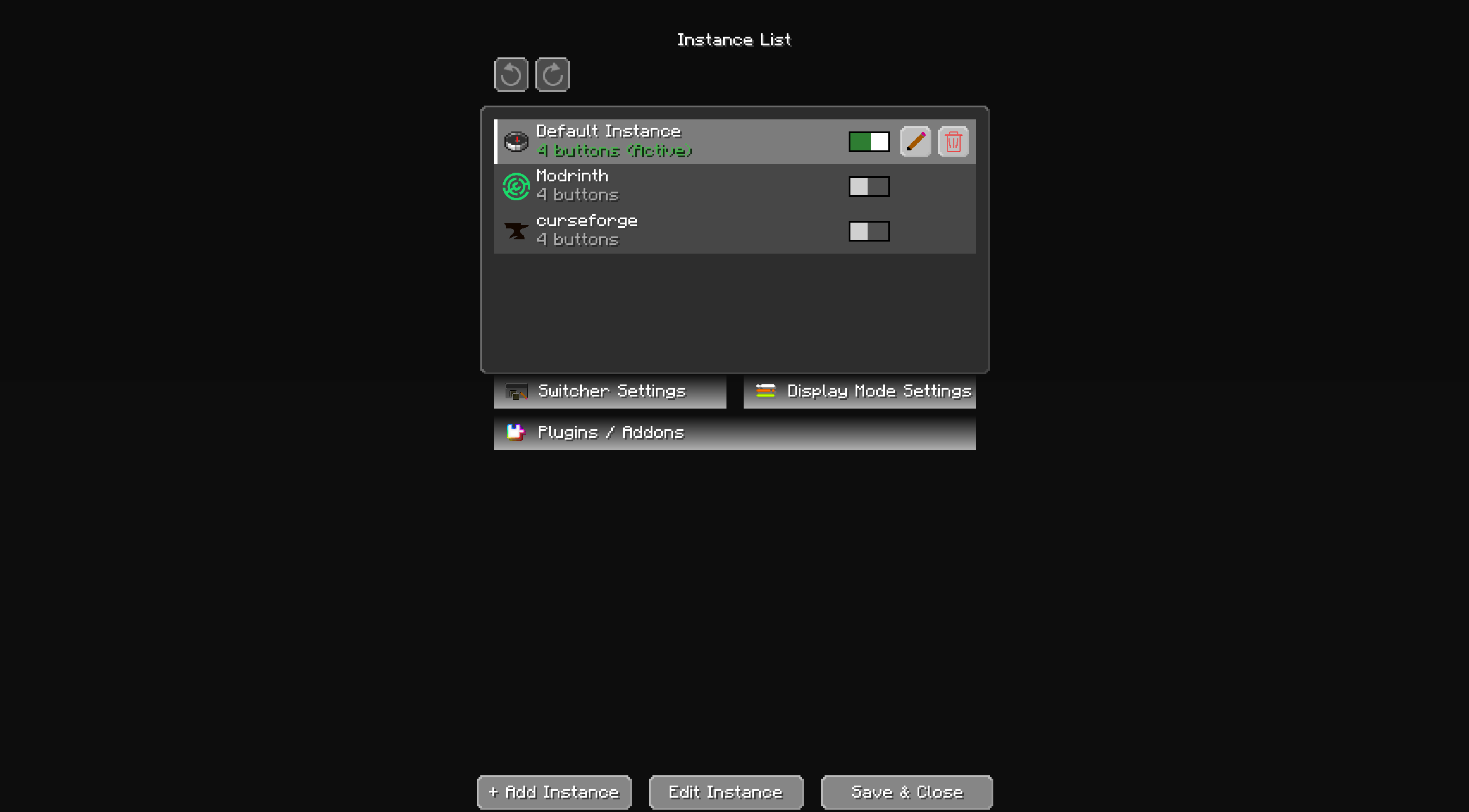
Custom switcher instances
Create multiple independent switcher instances for different situations, such as:
- Creative tools
- Survival utilities
- Server commands
- Building tools
- Teleport shortcuts
- Minigame controls
- Custom addon actions
Each instance can have its own name, icon, buttons, enabled state, and layout.
Commands and action chains
A single button can execute one or multiple actions in order.
Supported command modes include:
- Normal commands
- Chain commands
- Repeating commands
- Conditional commands
- Multi-line command input
- Command autocomplete
F34 follows normal Minecraft permission rules. Commands that require operator permissions are disabled when the player does not have permission.
Client-side actions
Buttons can also perform client actions, including:
- Leave the current server
- Quit Minecraft
- Actions registered by F34 addons
Actions that immediately change the game state are clearly shown before use.
Flexible icons
Choose an icon for every instance and slot using:
- Minecraft items and blocks
- Custom image files
- Player heads
- 2D player heads
- 3D player heads
Customizable interface
Adjust the appearance and position of the switcher:
- Window position and scale
- Title background
- Main background
- Slot button appearance
- Selected slot appearance
- Bottom text
- Show-all mode
- Four-slot scrolling mode
The interface is designed to remain usable at different window sizes and GUI scales.
Selection animations
F34 includes 10 built-in selection animations:
- Smooth Slide
- Linear Slide
- Accelerate
- Ease In and Out
- Bounce
- Overshoot
- Elastic
- Hop
- Wave
- Scale Pulse
Animations are disabled by default and can be enabled from Display Mode Settings. Addons can also register their own animations.
Addon API
F34 includes an addon API that allows other mods to register:
- Custom actions
- Preconfigured instances
- Slot buttons
- Selection animations
- Creator information and custom icons
New addons are not activated automatically. They must first be reviewed and approved from the Plugins / Addons screen.
The built-in AI Creation Prompt can generate detailed, beginner-friendly addon development instructions for Fabric, NeoForge, or Forge.
Multiplayer friendly
F34 is a client-side mod. Servers do not need to install it.
The mod does not bypass server permissions. Commands are sent normally and still require the permissions configured by the server.
Loader support
F34 is available for:
- Fabric
- NeoForge
- Forge
Always install the file made for your current mod loader. Do not mix builds from different loaders.
The Fabric version also requires Fabric API.
How to use
- Install the correct F34 build for your mod loader.
- Start Minecraft and open the F34 configuration button from the main or game menu.
- Open Controls → Key Binds → F34 Mod and assign keys for:
- Open Switcher Screen
- Open Switcher Configuration
- Create an instance.
- Add slots and choose their icons.
- Add commands or client actions to each slot.
- Save the configuration.
- Open the switcher and select a slot to execute its actions.
Commands inside a slot are executed from first to last.
Important notes
- F34 does not grant operator permissions.
- Server commands still follow normal server permission rules.
- The mod must match your Minecraft version and mod loader.
- Fabric, NeoForge, and Forge builds are separate files.
- Addons must be made for the same loader as the installed F34 build.
- Back up important configurations before replacing or downgrading versions.
Links
License
Copyright © magbFox. All rights reserved.
You may use the mod normally in your Minecraft installation. Editing, repackaging, or redistributing the mod is not permitted without the creator's permission.
Project description from Modrinth.
Pick your setup
F34 by Minecraft version and loader
Choose the version and loader you play, then open the matching release.
Minecraft version
26.1.2
4 loader buildsMinecraft version
26.1.1
4 loader buildsMinecraft version
26.1
4 loader buildsMinecraft version
1.12.2
1 loader buildMinecraft version
1.12.1
1 loader buildMinecraft version
1.12
1 loader buildCheck the dependencies, then try the file in a copied instance before changing a world you care about.
Recent files
F34 versions and loaders
1.0.2
f34-quilt-26.1-1.0.2.jar
9 Aug 2026
Client Optional Server Optional Dependencies No extras listed Listed on Release listing
Check the 26.1 · Fabric setup 26.1FabricQuilt release
1.0.2
f34-neoforge-26.1-1.0.2.jar
9 Aug 2026
Client Optional Server Optional Dependencies No extras listed Listed on Release listing
Check the 26.1 · NeoForge setup 26.1NeoForge release
1.0.2
f34-forge-26.1-1.0.2.jar
9 Aug 2026
Client Optional Server Optional Dependencies No extras listed Listed on Release listing
Check the 26.1 · Forge setup 26.1Forge release
1.0.2
f34-fabric-26.1-1.0.2.jar
9 Aug 2026
Client Optional Server Optional Dependencies No extras listed Listed on Release listing
Check the 26.1 · Fabric setup 26.1Fabric release
1.0.2
f34-quilt-26.1.1-1.0.2.jar
9 Aug 2026
Client Optional Server Optional Dependencies No extras listed Listed on Release listing
Check the 26.1.2 · Fabric setup 26.1.126.1.2FabricQuilt release
1.0.2
f34-neoforge-26.1.1-1.0.2.jar
9 Aug 2026
Client Optional Server Optional Dependencies No extras listed Listed on Release listing
Check the 26.1.1 · NeoForge setup 26.1.1NeoForge release
1.0.2
f34-forge-26.1.1-1.0.2.jar
9 Aug 2026
Client Optional Server Optional Dependencies No extras listed Listed on Release listing
Check the 26.1.1 · Forge setup 26.1.1Forge release
1.0.2
f34-fabric-26.1.1-1.0.2.jar
9 Aug 2026
Client Optional Server Optional Dependencies 1 required · 1 unchecked Listed on Release listing
Check the 26.1.1 · Fabric setup 26.1.1Fabric release
1.0.2
f34-quilt-26.1.2-1.0.2.jar
9 Aug 2026
Client Optional Server Optional Dependencies No extras listed Listed on Release listing
Check the 26.1.2 · Fabric setup 26.1.2FabricQuilt release
1.0.2
f34-neoforge-26.1.2-1.0.2.jar
9 Aug 2026
Client Optional Server Optional Dependencies No extras listed Listed on Release listing
Check the 26.1.2 · NeoForge setup 26.1.2NeoForge release
1.0.2
f34-forge-26.1.2-1.0.2.jar
9 Aug 2026
Client Optional Server Optional Dependencies No extras listed Listed on Release listing
Check the 26.1.2 · Forge setup 26.1.2Forge release
1.0.2
f34-fabric-26.1.2-1.0.2.jar
9 Aug 2026
Client Optional Server Optional Dependencies 1 required · 1 unchecked Listed on Release listing
Check the 26.1.2 · Fabric setup 26.1.2Fabric release
Looking for an older file? The official Modrinth project page is in Resources.
 mod
mod CurseForge + Modrinth · Minecraft
IG: Durability Multiplier
Complete control over item durability in Minecraft 26.1+. Multiply durability by any factor or make items completely unbreakable — all through GameRules. Works automatically with modded items via vanilla tags. Part of the Instant Gratification Collection.
 mod
mod CurseForge + Modrinth · Minecraft
XenoFactions
Xenofactions is a fork of the Xradar factions mod with various improvements and usability for server owners wanting a factions/claiming mod without using plugins.
 mod
mod CurseForge · Minecraft
Modular Machinery Community: Refoxed
Modular Machinery Community on newer Minecraft, with additional features and high performance !