Minecraft version
Back to mods 
Modrinth · Minecraft mod
Custom Totems
Adds extra 3D totems that you can craft!
Choose a version Pick your version below, then grab the matching file.
Quick answer
Which Custom Totems release should I use?
Latest stable file 1.1.0+datapack
Game version 26.3
Loader datapack
Custom Totems 1.1.0+datapack targets 26.3 with datapack. Installation on the client is optional. Installation on the dedicated server is optional. No extra mods listed for this file.
Where it goes
Is Custom Totems required on the client, server, or both?
Installation on the client is optional. Installation on the dedicated server is optional.
Client Optional
Dedicated server Optional
Loader for this release datapack
Required install it here Optional supported, not mandatory Not supported do not install here Source doesn’t say do not assume
The source marks this as usable on both the client and server.
What else does Custom Totems 1.1.0+datapack need?
1.1.0+datapack. Change the file and its required mods may change too.
This file does not list any required mods. Do not add a library just because a different file uses it.
This file does not list any required or optional mods.
Before you install it
Add Custom Totems without breaking your instance.
Built for Custom Totems 1.1.0+datapack. Pick another file and the loader, install side or required mods may change.
- 01
Stick to this file
Use 1.1.0+datapack. It targets 26.3 with datapack; another release may have different loader, side or dependency requirements.
- 02
Bring the mods it needs
This file does not list any required mods. Do not add a library just because a different file uses it.
- 03
Put it on the correct side
Installation on the client is optional. Installation on the dedicated server is optional.
- 04
Pick the file you checked
Use the “Get this file” button beside 1.1.0+datapack. It opens that exact file at the source.
About this project
What does Custom Totems add?
MORE CRAFTABLE TOTEMS!
This mod/datapack adds new cosmetic totems that you can craft!
All the totems are purely cosmetic and are made just to add a little more fun to servers and singleplayer worlds!
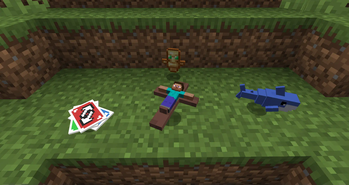
You unlock the recipes by getting a totem of undying
We have:
- Steve Cross
- Blahaj of undying
- Uno Reverse Card
I will be adding more in the future! Follow it for the updates!
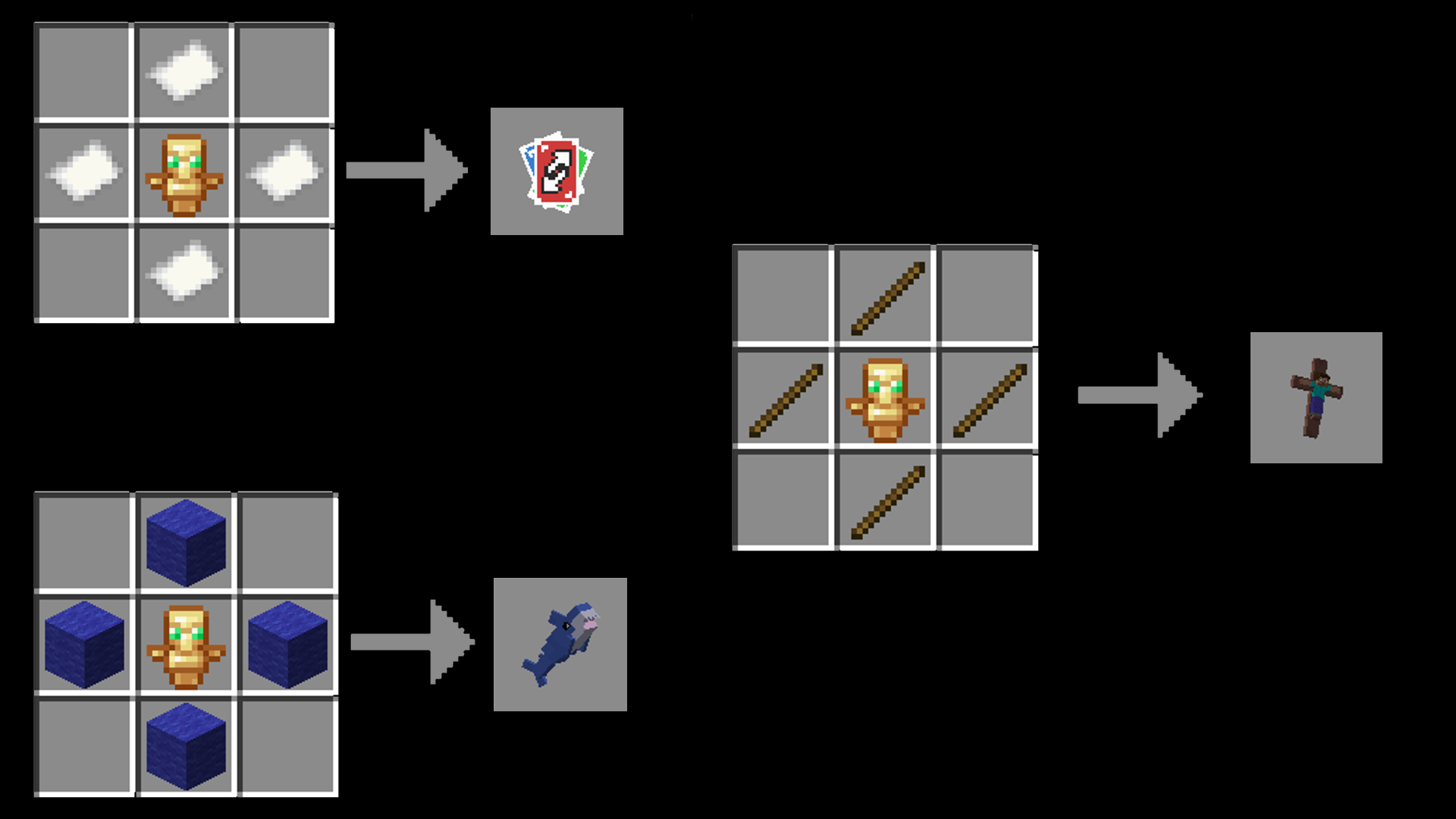
You can see other screenshots in the gallery!
🦈Installation:🦈
Mod version:
Just put the .jar in the mod folder, keep in mind that this is a datapack inside of a mod, items will not show up in the creative menu
Datapack version:
This is both a Datapack and a ResourcePack, put the zip in both directories, ignore warnings
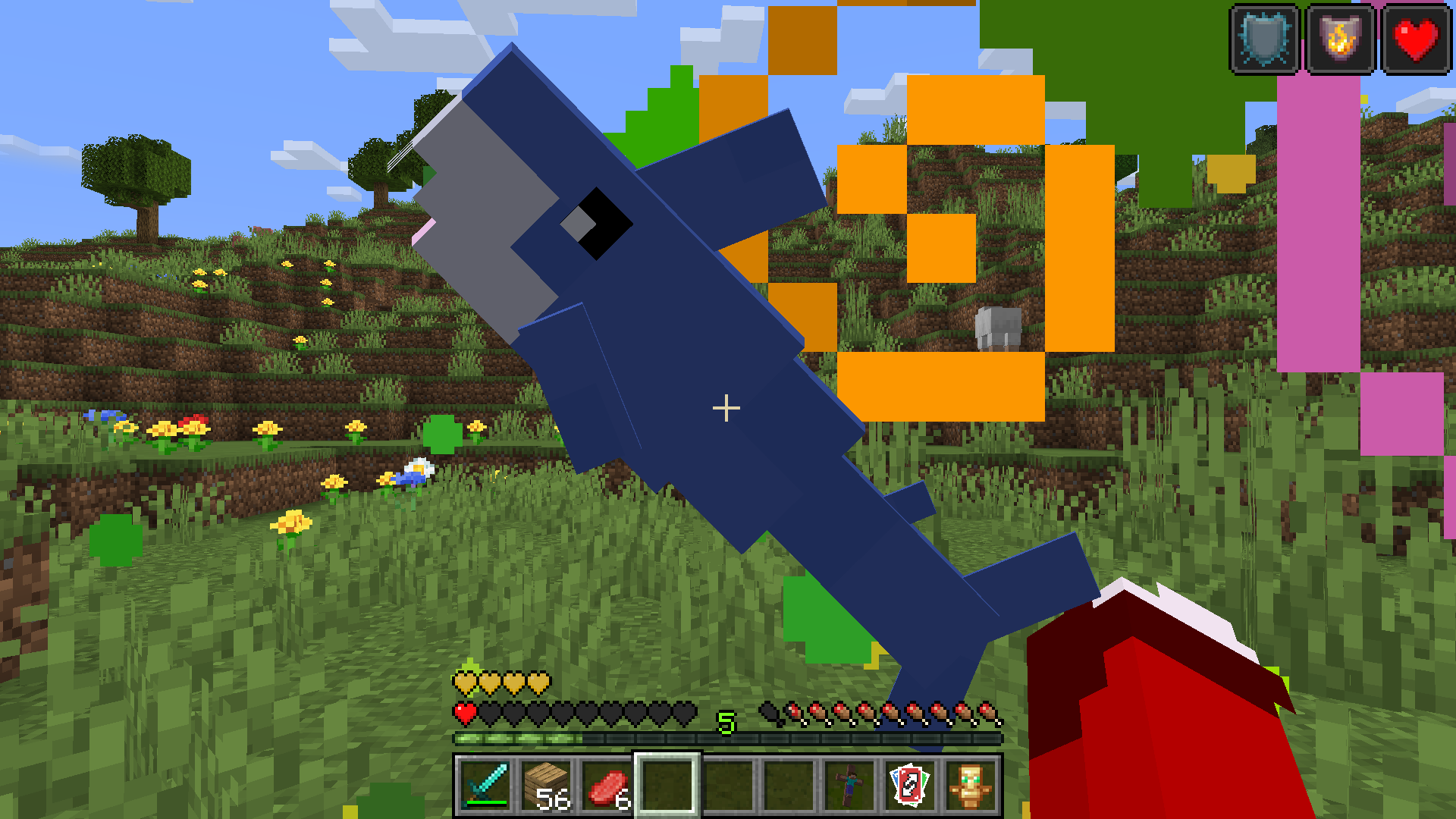
Project description from Modrinth.
Pick your setup
Custom Totems by Minecraft version and loader
Choose the version and loader you play, then open the matching release.
Minecraft version
26.1.2
5 loader buildsMinecraft version
26.1.1
5 loader buildsMinecraft version
26.1
5 loader buildsMinecraft version
1.21.11
5 loader buildsMinecraft version
1.21.10
5 loader buildsMinecraft version
1.21.3
5 loader buildsMinecraft version
1.21.2
5 loader buildsMinecraft version
1.21.1
5 loader buildsMinecraft version
1.21
5 loader buildsCheck the dependencies, then try the file in a copied instance before changing a world you care about.
Recent files
Custom Totems versions and loaders
1.1.0+datapack
moretotems-datapack-1.0.0.zip
2 Nov 2026
Client Optional Server Optional Dependencies No extras listed Listed on Release listing
Check the 26.3 · datapack setup 26.3datapack release
1.1.0+neoforge
moretotems-neoforge-26.3-1.0.0.jar
2 Nov 2026
Client Optional Server Optional Dependencies No extras listed Listed on Release listing
Check the 26.3 · NeoForge setup 26.3NeoForge release
1.1.0+fabric
moretotems-fabric-26.3-1.0.0.jar
2 Nov 2026
Client Optional Server Optional Dependencies 1 required · 1 unchecked Listed on Release listing
Check the 26.3 · Fabric setup 26.3Fabric release
1.1+mod
more-totems-1.1.jar
11 May 2026
Client Optional Server Optional Dependencies No extras listed Listed on Release listing
Check the 26.1.2 · Fabric setup 1.21.101.21.1126.126.1.1 release
1.1
MoreTotemsDONTUNZIP.zip
11 May 2026
Client Optional Server Optional Dependencies No extras listed Listed on Release listing
Check the 26.1.2 · datapack setup 1.21.101.21.1126.126.1.1 release
1.1_modded
more-totems-1.1.jar
31 Oct 2024
Client Optional Server Optional Dependencies No extras listed Listed on Release listing
Check the 1.21.3 · Fabric setup 1.211.21.11.21.21.21.3 release
1.1
MoreTotems.zip
31 Oct 2024
Client Optional Server Optional Dependencies No extras listed Listed on Release listing
Check the 1.21.3 · datapack setup 1.211.21.11.21.21.21.3 release
1.0_mod
more-totems-1.0_Datapack.jar
31 Oct 2024
Client Optional Server Optional Dependencies No extras listed Listed on Release listing
Check the 1.21.3 · Fabric setup 1.211.21.11.21.21.21.3 release
1.0_Datapack
MoreTotemsDONTUNZIP.zip
31 Oct 2024
Client Optional Server Optional Dependencies No extras listed Listed on Release listing
Check the 1.21.3 · datapack setup 1.211.21.11.21.21.21.3 release
Looking for an older file? The official Modrinth project page is in Resources.
 mod
CurseForge + Modrinth · Minecraft
Cider Core
A modular, configurable, and slightly invasive modpack core mod.
 mod
Modrinth · Minecraft
Just Loot Bundles
A simple mod that adds a probability to obtain bundles of different rarities with useful loot upon killing mobs.
 mod
Modrinth · Minecraft
Tinkers' Schema
Data-driven registration of custom tools for Tinkers' Construct 2 using JSON, with no Java required.