Quick answer
Which Trade Enchantment Display release should I use?
Latest stable file 1.1.5+1.20.6
Game version 1.20.5, 1.20.6
Loader NeoForge
Trade Enchantment Display 1.1.5+1.20.6 targets 1.20.5, 1.20.6 with NeoForge. It must be installed on the client. Do not install it on the dedicated server. All 1 required mods have matching files.
Where it goes
Is Trade Enchantment Display required on the client, server, or both?
It must be installed on the client. Do not install it on the dedicated server.
Client Required
Dedicated server Not supported
Loader for this release NeoForge
Required install it here Optional supported, not mandatory Not supported do not install here Source doesn’t say do not assume
This file is marked client-only.
What else does Trade Enchantment Display 1.1.5+1.20.6 need?
1.1.5+1.20.6. Change the file and its required mods may change too.
Install Cloth Config API first. We found matching files for this game-version and loader setup.
Matching file found Matched file: 14.0.139+neoforge
We only count dependency files that match this setup. A file for another loader does not fill the gap.
Before you install it
Add Trade Enchantment Display without breaking your instance.
Built for Trade Enchantment Display 1.1.5+1.20.6. Pick another file and the loader, install side or required mods may change.
- 01
Stick to this file
Use 1.1.5+1.20.6. It targets 1.20.5, 1.20.6 with NeoForge; another release may have different loader, side or dependency requirements.
- 02
Bring the mods it needs
Install Cloth Config API first. We found matching files for this game-version and loader setup.
- 03
Put it on the correct side
It must be installed on the client. Do not install it on the dedicated server.
- 04
Pick the file you checked
Use the “Get this file” button beside 1.1.5+1.20.6. It opens that exact file at the source.
About this project
What does Trade Enchantment Display add?
Some features are not supported by version 1.21 and later for the time being, please be patient and wait for subsequent updates!
Introduction
When trading with a villager, it will automatically display its enchantment above the enchantment book or enchanted item, cycling through them in sequence.
When the crosshair is aligned with a tradable villager and within the normal trading range, try to obtain the trade information and save it. (Or enable the setting Always attempt to get nearby offers to automatically get it)
If the trade information is successfully obtained, all enchanting trades will be displayed.
Commands
/trade-display [disable/reload/reset/save/settings]
- disable: Disable all features about display.
- reload: Load settings from the config file.
- reset: Clear cache.
- save: Save the settings to the config file.
- settings: Open the settings screen.
Hotkeys
Toggle Enable State (H)
- In the trading GUI, pressing the hotkey toggles the visibility of enchantments.
- In the main game screen (i.e., no other GUI open), pressing the hotkey toggles the visibility of enchantments.
Additionally, when sneaking (Shift), pressing the hotkey toggles the visibility of enchantments above merchants’
heads.
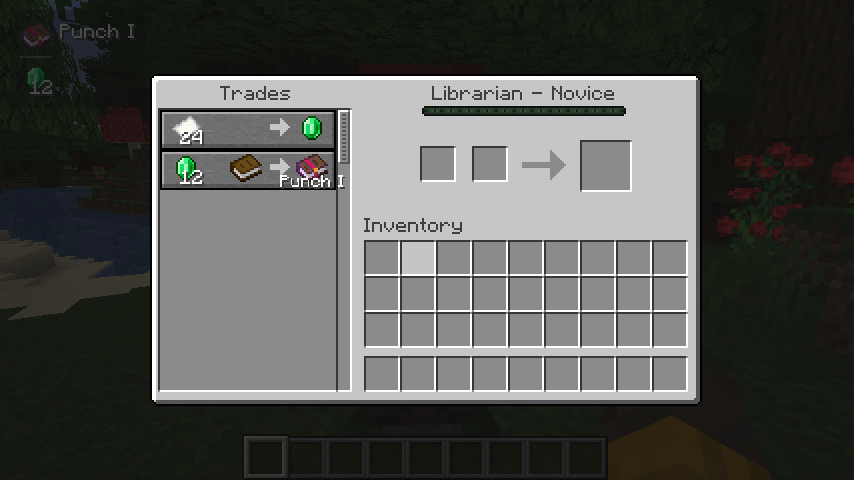
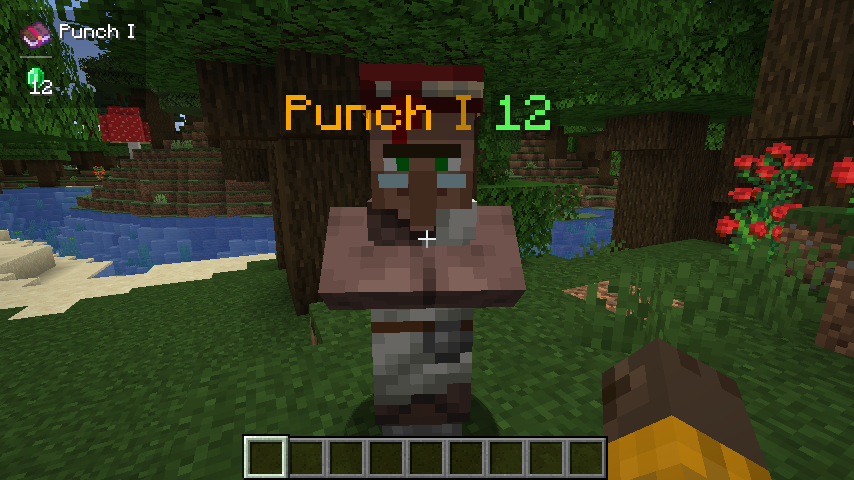
Project description from Modrinth.
Pick your setup
Trade Enchantment Display by Minecraft version and loader
Choose the version and loader you play, then open the matching release.
Minecraft version
1.20.6
2
loader builds Minecraft version
1.20.5
2
loader builds Minecraft version
1.20.4
2
loader builds Minecraft version
1.20.3
2
loader builds Minecraft version
1.20.2
2
loader builds Minecraft version
1.20.1
2
loader builds Minecraft version
1.20
2
loader builds Minecraft version
1.19.4
2
loader builds Minecraft version
1.19.3
2
loader builds Minecraft version
1.19.2
2
loader builds Minecraft version
1.19.1
2
loader builds Minecraft version
1.19
2
loader builds Showing the newest 12 of 18 game versions.
Older files are in the list below.
Check the dependencies, then try the file in a copied instance before changing a world you care about.
Recent files
Trade Enchantment Display versions and loaders
TradeEnchantmentDisplay-neoforge-1.1.5+1.20.6.jar
13 Jan 2025
Client Required Server Not supported Dependencies 1 required · matched Listed on Release listing
Check the 1.20.6 · NeoForge setup → 1.20.51.20.6NeoForge release
TradeEnchantmentDisplay-forge-1.1.5+1.20.4.jar
13 Jan 2025
Client Required Server Not supported Dependencies 1 required · 1 unchecked Listed on Release listing
Check the 1.20.4 · Forge setup → TradeEnchantmentDisplay-forge-1.1.5+1.20.2.jar
13 Jan 2025
Client Required Server Not supported Dependencies 1 required · 1 unchecked Listed on Release listing
Check the 1.20.3 · Forge setup → 1.20.21.20.3Forge release
TradeEnchantmentDisplay-forge-1.1.5+1.20.1.jar
13 Jan 2025
Client Required Server Not supported Dependencies 1 required · 1 unchecked Listed on Release listing
Check the 1.20.1 · Forge setup → TradeEnchantmentDisplay-forge-1.1.5+1.19.4.jar
13 Jan 2025
Client Required Server Not supported Dependencies 1 required · 1 unchecked Listed on Release listing
Check the 1.19.4 · Forge setup → TradeEnchantmentDisplay-forge-1.1.5+1.19.2.jar
13 Jan 2025
Client Required Server Not supported Dependencies 1 required · 1 unchecked Listed on Release listing
Check the 1.19.3 · Forge setup → 1.191.19.11.19.21.19.3 release
TradeEnchantmentDisplay-forge-1.1.5+1.18.jar
13 Jan 2025
Client Required Server Not supported Dependencies 1 required · 1 unchecked Listed on Release listing
Check the 1.18.2 · Forge setup → 1.181.18.11.18.2Forge release
TradeEnchantmentDisplay-forge-1.1.5+1.17.1.jar
13 Jan 2025
Client Required Server Not supported Dependencies 1 required · 1 unchecked Listed on Release listing
Check the 1.17.1 · Forge setup → TradeEnchantmentDisplay-forge-1.1.5+1.16.5.jar
13 Jan 2025
Client Required Server Not supported Dependencies 1 required · 1 unchecked Listed on Release listing
Check the 1.16.5 · Forge setup → TradeEnchantmentDisplay-fabric-1.1.5+1.20.6.jar
13 Jan 2025
Client Required Server Not supported Dependencies 1 required · 1 unchecked Listed on Release listing
Check the 1.20.6 · Fabric setup → 1.20.51.20.6Fabric release
TradeEnchantmentDisplay-fabric-1.1.5+1.20.4.jar
13 Jan 2025
Client Required Server Not supported Dependencies 1 required · 1 unchecked Listed on Release listing
Check the 1.20.4 · Fabric setup → TradeEnchantmentDisplay-fabric-1.1.5+1.20.2.jar
13 Jan 2025
Client Required Server Not supported Dependencies 1 required · 1 unchecked Listed on Release listing
Check the 1.20.3 · Fabric setup → 1.20.21.20.3Fabric release