Minecraft version
Back to mods 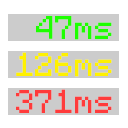
Modrinth · Minecraft mod
Visual Ping
Displays the player's numerical ping in the tablist
Choose a version Pick your version below, then grab the matching file.
Quick answer
Which Visual Ping release matches 26.2?
Best match for your filters 26.2
Game version 26.2
Loader Fabric
Visual Ping 26.2 targets 26.2 with Fabric. It must be installed on the client. Do not install it on the dedicated server. No extra mods listed for this file.
Where it goes
Is Visual Ping required on the client, server, or both?
It must be installed on the client. Do not install it on the dedicated server.
Client Required
Dedicated server Not supported
Loader for this release Fabric
Required install it here Optional supported, not mandatory Not supported do not install here Source doesn’t say do not assume
This file is marked client-only.
What else does Visual Ping 26.2 need?
26.2 on 26.2. Every mod below is checked against that same setup.
This file does not list any required mods. Do not add a library just because a different file uses it.
This file does not list any required or optional mods.
Before you install it
Add Visual Ping without breaking your instance.
Built for Visual Ping 26.2 on 26.2. Pick another file and the loader, install side or required mods may change.
- 01
Stick to this file
Use 26.2. It targets 26.2 with Fabric; another release may have different loader, side or dependency requirements.
- 02
Bring the mods it needs
This file does not list any required mods. Do not add a library just because a different file uses it.
- 03
Put it on the correct side
It must be installed on the client. Do not install it on the dedicated server.
- 04
Pick the file you checked
Use the “Get this file” button beside 26.2. It opens that exact file at the source.
About this project
What does Visual Ping add?
Visual Ping is a simple and useful Fabric mod that shows players' numeric ping directly in the tablist. It helps you quickly understand connection quality and server performance without opening debug screens or using extra commands.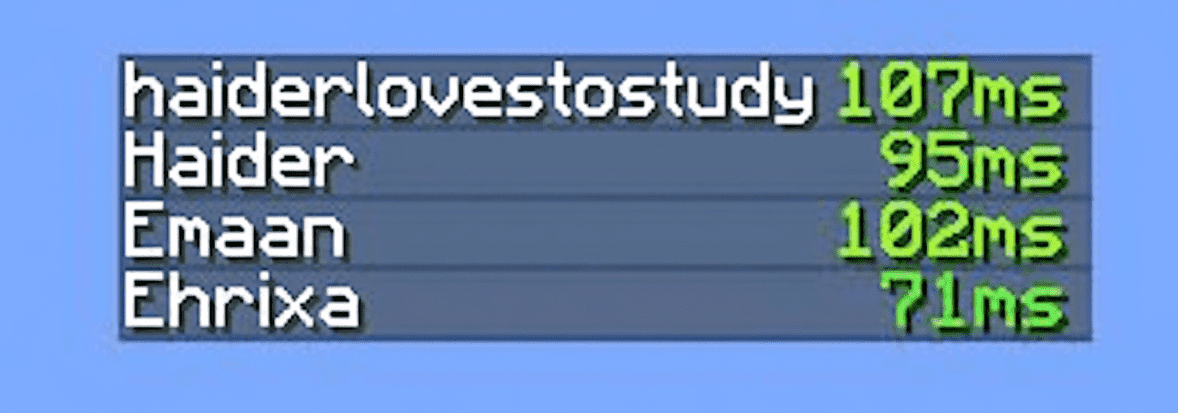
✨ Features
- Real-time numeric ping display in the tablist
- Automatic color changes based on ping
- Lightweight and performance-friendly
- Fully compatible with Fabric Loader
- Perfect for multiplayer servers
🎨 Ping Color System
The ping value changes color automatically depending on connection quality: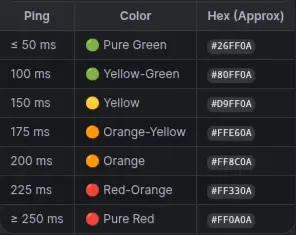
🚀 Why Should We Use Visual Ping?
- Quickly identify laggy players
- Monitor server stability
- Improve multiplayer experience
- Clean and minimal UI integration
📦 Requirements
- Minecraft (Fabric)
- Fabric Loader
- Fabric API (recommended)
Project description from Modrinth.
Pick your setup
Visual Ping by Minecraft version and loader
Choose the version and loader you play, then open the matching release.
Minecraft version
26.1.2
1 loader buildMinecraft version
26.1
1 loader buildMinecraft version
1.21.11
1 loader buildMinecraft version
1.21.1
1 loader buildMinecraft version
1.21
1 loader buildCheck the dependencies, then try the file in a copied instance before changing a world you care about.
Recent files
Visual Ping versions and loaders
26.2
VisualPing-26.2.jar
7 Aug 2026
Client Required Server Not supported Dependencies No extras listed Listed on Release listing
Check the 26.2 · Fabric setup 26.2Fabric release
Looking for an older file? The official Modrinth project page is in Resources.
 mod
mod CurseForge · Minecraft
Workhand Tool
Pickaxe and shovel for every material — 4 grades each, unlocking 3×3 to 5×5 area mining. Durability, speed and enchants always match vanilla.
 mod
mod CurseForge · Minecraft
Armor Cosmetic
Wear two sets of armor simultaneously — one for stats, one for style.
 mod
mod CurseForge · Minecraft
Ascendant Enchanting
Overhauls major enchanting systems — new enchanting table mechanics, enchantment library, and enchantments. Fork of Apothic Enchanting — module of the Ascendant Equipment family. Requires Common Toolkit and Ascendant Attributes.