Minecraft version
Back to mods 
Modrinth · Minecraft mod
UPaint
Paint your Minecraft skin in-game. Live, with a full editor, screen pipette, and instant multiplayer sync.
Choose a version Pick your version below, then grab the matching file.
Quick answer
Which UPaint release matches 1.20.3?
Best match for your filters 1.1.0
Game version 1.20.2, 1.20.3, 1.20.4
Loader Fabric
UPaint 1.1.0 targets 1.20.2, 1.20.3, 1.20.4 with Fabric. Installation on the client is optional. Installation on the dedicated server is optional. No extra mods listed for this file.
Where it goes
Is UPaint required on the client, server, or both?
Installation on the client is optional. Installation on the dedicated server is optional.
Client Optional
Dedicated server Optional
Loader for this release Fabric
Required install it here Optional supported, not mandatory Not supported do not install here Source doesn’t say do not assume
The source marks this as usable on both the client and server.
What else does UPaint 1.1.0 need?
1.1.0 on 1.20.3. Every mod below is checked against that same setup.
This file does not list any required mods. Do not add a library just because a different file uses it.
This file does not list any required or optional mods.
Before you install it
Add UPaint without breaking your instance.
Built for UPaint 1.1.0 on 1.20.3. Pick another file and the loader, install side or required mods may change.
- 01
Stick to this file
Use 1.1.0. It targets 1.20.2, 1.20.3, 1.20.4 with Fabric; another release may have different loader, side or dependency requirements.
- 02
Bring the mods it needs
This file does not list any required mods. Do not add a library just because a different file uses it.
- 03
Put it on the correct side
Installation on the client is optional. Installation on the dedicated server is optional.
- 04
Pick the file you checked
Use the “Get this file” button beside 1.1.0. It opens that exact file at the source.
About this project
What does UPaint add?
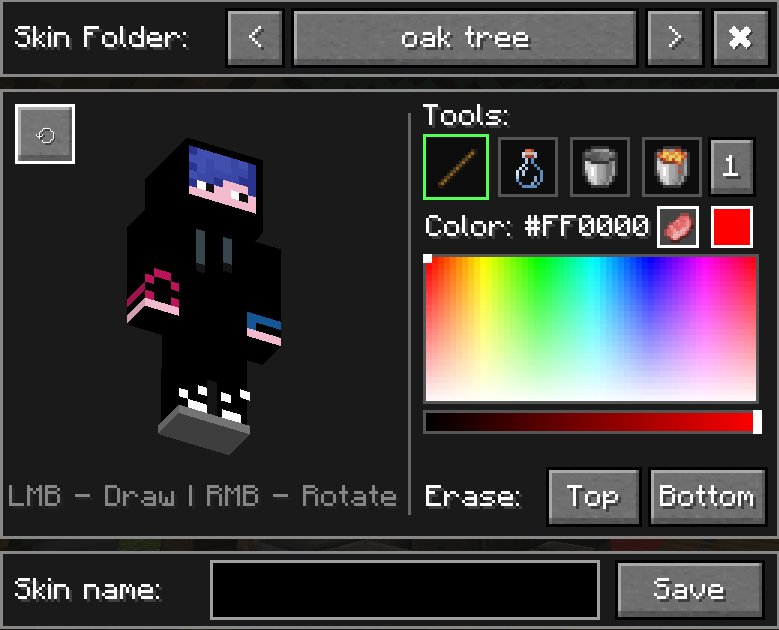
This mod allows you to edit, create, and load skins for your character directly while playing Minecraft.
Basically you:
- Open your inventory.
- Click the button next to your character preview.
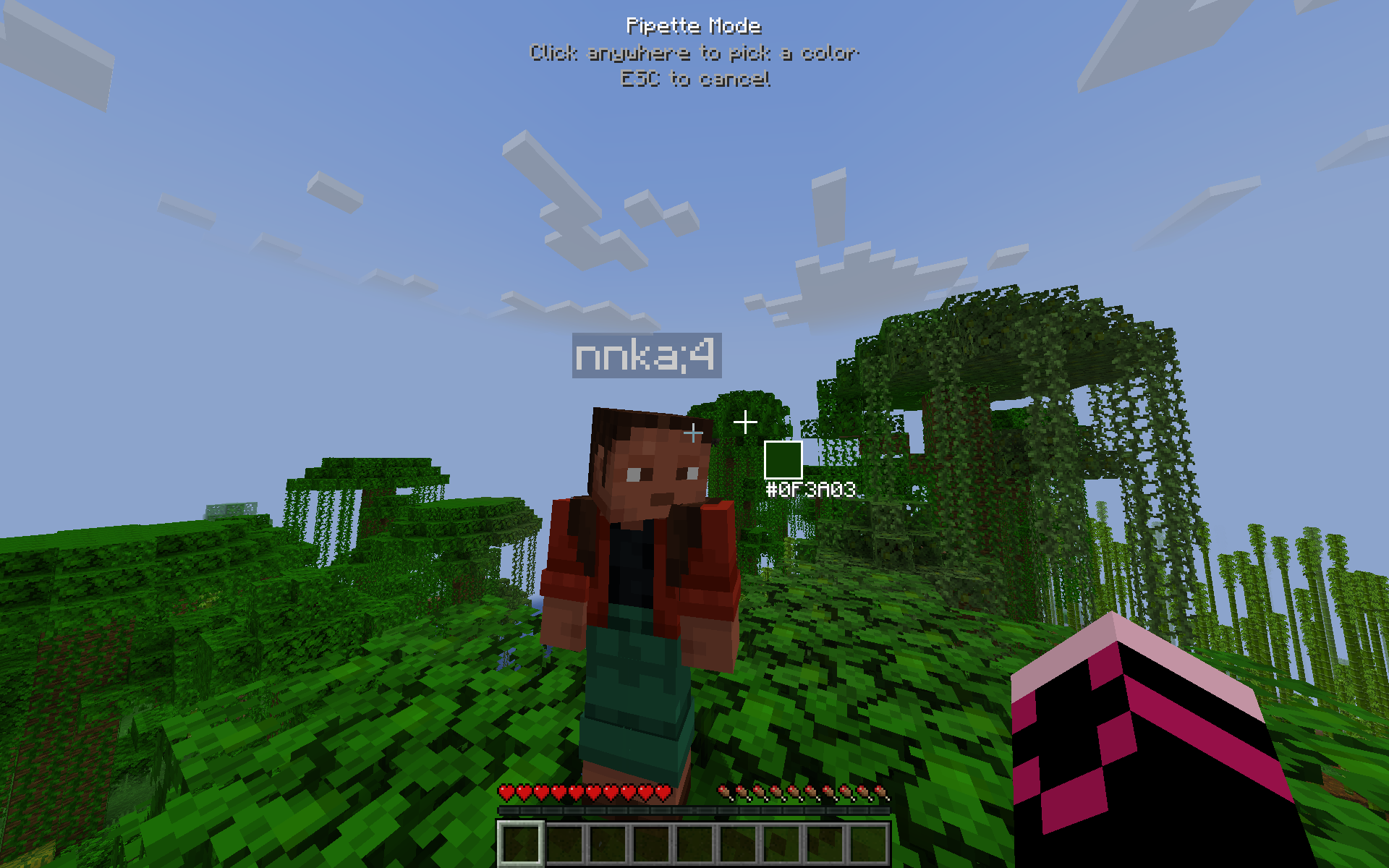
- Use the color palette and tools to paint your skin. Possibly use screen pipette if playing hide&seek.
- Click "Back", and you're done, and everybody else instantly sees your changes without you leaving the world. As easy as it sounds.
Key Features:
- Built-in Editor: Features a full color palette and a set of tools.
- Screen Pipette: It is great for hide&seek. You can sample colors from your surroundings and paint your skin to blend in.
- Save & Load: Save and load your skins to/from a
skinsfolder inside your.minecraftdirectory under custom names, without ever leaving the game. - Undo/Redo: Use Ctrl+Z for Undo and Ctrl+Shift+Z for Redo.
Important notes:
- To display your custom skin on a server, this mod MUST be installed on the server as well. Otherwise it wont work.
- This mod will not work on TLauncher because their mod
tl skin capeoverrides vanilla skin mechanics, breaking skin mods. Use legacy launcher, prism launcher or vanilla minecraft launcher to avoid issues.
Project description from Modrinth.
Pick your setup
UPaint by Minecraft version and loader
Choose the version and loader you play, then open the matching release.
Minecraft version
1.20.3
1 loader buildMinecraft version
1.20.2
1 loader buildMinecraft version
1.20.1
1 loader buildMinecraft version
1.20
1 loader buildCheck the dependencies, then try the file in a copied instance before changing a world you care about.
Recent files
UPaint versions and loaders
1.1.0
upaint-1.1.0.jar
15 Jul 2026
Client Optional Server Optional Dependencies No extras listed Listed on Release listing
Check the 1.20.3 · Fabric setup 1.20.21.20.31.20.4Fabric release
1.0.0
upaint-1.0.0.jar
27 Jun 2026
Client Optional Server Optional Dependencies 1 required · 1 unchecked Listed on Release listing
Check the 1.20.3 · Fabric setup 1.20.21.20.31.20.4Fabric release
Looking for an older file? The official Modrinth project page is in Resources.
 mod
CurseForge + Modrinth · Minecraft
Underground Villages, Stoneholm (Fabric/Forge/NeoForge)
((✓ Forge, ✓ Neoforge and ✓ fabric ) Stoneholm is a Forge & Fabric mod adds underground villages to the world. Inspired by Strongholds and Villages.
 mod
CurseForge + Modrinth · Minecraft
EasyAuth
Authentication mod for Fabric servers
 mod
Modrinth · Minecraft
Questlog
Adds a quest system designed to make info conveyance in modpacks far more intuitive!