Minecraft version
Back to mods 
Modrinth · Minecraft mod
Boosted Brightness Remastered
Allows you to set your brightness beyond default levels.
Choose a version Pick your version below, then grab the matching file.
Quick answer
Which Boosted Brightness Remastered release should I use?
Latest stable file 1.3-forge-26.3
Game version 26.3
Loader Forge
Boosted Brightness Remastered 1.3-forge-26.3 targets 26.3 with Forge. It must be installed on the client. Do not install it on the dedicated server. No extra mods listed for this file.
Where it goes
Is Boosted Brightness Remastered required on the client, server, or both?
It must be installed on the client. Do not install it on the dedicated server.
Client Required
Dedicated server Not supported
Loader for this release Forge
Required install it here Optional supported, not mandatory Not supported do not install here Source doesn’t say do not assume
This file is marked client-only.
What else does Boosted Brightness Remastered 1.3-forge-26.3 need?
1.3-forge-26.3. Change the file and its required mods may change too.
This file does not list any required mods. Do not add a library just because a different file uses it.
This file does not list any required or optional mods.
Before you install it
Add Boosted Brightness Remastered without breaking your instance.
Built for Boosted Brightness Remastered 1.3-forge-26.3. Pick another file and the loader, install side or required mods may change.
- 01
Stick to this file
Use 1.3-forge-26.3. It targets 26.3 with Forge; another release may have different loader, side or dependency requirements.
- 02
Bring the mods it needs
This file does not list any required mods. Do not add a library just because a different file uses it.
- 03
Put it on the correct side
It must be installed on the client. Do not install it on the dedicated server.
- 04
Pick the file you checked
Use the “Get this file” button beside 1.3-forge-26.3. It opens that exact file at the source.
About this project
What does Boosted Brightness Remastered add?

This is a Unofficial Port of Boosted Brightness
Boosted Brightness is a simple mod that allows you to set your brightness beyond default levels.

Modified brightness slider, extending brightness range to -150% to 1200%.
Up to 5 custom brightness levels accessible via Mod Menu.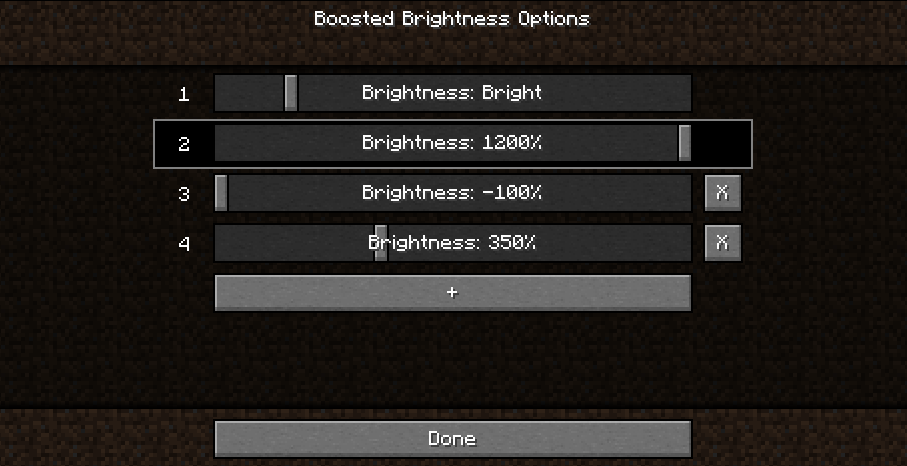
Keybinds to raise/lower brightness and switch to particular brightness levels in-game.

Cave brightness comparison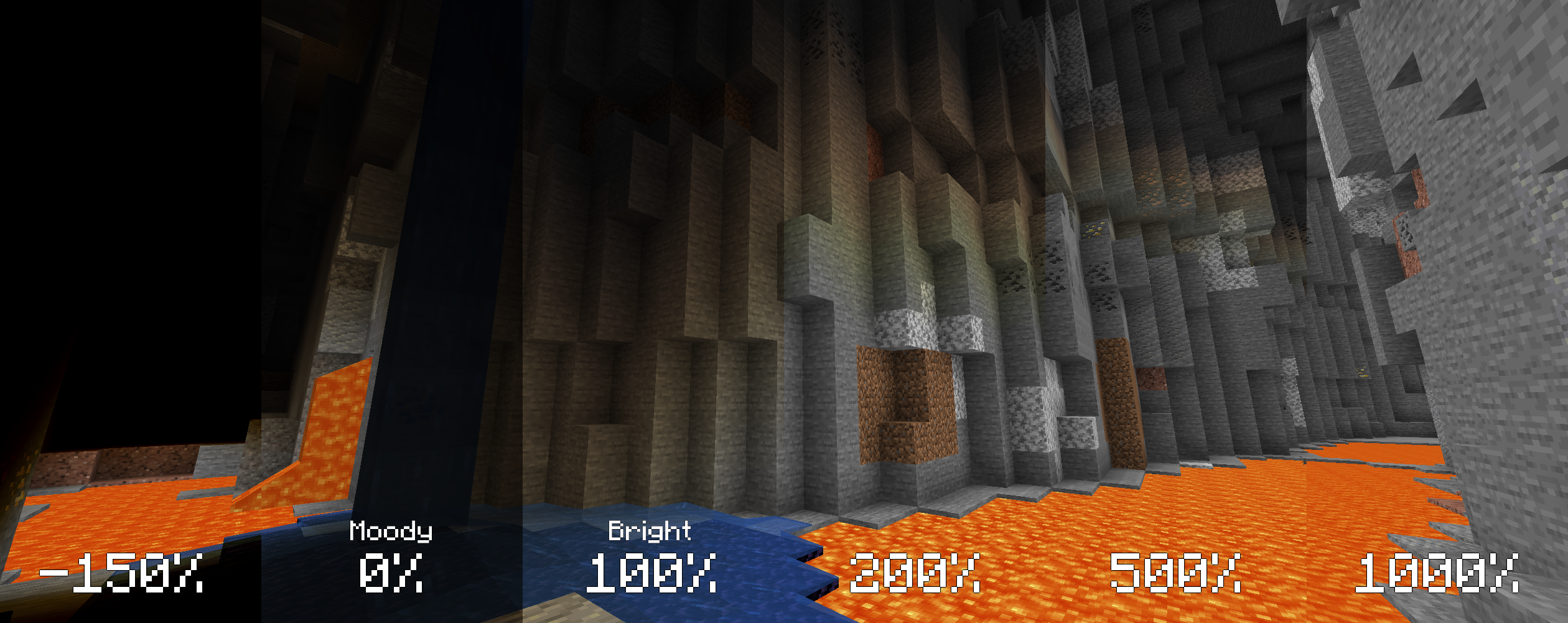
Nighttime brightness comparison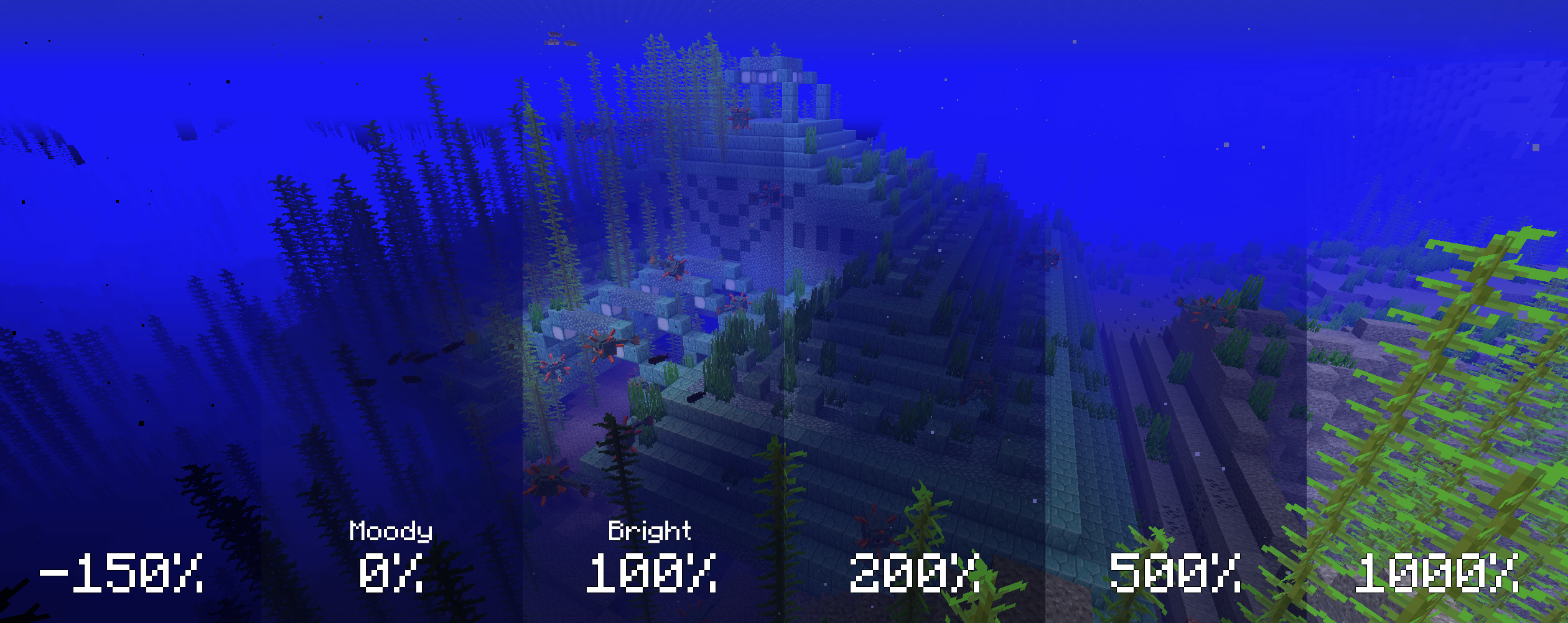
Video (<1-Minute)
Missing v2 features but still useful!

- Install Fabric
- Drop the Fabric API jar into the mods folder
- Drop the Boosted Brightness and Mod Menu jars into the mods folder
Compatibility
Works with Optifine and Sodium. Let me know if you find any compatibility issues.
License
MIT. Feel free to use this mod in any modpack.
Project Support & Usage
Hosting: For the best performance, I recommend using BisectHosting linked in the banner.
Modpacks: You are free to include my work in any modpack. Please ensure proper credit is given by providing a link to this project page.

Project description from Modrinth.
Pick your setup
Boosted Brightness Remastered by Minecraft version and loader
Choose the version and loader you play, then open the matching release.
Minecraft version
26.2
3 loader buildsMinecraft version
26.1.2
3 loader buildsMinecraft version
26.1.1
3 loader buildsMinecraft version
26.1
3 loader buildsMinecraft version
1.21.11
3 loader buildsMinecraft version
1.21.10
3 loader buildsMinecraft version
1.21.9
1 loader buildMinecraft version
1.21.2
1 loader buildMinecraft version
1.21.1
3 loader buildsMinecraft version
1.21
1 loader buildMinecraft version
1.20.1
2 loader buildsCheck the dependencies, then try the file in a copied instance before changing a world you care about.
Recent files
Boosted Brightness Remastered versions and loaders
1.3-forge-26.3
Boosted-Brightness-Remastered-Forge-26.3-1.3.jar
22 Sept 2026
Client Required Server Not supported Dependencies No extras listed Listed on Release listing
Check the 26.3 · Forge setup 26.3Forge release
1.2
Saros-Boosted-Brightness-NeoForge-26.3-1.2.jar
20 Sept 2026
Client Required Server Not supported Dependencies No extras listed Listed on Release listing
Check the 26.3 · NeoForge setup 26.3NeoForge release
1.0.3
Saros-Boosted-Brightness-Fabric-26.3-1.0.3.jar
19 Sept 2026
Client Required Server Not supported Dependencies No extras listed Listed on Release listing
Check the 26.3 · Fabric setup 26.3Fabric release
1.0.2
Saros-Boosted-Brightness-Fabric-26.3-1.0.2.jar
19 Sept 2026
Client Required Server Not supported Dependencies No extras listed Listed on Release listing
Check the 26.3 · Fabric setup 26.3Fabric release
1.0.1
Boosted-Brightness-Remastered-Forge-1.21.11-1.0.1.jar
16 Sept 2026
Client Required Server Not supported Dependencies No extras listed Listed on Release listing
Check the 1.21.11 · Forge setup 1.21.11Forge release
1.0.1
Boosted-Brightness-Remastered-Forge-1.21.10-1.0.1.jar
16 Sept 2026
Client Required Server Not supported Dependencies No extras listed Listed on Release listing
Check the 1.21.10 · Forge setup 1.21.10Forge release
1.0.1
Boosted-Brightness-Remastered-Forge-1.21.1-1.0.1.jar
16 Sept 2026
Client Required Server Not supported Dependencies No extras listed Listed on Release listing
Check the 1.21.1 · Forge setup 1.21.1Forge release
1.1
boosted-brightness-1.1.jar
23 Jun 2026
Client Required Server Not supported Dependencies No extras listed Listed on Release listing
Check the 26.1 · Fabric setup 26.1Fabric release
1.1
boosted-brightness-1.1.jar
22 Jun 2026
Client Required Server Not supported Dependencies No extras listed Listed on Release listing
Check the 1.21.11 · Fabric setup 1.21.11Fabric release
1.0.1
boosted-brightness-1.0.1.jar
21 Jun 2026
Client Required Server Not supported Dependencies No extras listed Listed on Release listing
Check the 26.2 · Fabric setup 26.2Fabric release
1.1
boostedbrightness-1.1.jar
21 Jun 2026
Client Required Server Not supported Dependencies No extras listed Listed on Release listing
Check the 26.2 · NeoForge setup 26.2NeoForge release
1.1
boostedbrightness-1.1.jar
21 Jun 2026
Client Required Server Not supported Dependencies No extras listed Listed on Release listing
Check the 26.2 · Forge setup 26.2Forge release
Looking for an older file? The official Modrinth project page is in Resources.
 mod
mod CurseForge + Modrinth · Minecraft
Easy NPC
Create easily NPCs with dialogs for your world or for your mods.
 mod
mod CurseForge + Modrinth · Minecraft
Easy NPC: Core
Provides the core functionallity for the Easy NPC mod.
 mod
mod CurseForge + Modrinth · Minecraft
Sophisticated Core
Library mod for Sophisticated mods