Minecraft version
Back to mods 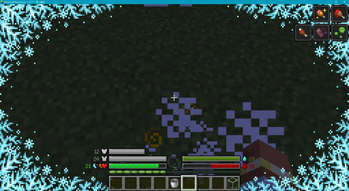
Modrinth · Minecraft mod
Classic Bar Unofficial
Classic Bar Unofficial — A community-maintained fork of the original Classic Bar. Adds extended mod support including thirst overlay (Thirst Was Taken), Vampirism blood bar, Forbidden Curse hunger bar, and full Chinese localization.
Choose a version Pick your version below, then grab the matching file.
Quick answer
Which Classic Bar Unofficial release should I use?
Latest stable file 1.21.1-1.5.5
Game version 1.21.1
Loader NeoForge
Classic Bar Unofficial 1.21.1-1.5.5 targets 1.21.1 with NeoForge. It must be installed on the client. Do not install it on the dedicated server. No extra mods listed for this file.
Where it goes
Is Classic Bar Unofficial required on the client, server, or both?
It must be installed on the client. Do not install it on the dedicated server.
Client Required
Dedicated server Not supported
Loader for this release NeoForge
Required install it here Optional supported, not mandatory Not supported do not install here Source doesn’t say do not assume
This file is marked client-only.
What else does Classic Bar Unofficial 1.21.1-1.5.5 need?
1.21.1-1.5.5. Change the file and its required mods may change too.
This file does not list any required mods. Do not add a library just because a different file uses it.
This file does not list any required or optional mods.
Before you install it
Add Classic Bar Unofficial without breaking your instance.
Built for Classic Bar Unofficial 1.21.1-1.5.5. Pick another file and the loader, install side or required mods may change.
- 01
Stick to this file
Use 1.21.1-1.5.5. It targets 1.21.1 with NeoForge; another release may have different loader, side or dependency requirements.
- 02
Bring the mods it needs
This file does not list any required mods. Do not add a library just because a different file uses it.
- 03
Put it on the correct side
It must be installed on the client. Do not install it on the dedicated server.
- 04
Pick the file you checked
Use the “Get this file” button beside 1.21.1-1.5.5. It opens that exact file at the source.
About this project
What does Classic Bar Unofficial add?
Classic Bar Unofficial
A NeoForge 1.21.1 community port of Tfarcenim's Classic Bar. Clean, readable progress bars replace Minecraft's default icon HUD — hearts, armor, food, air, and more.
What It Does
Classic Bar replaces the traditional icon rows on your HUD — hearts, armor pieces, food drumsticks, air bubbles, and other status symbols — with continuous progress bars. The health bar scales dynamically with your maximum health instead of locking at 20 points, giving you a cleaner, more information-dense HUD at a single glance.
Originally created by Tfarcenim for Minecraft Forge, this community fork updates the mod to NeoForge 1.21.1, adds new mod integrations, and provides ongoing maintenance.
Why Download
- Dynamic health scaling — the health bar adjusts to your actual max HP, not a fixed 20
- Deep customization — every bar can be positioned left, right, or hidden; colors, number display modes, icon toggles, and overlay effects are all configurable through an in-game GUI
- Extended mod support — five additional mods now have dedicated bar integrations (see below)
- Better readability — continuous bars are easier to parse at a glance than scattered icon rows
- Cleaner look — reduces visual clutter while keeping all information accessible
Features
Native Status Bars (8)
- Health — Scales dynamically with max health; poison/wither/frozen overlay effects
- Armor — Configurable number of armor layers
- Food — Hunger icon variant; food preview when holding edible items
- Saturation — Sub-bar below the food bar
- Air — Underwater breath indicator with flashing warning
- Armor Toughness — Secondary damage reduction stat
- Mount Health — Health of horses, striders, llamas, and other mounts
- Absorption — Absorption hearts shown as a progress bar
Mod Compatibility
- Thirst Was Taken — thirst bar + hydration sub-bar + drink preview
- Vampirism — blood level bar (replaces the food bar when in vampire form)
- Farmer's Delight — golden nourishment overlay on the food bar
- Kaleidoscope Cookery — red satiation-compensation overlay on the food bar
- Enigmatic Legacy+ — Forbidden Curse hunger overlay (mutually exclusive with blood/food)
Multi-Effect Icon Stacking
Poison, Wither, and Freezing icons automatically stack side-by-side on the health bar. Similarly, Hunger, Nourishment, and Satiation-Compensation icons arrange themselves on the food bar — no overlapping mess.
Food & Drink Preview
Hold a food item in your hand to see exactly how much hunger and saturation it will restore, shown as a preview overlay on the bars (similar to AppleSkin).
Custom Pixel Number Fonts
Choose between 3x5 and 3x5_tiny bitmap fonts for a compact, retro-looking numeric display on the HUD.
Full Chinese Translation
Complete zh_CN localization of the entire UI and configuration menu.
Debug Toggles (8)
Developer-only switches for testing bar behavior and HUD rendering — available only in a development environment.
Code Quality Improvements
Compared to the original Forge version, this fork brings:
- Centralized registration system (ModOverlays, ModIcons, ModConfigs)
- Spotless automated code formatting
- Gradle version catalog for unified dependency management
- Access Transformer infrastructure
- Data generation framework
Configuration Highlights
- Every status bar: LEFT / RIGHT / HIDDEN
- Custom color picker for each bar
- Number display modes: Current value only / Current + Max / Percentage
- Per-bar icon toggle
- Per-bar overlay effect toggle
- Full configuration GUI — no manual file editing required
Requirements
- Minecraft: 1.21.1
- NeoForge: 21.1.228+
- Side: Client-side only (no server installation needed)
Credits
- Original author: Tfarcenim
- Original project: Classic Bar (Forge)
License
GPL-3.0-only — This fork is released under the GNU General Public License v3.0. Includes 3x5 bitmap fonts from Reliable-Recount by catboybinary, also GPL-3.0.
Project description from Modrinth.
Pick your setup
Classic Bar Unofficial by Minecraft version and loader
Choose the version and loader you play, then open the matching release.
Minecraft version
1.21.1
1 loader buildCheck the dependencies, then try the file in a copied instance before changing a world you care about.
Recent files
Classic Bar Unofficial versions and loaders
1.21.1-1.5.5
classicbar-1.21.1-1.5.5.jar
18 Sept 2026
Client Required Server Not supported Dependencies No extras listed Listed on Release listing
Check the 1.21.1 · NeoForge setup 1.21.1NeoForge release
26.1.2-1.5.4
classicbar-26.1.2-1.5.4.jar
20 Aug 2026
Client Required Server Not supported Dependencies No extras listed Listed on Release listing
Check the 26.1.2 · NeoForge setup 26.1.2NeoForge release
1.21.1-1.5.3
classicbar-1.21.1-1.5.3.jar
10 May 2026
Client Required Server Not supported Dependencies No extras listed Listed on Release listing
Check the 1.21.1 · NeoForge setup 1.21.1NeoForge release
1.21.1-1.5.2
classicbar-1.21.1-1.5.2.jar
8 May 2026
Client Required Server Not supported Dependencies No extras listed Listed on Release listing
Check the 1.21.1 · NeoForge setup 1.21.1NeoForge release
1.21.1-1.4.0
classicbar-1.21.1-1.4.0.jar
1 May 2026
Client Required Server Not supported Dependencies No extras listed Listed on Release listing
Check the 1.21.1 · NeoForge setup 1.21.1NeoForge release
Looking for an older file? The official Modrinth project page is in Resources.
 mod
mod CurseForge + Modrinth · Minecraft
Cobblemon: Better Campfire Pot
A Cobblemon addon to make cooking pot faster and automation friendly.
 mod
mod CurseForge + Modrinth · Minecraft
Lootr (Forge & NeoForge)
A mod that makes it so nobody misses out on Loot! All loot chests are instanced per player and visually unique.
 mod
mod CurseForge + Modrinth · Minecraft
World Degrade
A mod That converts player made structures into ruins