Fabric API Needed by Cluttered Creative 2.1.0+1.21-fabric
requiredMatching file found Matched file: [1.21] Fabric API 0.102.0+1.21

Modrinth · Minecraft mod
Bring back the old cluttered creative inventory.
Quick answer
Cluttered Creative 2.1.0+1.21-fabric targets 1.21 with Fabric. It must be installed on the client. Do not install it on the dedicated server. All 1 required mods have matching files.
Where it goes
It must be installed on the client. Do not install it on the dedicated server.
This file is marked client-only.
2.1.0+1.21-fabric. Change the file and its required mods may change too.
Install Fabric API first. We found matching files for this game-version and loader setup. 1 comes through another mod in the chain.
1 extra mod was pulled in by another dependency. Indented rows show who needs each one. We only count dependency files that match this setup. A file for another loader does not fill the gap.
Before you install it
Built for Cluttered Creative 2.1.0+1.21-fabric. Pick another file and the loader, install side or required mods may change.
Use 2.1.0+1.21-fabric. It targets 1.21 with Fabric; another release may have different loader, side or dependency requirements.
Install Fabric API first. We found matching files for this game-version and loader setup. 1 comes through another mod in the chain.
It must be installed on the client. Do not install it on the dedicated server.
Use the “Get this file” button beside 2.1.0+1.21-fabric. It opens that exact file at the source.
About this project
Unable to find anything in the new inventory layout? Well then this mod is for you! It brings the old creative inventory layout (pre 1.19.3) to 1.20+.
Probably not compatible with mods that add items to the default item groups, however a compatibility layer is planned.
I'm doing my best to include all items including new ones from 1.20 but I might miss some so please report them on the issues page or my Discord server.
If there is only one custom item group then the page selector will not show, most likely due to the fact that this inventory has one less tab. I'm working on a fix.
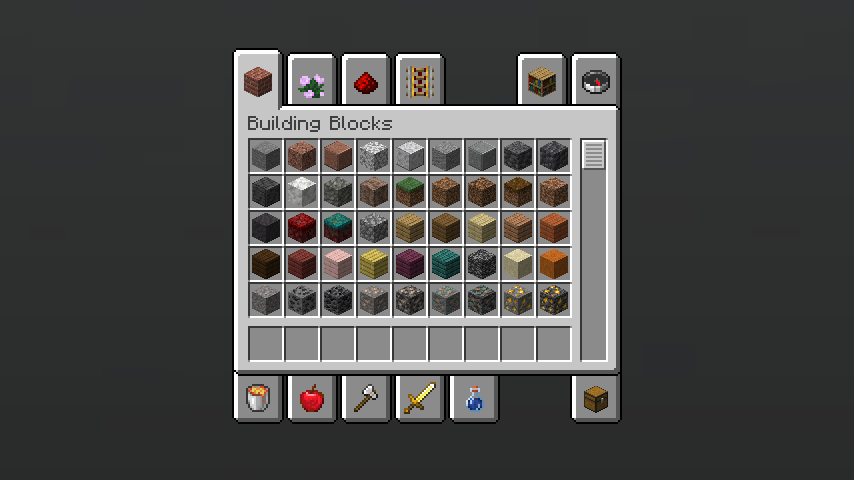
Project description from Modrinth.
Pick your setup
Choose the version and loader you play, then open the matching release.
Check the dependencies, then try the file in a copied instance before changing a world you care about.
Recent files
cc-2.1.0+1.21-fabric.jar
9 Feb 2025
cc-2.1.0+1.20.6-fabric.jar
9 Feb 2025
cc-2.1.0+1.20.5-fabric.jar
9 Feb 2025
cc-2.1.0+1.20.4-fabric.jar
9 Feb 2025
cc-2.1.0+1.20.3-fabric.jar
9 Feb 2025
cc-2.1.0+1.20.2-fabric.jar
9 Feb 2025
cc-2.1.0+1.20.1-fabric.jar
9 Feb 2025
cc-2.1.0+1.20-fabric.jar
9 Feb 2025
cc-2.0.0+1.21-fabric.jar
14 Jul 2024
cc-2.0.0+1.20.6-fabric.jar
14 Jul 2024
cc-2.0.0+1.20.4-fabric.jar
14 Jul 2024
cc-2.0.0+1.20.3-fabric.jar
14 Jul 2024
Looking for an older file? The official Modrinth project page is in Resources.
 mod
Create Holograms. Make Texts, Images, Scoreboards, Blocks and interact with them bind commands to holograms use them as paged books.
 mod
Client mod for Escape From Tarkraft, a Tarkov-style extraction shooter in Minecraft: modular guns and attachments, real ballistics, armor plates, native shaders and dynamic lighting for a post-apocalyptic milsim FPS.
 mod
Mini game with vault in minecraft