Minecraft version
Back to mods 
Modrinth · Minecraft mod
EpicFight Sword Light Modifications
Adjusted the swing trails in EpicFight to make it shine.
Choose a version Pick your version below, then grab the matching file.
Quick answer
Which EpicFight Sword Light Modifications release should I use?
Latest stable file 19.5.2
Game version 1.19.2
Loader Forge
EpicFight Sword Light Modifications 19.5.2 targets 1.19.2 with Forge. Installation on the client is optional. Installation on the dedicated server is optional. No extra mods listed for this file.
Where it goes
Is EpicFight Sword Light Modifications required on the client, server, or both?
Installation on the client is optional. Installation on the dedicated server is optional.
Client Optional
Dedicated server Optional
Loader for this release Forge
Required install it here Optional supported, not mandatory Not supported do not install here Source doesn’t say do not assume
The source marks this as usable on both the client and server.
What else does EpicFight Sword Light Modifications 19.5.2 need?
19.5.2. Change the file and its required mods may change too.
This file does not list any required mods. Do not add a library just because a different file uses it.
This file does not list any required or optional mods.
Before you install it
Add EpicFight Sword Light Modifications without breaking your instance.
Built for EpicFight Sword Light Modifications 19.5.2. Pick another file and the loader, install side or required mods may change.
- 01
Stick to this file
Use 19.5.2. It targets 1.19.2 with Forge; another release may have different loader, side or dependency requirements.
- 02
Bring the mods it needs
This file does not list any required mods. Do not add a library just because a different file uses it.
- 03
Put it on the correct side
Installation on the client is optional. Installation on the dedicated server is optional.
- 04
Pick the file you checked
Use the “Get this file” button beside 19.5.2. It opens that exact file at the source.
About this project
What does EpicFight Sword Light Modifications add?
This mod has been redesigned!!!
谢谢你,东非大野猪!
The zylob:acg_trail blade effect included in this mod comes from assets by Epic ACG.
To experience the full version of this mod, please add the Fancy Trail , EpicFight-Nightfall , and Epic Fight - Limbus Company Moveset mods.
When you add the Fancy Trai mod, EpicFight-Nightfall mod, or Epic Fight - Limbus Company Moveset, their trail effects will automatically be added to the list.There are a total of 41
Inside, the Epicfight mod offers 1 trail, this mod provides 4 trails, EpicFight-Nightfall offers 3 trails, Epic Fight - Limbus Company Moveset offers 12 trails, and Fancy Trail offers 21 trails.There are a total of 41 trail .
Currently, this mod focuses on the Epic Fight mod for the latest version of Minecraft 1.20.1 and will be prioritized for updates.
The current setting replaces the global epicfight:swing_trail blade trail particles, and also generates other particles whenever any blade trail particles are created.
The priority of these settings is Global Config < Personal Config < Resource Pack
Also, this module is already set up to sync resource pack settings and personal configurations, so other players can see it too. The effect is: when the swing trail belongs to another entity, it will first use the player's own resource pack settings, and then the global settings; if the swing trail belongs to a player, it will first use the other person's resource pack settings, and if they don't have any, it will show their personal configuration.
Here's the example resource pack setup:
.item_skins.s_iron_sword.json
{
"trail": {
"color": [152, 122, 57],
"begin_pos": [0.0, 0.1, 2],
"end_pos": [0.0, -0.05, -2],
"lifetime": 6,
"interpolations": 5,
"texture_path": "epicfight:textures/particle/swing_trail.png",
"particle_type": "zylob:swing_trail",
"overlays": ["zylob:acg_trail","zylob:ender_rift_trail"],
"ender_rift_trail_texture": "zylob:textures/effect/star2.png"
}
}
The values in "overlays" are used to store other trajectory effects generated by this weapon at the same time.
When you use the “zylob:ender_rift_trail” trail effect, you can set a value in "ender_rift_trail_texture" to specify its texture path.
Descriptions are all translated using Bing.( )
Something like that, maybe?
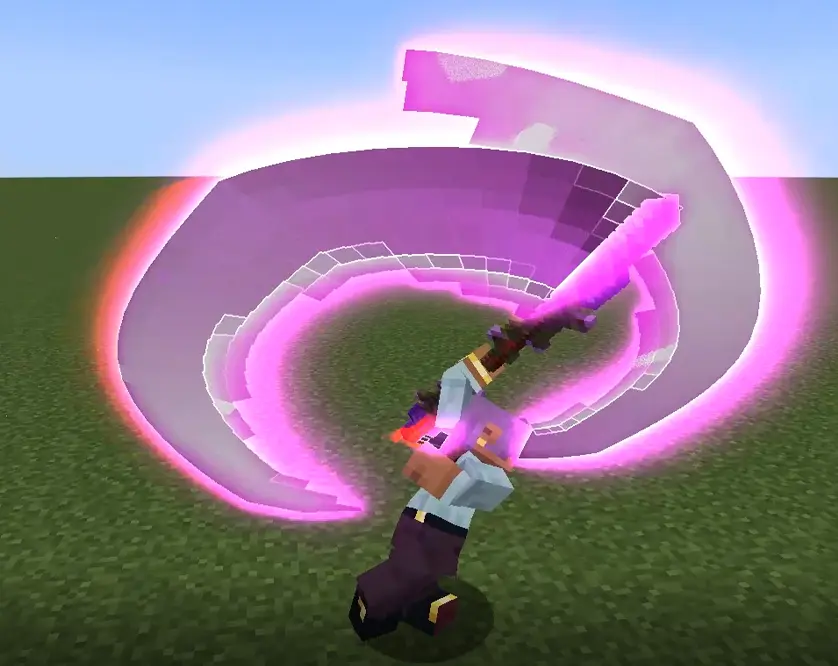

Try to keep the number of overlapping blade flashes to a minimum, because I'm actually generating these particles at the same time as the blade flashes, so having too many overlapping will cause serious lag.
Project description from Modrinth.
Pick your setup
EpicFight Sword Light Modifications by Minecraft version and loader
Choose the version and loader you play, then open the matching release.
Minecraft version
1.20.1
1 loader buildMinecraft version
1.19.2
1 loader buildMinecraft version
1.18.2
1 loader buildCheck the dependencies, then try the file in a copied instance before changing a world you care about.
Recent files
EpicFight Sword Light Modifications versions and loaders
19.5.2
zylob-forge1.19.2-19.5.2.jar
1 Oct 2026
Client Optional Server Optional Dependencies No extras listed Listed on Release listing
Check the 1.19.2 · Forge setup 1.19.2Forge release
18.5.2
zylob-forge1.18.2-18.5.2.jar
1 Oct 2026
Client Optional Server Optional Dependencies No extras listed Listed on Release listing
Check the 1.18.2 · Forge setup 1.18.2Forge release
20.14.13
zylob-forge1.20.1-20.14.13.jar
1 Oct 2026
Client Optional Server Optional Dependencies No extras listed Listed on Release listing
Check the 1.20.1 · Forge setup 1.20.1Forge release
20.14.12
zylob-forge1.20.1-20.14.12.jar
2 Sept 2026
Client Optional Server Optional Dependencies No extras listed Listed on Release listing
Check the 1.20.1 · Forge setup 1.20.1Forge release
20.14.11
zylob-forge1.20.1-20.14.11.jar
15 Aug 2026
Client Optional Server Optional Dependencies No extras listed Listed on Release listing
Check the 1.20.1 · Forge setup 1.20.1Forge release
20.14.10
zylob-forge1.20.1-20.14.10.jar
11 Aug 2026
Client Optional Server Optional Dependencies No extras listed Listed on Release listing
Check the 1.20.1 · Forge setup 1.20.1Forge release
20.14.9
zylob-forge1.20.1-20.14.9.jar
10 Aug 2026
Client Optional Server Optional Dependencies 1 required · 1 unchecked Listed on Release listing
Check the 1.20.1 · Forge setup 1.20.1Forge release
21.16.2
zylob-21.16.2.jar
9 Aug 2026
Client Optional Server Optional Dependencies No extras listed Listed on Release listing
Check the 1.21.1 · NeoForge setup 1.21.1NeoForge release
20.14.8
zylob-forge1.20.1-20.14.8.jar
9 Aug 2026
Client Optional Server Optional Dependencies No extras listed Listed on Release listing
Check the 1.20.1 · Forge setup 1.20.1Forge release
21.16.1
zylob-21.16.1.jar
16 Apr 2026
Client Optional Server Optional Dependencies No extras listed Listed on Release listing
Check the 1.21.1 · NeoForge setup 1.21.1NeoForge release
20.14.6
zylob-forge1.20.1-20.14.6.jar
16 Feb 2026
Client Optional Server Optional Dependencies No extras listed Listed on Release listing
Check the 1.20.1 · Forge setup 1.20.1Forge release
20.14.5
zylob-forge1.20.1-20.14.5.jar
15 Feb 2026
Client Optional Server Optional Dependencies No extras listed Listed on Release listing
Check the 1.20.1 · Forge setup 1.20.1Forge release
Looking for an older file? The official Modrinth project page is in Resources.
 mod
CurseForge + Modrinth · Minecraft
Dungeon Train: A Lore-Rich Roguelite RPG Adventure
Adventure time inspired dungeon crawler on a train. Procedurally generated carriages on a infinite sable physics train. Rich narrative, with custom made mods for a completely unique experience.
 mod
Modrinth · Minecraft
Dirt Deco
Don't alienate your hobbitzes, aka dirt homes can look nice too!
 mod
CurseForge · Minecraft
Spirit Form
Allows players to enter an astral Spirit Form featuring flight, noclip, and damage immunity