Fabric API Needed by InvShots 1.0.1-26.3
requiredMatching file found Matched file: 0.165.0+26.3

Modrinth · Minecraft mod
Save interactive snapshots of your inventory and ender chest, revisit them anytime with full item tooltips and enchantment details.
Quick answer
InvShots 1.0.1-26.3 targets 26.3 with Fabric. Do not install it on the client. It must be installed on the dedicated server. All 1 required mods have matching files.
Where it goes
Do not install it on the client. It must be installed on the dedicated server.
This file is marked server-only.
1.0.1-26.3 on 26.3. Every mod below is checked against that same setup.
Install Fabric API first. We found matching files for this game-version and loader setup.
We only count dependency files that match this setup. A file for another loader does not fill the gap.
Before you install it
Built for InvShots 1.0.1-26.3 on 26.3. Pick another file and the loader, install side or required mods may change.
Use 1.0.1-26.3. It targets 26.3 with Fabric; another release may have different loader, side or dependency requirements.
Install Fabric API first. We found matching files for this game-version and loader setup.
Do not install it on the client. It must be installed on the dedicated server.
Use the “Get this file” button beside 1.0.1-26.3. It opens that exact file at the source.
About this project
Save interactive snapshots of your inventory and ender chest, then revisit them anytime with full item tooltips and enchantment details — perfect for keeping track of your best gear, or reviewing what you had before a dangerous adventure. For servers each player's snapshots are private by default; operators can view and manage everyone's.
Commands:
Single player: Works out of the box — commands have no permission requirement, so you can use them directly.
Server: Install the mod on the server only. Clients don't need anything — the inventory UI displays through vanilla container screens. Each player's snapshots are stored in config/invshots//.

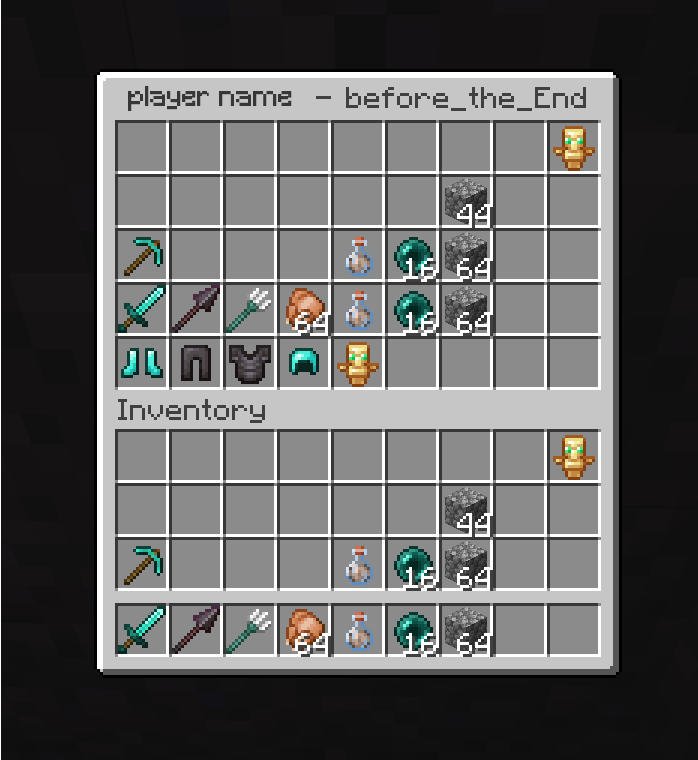
Project description from Modrinth.
Pick your setup
Choose the version and loader you play, then open the matching release.
Check the dependencies, then try the file in a copied instance before changing a world you care about.
Recent files
InvShots-1.0.0-26.3+.jar
10 Oct 2026
Looking for an older file? The official Modrinth project page is in Resources.
 mod
modSick of wasting time with Minecraft’s slow launcher just to change your skin? Quick Skin lets you swap skins instantly even on “offline” servers and gives you access to every official Minecraft cape.
 mod
modShoulder Surfing Reloaded is a highly configurable third person camera mod for Minecraft
 mod
modA clean view leads to clean plays