Minecraft version
Back to mods 
Modrinth · Minecraft mod
UnifiedOptions
Modrinth version of https://www.curseforge.com/minecraft/mc-mods/unifiedkeybinds-unifedoptions
Choose a version Pick your version below, then grab the matching file.
Quick answer
Which UnifiedOptions release matches 1.18.2 Forge?
Best match for your filters 1.18.2-1.1
Game version 1.18.2
Loader Forge
UnifiedOptions 1.18.2-1.1 targets 1.18.2 with Forge. It must be installed on the client. Do not install it on the dedicated server. No extra mods listed for this file.
Where it goes
Is UnifiedOptions required on the client, server, or both?
It must be installed on the client. Do not install it on the dedicated server.
Client Required
Dedicated server Not supported
Loader for this release Forge
Required install it here Optional supported, not mandatory Not supported do not install here Source doesn’t say do not assume
This file is marked client-only.
What else does UnifiedOptions 1.18.2-1.1 need?
1.18.2-1.1 on 1.18.2 Forge. Every mod below is checked against that same setup.
This file does not list any required mods. Do not add a library just because a different file uses it.
This file does not list any required or optional mods.
Before you install it
Add UnifiedOptions without breaking your instance.
Built for UnifiedOptions 1.18.2-1.1 on 1.18.2 Forge. Pick another file and the loader, install side or required mods may change.
- 01
Stick to this file
Use 1.18.2-1.1. It targets 1.18.2 with Forge; another release may have different loader, side or dependency requirements.
- 02
Bring the mods it needs
This file does not list any required mods. Do not add a library just because a different file uses it.
- 03
Put it on the correct side
It must be installed on the client. Do not install it on the dedicated server.
- 04
Pick the file you checked
Use the “Get this file” button beside 1.18.2-1.1. It opens that exact file at the source.
About this project
What does UnifiedOptions add?

UnifiedKeybinds/UnifiedOptions
If you're reading this, I bothered to publish it (and document it)
What does it do 🤔
Unifies options.txt and keybinds for all minecraft instances with the
mod installed into a single file that is used by all versions.
Put simply, in a diagram
Without the mod installed
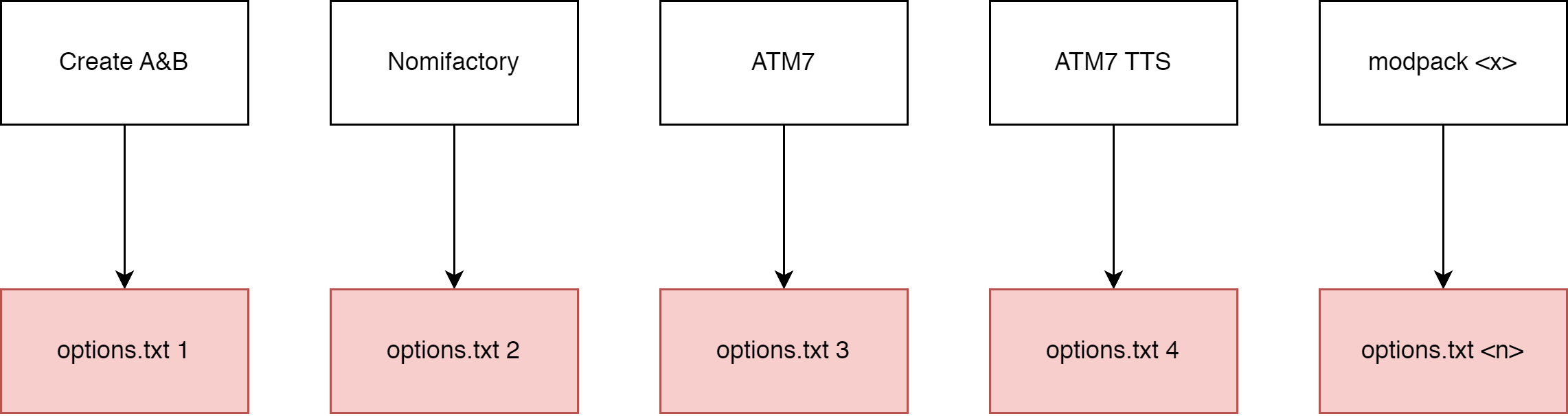
With the mod installed

How to use it 🤔🤔
The mod should function out of the box.
When the mod is installed, it will move most options.txt options intouniversal.txt which can be found in your home directory:
- Windows users:
%userprofile%/MinecraftOptions - Linux users (and I assume macos, never used it):
~/MinecraftOptions
Default options? YOSBR?? 🤨
The mod also has a feature kinda like YOSBR and default options, but
instead of copying configs from a folder within the modpack directory,
it copies from MinecraftOptions/<version>/extras. You could use this,
for example to automatically copy your journeymap config into all your
modpacks so that your map always looks the same, or disable immersive
engineering's cluttery tag tooltips.
Configuring it 🤔🥱🙄
The mod should function out of the box, but you can configure what
options are synchronized, move where options are stored and completely
disable the mod.
The config file is found at MinecraftOptions/config.toml. It explains
what each option does.
If you want to reset your config, just delete config.toml and the
mod will generate a new one.
By default, the following options are not synchronized:
- tutorialStep
- This mod disables the tutorial.
- overrideWidth
- overrideHeight
- resourcePacks
- incompatibleResourcePacks
- renderDistance
- simulationDistance
- fullscreen
- fullscreenResolution
You can add or remove options (or keybinds) to/from the blacklist.
Blacklisted options will be stored in the vanilla options.txt.
You can change where universal.txt and extras are read from by
changing directory, under synchronization. config.toml cannot be
moved.
1.12
If you open a 1.12 options.txt, you will see your controls formatted with numbers, like this:
key_key.jump:57
key_key.sneak:42
key_key.sprint:16
key_key.drop:211
key_key.inventory:20
key_key.chat:28
key_key.playerlist:0
And if you open a 1.16 options.txt, you will see your controls formatted with named keys, like this:
key_key.jump:key.keyboard.space
key_key.sneak:key.keyboard.left.shift
key_key.sprint:key.keyboard.left.control
key_key.drop:key.keyboard.q
key_key.inventory:key.keyboard.e
key_key.chat:key.keyboard.t
key_key.playerlist:key.keyboard.tab
The 1.12 version of this mod converts any numerical values into the modern named keys automatically. Note that 1.16 and higher versions do not support this, so if you want to convert a 1.12 options.txt, load it with the 1.12 version of this mod.
Use in modpacks?
yes
Maven packages for use in a developer environment
Add this to your repositories
repositories {
    maven { url "https://codeberg.org/api/packages/PORTB/maven" }
}
And add this to your dependencies
dependencies {
    //example: portb:unifiedoptions:1.19.4-1.1
    runtimeOnly fg.deobf("portb:unifiedoptions:<MC VERSION>-<MOD VERSION>")
}
List of versions:
https://codeberg.org/PORTB/-/packages/maven/portb-unifiedoptions/versions
Project description from Modrinth.
Pick your setup
UnifiedOptions by Minecraft version and loader
Choose the version and loader you play, then open the matching release.
Minecraft version
1.19.4
1 loader buildMinecraft version
1.19.3
1 loader buildMinecraft version
1.19.2
1 loader buildMinecraft version
1.18.2
1 loader buildMinecraft version
1.17.1
1 loader buildMinecraft version
1.16.5
1 loader buildMinecraft version
1.12.2
1 loader buildCheck the dependencies, then try the file in a copied instance before changing a world you care about.
Recent files
UnifiedOptions versions and loaders
1.18.2-1.1
unifiedoptions-1.18.2-1.1.jar
17 Apr 2023
Client Required Server Not supported Dependencies No extras listed Listed on Release listing
Check the 1.18.2 · Forge setup 1.18.2Forge release
Looking for an older file? The official Modrinth project page is in Resources.