Minecraft version
Back to mods 
Modrinth · Minecraft mod
WorldComment
Post comments right into the game world, associated with certain locations - an idea similar to Danmaku in videos.
Choose a version Pick your version below, then grab the matching file.
Quick answer
Which WorldComment release should I use?
Latest stable file 0.3.2+1.21.1
Game version 1.21.1
Loader Fabric, NeoForge, Quilt
WorldComment 0.3.2+1.21.1 targets 1.21.1 with Fabric, NeoForge, Quilt. Installation on the client is optional. Installation on the dedicated server is optional. No extra mods listed for this file.
Where it goes
Is WorldComment required on the client, server, or both?
Installation on the client is optional. Installation on the dedicated server is optional.
Client Optional
Dedicated server Optional
Loader for this release Fabric, NeoForge, Quilt
Required install it here Optional supported, not mandatory Not supported do not install here Source doesn’t say do not assume
The source marks this as usable on both the client and server.
What else does WorldComment 0.3.2+1.21.1 need?
0.3.2+1.21.1. Change the file and its required mods may change too.
This file does not list any required mods. Do not add a library just because a different file uses it.
This file does not list any required or optional mods.
Before you install it
Add WorldComment without breaking your instance.
Built for WorldComment 0.3.2+1.21.1. Pick another file and the loader, install side or required mods may change.
- 01
Stick to this file
Use 0.3.2+1.21.1. It targets 1.21.1 with Fabric, NeoForge, Quilt; another release may have different loader, side or dependency requirements.
- 02
Bring the mods it needs
This file does not list any required mods. Do not add a library just because a different file uses it.
- 03
Put it on the correct side
Installation on the client is optional. Installation on the dedicated server is optional.
- 04
Pick the file you checked
Use the “Get this file” button beside 0.3.2+1.21.1. It opens that exact file at the source.
About this project
What does WorldComment add?
World Comment (Subnoteica)
Post comments associated with locations from your in-game world. An idea similar to Danmaku in videos, or Subnautica's well-received feedback system.
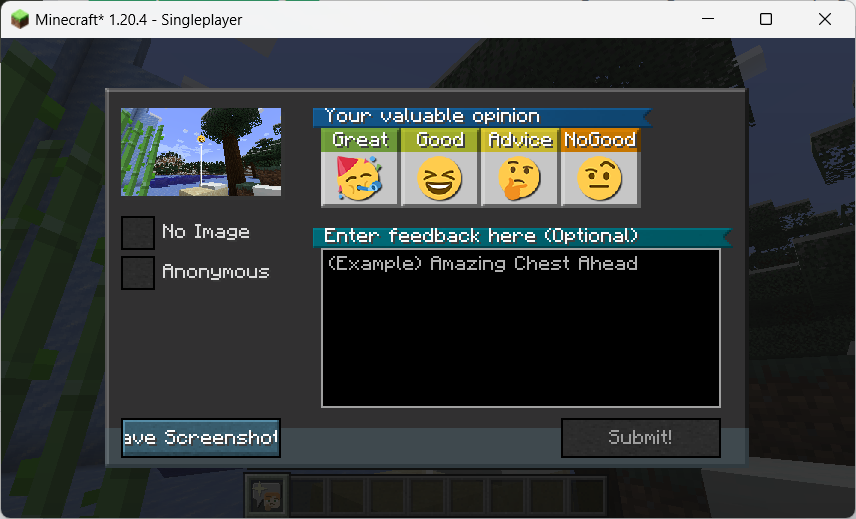
It takes some additional configuration to be able to attach screenshots to comments - See Instructions on Configuration.
This mod is inspired by the feedback tool in Subnautica. Players can take a screenshot and leave a comment to send feedback to the production team, the feedback will be sent in association with location information and the production team can see a map of the location with an overall rating. Also, the visual style of the comment "posts" is inspired by Death Stranding.
And it also got me thinking about the idea of Danmaku; they have the advantage over normal comments in that they relate to the content of the video at a given time, enhancing the viewing experience for the viewer. In this way, something similar could be done for Danmaku in the game world of Minecraft.
In addition, in order to ensure the normal operation under the multi-server cluster configuration of Teacon 2023, a Redis-based synchronization function has been added, so that the comments in each sub-server can be synchronized with each other and saved in a persistent manner.
随处随笔
本模组参加了 Teacon 2023。
在游戏世界中发送评论,这些评论可以附上截图,且与特定的位置相关联。
本模组的灵感来源于《Subnautica》(《深海迷航》或《美丽水世界》)中的反馈工具。玩家可以截图留言给制作组发送反馈,反馈将关联位置信息发送,制作组可以看到一张位置与总体评价的地图。我在 YouTube 上看到了一篇介绍这一系统的影片,提到它对 Subnautica 制作组了解设计效果很有帮助。
而且这也让我想到了弹幕的概念;弹幕比起评论优点就在于它关联视频某一时间的内容,提升观者的观看体验。这样来说,类似的东西也可以作为 Minecraft 游戏世界里的弹幕。
此外,为保证随处随笔在 TeaCon 的多服务器集群配置下正常运作,增加了基于 Redis 的同步功能,使得各分服务器中的随笔可以互相同步及持久化保存。
Project description from Modrinth.
Pick your setup
WorldComment by Minecraft version and loader
Choose the version and loader you play, then open the matching release.
Minecraft version
26.1.1
2 loader buildsMinecraft version
26.1
2 loader buildsMinecraft version
1.21.8
2 loader buildsMinecraft version
1.21.1
3 loader buildsMinecraft version
1.20.4
4 loader buildsMinecraft version
1.20.1
4 loader buildsMinecraft version
1.20
4 loader buildsMinecraft version
1.19.2
4 loader buildsCheck the dependencies, then try the file in a copied instance before changing a world you care about.
Recent files
WorldComment versions and loaders
0.6.0-beta.4+26.1.2-neoforge
WorldComment-0.6.0-beta.4+26.1.2-neoforge.jar
31 May 2026
Client Optional Server Optional Dependencies No extras listed Listed on Release listing
Check the 26.1.2 · NeoForge setup 26.126.1.126.1.2NeoForge beta
0.6.0-beta.4+26.1.2-fabric
WorldComment-0.6.0-beta.4+26.1.2-fabric.jar
31 May 2026
Client Optional Server Optional Dependencies No extras listed Listed on Release listing
Check the 26.1.2 · Fabric setup 26.126.1.126.1.2Fabric beta
0.6.0-beta.3+26.1
WorldComment-fabric-0.6.0-beta.3+26.1.jar
29 May 2026
Client Optional Server Optional Dependencies No extras listed Listed on Release listing
Check the 26.1.2 · Fabric setup 26.126.1.126.1.2Fabric beta
0.6.0-beta.2+26.1
WorldComment-fabric-0.6.0-beta.2+26.1.jar
11 May 2026
Client Optional Server Optional Dependencies No extras listed Listed on Release listing
Check the 26.1.2 · Fabric setup 26.126.1.126.1.2Fabric beta
0.6.0-beta.1+26.1
WorldComment-fabric-0.6.0-beta.1+26.1.jar
10 May 2026
Client Optional Server Optional Dependencies No extras listed Listed on Release listing
Check the 26.1.2 · Fabric setup 26.126.1.126.1.2Fabric beta
0.5.0-rc.2+1.21.8
WorldComment-0.5.0-rc.2+1.21.8.jar
6 Sept 2025
Client Optional Server Optional Dependencies No extras listed Listed on Release listing
Check the 1.21.8 · Fabric setup 1.21.8FabricNeoForge beta
0.5.0-rc.1+1.21.8
WorldComment-0.5.0-rc.1+1.21.8.jar
5 Sept 2025
Client Optional Server Optional Dependencies No extras listed Listed on Release listing
Check the 1.21.8 · Fabric setup 1.21.8FabricNeoForge beta
0.4.0-rc.1+1.21.8
WorldComment-0.4.0-rc.1+1.21.8.jar
4 Sept 2025
Client Optional Server Optional Dependencies No extras listed Listed on Release listing
Check the 1.21.8 · Fabric setup 1.21.8FabricNeoForge beta
0.3.3-rc.1+1.21.8
WorldComment-0.3.3-rc.1+1.21.8.jar
1 Sept 2025
Client Optional Server Optional Dependencies No extras listed Listed on Release listing
Check the 1.21.8 · Fabric setup 1.21.8FabricNeoForge beta
0.3.2+1.21.1
WorldComment-0.3.2+1.21.1.jar
17 May 2025
Client Optional Server Optional Dependencies No extras listed Listed on Release listing
Check the 1.21.1 · Fabric setup 1.21.1FabricNeoForgeQuilt release
0.3.2+1.20.4
WorldComment-0.3.2+1.20.4.jar
17 May 2025
Client Optional Server Optional Dependencies No extras listed Listed on Release listing
Check the 1.20.4 · Fabric setup 1.20.4FabricForgeQuilt release
0.3.2+1.20.1
WorldComment-0.3.2+1.20.1.jar
17 May 2025
Client Optional Server Optional Dependencies No extras listed Listed on Release listing
Check the 1.20.1 · Fabric setup 1.201.20.1FabricForge release
Looking for an older file? The official Modrinth project page is in Resources.
 mod
CurseForge + Modrinth · Minecraft
SpellHud Addon
An addon for Spell Engine's hud with 3+ more options to choose from!
 mod
GitHub · Minecraft
modpacks-ch-github-test
Disposable public fixture for testing the Modpacks.ch GitHub catalogue flow
 mod
Modrinth · Minecraft
Retromod
Retromod Is a Minecraft mod that allows you to play older mods on newer versions.