Minecraft version
Back to mods 
Modrinth · Minecraft mod
Dokko's Hotbar Optimizer
Makes hotbar sync 1 tick sooner, reducing ghost totems and making attribute swapping easier
Choose a version Pick your version below, then grab the matching file.
Quick answer
Which Dokko's Hotbar Optimizer release should I use?
Latest stable file 1.2.3
Game version 1.20.5, 1.20.6
Loader Fabric, Quilt
Dokko's Hotbar Optimizer 1.2.3 targets 1.20.5, 1.20.6 with Fabric, Quilt. It must be installed on the client. Do not install it on the dedicated server. No extra mods listed for this file.
Where it goes
Is Dokko's Hotbar Optimizer required on the client, server, or both?
It must be installed on the client. Do not install it on the dedicated server.
Client Required
Dedicated server Not supported
Loader for this release Fabric, Quilt
Required install it here Optional supported, not mandatory Not supported do not install here Source doesn’t say do not assume
This file is marked client-only.
What else does Dokko's Hotbar Optimizer 1.2.3 need?
1.2.3. Change the file and its required mods may change too.
This file does not list any required mods. Do not add a library just because a different file uses it.
This file does not list any required or optional mods.
Before you install it
Add Dokko's Hotbar Optimizer without breaking your instance.
Built for Dokko's Hotbar Optimizer 1.2.3. Pick another file and the loader, install side or required mods may change.
- 01
Stick to this file
Use 1.2.3. It targets 1.20.5, 1.20.6 with Fabric, Quilt; another release may have different loader, side or dependency requirements.
- 02
Bring the mods it needs
This file does not list any required mods. Do not add a library just because a different file uses it.
- 03
Put it on the correct side
It must be installed on the client. Do not install it on the dedicated server.
- 04
Pick the file you checked
Use the “Get this file” button beside 1.2.3. It opens that exact file at the source.
About this project
What does Dokko's Hotbar Optimizer add?
Dokko's Hotbar Optimizer
Dokko's Hotbar Optimizer is a client-side mod designed to refine how Minecraft handles hotbar slot changes.
Disclaimer
This mod may be detected as a cheat by some anti-cheats.
Please ask if this mod is allowed before using it on a server.
Disallowed on PvPClub, Stray and FlowPvP
Probably banned on most servers
This mod breaks the Minecraft protocol, this mod has been banned from most servers.
The owner and I therefore decided to make this project unmaintained, in particular because of the first problemWith all this, I do not recommend using this mod (except on private servers)
This mod is also a cheat on <50ms latency
What does the mod do?
In vanilla Minecraft, when you switch hotbar slots, your client waits up to 50ms (one game tick) before telling the server. This mod removes that delay and sends the update instantly.
This fundamental change brings noticeable improvements to several key areas of gameplay:
Ghost Totem Reduction:
Totems are more reliable because the server knows you’re holding one sooner, reducing the amount of time in which you can "ghost".- Low ping (20ms): Reduces the chance of ghost totems by ~71%
- High Ping (150ms): Still helps, ~25% better
Attribute Swapping Improvement:
Quick swaps for things like axe combos or breach tech feel smoother and hit more reliably.- Low ping: Server sees your swap ~71% faster
- High ping: ~25% faster
Basically, it makes hotbar actions more responsive and consistent—great for PvP, crystal fights, and clutch totem saves.
How do I turn it on / off?
You can enable / disable the mod with ModMenu's settings screen.
Mod settings (v1.2.2)
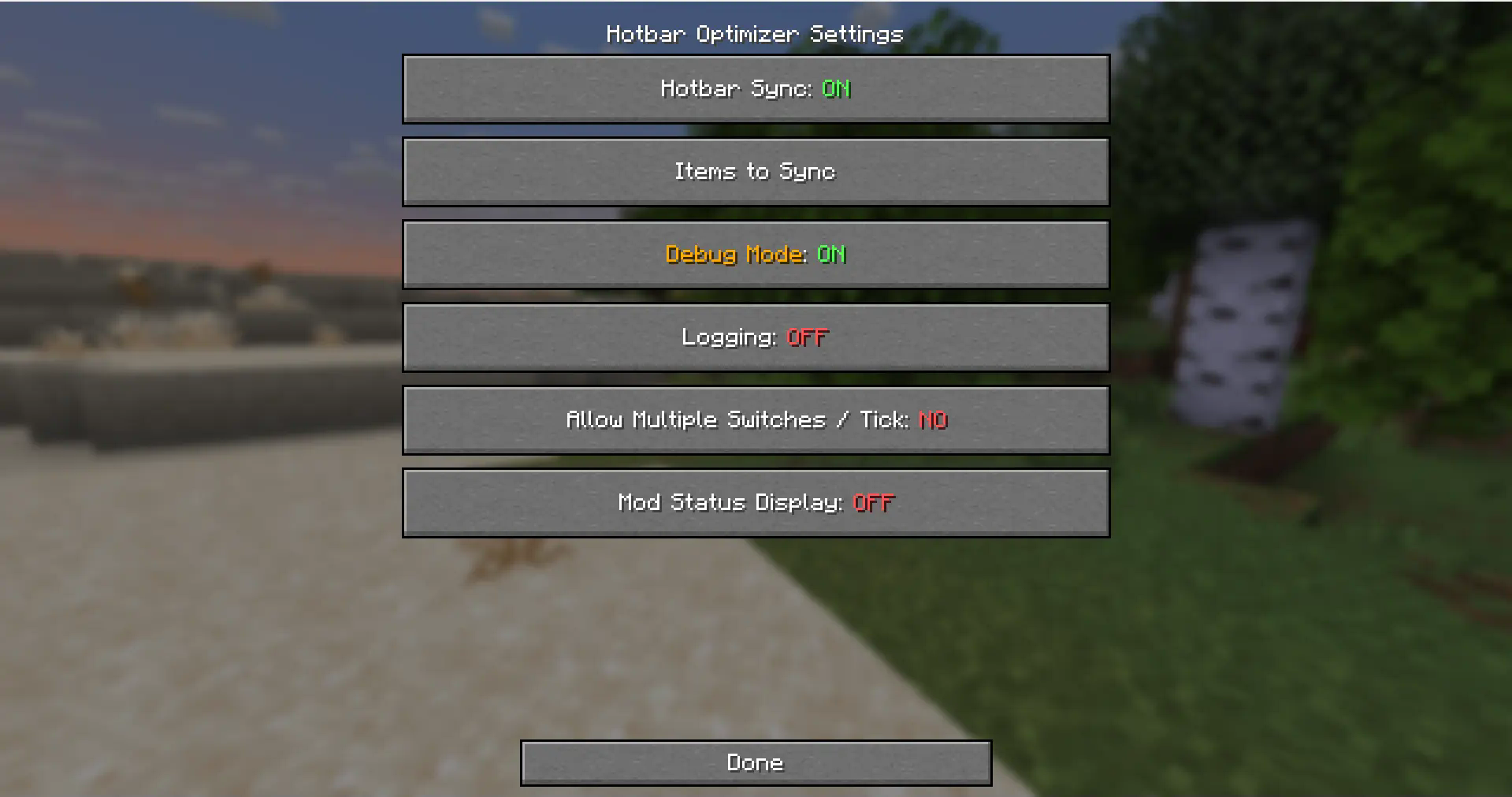
- Hotbar Sync: the state of the mod.
- Items To Sync: the items that the mod will run on.
- Debug Mode: thats for developers, don't use it.
- Logging: also for developers.
- Allow Multiple Switches / Tick: if enabled some servers might flag more.
- Mod Status Display: when you join a server that bans the mod it will tell you.
Project description from Modrinth.
Pick your setup
Dokko's Hotbar Optimizer by Minecraft version and loader
Choose the version and loader you play, then open the matching release.
Minecraft version
1.21.7
2 loader buildsMinecraft version
1.21.6
2 loader buildsMinecraft version
1.21.5
2 loader buildsMinecraft version
1.21.4
2 loader buildsMinecraft version
1.21.3
2 loader buildsMinecraft version
1.21.2
2 loader buildsMinecraft version
1.21.1
2 loader buildsMinecraft version
1.21
2 loader buildsMinecraft version
1.20.6
2 loader buildsMinecraft version
1.20.5
2 loader buildsCheck the dependencies, then try the file in a copied instance before changing a world you care about.
Recent files
Dokko's Hotbar Optimizer versions and loaders
1.2.3
Dokko's Hotbar Optimizer 1.2.3 (1.20.5-1.20.6).jar
25 Sept 2025
Client Required Server Not supported Dependencies No extras listed Listed on Release listing
Check the 1.20.6 · Fabric setup 1.20.51.20.6FabricQuilt release
1.2.3
Dokkos Hotbar Optimizer 1.2.3 (1.21.6-1.21.8).jar
6 Sept 2025
Client Required Server Not supported Dependencies No extras listed Listed on Release listing
Check the 1.21.8 · Fabric setup 1.21.61.21.71.21.8Fabric release
1.2.3
Dokkos Hotbar Optimizer 1.2.3 (1.21.5).jar
6 Sept 2025
Client Required Server Not supported Dependencies No extras listed Listed on Release listing
Check the 1.21.5 · Fabric setup 1.21.5FabricQuilt release
1.2.3
Dokkos Hotbar Optimizer 1.2.3 (1.21.4).jar
6 Sept 2025
Client Required Server Not supported Dependencies No extras listed Listed on Release listing
Check the 1.21.4 · Fabric setup 1.21.4FabricQuilt release
1.2.3
Dokkos Hotbar Optimizer 1.2.3 (1.21.2-1.21.3).jar
6 Sept 2025
Client Required Server Not supported Dependencies No extras listed Listed on Release listing
Check the 1.21.3 · Fabric setup 1.21.21.21.3FabricQuilt release
1.2.3
Dokkos Hotbar Optimizer 1.2.3 (1.21-1.21.1).jar
6 Sept 2025
Client Required Server Not supported Dependencies No extras listed Listed on Release listing
Check the 1.21.1 · Fabric setup 1.211.21.1FabricQuilt release
1.2.2+1.21.5
dokkos-hotbar-optimizer-1.2.2+1.21.5.jar
17 Aug 2025
Client Required Server Not supported Dependencies No extras listed Listed on Release listing
Check the 1.21.8 · Fabric setup 1.21.51.21.61.21.71.21.8 release
1.2.1+1.21.5
dokkos-hotbar-optimizer-1.2.1+1.21.5.jar
6 Aug 2025
Client Required Server Not supported Dependencies No extras listed Listed on Release listing
Check the 1.21.8 · Fabric setup 1.21.51.21.61.21.71.21.8 release
1.2.0+1.21.5
dokkos-hotbar-optimizer-1.2.0+1.21.5.jar
5 Aug 2025
Client Required Server Not supported Dependencies No extras listed Listed on Release listing
Check the 1.21.8 · Fabric setup 1.21.51.21.61.21.71.21.8 release
1.1.1+1.21.5
dokkos-hotbar-optimizer-1.1.1+1.21.5.jar
4 Aug 2025
Client Required Server Not supported Dependencies No extras listed Listed on Release listing
Check the 1.21.8 · Fabric setup 1.21.51.21.61.21.71.21.8 release
1.1.1+1.21
dokkos-hotbar-optimizer-1.1.1+1.21.jar
4 Aug 2025
Client Required Server Not supported Dependencies No extras listed Listed on Release listing
Check the 1.21.4 · Fabric setup 1.211.21.11.21.21.21.3 release
1.1.0
dokkos-hotbar-optimizer-1.1.0.jar
24 Jul 2025
Client Required Server Not supported Dependencies No extras listed Listed on Release listing
Check the 1.21.4 · Fabric setup 1.211.21.11.21.21.21.3 release
Looking for an older file? The official Modrinth project page is in Resources.
 mod
mod CurseForge + Modrinth · Minecraft
Packdev Toolkit
A collection of developer tools for building modpacks and datapacks. Pull textures/models out of resource packs, dump lang entries, search datapacks, and copy item IDs: all without leaving the game!
 mod
mod CurseForge + Modrinth · Minecraft
Modulation
A growing collection of quality-of-life tweaks, bug fixes, and cross-mod integrations for modpack creators!
 mod
mod CurseForge + Modrinth · Minecraft
Nuclear Science
Nuclear Science is a Minecraft Mod for version 1.20 focused around nuclear physics that introduces many new machines/blocks and items into the game.