Minecraft version
Back to mods 
Modrinth · Minecraft mod
ArmorStats
Minecraft mod for pvp 1.20.1+ Shows your armor in left corner with stats
Choose a version Pick your version below, then grab the matching file.
Quick answer
Which ArmorStats release matches 1.20.5 Forge?
Best match for your filters 2.1.0
Game version 1.20.1, 1.20.2, 1.20.3
Loader Forge
ArmorStats 2.1.0 targets 1.20.1, 1.20.2, 1.20.3 with Forge. It must be installed on the client. Do not install it on the dedicated server. No extra mods listed for this file.
Where it goes
Is ArmorStats required on the client, server, or both?
It must be installed on the client. Do not install it on the dedicated server.
Client Required
Dedicated server Not supported
Loader for this release Forge
Required install it here Optional supported, not mandatory Not supported do not install here Source doesn’t say do not assume
This file is marked client-only.
What else does ArmorStats 2.1.0 need?
2.1.0 on 1.20.5 Forge. Every mod below is checked against that same setup.
This file does not list any required mods. Do not add a library just because a different file uses it.
This file does not list any required or optional mods.
Before you install it
Add ArmorStats without breaking your instance.
Built for ArmorStats 2.1.0 on 1.20.5 Forge. Pick another file and the loader, install side or required mods may change.
- 01
Stick to this file
Use 2.1.0. It targets 1.20.1, 1.20.2, 1.20.3 with Forge; another release may have different loader, side or dependency requirements.
- 02
Bring the mods it needs
This file does not list any required mods. Do not add a library just because a different file uses it.
- 03
Put it on the correct side
It must be installed on the client. Do not install it on the dedicated server.
- 04
Pick the file you checked
Use the “Get this file” button beside 2.1.0. It opens that exact file at the source.
About this project
What does ArmorStats add?



📊 If you find BUG please REPORT in our discord server
Armor Stats & HUD is a lightweight, all-in-one client-side mod designed to give you real-time visibility over your worn armor and item durability. Never get caught off-guard with broken equipment in the middle of battle or exploration again—without bloat.
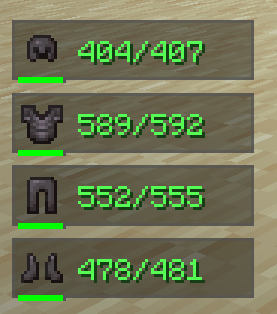
⚡ 100% Client-Side: Works on any vanilla or modded server. No server-side installation required!
⚙️ Fully Customizable: Every single feature can be tweaked, toggled, or customized directly in the Minecraft Settings menu!
⚙️ Fully Integrated Settings Menu
Don't want a specific position? Want to change background colors, scales, or the smooth RGB mode?
Armor Stats & HUD seamlessly integrates into the native Minecraft options interface (via Mod Menu / Cloth Config). You can adjust or toggle anything on the fly with a single click!
🌟 Features Breakdown
🛡️ HUD & Armor Displays
- Real-Time Armor Overlay — Displays your currently equipped armor (Helmet, Chestplate, Leggings, Boots) with smooth entry and exit animations when equipment changes.
- Exact Durability & Percentages — Toggle between exact numeric durability values (
150/450) or simple percentage indicators (33%). - Smart Durability Color Coding — Numeric text dynamically changes color from Green to Yellow and Red as your gear loses durability, giving you instant visual feedback.
- Durability Progress Bar — Includes a mini visual progress bar under each armor piece for quick scanning during intense fights.
🎨 Advanced Background & Visual Styling
- Multiple Background Presets — Choose from a list of clean background options, including Dark (Default), Red, Green, Blue, Purple, or Transparent.
- Smooth RGB Rainbow Mode — Enable the dynamic RGB mode to make your HUD panels seamlessly cycle through a vibrant, fully animated rainbow palette.
- Custom Scale & Offset — Scale the HUD anywhere from
0.5xto3.0xand fine-tune its position with pixel-exact X/Y offsets. - Flexible HUD Positioning — Lock the overlay to any screen corner (Top-Left, Top-Right, Bottom-Left, Bottom-Right, Top-Center, Bottom-Center).
⚡ Performance & Smooth Animations
- Zero Lag Overhead: Written natively using fast GUI rendering pipelines without unnecessary tick bloat.
- Animated Show/Hide: Items smoothly slide in and out of your screen when equipped, unequipped, or broken.
🌟 By Denuver
Project description from Modrinth.
Pick your setup
ArmorStats by Minecraft version and loader
Choose the version and loader you play, then open the matching release.
Minecraft version
1.20.5
2 loader buildsMinecraft version
1.20.4
2 loader buildsMinecraft version
1.20.3
2 loader buildsMinecraft version
1.20.2
2 loader buildsMinecraft version
1.20.1
2 loader buildsCheck the dependencies, then try the file in a copied instance before changing a world you care about.
Recent files
ArmorStats versions and loaders
2.1.0
armorstats-2.1.0.jar
26 Jul 2026
Client Required Server Not supported Dependencies No extras listed Listed on Release listing
Check the 1.20.5 · Forge setup 1.20.11.20.21.20.31.20.4 release
Looking for an older file? The official Modrinth project page is in Resources.
 mod
mod Modrinth · Minecraft
RTS building: Build From Above
Build, manage storage, and interact with your base from an overhead RTS-style building panel.
 mod
mod Modrinth · Minecraft
Starcatcher
A fishing mod with lots of fishes and secrets!
 mod
mod CurseForge + Modrinth · Minecraft
Safra
Don’t mess with the server Play Minecraft with your friends in 2 clicks