Minecraft version
Back to mods 
Modrinth · Minecraft mod
Fluid Void Fading
Renders fluids flowing into the void, seamlessly
Choose a version Pick your version below, then grab the matching file.
Quick answer
Which Fluid Void Fading release should I use?
Latest stable file 2.2.0+26.2-neoforge
Game version 26.2
Loader NeoForge
Fluid Void Fading 2.2.0+26.2-neoforge targets 26.2 with NeoForge. It must be installed on the client. Do not install it on the dedicated server. No extra mods listed for this file.
Where it goes
Is Fluid Void Fading required on the client, server, or both?
It must be installed on the client. Do not install it on the dedicated server.
Client Required
Dedicated server Not supported
Loader for this release NeoForge
Required install it here Optional supported, not mandatory Not supported do not install here Source doesn’t say do not assume
This file is marked client-only.
What else does Fluid Void Fading 2.2.0+26.2-neoforge need?
2.2.0+26.2-neoforge. Change the file and its required mods may change too.
This file does not list any required mods. Do not add a library just because a different file uses it.
This file does not list any required or optional mods.
Before you install it
Add Fluid Void Fading without breaking your instance.
Built for Fluid Void Fading 2.2.0+26.2-neoforge. Pick another file and the loader, install side or required mods may change.
- 01
Stick to this file
Use 2.2.0+26.2-neoforge. It targets 26.2 with NeoForge; another release may have different loader, side or dependency requirements.
- 02
Bring the mods it needs
This file does not list any required mods. Do not add a library just because a different file uses it.
- 03
Put it on the correct side
It must be installed on the client. Do not install it on the dedicated server.
- 04
Pick the file you checked
Use the “Get this file” button beside 2.2.0+26.2-neoforge. It opens that exact file at the source.
About this project
What does Fluid Void Fading add?
Renders fluids smoothly flowing into the void, instead of being cut instantly, making sky type worlds look much nicer and dynamic.
A must-have for every Skyblock pack or packs featuring dimensions up in the sky, clientside only!
Notable Features
- client-only required
- automatic compat with all modded fluids
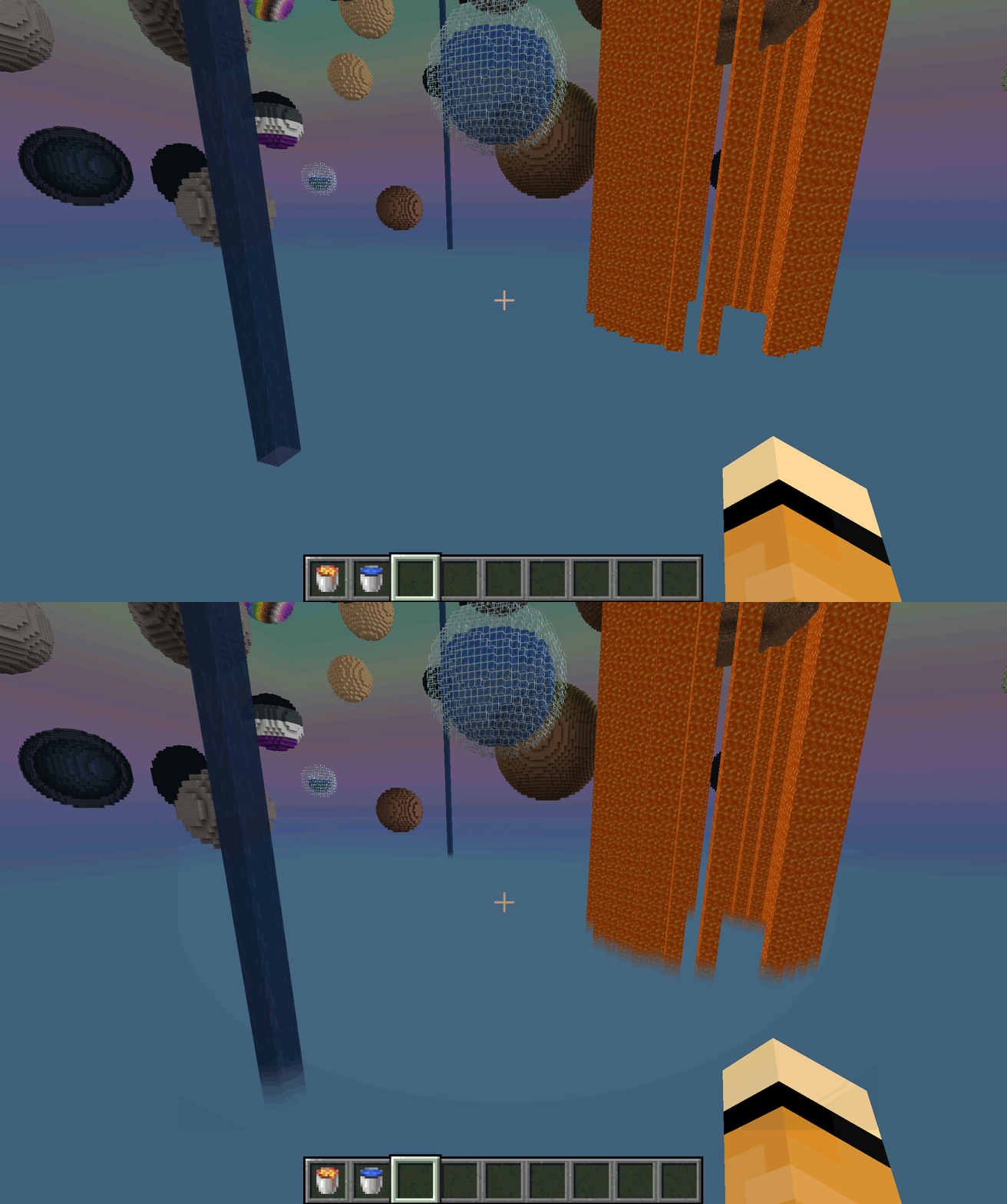
Comparison: With and Without Fluid Void Fading
By default, fluids flowing into the bottom of the world will get cut up harshly, leaving a ugly floating block behind
With Fluid Void Fading added, it gets a transparent tail as it smoothly blends into nothingness
Troubleshooting
- Should a fluid not render transparent (its texture is not transparent by default, like lava), add it's name to the configuration file
- Currently does not work with Sodium
Project description from Modrinth.
Pick your setup
Fluid Void Fading by Minecraft version and loader
Choose the version and loader you play, then open the matching release.
Minecraft version
26.1.2
2 loader buildsMinecraft version
26.1.1
2 loader buildsMinecraft version
26.1
2 loader buildsMinecraft version
1.21.11
2 loader buildsMinecraft version
1.21.8
2 loader buildsMinecraft version
1.21.5
1 loader buildMinecraft version
1.21.4
1 loader buildMinecraft version
1.21.1
1 loader buildMinecraft version
1.21
1 loader buildMinecraft version
1.20.6
2 loader buildsMinecraft version
1.20.4
2 loader buildsShowing the newest 12 of 18 game versions. Older files are in the list below.
Check the dependencies, then try the file in a copied instance before changing a world you care about.
Recent files
Fluid Void Fading versions and loaders
2.2.0+26.2-neoforge
FluidVoidFading-2.2.0+26.2-neoforge.jar
17 Jul 2026
Client Required Server Not supported Dependencies No extras listed Listed on Release listing
Check the 26.2 · NeoForge setup 26.2NeoForge release
2.2.0+26.2
fluidvoidfading-2.2.0+26.2.jar
17 Jul 2026
Client Required Server Not supported Dependencies No extras listed Listed on Release listing
Check the 26.2 · Fabric setup 26.2Fabric release
2.0.0+26.1
fluidvoidfading-2.0.0+26.1.jar
27 Apr 2026
Client Required Server Not supported Dependencies No extras listed Listed on Release listing
Check the 26.1.2 · Fabric setup 26.126.1.126.1.2Fabric release
2.0.0+26.1-neoforge
FluidVoidFading-2.0.0+26.1-neoforge.jar
27 Apr 2026
Client Required Server Not supported Dependencies No extras listed Listed on Release listing
Check the 26.1.2 · NeoForge setup 26.126.1.126.1.2NeoForge release
1.5.2+1.21.11-neoforge
fluidvoidfading-1.5.2+1.21.11-neoforge.jar
26 Apr 2026
Client Required Server Not supported Dependencies No extras listed Listed on Release listing
Check the 1.21.11 · NeoForge setup 1.21.11NeoForge release
1.5.2+1.21.11
fluidvoidfading-1.5.2+1.21.11.jar
26 Apr 2026
Client Required Server Not supported Dependencies No extras listed Listed on Release listing
Check the 1.21.11 · Fabric setup 1.21.11Fabric release
1.5.1+1.21.11-neoforge
fluidvoidfading-1.5.1+1.21.11-neoforge.jar
1 Jan 2026
Client Required Server Not supported Dependencies No extras listed Listed on Release listing
Check the 1.21.11 · NeoForge setup 1.21.11NeoForge release
1.5.1+1.21.11-fabric
fluidvoidfading-1.5.1+1.21.11.jar
1 Jan 2026
Client Required Server Not supported Dependencies No extras listed Listed on Release listing
Check the 1.21.11 · Fabric setup 1.21.11Fabric release
1.4.1+1.21.8-neoforge
fluidvoidfading-1.4.1-neoforge.jar
13 Oct 2025
Client Required Server Not supported Dependencies No extras listed Listed on Release listing
Check the 1.21.8 · NeoForge setup 1.21.8NeoForge release
1.4.1+1.21.8-fabric
fluidvoidfading-1.4.1+1.21.8.jar
6 Sept 2025
Client Required Server Not supported Dependencies 2 required · 2 unchecked Listed on Release listing
Check the 1.21.8 · Fabric setup 1.21.8Fabric release
1.4.0+1.21.8
fluidvoidfading-1.4.0+1.21.8.jar
24 Aug 2025
Client Required Server Not supported Dependencies 2 required · 2 unchecked Listed on Release listing
Check the 1.21.8 · Fabric setup 1.21.8Fabric release
1.3.0+1.21.5
fluidvoidfading-1.3.0+1.21.5.jar
7 Apr 2025
Client Required Server Not supported Dependencies 2 required · 2 unchecked Listed on Release listing
Check the 1.21.5 · Fabric setup 1.21.5Fabric release
Looking for an older file? The official Modrinth project page is in Resources.
 mod
mod CurseForge + Modrinth · Minecraft
Fabric API
Lightweight and modular API providing common hooks and intercompatibility measures utilized by mods using the Fabric toolchain.
 mod
mod CurseForge + Modrinth · Minecraft
Stamina
Add stamina to sprinting and swimming based off your current health
mod
Modrinth · Minecraft
Enchant Limit
Limits enchants on enchantable items