Fabric API Needed by Area Lib 0.9.1+26.3
requiredMatching file found Matched file: 0.166.2+26.3
Modrinth · Minecraft mod
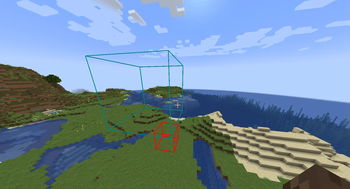
Library mod that allows for creating arbitrary areas
Quick answer
Area Lib 0.9.1+26.3 targets 26.3 with Fabric. Installation on the client is optional. Installation on the dedicated server is optional. All 1 required mods have matching files.
Where it goes
Installation on the client is optional. Installation on the dedicated server is optional.
The source marks this as usable on both the client and server.
0.9.1+26.3. Change the file and its required mods may change too.
Install Fabric API first. We found matching files for this game-version and loader setup.
We only count dependency files that match this setup. A file for another loader does not fill the gap.
Before you install it
Built for Area Lib 0.9.1+26.3. Pick another file and the loader, install side or required mods may change.
Use 0.9.1+26.3. It targets 26.3 with Fabric; another release may have different loader, side or dependency requirements.
Install Fabric API first. We found matching files for this game-version and loader setup.
Installation on the client is optional. Installation on the dedicated server is optional.
Use the “Get this file” button beside 0.9.1+26.3. It opens that exact file at the source.
About this project
Create areas using /area create
For example /area create <id> box ~ ~ ~ ~5 ~5 ~5 creates a 5x5x5 box area
Some built-in properties, such as color and priority can be changed using/area modify <id> <property> <value>
Components can be set and removed using/area modify <id> components (set|remove|get|copy_from) ...
You can create union areas using /area create <id> union <...areas>
Adding additional sub-areas can be done using /area modify_composite <id> add <sub_area>
Similarly, ub-areas can be removed by running /area modify_composite <id> remove <sub_area>
To completely delete an area use/area delete <id>
To check which area you are currently in, use/area query
Note that these areas don't do anything by themselves, but require additional mods that can implement specific functionality for them. For example area-tools adds various area related tools using this library
Partial documentation is available here
Project description from Modrinth.
Pick your setup
Choose the version and loader you play, then open the matching release.
Check the dependencies, then try the file in a copied instance before changing a world you care about.
Recent files
area_lib-0.9.1+26.3.jar
20 Sept 2026
area_lib-0.9.0+26.3.jar
17 Sept 2026
area_lib-0.9.0+26.1.jar
17 Sept 2026
area_lib-0.8.3+26.1.jar
16 May 2026
area_lib-0.8.2+26.1.jar
16 May 2026
area_lib-0.8.1+26.1.jar
4 May 2026
area_lib-0.8.0+26.1.jar
10 Apr 2026
area_lib-0.7.0+26.1.jar
2 Apr 2026
area_lib-0.6.1+26.1.jar
1 Apr 2026
area_lib-0.6.0+26.1.jar
24 Mar 2026
area_lib-0.6.0+1.21.11.jar
15 Feb 2026
area_lib-0.5.0+1.21.10.jar
14 Feb 2026
Looking for an older file? The official Modrinth project page is in Resources.
 mod
This mod allows you to load mesh geo models created with the Meshy plugin into TacZ.
 mod
Fully configurable mob fights: pick fighters with the Battle Wand (duels, teams, free-for-all) or save whole battles in the Battle Codex. Every mob really fights!
 mod
Server-authoritative Plex movie and TV playback on synchronized player-built Minecraft screens.