Cloth Config API Needed by ContainerSearcher 0.3.6+mc1.21.11
requiredMatching file found Matched file: 21.11.153+fabric
Modrinth · Minecraft mod
Caches opened containers and allows you to search through them via an in-game menu.
Quick answer
ContainerSearcher 0.3.6+mc1.21.11 targets 1.21.11 with Fabric. It must be installed on the client. Do not install it on the dedicated server. All 2 required mods have matching files.
Where it goes
It must be installed on the client. Do not install it on the dedicated server.
This file is marked client-only.
0.3.6+mc1.21.11. Change the file and its required mods may change too.
Install Cloth Config API, Fabric API first. We found matching files for this game-version and loader setup. 1 comes through another mod in the chain.
1 extra mod was pulled in by another dependency. Indented rows show who needs each one. We only count dependency files that match this setup. A file for another loader does not fill the gap.
Before you install it
Built for ContainerSearcher 0.3.6+mc1.21.11. Pick another file and the loader, install side or required mods may change.
Use 0.3.6+mc1.21.11. It targets 1.21.11 with Fabric; another release may have different loader, side or dependency requirements.
Install Cloth Config API, Fabric API first. We found matching files for this game-version and loader setup. 1 comes through another mod in the chain.
It must be installed on the client. Do not install it on the dedicated server.
Use the “Get this file” button beside 0.3.6+mc1.21.11. It opens that exact file at the source.
About this project
Caches opened containers and allows you to search through them via an in-game menu.
When you open a chest, its contents are saved to a file.
Using a keybind (NUMPAD 5 by default, can be changed in your keybindings) you can open a menu that shows the contents of all chests opened while you had this mod, allowing you to search for items with different sorting modes.
Clicking on an item will highlight the container it's in, draw a particle trail, and make you look in the direction of that container; if you're close enough, the container will open directly.
Once inside the container, the items you clicked on will be highlighted.
You can also configure a keybind to search for a hovered item in your inventory in nearby containers, as the Extra Utilities mod does.
👉🏻 Requires Fabric API and Cloth Config.
Mod menu is recommended to configure the mod.
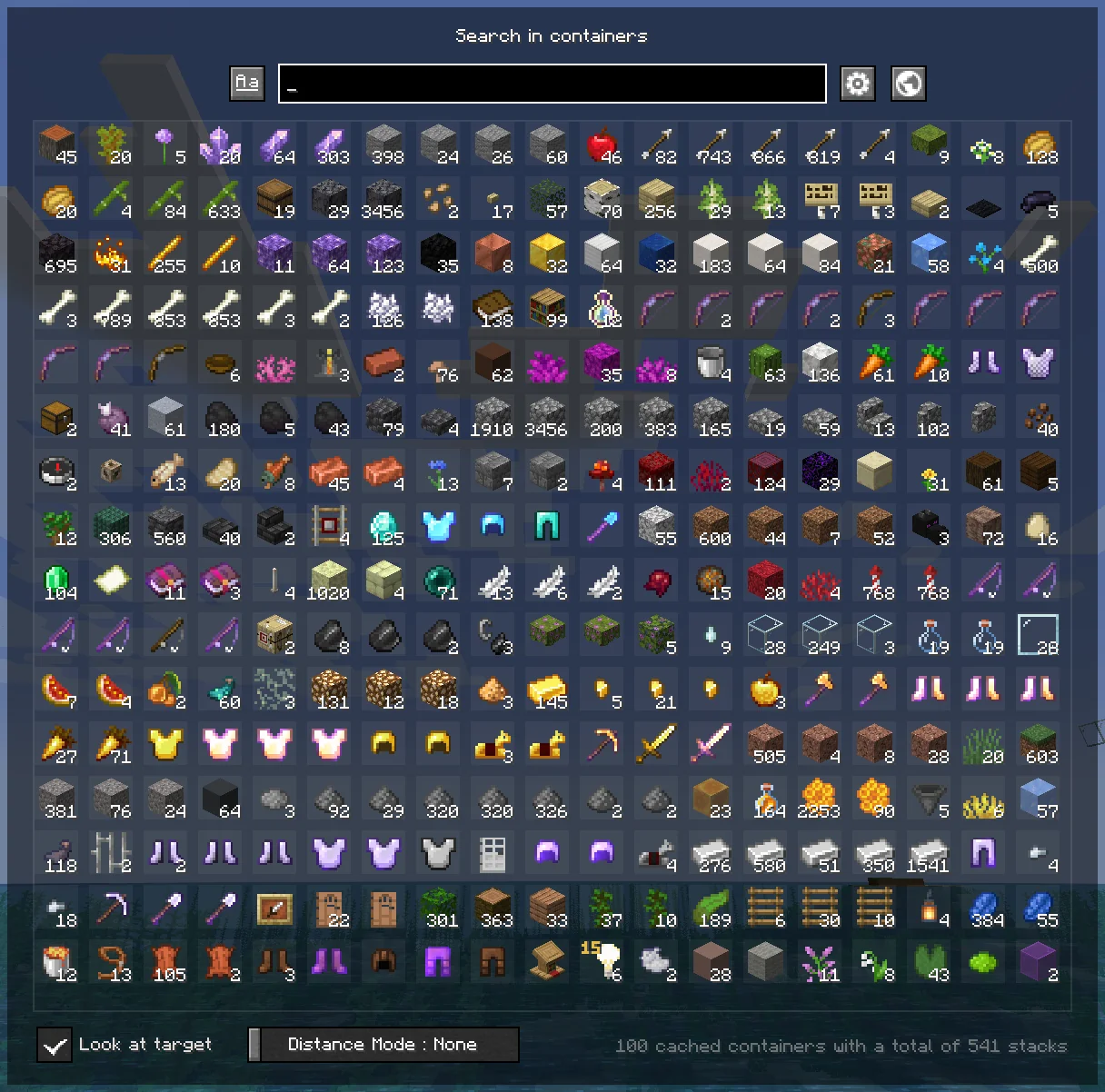
You can find them in your normal Minecraft keybindings, look for the Container Searcher section, usually under the Miscellaneous section.
You will find two configurable keybindings, one to open the search menu as mentioned above, and another to search for the hovered stack in nearby containers.
Project description from Modrinth.
Pick your setup
Choose the version and loader you play, then open the matching release.
Showing the newest 12 of 18 game versions. Older files are in the list below.
Check the dependencies, then try the file in a copied instance before changing a world you care about.
Recent files
ContainerSearcher-0.3.6+mc1.21.11.jar
15 Feb 2026
ContainerSearcher-0.3.5+mc1.21.10.jar
21 Dec 2025
ContainerSearcher-0.3.4-beta.1+mc1.21.8.jar
18 Sept 2025
ContainerSearcher-0.3.3-beta.1+mc1.21.5.jar
20 Aug 2025
ContainerSearcher-0.3.2+beta1+mc1.21.4.jar
26 Jun 2025
ContainerSearcher-0.3.1+mc1.21.3.jar
9 Feb 2025
ContainerSearcher-0.3.1+mc1.21.1.jar
26 Aug 2024
ContainerSearcher-0.3.0+mc1.20.4.jar
4 Mar 2024
ContainerSearcher-0.3.0+mc1.20.2.jar
4 Mar 2024
ContainerSearcher-0.2.1+mc1.20.1.jar
2 Aug 2023
ContainerSearcher-0.2.0+mc1.20.jar
25 Jul 2023
ContainerSearcher-0.1.8+mc1.20.jar
30 Jun 2023
Looking for an older file? The official Modrinth project page is in Resources.
 mod
modEnhances search bars with support for mistyped searches, multiple languages and much more!
 mod
modDiscover Plants, Animals and Monsters with a Spyglass. Collect them all and take notes in your personal Field Guide!
 mod
modAllows you to automatically reequip a totem after popping one