Minecraft version
Back to mods 
Modrinth · Minecraft mod
Improved/More Biomes
This datapack improves and adds 20+ new biomes such as the enchanted forest or the canyons! Custom lighting color support from 26.1
Choose a version Pick your version below, then grab the matching file.
Quick answer
Which Improved/More Biomes release should I use?
Latest stable file 3.7.4+mod
Game version 26.4-snapshot-8, 26.4-snapshot-7, 26.4-snapshot-6
Loader Fabric, Forge, NeoForge
Improved/More Biomes 3.7.4+mod targets 26.4-snapshot-8, 26.4-snapshot-7, 26.4-snapshot-6 with Fabric, Forge, NeoForge. Installation on the client is optional. Installation on the dedicated server is optional. No extra mods listed for this file.
Where it goes
Is Improved/More Biomes required on the client, server, or both?
Installation on the client is optional. Installation on the dedicated server is optional.
Client Optional
Dedicated server Optional
Loader for this release Fabric, Forge, NeoForge
Required install it here Optional supported, not mandatory Not supported do not install here Source doesn’t say do not assume
The source marks this as usable on both the client and server.
What else does Improved/More Biomes 3.7.4+mod need?
3.7.4+mod. Change the file and its required mods may change too.
This file does not list any required mods. Do not add a library just because a different file uses it.
This file does not list any required or optional mods.
Before you install it
Add Improved/More Biomes without breaking your instance.
Built for Improved/More Biomes 3.7.4+mod. Pick another file and the loader, install side or required mods may change.
- 01
Stick to this file
Use 3.7.4+mod. It targets 26.4-snapshot-8, 26.4-snapshot-7, 26.4-snapshot-6 with Fabric, Forge, NeoForge; another release may have different loader, side or dependency requirements.
- 02
Bring the mods it needs
This file does not list any required mods. Do not add a library just because a different file uses it.
- 03
Put it on the correct side
Installation on the client is optional. Installation on the dedicated server is optional.
- 04
Pick the file you checked
Use the “Get this file” button beside 3.7.4+mod. It opens that exact file at the source.
About this project
What does Improved/More Biomes add?
More Biomes
This datapack changes world generation by adding new biomes & having regular biomes updated with custom skies, custom trees, different ground, more variation!
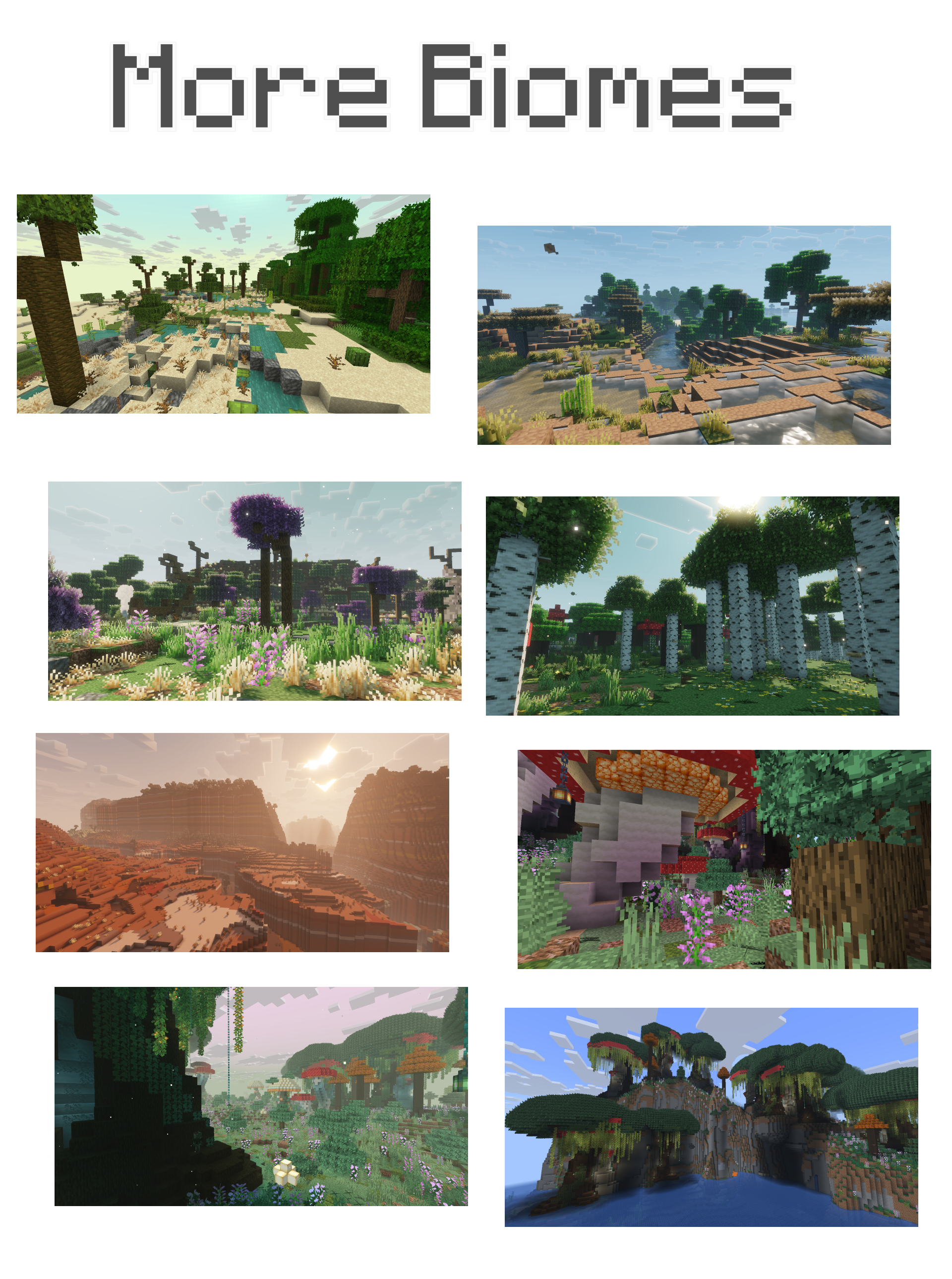
Fantasy & real life inspired
This datapack adds some fantasy like biomes such as the Enchanted Forest, but also different subbiomes for forests & taiga, generating close to each others to recreate the real life randomness of trees placements & ground, and making forests feel less repeatitive.
For example, the 'Mountain Plains' biome generate near or inside taigas, but has more space between trees & offers a slightly different ground than the taiga biome.


Biomes List
Check the gallery for biomes pictures
- Improved Birch Forests (taller trees, different ground, red shrubs)
- Improved Forests (wider trees, different ground, fog sometimes or water pool depending on the forest variant)
- Improved Savannas (wider trees, stones, different ground, baobabs)
- Autumn Forests (autumn trees)
- Improved Taigas (custom sky, different ground and vegetation, colored trees, red shrubs)
- Improved Snowy Taiga (custom sky)
- Improved Swamps (custom sky, giant mushrooms, new trees)
- Improved Stony Shore (ground made out of stone and cobblestone)
- Improved Dark Forests (custom mushrooms with vines)
- Arks added to rivers
- Improved Snowy Plains (custom sky)
- Improved Deserts (custom sky, oasis)
- Improved Badlands (custom sky, improved terrain)
- Improved cold biomes (custom sky)
- Forest Meadow (small field appearing near forests)
- The Lost Woods (Biome from Zelda Ocarina of Time & Majora's Mask)
- Mushroom Paradise (Biome made out of bright mushrooms)
- Improved Lush Caves (upside down giant mushrooms)
- Improved Windswept Forest (forest rocks, dirt & grass)
- Sulfur Grounds (Nether Biome)
- Mossy Taiga (spruce trees, mossy)
- Enchanted Forest (Very big mushrooms, huge trees, big poplar trees, waterfalls)
- Dry Land (Tree without leaves, dry grass)
- Flower Pool (Small waterpools with flowers & yellow trees)
- Ice Caves (Caves made out ice, blue ice & packed ice with dripstones, and a blue ambient light color)
- Palm Beach (Palm trees, appear near desert, quite rare)
- Autumn Cherry Grove (dark pink/red grass, cherry trees, yellow poplar, yellow oak)
- Poplar Forest (Mix of taller oak, poplar trees, moss, yellow-green grass)
- Canyons (similar to badlands, but near rivers & palm beaches, with different terracotta colors)
- Warm Plains (Transition biome between savannas & plains)
- Shrubland (Oak bushes, dry grass, dead bush)
- Oasis (Moss & sand blocks with palm trees & water pool)
- Mysterious Grove
- Jungle Water Pool
- Savanna Water Pool
- Mountain Plains
- Glade
- Waterfall
- Tall Forest
- Yellow Poplar Tall Forest

Custom light color (NEW, from 26.1)
Most of the biomes now have a specific light color; for example greenish light for flower forests.

More compatible datapacks
Use Wind Waker Sky datapack/mod for a colorful sky at night and red lighting during sunsets.
Use The Lost Woods for custom audio & mobs in the Lost Woods biome.
Cliffs & Canyons is included in the datapack
Project description from Modrinth.
Pick your setup
Improved/More Biomes by Minecraft version and loader
Choose the version and loader you play, then open the matching release.
Minecraft version
26.4-snapshot-7
5 loader buildsMinecraft version
26.4-snapshot-6
5 loader buildsMinecraft version
26.4-snapshot-5
5 loader buildsMinecraft version
26.3-snapshot-10
5 loader buildsMinecraft version
26.3-snapshot-9
5 loader buildsMinecraft version
26.3-snapshot-8
5 loader buildsMinecraft version
26.3-snapshot-7
5 loader buildsMinecraft version
26.3-snapshot-6
5 loader buildsMinecraft version
26.3-snapshot-5
5 loader buildsMinecraft version
26.3-snapshot-4
5 loader buildsMinecraft version
26.3-snapshot-3
5 loader buildsShowing the newest 12 of 19 game versions. Older files are in the list below.
Check the dependencies, then try the file in a copied instance before changing a world you care about.
Recent files
Improved/More Biomes versions and loaders
3.7.4+mod
improved-more-biomes-3.7.4.jar
10 Nov 2026
Client Optional Server Optional Dependencies No extras listed Listed on Release listing
Check the 26.4-snapshot-8 · Fabric setup 26.4-snapshot-826.4-snapshot-726.4-snapshot-626.4-snapshot-5 release
3.7.4
More Biomes 26.4.zip
10 Nov 2026
Client Optional Server Optional Dependencies No extras listed Listed on Release listing
Check the 26.4-snapshot-8 · datapack setup 26.4-snapshot-826.4-snapshot-726.4-snapshot-626.4-snapshot-5 release
3.7.4+mod
improved-more-biomes-3.7.4.jar
10 Nov 2026
Client Optional Server Optional Dependencies No extras listed Listed on Release listing
Check the 26.3 · Fabric setup 26.3FabricForgeNeoForge release
3.7.4
More Biomes 26.3.zip
10 Nov 2026
Client Optional Server Optional Dependencies No extras listed Listed on Release listing
Check the 26.3 · datapack setup 26.3datapack release
3.7.3.1+mod
improved-more-biomes-3.7.3.1.jar
10 Nov 2026
Client Optional Server Optional Dependencies No extras listed Listed on Release listing
Check the 26.4-snapshot-8 · Fabric setup 26.4-snapshot-826.4-snapshot-726.4-snapshot-626.4-snapshot-5 release
3.7.3.1
More Biomes 26.4.zip
10 Nov 2026
Client Optional Server Optional Dependencies No extras listed Listed on Release listing
Check the 26.4-snapshot-8 · datapack setup 26.4-snapshot-826.4-snapshot-726.4-snapshot-626.4-snapshot-5 release
3.7.3+mod
improved-more-biomes-3.7.3.jar
4 Nov 2026
Client Optional Server Optional Dependencies No extras listed Listed on Release listing
Check the 26.4-snapshot-7 · Fabric setup 26.4-snapshot-726.4-snapshot-626.4-snapshot-5Fabric release
3.7.3
More Biomes 26.4.zip
4 Nov 2026
Client Optional Server Optional Dependencies No extras listed Listed on Release listing
Check the 26.4-snapshot-7 · datapack setup 26.4-snapshot-726.4-snapshot-626.4-snapshot-5datapack release
3.7.3+mod
improved-more-biomes-3.7.3.jar
4 Nov 2026
Client Optional Server Optional Dependencies No extras listed Listed on Release listing
Check the 26.3 · Fabric setup 26.3FabricForgeNeoForge release
3.7.3
More Biomes 26.3.zip
4 Nov 2026
Client Optional Server Optional Dependencies No extras listed Listed on Release listing
Check the 26.3 · datapack setup 26.3datapack release
3.7.0.1+mod
improved-more-biomes-3.7.0.1.jar
4 Nov 2026
Client Optional Server Optional Dependencies No extras listed Listed on Release listing
Check the 1.21.1 · Fabric setup 1.211.21.1FabricForge beta
3.7.0.1
More Biomes 1.21.1 3.7-beta.zip
4 Nov 2026
Client Optional Server Optional Dependencies No extras listed Listed on Release listing
Check the 1.21.1 · datapack setup 1.211.21.1datapack beta
Looking for an older file? The official Modrinth project page is in Resources.
 mod
CurseForge + Modrinth · Minecraft
Spatial GUI
A client-side mod that renders inventory & container screens as a 3D plane.
 mod
CurseForge + Modrinth · Minecraft
Mo' Bends [MODERN PORT]
A port of the Mo' Bends mod to modern Minecraft.
 mod
GitHub · Minecraft
modpacks-ch-github-test
Disposable public fixture for testing the Modpacks.ch GitHub catalogue flow