

Minecraft version
Back to mods 
Modrinth · Minecraft mod
Music Interface
A modern in-game music player for Minecraft with playlists, favorites, album covers and full control over custom music libraries.
Choose a version Pick your version below, then grab the matching file.
Quick answer
Which Music Interface release should I use?
Latest stable file 2.0
Game version 26.3
Loader NeoForge
Music Interface 2.0 targets 26.3 with NeoForge. It must be installed on the client. Do not install it on the dedicated server. No extra mods listed for this file.
Where it goes
Is Music Interface required on the client, server, or both?
It must be installed on the client. Do not install it on the dedicated server.
Client Required
Dedicated server Not supported
Loader for this release NeoForge
Required install it here Optional supported, not mandatory Not supported do not install here Source doesn’t say do not assume
This file is marked client-only.
What else does Music Interface 2.0 need?
2.0. Change the file and its required mods may change too.
This file does not list any required mods. Do not add a library just because a different file uses it.
This file does not list any required or optional mods.
Before you install it
Add Music Interface without breaking your instance.
Built for Music Interface 2.0. Pick another file and the loader, install side or required mods may change.
- 01
Stick to this file
Use 2.0. It targets 26.3 with NeoForge; another release may have different loader, side or dependency requirements.
- 02
Bring the mods it needs
This file does not list any required mods. Do not add a library just because a different file uses it.
- 03
Put it on the correct side
It must be installed on the client. Do not install it on the dedicated server.
- 04
Pick the file you checked
Use the “Get this file” button beside 2.0. It opens that exact file at the source.
About this project
What does Music Interface add?
🎵 Music Interface
Turn Minecraft's music into a complete customizable music experience.







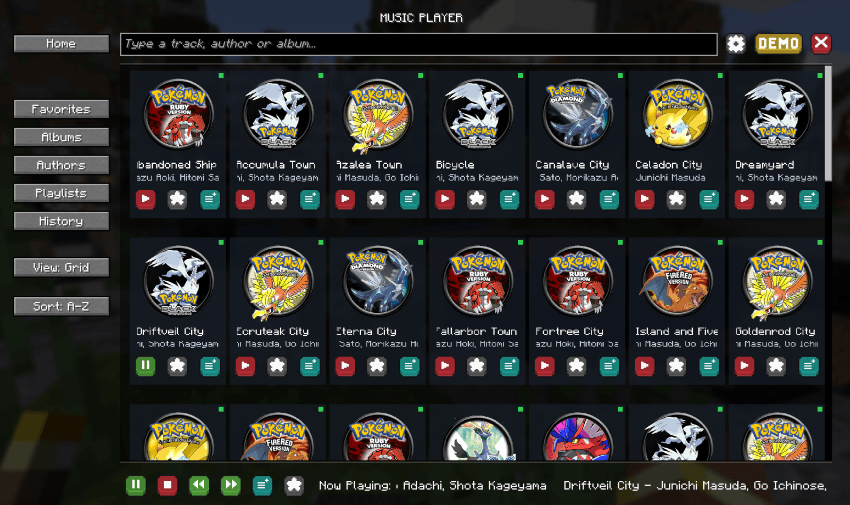
About
Music Interface is a complete in-game music player and intelligent music system for Minecraft.
Browse your music library, create playlists, build a playback queue, discover personalized mixes and let tracks automatically adapt to your world through contextual rules.
Music is provided through standard Minecraft resource packs, making Music Interface ideal for players, modpacks and creators who want their own complete soundtrack.
Highlights
- 🎵 Modern Music Player: Browse tracks, albums and artists with cover artwork, search, grid/list views and full playback controls.
- ❤️ Favorites & Playlists: Build your own collections, reorder tracks and play them in order or shuffle mode.
- 🔗 Playlist Sharing: Export, share and import playlists directly between players.
- 📋 Playback Queue: Use Play Next, build a persistent queue, drag tracks into order and save queues as playlists.
- 📻 Track Radio: Start an ongoing radio session based around any track.
- ✨ Made For You: Dynamic mixes including For You, On Repeat, Rediscover and music based on your current context.
- 👤 Listening Profile: Track plays, skips, replays, listening time and preferences across artists, albums, music packs and world contexts.
- 🌍 Context-Aware Music: Music packs can react to dimensions, biomes, biome tags, time, weather and combat.
- 🔄 Smooth Playback: Crossfades, track-specific fades, cooldowns, weighting and configurable automatic playback.
- 🏠 Main Menu Music: Custom libraries can also automatically provide music directly from the title screen.
- 🔔 Now Playing Toast: Configurable track notifications with multiple positions and animation styles.
- 🎮 Cobblemon Support: Optional battle-aware playback lets Music Interface pause or provide contextual battle music.
- 📦 Multi-Pack Support: Combine multiple music resource packs with Minecraft's normal resource-pack priority system.
- 🛠️ Pack Tools: Generate a ready-to-edit template pack and use built-in diagnostics to find invalid tracks, duplicates and pack issues.
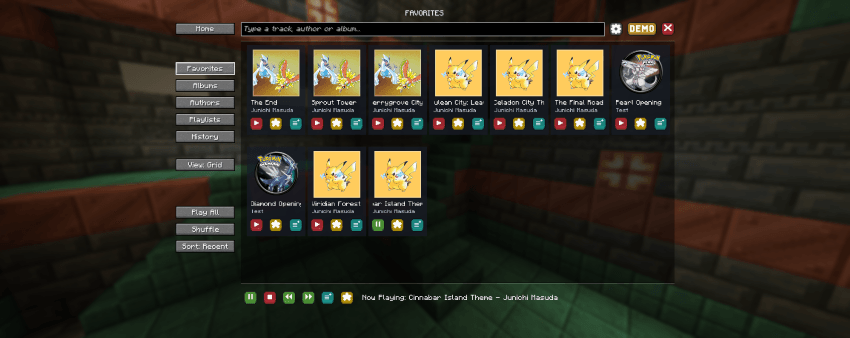
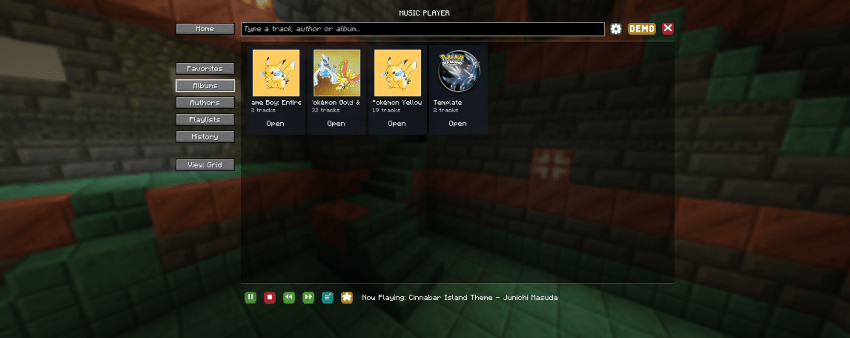
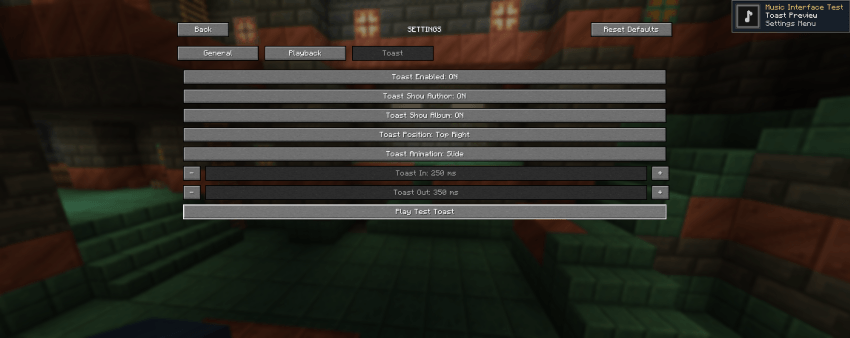
Custom Music Packs
Music Interface uses standard Minecraft resource packs for custom music.
A music pack can define:
- Audio tracks
- Track titles
- Artists
- Albums
- Cover artwork
- Genres, moods and tags
- Playback weight and volume
- Fade settings and cooldowns
- Context rules for biomes, dimensions, time, weather and combat
Multiple music packs can be enabled at the same time and are automatically merged according to Minecraft's resource-pack priority.
A built-in template generator is available to make creating new music packs easier.
Fully Configurable
Control how Music Interface interacts with Minecraft's normal music system.
Configure custom and vanilla music coexistence, automatic playback delays, crossfades, menu music, track visibility, history size, interface layout, toast behavior and more.
Cloth Config is optionally supported for in-game configuration.
Requirements
Minecraft: 1.21.1
Loaders: Fabric & NeoForge
Java: 21
Architectury API: Required
Fabric API: Required on Fabric
Cloth Config: Optional
Support the Project
Enjoying Music Interface?
Support future updates and upcoming Our Story projects through Patreon.
For support, music pack creation, suggestions or bug reports, join the Our Story community on Discord.
Game Hosting
Need a server for your Minecraft adventures?
Host your server with BisectHosting and use code OURSTORY for 25% OFF.
Every purchase helps support the development of Our Story projects.
Created by LevelsFR × Our Story
CurseForge • Modrinth • Discord • Patreon
Project description from Modrinth.
Pick your setup
Music Interface by Minecraft version and loader
Choose the version and loader you play, then open the matching release.
Minecraft version
26.2
2 loader buildsMinecraft version
26.1
2 loader buildsMinecraft version
1.21.11
2 loader buildsMinecraft version
1.21.10
2 loader buildsMinecraft version
1.21.8
2 loader buildsMinecraft version
1.21.5
2 loader buildsMinecraft version
1.21.4
2 loader buildsMinecraft version
1.21.1
2 loader buildsCheck the dependencies, then try the file in a copied instance before changing a world you care about.
Recent files
Music Interface versions and loaders
2.0
musicinterface-neoforge-26.3-2.0.jar
28 Sept 2026
Client Required Server Not supported Dependencies No extras listed Listed on Release listing
Check the 26.3 · NeoForge setup 26.3NeoForge release
2.0
musicinterface-neoforge-26.2-2.0.jar
28 Sept 2026
Client Required Server Not supported Dependencies No extras listed Listed on Release listing
Check the 26.2 · NeoForge setup 26.2NeoForge release
2.0
musicinterface-neoforge-26.1-2.0.jar
28 Sept 2026
Client Required Server Not supported Dependencies No extras listed Listed on Release listing
Check the 26.1 · NeoForge setup 26.1NeoForge release
2.0
musicinterface-neoforge-1.21.11-2.0.jar
28 Sept 2026
Client Required Server Not supported Dependencies No extras listed Listed on Release listing
Check the 1.21.11 · NeoForge setup 1.21.11NeoForge release
2.0
musicinterface-neoforge-1.21.10-2.0.jar
28 Sept 2026
Client Required Server Not supported Dependencies No extras listed Listed on Release listing
Check the 1.21.10 · NeoForge setup 1.21.10NeoForge release
2.0
musicinterface-neoforge-1.21.8-2.0.jar
28 Sept 2026
Client Required Server Not supported Dependencies No extras listed Listed on Release listing
Check the 1.21.8 · NeoForge setup 1.21.8NeoForge release
2.0
musicinterface-neoforge-1.21.5-2.0.jar
28 Sept 2026
Client Required Server Not supported Dependencies No extras listed Listed on Release listing
Check the 1.21.5 · NeoForge setup 1.21.5NeoForge release
2.0
musicinterface-neoforge-1.21.4-2.0.jar
28 Sept 2026
Client Required Server Not supported Dependencies No extras listed Listed on Release listing
Check the 1.21.4 · NeoForge setup 1.21.4NeoForge release
2.0
musicinterface-neoforge-1.21.1-2.0.jar
28 Sept 2026
Client Required Server Not supported Dependencies No extras listed Listed on Release listing
Check the 1.21.1 · NeoForge setup 1.21.1NeoForge release
2.0
musicinterface-fabric-26.3-2.0.jar
28 Sept 2026
Client Required Server Not supported Dependencies No extras listed Listed on Release listing
Check the 26.3 · Fabric setup 26.3Fabric release
2.0
musicinterface-fabric-26.2-2.0.jar
28 Sept 2026
Client Required Server Not supported Dependencies No extras listed Listed on Release listing
Check the 26.2 · Fabric setup 26.2Fabric release
2.0
musicinterface-fabric-26.1-2.0.jar
28 Sept 2026
Client Required Server Not supported Dependencies No extras listed Listed on Release listing
Check the 26.1 · Fabric setup 26.1Fabric release
Looking for an older file? The official Modrinth project page is in Resources.