Minecraft version
Back to mods 
Modrinth · Minecraft mod
Glitch Visuals
These are simple visuals featuring only the most useful functions.
Choose a version Pick your version below, then grab the matching file.
Quick answer
Which Glitch Visuals release should I use?
Latest stable file 1.0.3
Game version 1.21.11
Loader Fabric
Glitch Visuals 1.0.3 targets 1.21.11 with Fabric. It must be installed on the client. Do not install it on the dedicated server. No extra mods listed for this file.
Where it goes
Is Glitch Visuals required on the client, server, or both?
It must be installed on the client. Do not install it on the dedicated server.
Client Required
Dedicated server Not supported
Loader for this release Fabric
Required install it here Optional supported, not mandatory Not supported do not install here Source doesn’t say do not assume
This file is marked client-only.
What else does Glitch Visuals 1.0.3 need?
1.0.3. Change the file and its required mods may change too.
This file does not list any required mods. Do not add a library just because a different file uses it.
This file does not list any required or optional mods.
Before you install it
Add Glitch Visuals without breaking your instance.
Built for Glitch Visuals 1.0.3. Pick another file and the loader, install side or required mods may change.
- 01
Stick to this file
Use 1.0.3. It targets 1.21.11 with Fabric; another release may have different loader, side or dependency requirements.
- 02
Bring the mods it needs
This file does not list any required mods. Do not add a library just because a different file uses it.
- 03
Put it on the correct side
It must be installed on the client. Do not install it on the dedicated server.
- 04
Pick the file you checked
Use the “Get this file” button beside 1.0.3. It opens that exact file at the source.
About this project
What does Glitch Visuals add?
Main Mod Features
1. Shaders
Works only in conjunction with Iris Shaders. Quickly enable your disable shaders.
2. Gamma
Tired of caves being too dark but can't be bothered to dig through game settings? Gamma lets you instantly brighten things up so night looks like day!
3. Kill Effects
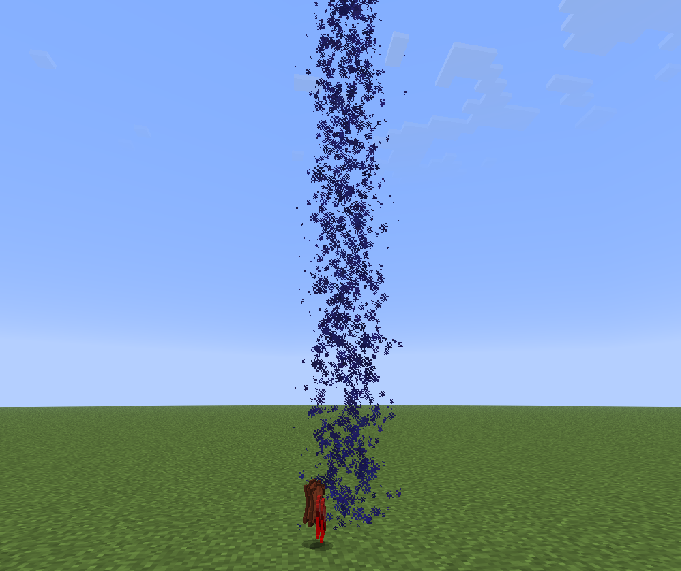
Bored of defeating mobs or players? Kill effects will spice things up!
4. Better Near
Playing on a server and want to know who's nearby, but lack the necessary rank or find it too expensive? This feature lets you instantly see which players are within a 200-block radius.
5. Markers
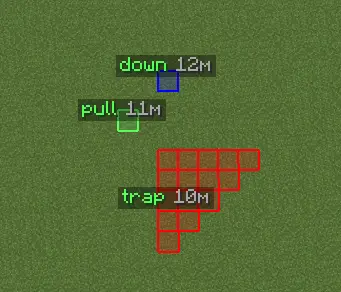
New to Minecraft and constantly forgetting where your base is? Or are you a trapper who can't remember where you placed that pressure plate? With markers, you'll never lose track of anything again!
6. Configs
Love having multiple setting presets but hate the hassle of switching between them? Configs let you create various presets and switch between them instantly.
7. Inventory Animations
Find it boring when crafting tables, furnaces, or chat messages just pop up instantly? This feature makes things more fun!
8. Favorites

Do you have specific settings you want quick access to? The Favorites section will open automatically whenever you launch the Glitch Visuals menu!
Sound Guide
Our visuals support custom sounds. Here’s how to set them up:
- Choose your sound
- Convert it to .ogg format using an online converter
- Move your sound file to
.minecraft/config/glitchvisuals/sounds - Select your sound in the "Player" section
Project description from Modrinth.
Pick your setup
Glitch Visuals by Minecraft version and loader
Choose the version and loader you play, then open the matching release.
Minecraft version
1.20.6
1 loader buildMinecraft version
1.20.5
1 loader buildMinecraft version
1.20.4
1 loader buildMinecraft version
1.20.3
1 loader buildMinecraft version
1.20.2
1 loader buildMinecraft version
1.20.1
1 loader buildCheck the dependencies, then try the file in a copied instance before changing a world you care about.
Recent files
Glitch Visuals versions and loaders
1.0.3
glitch_visuals-1.0.0.jar
18 Oct 2026
Client Required Server Not supported Dependencies No extras listed Listed on Release listing
Check the 1.21.11 · Fabric setup 1.21.11Fabric release
1.0.2
glitch_visuals-1.0.0.jar
6 Oct 2026
Client Required Server Not supported Dependencies No extras listed Listed on Release listing
Check the 1.21.11 · Fabric setup 1.21.11Fabric release
1.0.2
glitch_visuals-forge-1.20.1-1.0.0.jar
4 Oct 2026
Client Required Server Not supported Dependencies No extras listed Listed on Release listing
Check the 1.20.6 · Forge setup 1.20.11.20.21.20.31.20.4 release
1.0.1
glitch_visuals-forge-1.20.1-1.0.0.jar
4 Oct 2026
Client Required Server Not supported Dependencies No extras listed Listed on Release listing
Check the 1.20.6 · Forge setup 1.20.11.20.21.20.31.20.4 release
1.0.1
glitch_visuals-1.0.0.jar
30 Sept 2026
Client Required Server Not supported Dependencies No extras listed Listed on Release listing
Check the 1.21.11 · Fabric setup 1.21.11Fabric release
1.0.0
glitch_visuals-1.0.0.jar
11 Aug 2026
Client Required Server Not supported Dependencies No extras listed Listed on Release listing
Check the 1.21.11 · Fabric setup 1.21.11Fabric release
Looking for an older file? The official Modrinth project page is in Resources.
 mod
Modrinth · Minecraft
Just Enough Items (JEI)
View Items and Recipes
 mod
CurseForge + Modrinth · Minecraft
Cider Core
A modular, configurable, and slightly invasive modpack core mod.
 mod
Modrinth · Minecraft
Antisolar Blocks
1,130 blocks already and more is to come. Focused on new rocks and plants this building mod is meant to fit in with vanilla while sprucing up the limited minecraft palette.