Minecraft version
Back to mods 
CurseForge · Minecraft mod
Creative Tabs Tweaker
CreativeTabsTweaker (Forge 1.12.2) lets you remove modded creative tabs, add custom ones, and move items between tabs for better organization.
Choose a version Pick your version below, then grab the matching file.
Quick answer
Which Creative Tabs Tweaker release should I use?
Latest stable file CreativeTabsTweaker-1.0.3.jar
Game version 1.12.2
Loader Forge
Creative Tabs Tweaker CreativeTabsTweaker-1.0.3.jar targets 1.12.2 with Forge. The project page does not say whether this file belongs on the client, dedicated server, or both. No extra mods listed for this file.
Where it goes
Is Creative Tabs Tweaker required on the client, server, or both?
The project page does not say whether this file belongs on the client, dedicated server, or both.
Client Source doesn’t say
Dedicated server Source doesn’t say
Loader for this release Forge
Required install it here Optional supported, not mandatory Not supported do not install here Source doesn’t say do not assume
The source does not explicitly classify this release as client-only or server-only.
What else does Creative Tabs Tweaker CreativeTabsTweaker-1.0.3.jar need?
CreativeTabsTweaker-1.0.3.jar. Change the file and its required mods may change too.
This file does not list any required mods. Do not add a library just because a different file uses it.
This file does not list any required or optional mods.
Before you install it
Add Creative Tabs Tweaker without breaking your instance.
Built for Creative Tabs Tweaker CreativeTabsTweaker-1.0.3.jar. Pick another file and the loader, install side or required mods may change.
- 01
Stick to this file
Use CreativeTabsTweaker-1.0.3.jar. It targets 1.12.2 with Forge; another release may have different loader, side or dependency requirements.
- 02
Bring the mods it needs
This file does not list any required mods. Do not add a library just because a different file uses it.
- 03
Put it on the correct side
The project page does not say whether this file belongs on the client, dedicated server, or both.
- 04
Pick the file you checked
Use the “Get this file” button beside CreativeTabsTweaker-1.0.3.jar. It opens that exact file at the source.
About this project
What does Creative Tabs Tweaker add?
CreativeTabsTweaker - Minecraft Forge 1.12.2
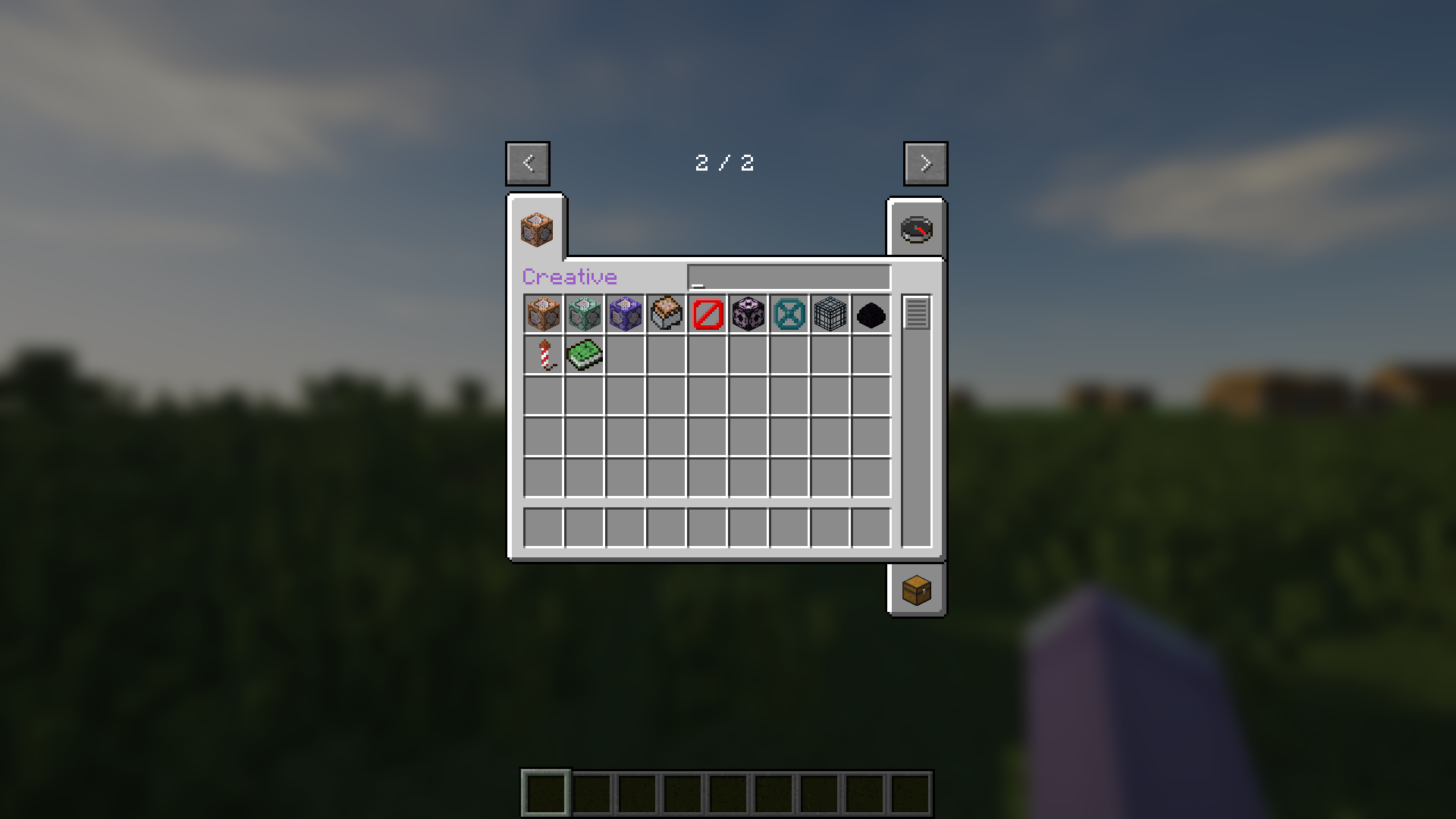
CreativeTabsTweaker (Forge 1.12.2) lets you remove modded creative tabs, add custom ones, and move items between tabs for better organization.
🎉 Features 🎉
- Remove any Creative Tabs from Mod.
- Add custom new Creative Tabs.
- Change Items' Tab.
🚀 Usage 🚀
- Run Minecraft 1 time when installed mod to create config file.
- Edit configured example or just follow below rules.
- Add .lang and .png file of custom tabs to resourcepacks folder.
⚙️ CreativeTabsTweaker.json ⚙️
  "removeTabs": [
    // "tabLabel" What tab you want to remove. You can look for tabs' label in game logs. //
  ],
  "addTabs": {
    "creative": { // What is your custom tab name. //
      "tabBackgroundImage": "tab_creative.png", // Tab's background image from Resource Pack, always start with "tab_" and end with ".png" //
      "tabIconItem": "minecraft:command_block", // Tab's icon item registry name. You can look for the registry name of items in tooltips. //
      "drawTitle": true, // Your tab have title or not. //
      "hasSearchBar": true, // Your tab have search bar or not. //
      "hexLabelColor": "#9A5CC6" // If have title, what is it color in hex. //
      "searchBarWidth": 89, // If have search bar, what is it width. //
    }
  },
  "items": {
    "minecraft:command_block": { // Registry name of item that you want to edit tab //
        "tabs": ["creative"], // List of tabs label to add or change to. //
        "nbt": {} // JSON format of any NBT for item. //
    },
    "minecraft:dirt": {} // If want to remove item from any tabs just leave empty //
  }
🖼️ CreativeTabsTweaker.zip 🖼️
CreativeTabsTweaker.zip
├── assets
│   └── ctt
│       ├── lang
│       │   └── .lang
│       └── texture
│           └── gui
│               └── container
│                   └── creative_inventory
│                       └── .png
└── pack.mcmeta
📄 pack.mcmeta 📄
{
  "pack": {
    "description": "ctt mod resources",
    "pack_format": 3
  }
}
🎌 locale_code.lang 🎌
itemGroup.creative=Creative // itemGroup dot then tab label and visual title //
📜 License 📜
- © 2025 by MeowSkyKung is licensed under CC BY-SA 4.0. 🔖
- Credits to MCreator, Blur, Optifine, SEUS
💖 Supporting by 💖
- Star Me on GitHub 🌟
- Donate on Ko-Fi ☕
Project description from CurseForge.
Pick your setup
Creative Tabs Tweaker by Minecraft version and loader
Choose the version and loader you play, then open the matching release.
Check the dependencies, then try the file in a copied instance before changing a world you care about.
Recent files
Creative Tabs Tweaker versions and loaders
CreativeTabsTweaker-1.0.3.jar
22 Jul 2025
Client Source doesn’t say Server Source doesn’t say Dependencies No extras listed Listed on Release listing
Check the 1.12.2 · Forge setup Forge1.12.2 release
CreativeTabsTweaker-1.0.2.jar
20 Jul 2025
Client Source doesn’t say Server Source doesn’t say Dependencies No extras listed Listed on Release listing
Check the 1.12.2 · Forge setup Forge1.12.2 release
CreativeTabsTweaker-1.0.1.jar
18 Jul 2025
Client Source doesn’t say Server Source doesn’t say Dependencies No extras listed Listed on Release listing
Check the 1.12.2 · Forge setup Forge1.12.2 release
CreativeTabsTweaker-1.0.0.jar
16 Jul 2025
Client Source doesn’t say Server Source doesn’t say Dependencies No extras listed Listed on Release listing
Check the 1.12.2 · Forge setup Forge1.12.2 release
Looking for an older file? The official CurseForge project page is in Resources.
 mod
mod CurseForge · Minecraft
Pocket List
A checklist in the corner of your screen that ticks itself off as you gather. Pin items or recipes and break them down into ingredients. Client-side.
 mod
mod Modrinth · Minecraft
Ji AFK Cinematic
AFK Cinematics in 4K with immersive camera system
 mod
mod CurseForge · Minecraft
Polis
A registry for land, contracts, money and a court - it records what players do and never prevents it.