Minecraft version
Back to mods 
Modrinth · Minecraft mod
Better-PvP
This Mod allows players to create fully customizable teams with features like changing player armor colors and chat names, all client-side.
Choose a version Pick your version below, then grab the matching file.
Quick answer
Which Better-PvP release should I use?
Latest stable file 1.1.1
Game version 1.21.11
Loader Fabric
Better-PvP 1.1.1 targets 1.21.11 with Fabric. It must be installed on the client. Do not install it on the dedicated server. No extra mods listed for this file.
Where it goes
Is Better-PvP required on the client, server, or both?
It must be installed on the client. Do not install it on the dedicated server.
Client Required
Dedicated server Not supported
Loader for this release Fabric
Required install it here Optional supported, not mandatory Not supported do not install here Source doesn’t say do not assume
This file is marked client-only.
What else does Better-PvP 1.1.1 need?
1.1.1. Change the file and its required mods may change too.
This file does not list any required mods. Do not add a library just because a different file uses it.
This file does not list any required or optional mods.
Before you install it
Add Better-PvP without breaking your instance.
Built for Better-PvP 1.1.1. Pick another file and the loader, install side or required mods may change.
- 01
Stick to this file
Use 1.1.1. It targets 1.21.11 with Fabric; another release may have different loader, side or dependency requirements.
- 02
Bring the mods it needs
This file does not list any required mods. Do not add a library just because a different file uses it.
- 03
Put it on the correct side
It must be installed on the client. Do not install it on the dedicated server.
- 04
Pick the file you checked
Use the “Get this file” button beside 1.1.1. It opens that exact file at the source.
About this project
What does Better-PvP add?
Better PvP
Better PvP is a Fabric client-side modification that allows you to create and organize players into custom teams. This provides the opportunity to colorize player names in chat and even adds a nice outline of the specific team color to each individual player's armor. Every feature is toggleable and designed to be as flexible as possible. Overall, this mod enhances your in-game experience and significantly improves team-based PvP.
Functions
1. Team-Based Chat Colorization
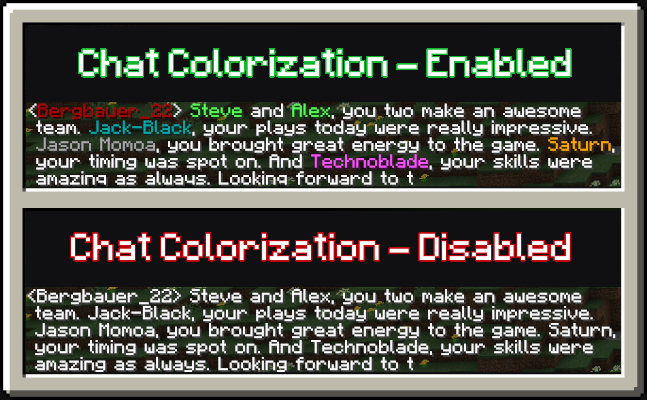
When the setting to colorize players based on their team is enabled, each player's messages in the chat will be displayed in their team's color. This feature is especially useful when playing on multiplayer servers with prominent team dynamics, as it makes it easier to differentiate players by their team affiliation.
2. Team-Based Armor Colorization
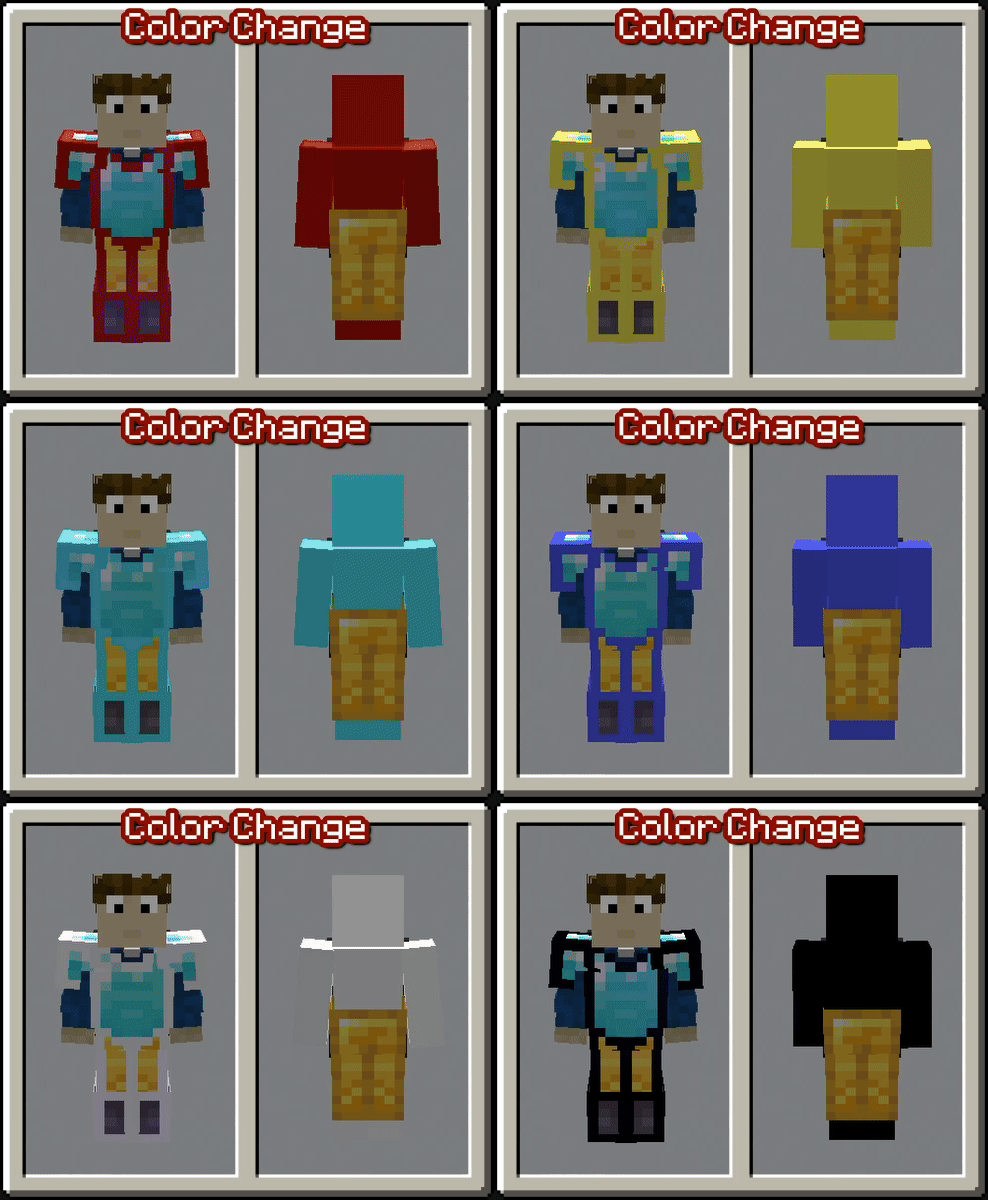
With the setting enabled to colorize player armor based on their team, vanilla armor pieces will display an outline in the team's color. This feature helps distinguish players more easily in-game, even when they are wearing the same type of armor. Please note that this only works with vanilla armor and not with modded armor.
3. Team-Based Skin Colorization
Enabling the setting to colorize player skins based on their team changes the entire skin to match the team’s color. This feature is useful if the team-based armor colorization is insufficient or cannot be applied due to the use of non-vanilla armor. By default, this setting is turned off.
Teams and Settings
Managing teams in this mod is simple with a custom GUI.
You can access the GUI using a customizable keybind (set to "G" by default). Once inside, you’ll find various options to get started:
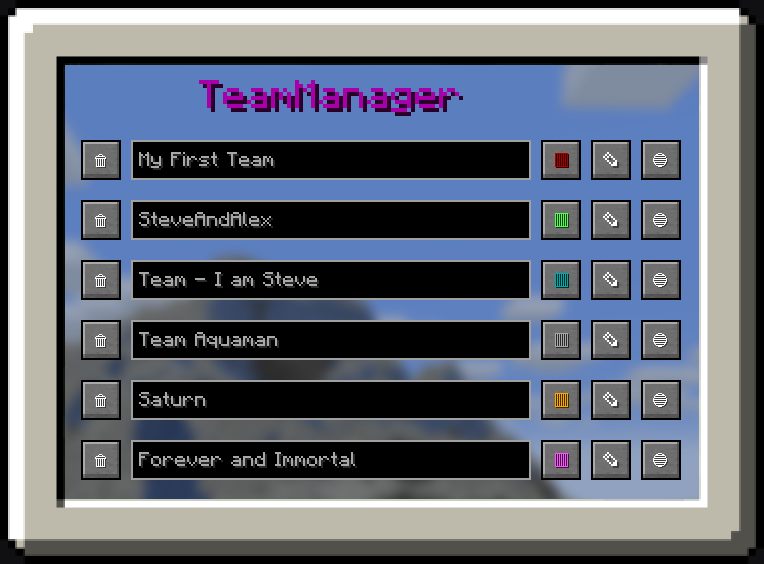
1. Team Manager Panel
- Navigate to the Team Manager Panel to create your first team.
- Use the buttons on the right side to modify the team's name, color, or members.
- Clicking the third button takes you to the individual team page, where you can add specific players to the team.
2. Settings Panel
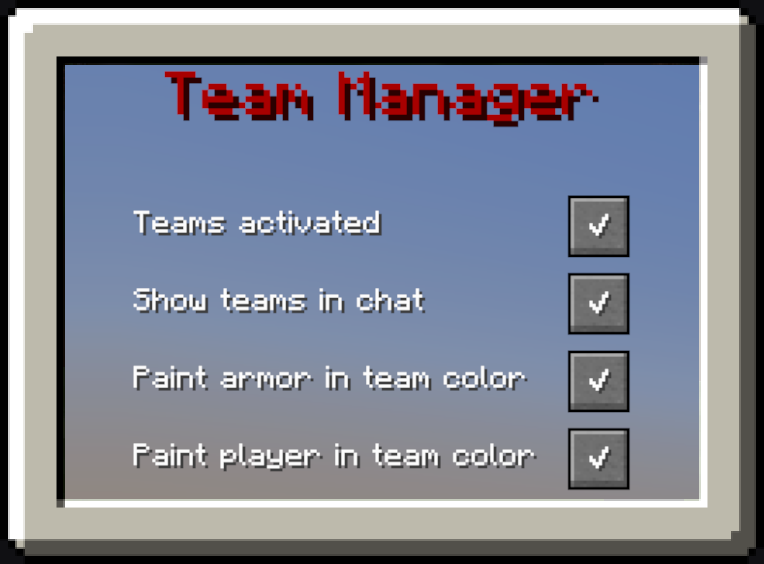
- Open the Settings Panel to configure which features of the mod you want to enable.
- Use the checkboxes to easily activate or deactivate individual features based on your preferences.
Tutorials and Showcase
How to create your first Team
How to change the color of the Team
How to change the Settings
Project description from Modrinth.
Pick your setup
Better-PvP by Minecraft version and loader
Choose the version and loader you play, then open the matching release.
Minecraft version
1.21.10
1 loader buildMinecraft version
1.21.9
1 loader buildMinecraft version
1.21.8
1 loader buildMinecraft version
1.21.7
1 loader buildMinecraft version
1.21.6
1 loader buildMinecraft version
1.21.5
1 loader buildMinecraft version
1.21.4
1 loader buildMinecraft version
1.21.3
1 loader buildMinecraft version
1.21.2
1 loader buildMinecraft version
1.21.1
1 loader buildCheck the dependencies, then try the file in a copied instance before changing a world you care about.
Recent files
Better-PvP versions and loaders
1.1.1
better_pvp-V.1.1.1_1.21.11.jar
26 Apr 2026
Client Required Server Not supported Dependencies No extras listed Listed on Release listing
Check the 1.21.11 · Fabric setup 1.21.11Fabric release
1.1.0
better_pvp-V.1.1.0_1.21.11.jar
27 Dec 2025
Client Required Server Not supported Dependencies No extras listed Listed on Release listing
Check the 1.21.11 · Fabric setup 1.21.11Fabric release
1.1.0
better_pvp-V.1.1.0_1.21.10.jar
27 Dec 2025
Client Required Server Not supported Dependencies No extras listed Listed on Release listing
Check the 1.21.10 · Fabric setup 1.21.10Fabric release
1.1.0
better_pvp-V.1.1.0_1.21.9.jar
27 Dec 2025
Client Required Server Not supported Dependencies No extras listed Listed on Release listing
Check the 1.21.9 · Fabric setup 1.21.9Fabric release
1.1.0
better_pvp-V.1.1.0_1.21.8.jar
25 Dec 2025
Client Required Server Not supported Dependencies No extras listed Listed on Release listing
Check the 1.21.8 · Fabric setup 1.21.8Fabric release
1.1.0
better_pvp-V.1.1.0_1.21.7.jar
25 Dec 2025
Client Required Server Not supported Dependencies No extras listed Listed on Release listing
Check the 1.21.7 · Fabric setup 1.21.7Fabric release
1.1.0
better_pvp-V.1.1.0_1.21.6.jar
25 Dec 2025
Client Required Server Not supported Dependencies No extras listed Listed on Release listing
Check the 1.21.6 · Fabric setup 1.21.6Fabric release
1.1.0
better_pvp-V.1.1.0_1.21.5.jar
23 Dec 2025
Client Required Server Not supported Dependencies No extras listed Listed on Release listing
Check the 1.21.5 · Fabric setup 1.21.5Fabric release
1.1.0
better_pvp-V.1.1.0_1.21.4.jar
23 Dec 2025
Client Required Server Not supported Dependencies No extras listed Listed on Release listing
Check the 1.21.4 · Fabric setup 1.21.4Fabric release
1.1.0
better_pvp-V.1.1.0_1.21.3.jar
23 Dec 2025
Client Required Server Not supported Dependencies No extras listed Listed on Release listing
Check the 1.21.3 · Fabric setup 1.21.3Fabric release
1.1.0
better_pvp-V.1.1.0_1.21.2.jar
23 Dec 2025
Client Required Server Not supported Dependencies No extras listed Listed on Release listing
Check the 1.21.2 · Fabric setup 1.21.2Fabric release
1.0.0
better_pvp-V.1.0.0_1.21.1.jar
23 Dec 2024
Client Required Server Not supported Dependencies No extras listed Listed on Release listing
Check the 1.21.1 · Fabric setup 1.21.1Fabric release
Looking for an older file? The official Modrinth project page is in Resources.
 mod
GitHub · Minecraft
modpacks-ch-github-test
Disposable public fixture for testing the Modpacks.ch GitHub catalogue flow
 mod
Modrinth · Minecraft
Custom Capes
This Mod adds the ability to add custom capes to your player including gifs and normal images with a resolution up to 2048x1024 you can also see other capes and vice versa and it also works with elytra models and wavey capes
 mod
Modrinth · Minecraft
Sorted - Inventory & Chest Sorting, Quick Stack
Sort chests and your inventory in one click, Quick Stack everything into the right chests, and find any item in your base. Client-side inventory sorting: works on vanilla servers and Realms, on Fabric and NeoForge.