Minecraft version
Back to mods 
Modrinth · Minecraft mod
Banner&Lodestone Locator Bar
Place a banner on top of a lodestone to see it on the locator bar !
Choose a version Pick your version below, then grab the matching file.
Quick answer
Which Banner&Lodestone Locator Bar release should I use?
Latest stable file 26.3+mod
Game version 26.3
Loader Fabric, Forge, NeoForge
Banner&Lodestone Locator Bar 26.3+mod targets 26.3 with Fabric, Forge, NeoForge. Installation on the client is optional. Installation on the dedicated server is optional. No extra mods listed for this file.
Where it goes
Is Banner&Lodestone Locator Bar required on the client, server, or both?
Installation on the client is optional. Installation on the dedicated server is optional.
Client Optional
Dedicated server Optional
Loader for this release Fabric, Forge, NeoForge
Required install it here Optional supported, not mandatory Not supported do not install here Source doesn’t say do not assume
The source marks this as usable on both the client and server.
What else does Banner&Lodestone Locator Bar 26.3+mod need?
26.3+mod. Change the file and its required mods may change too.
This file does not list any required mods. Do not add a library just because a different file uses it.
This file does not list any required or optional mods.
Before you install it
Add Banner&Lodestone Locator Bar without breaking your instance.
Built for Banner&Lodestone Locator Bar 26.3+mod. Pick another file and the loader, install side or required mods may change.
- 01
Stick to this file
Use 26.3+mod. It targets 26.3 with Fabric, Forge, NeoForge; another release may have different loader, side or dependency requirements.
- 02
Bring the mods it needs
This file does not list any required mods. Do not add a library just because a different file uses it.
- 03
Put it on the correct side
Installation on the client is optional. Installation on the dedicated server is optional.
- 04
Pick the file you checked
Use the “Get this file” button beside 26.3+mod. It opens that exact file at the source.
About this project
What does Banner&Lodestone Locator Bar add?
Have you ever wanted to use the Locator bar to locate your base, your farm, or even just a cool spot where you want to come back later ?
With Banner&Lodestone you don't need to screen or write down your coordinates anymore, this is a lightweight, survival friendly way to locate spots where you've already been in your minecraft world !
Simply place a banner on top of a lodestone and a dot matching the color of the banner will appear on your locator bar !
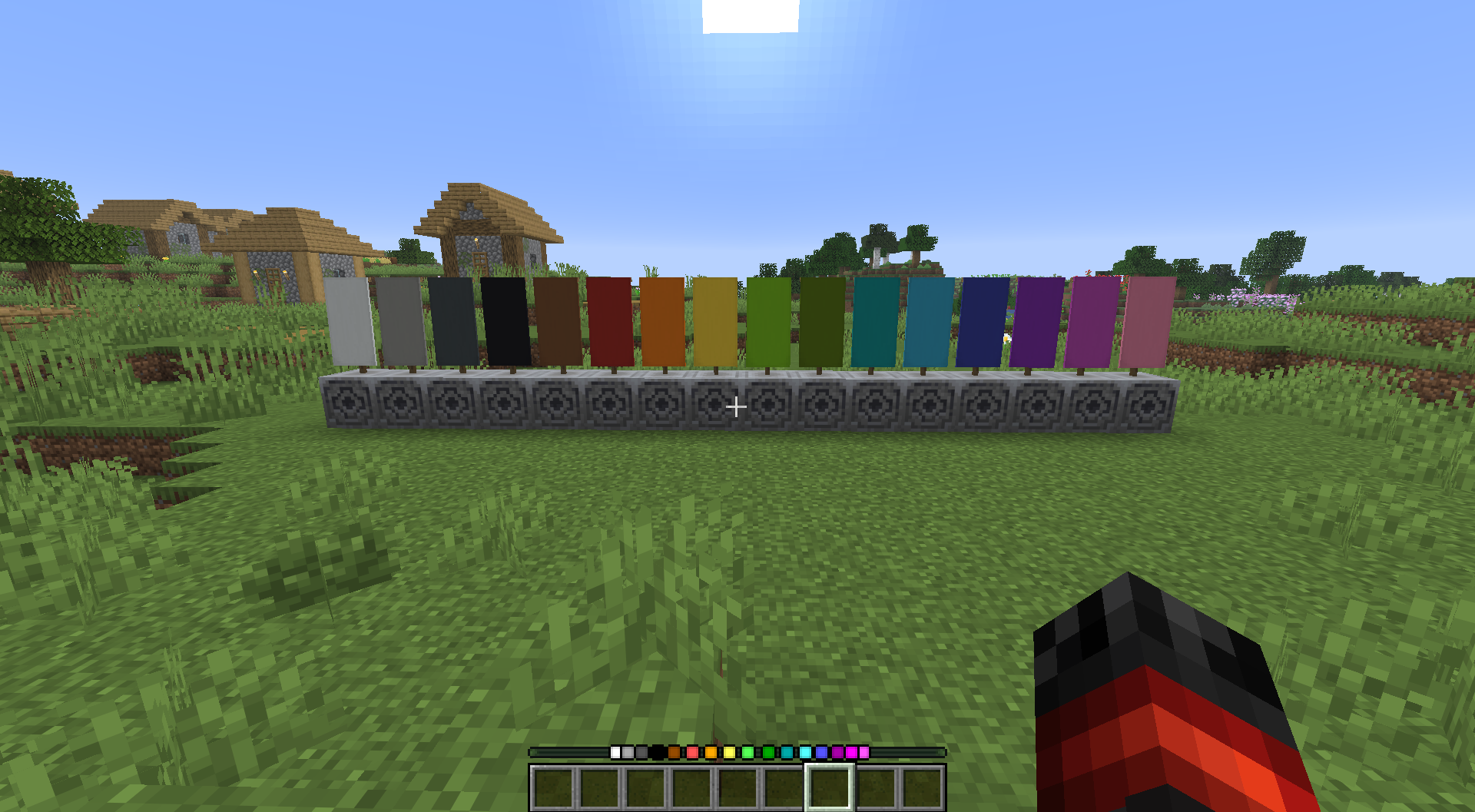
And if you wish to remove a dot, you just need to break the banner, it's as simple as that !
If you have any issue/question, contact me on discord! (@nugrevan) : https://discord.gg/SxarRKTw8k, any feedback will be greatly appreciated, thanks !
Project description from Modrinth.
Pick your setup
Banner&Lodestone Locator Bar by Minecraft version and loader
Choose the version and loader you play, then open the matching release.
Minecraft version
26.2
5 loader buildsMinecraft version
26.1.2
5 loader buildsMinecraft version
26.1.1
5 loader buildsMinecraft version
26.1
5 loader buildsMinecraft version
1.21.11
5 loader buildsForge 1.21.6+-1+mod 2
stable files
· 2 total · 16 May 2026Fabric 1.21.6+-1+mod 2
stable files
· 2 total · 16 May 2026Quilt 1.21.6+-1+mod 2
stable files
· 2 total · 16 May 2026NeoForge 1.21.6+-1+mod 2
stable files
· 2 total · 16 May 2026Loader not listed 1.21.6+-1 2
stable files
· 2 total · 16 May 2026
Minecraft version
1.21.10
5 loader buildsForge 1.21.6+-1+mod 2
stable files
· 2 total · 16 May 2026Fabric 1.21.6+-1+mod 2
stable files
· 2 total · 16 May 2026Quilt 1.21.6+-1+mod 2
stable files
· 2 total · 16 May 2026NeoForge 1.21.6+-1+mod 2
stable files
· 2 total · 16 May 2026Loader not listed 1.21.6+-1 2
stable files
· 2 total · 16 May 2026
Minecraft version
1.21.9
5 loader buildsForge 1.21.6+-1+mod 2
stable files
· 2 total · 16 May 2026Fabric 1.21.6+-1+mod 2
stable files
· 2 total · 16 May 2026Quilt 1.21.6+-1+mod 2
stable files
· 2 total · 16 May 2026NeoForge 1.21.6+-1+mod 2
stable files
· 2 total · 16 May 2026Loader not listed 1.21.6+-1 2
stable files
· 2 total · 16 May 2026
Minecraft version
1.21.8
5 loader buildsForge 1.21.6+-1+mod 2
stable files
· 2 total · 16 May 2026Fabric 1.21.6+-1+mod 2
stable files
· 2 total · 16 May 2026Quilt 1.21.6+-1+mod 2
stable files
· 2 total · 16 May 2026NeoForge 1.21.6+-1+mod 2
stable files
· 2 total · 16 May 2026Loader not listed 1.21.6+-1 2
stable files
· 2 total · 16 May 2026
Minecraft version
1.21.7
5 loader buildsForge 1.21.6+-1+mod 2
stable files
· 2 total · 16 May 2026Fabric 1.21.6+-1+mod 2
stable files
· 2 total · 16 May 2026Quilt 1.21.6+-1+mod 2
stable files
· 2 total · 16 May 2026NeoForge 1.21.6+-1+mod 2
stable files
· 2 total · 16 May 2026Loader not listed 1.21.6+-1 2
stable files
· 2 total · 16 May 2026
Minecraft version
1.21.6
5 loader buildsForge 1.21.6+-1+mod 2
stable files
· 2 total · 16 May 2026Fabric 1.21.6+-1+mod 2
stable files
· 2 total · 16 May 2026Quilt 1.21.6+-1+mod 2
stable files
· 2 total · 16 May 2026NeoForge 1.21.6+-1+mod 2
stable files
· 2 total · 16 May 2026Loader not listed 1.21.6+-1 2
stable files
· 2 total · 16 May 2026
Check the dependencies, then try the file in a copied instance before changing a world you care about.
Recent files
Banner&Lodestone Locator Bar versions and loaders
26.3+mod
banner_and_lodestone-locator-bar-26.3.jar
17 Sept 2026
Client Optional Server Optional Dependencies No extras listed Listed on Release listing
Check the 26.3 · Fabric setup 26.3FabricForgeNeoForge release
26.3
ks_banner_and_lodestone_26.3.zip
17 Sept 2026
Client Optional Server Optional Dependencies No extras listed Listed on Release listing
Check the 26.3 · datapack setup 26.3datapack release
26.2+mod
banner_and_lodestone-locator-bar-26.2.jar
16 Jun 2026
Client Optional Server Optional Dependencies No extras listed Listed on Release listing
Check the 26.2 · Fabric setup 26.2FabricForgeNeoForge release
26.2
ks_banner_and_lodestone_26.2.zip
16 Jun 2026
Client Optional Server Optional Dependencies No extras listed Listed on Release listing
Check the 26.2 · datapack setup 26.2datapack release
1.21.6+-1+mod
banner_and_lodestone-locator-bar-1.21.6+-1.jar
16 May 2026
Client Optional Server Optional Dependencies No extras listed Listed on Release listing
Check the 1.21.11 · Fabric setup 1.21.61.21.71.21.81.21.9 release
1.21.6+-1
banner_and_lodestone_locator_bar_1.21.6+-1.zip
16 May 2026
Client Optional Server Optional Dependencies No extras listed Listed on Release listing
Check the 1.21.11 · datapack setup 1.21.61.21.71.21.81.21.9 release
26.1.x-1+mod
banner_and_lodestone-locator-bar-26.1.x-1.jar
16 May 2026
Client Optional Server Optional Dependencies No extras listed Listed on Release listing
Check the 26.1.2 · Fabric setup 26.126.1.126.1.2Fabric release
26.1.x-1
banner_and_lodestone_locator_bar_26.1.x-1.zip
16 May 2026
Client Optional Server Optional Dependencies No extras listed Listed on Release listing
Check the 26.1.2 · datapack setup 26.126.1.126.1.2datapack release
1.21.6++mod
banner_and_lodestone-locator-bar-1.21.6+.jar
11 May 2026
Client Optional Server Optional Dependencies No extras listed Listed on Release listing
Check the 1.21.11 · Fabric setup 1.21.61.21.71.21.81.21.9 release
1.21.6+
lodestone_and_banner_1.21.6+.zip
11 May 2026
Client Optional Server Optional Dependencies No extras listed Listed on Release listing
Check the 1.21.11 · datapack setup 1.21.61.21.71.21.81.21.9 release
26.1.x+mod
banner_and_lodestone-locator-bar-26.1.x.jar
11 May 2026
Client Optional Server Optional Dependencies No extras listed Listed on Release listing
Check the 26.1.2 · Fabric setup 26.126.1.126.1.2Fabric release
26.1.x
banner_and_lodestone_locator_bar_26.1.x.zip
8 May 2026
Client Optional Server Optional Dependencies No extras listed Listed on Release listing
Check the 26.1.2 · datapack setup 26.126.1.126.1.2datapack release
Looking for an older file? The official Modrinth project page is in Resources.
 mod
mod CurseForge + Modrinth · Minecraft
Factions (Fabric)
Highly customizable, fast and fully featured solution to factions for Fabric
 mod
mod CurseForge + Modrinth · Minecraft
Sodium Extra Information
A Sodium Extra addon that adds more in-game information.
 mod
mod CurseForge + Modrinth · Minecraft
Quick Skin
Sick of wasting time with Minecraft’s slow launcher just to change your skin? Quick Skin lets you swap skins instantly even on “offline” servers and gives you access to every official Minecraft cape.