Quick answer
Which Client Sort release should I use?
Latest stable file 3.103.1+26.2
Game version 26.2
Loader NeoForge
Client Sort 3.103.1+26.2 targets 26.2 with NeoForge. Installation on the client is optional. Installation on the dedicated server is optional. All 1 required mods have matching files.
Where it goes
Is Client Sort required on the client, server, or both?
Installation on the client is optional. Installation on the dedicated server is optional.
Client Optional
Dedicated server Optional
Loader for this release NeoForge
Required install it here Optional supported, not mandatory Not supported do not install here Source doesn’t say do not assume
The source marks this as usable on both the client and server.
What else does Client Sort 3.103.1+26.2 need?
3.103.1+26.2. Change the file and its required mods may change too.
Install Cloth Config API first. We found matching files for this game-version and loader setup.
Matching file found Matched file: 26.2.155+neoforge
We only count dependency files that match this setup. A file for another loader does not fill the gap.
Before you install it
Add Client Sort without breaking your instance.
Built for Client Sort 3.103.1+26.2. Pick another file and the loader, install side or required mods may change.
- 01
Stick to this file
Use 3.103.1+26.2. It targets 26.2 with NeoForge; another release may have different loader, side or dependency requirements.
- 02
Bring the mods it needs
Install Cloth Config API first. We found matching files for this game-version and loader setup.
- 03
Put it on the correct side
Installation on the client is optional. Installation on the dedicated server is optional.
- 04
Pick the file you checked
Use the “Get this file” button beside 3.103.1+26.2. It opens that exact file at the source.
About this project
What does Client Sort add?
Operations
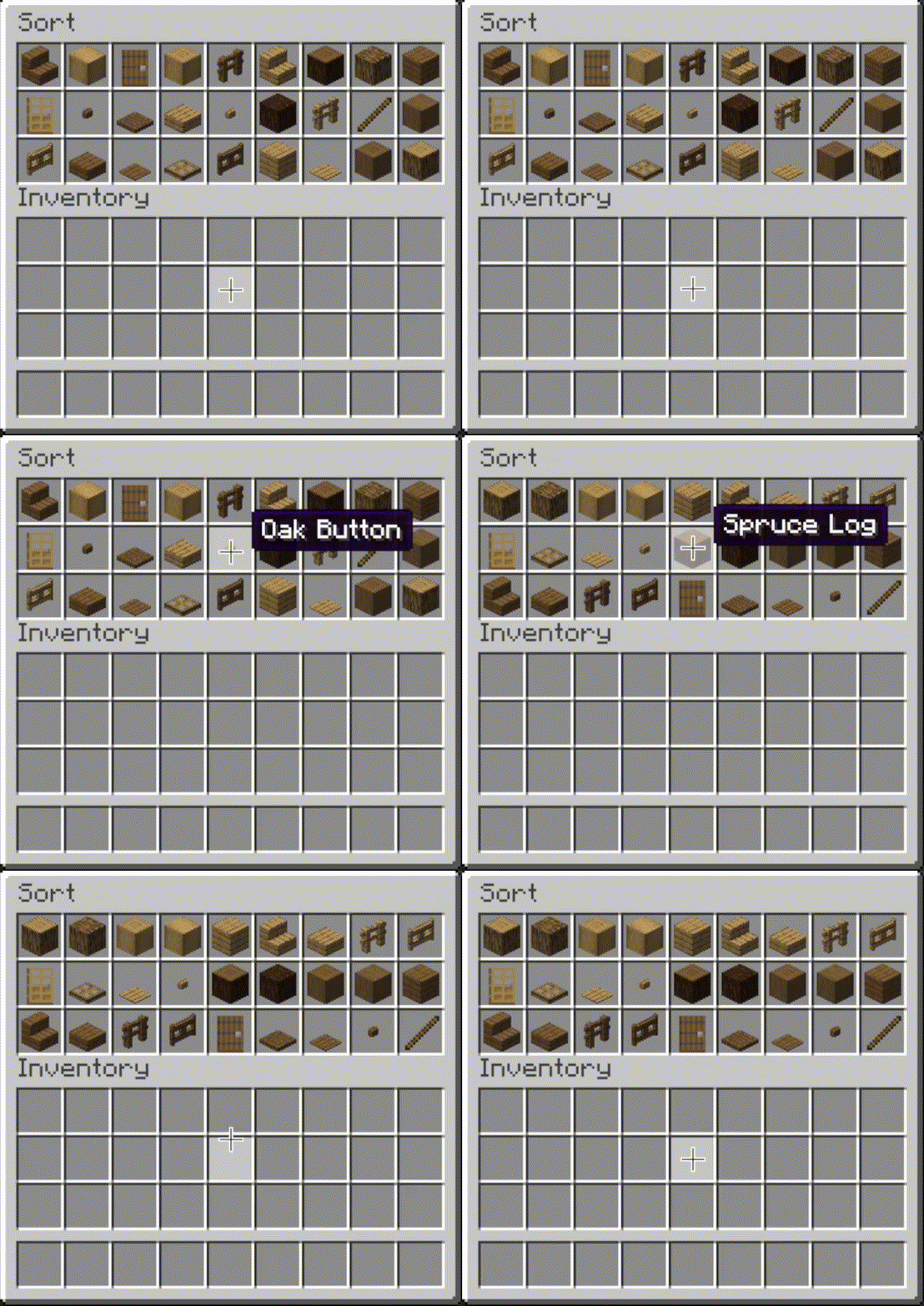
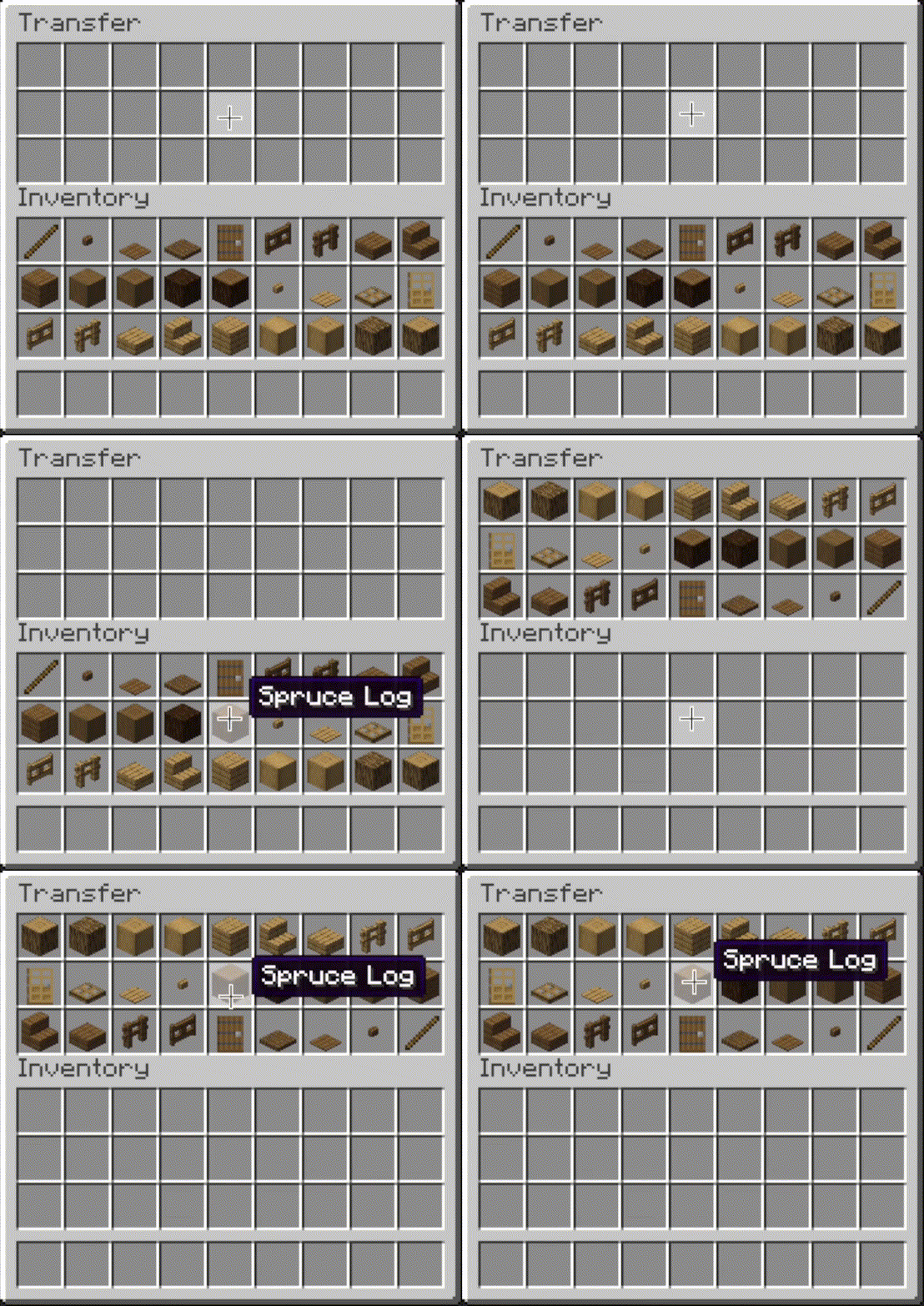
 Sort
Sort
- Press the button, or hover over the inventory with
your mouse and press the keybind (default: middle mouse button).
- When activated, items are sorted by their position in the creative inventory search tab.
Alternative sort orders can be used by holding down a modifier key while sorting.
Shift - descending order of quantity.Control - alphabetical order.Alt - ascending order of item ID.
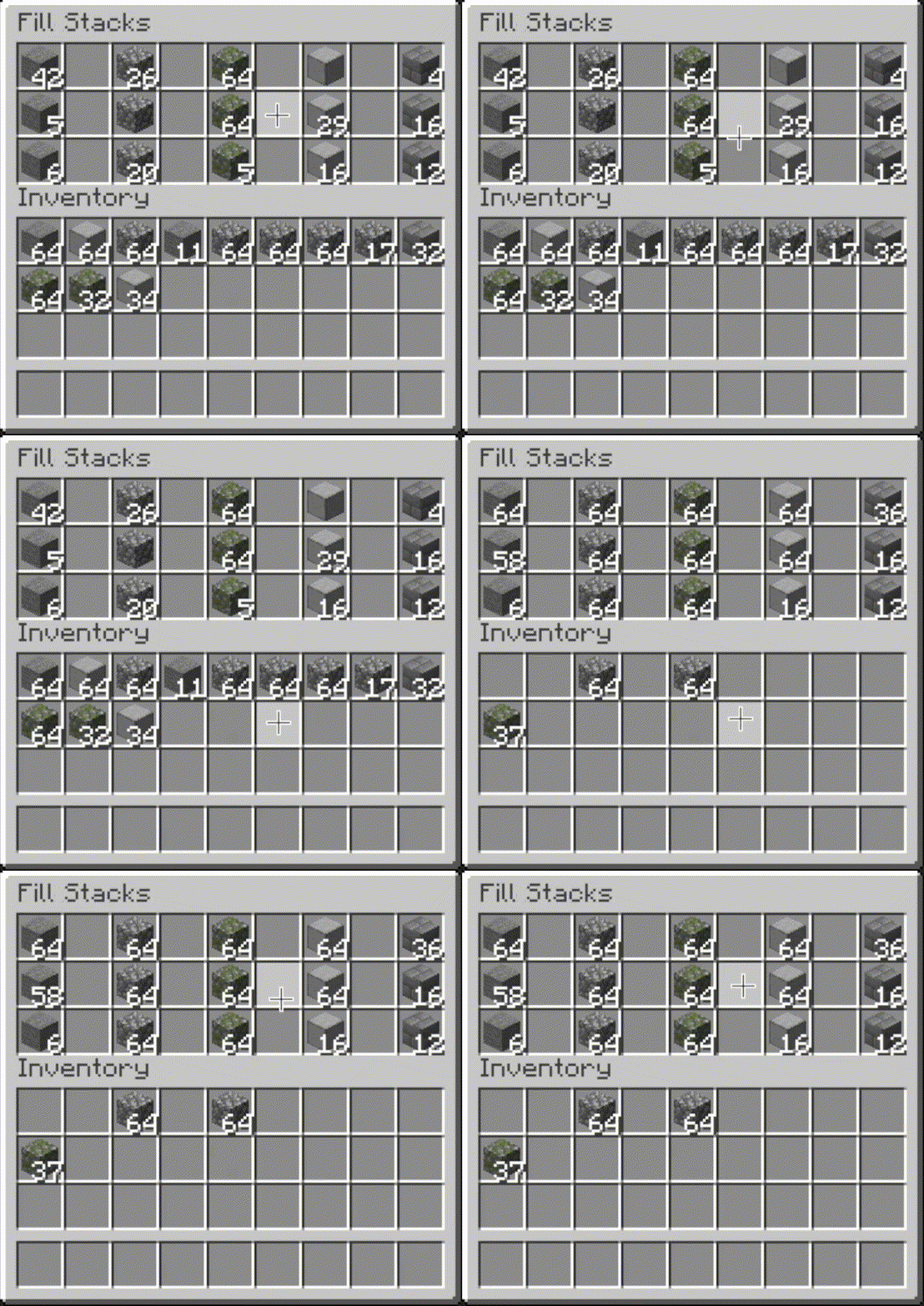
 Fill Stacks
- Press the button, or hover over
the inventory that you want to move items out of and press the keybind (default: unbound).
- When activated, partial stacks in the other inventory are topped-up using items in the origin
inventory.
- This button is disabled on the player inventory by default, but can be enabled via the editor (see
below).
 Restock
- Press the button, or
hover over the inventory that you want to move items out of and press the keybind (default:
unbound).
- When activated, the other inventory is restocked using items in the origin inventory. No new item
types are added to the other inventory.
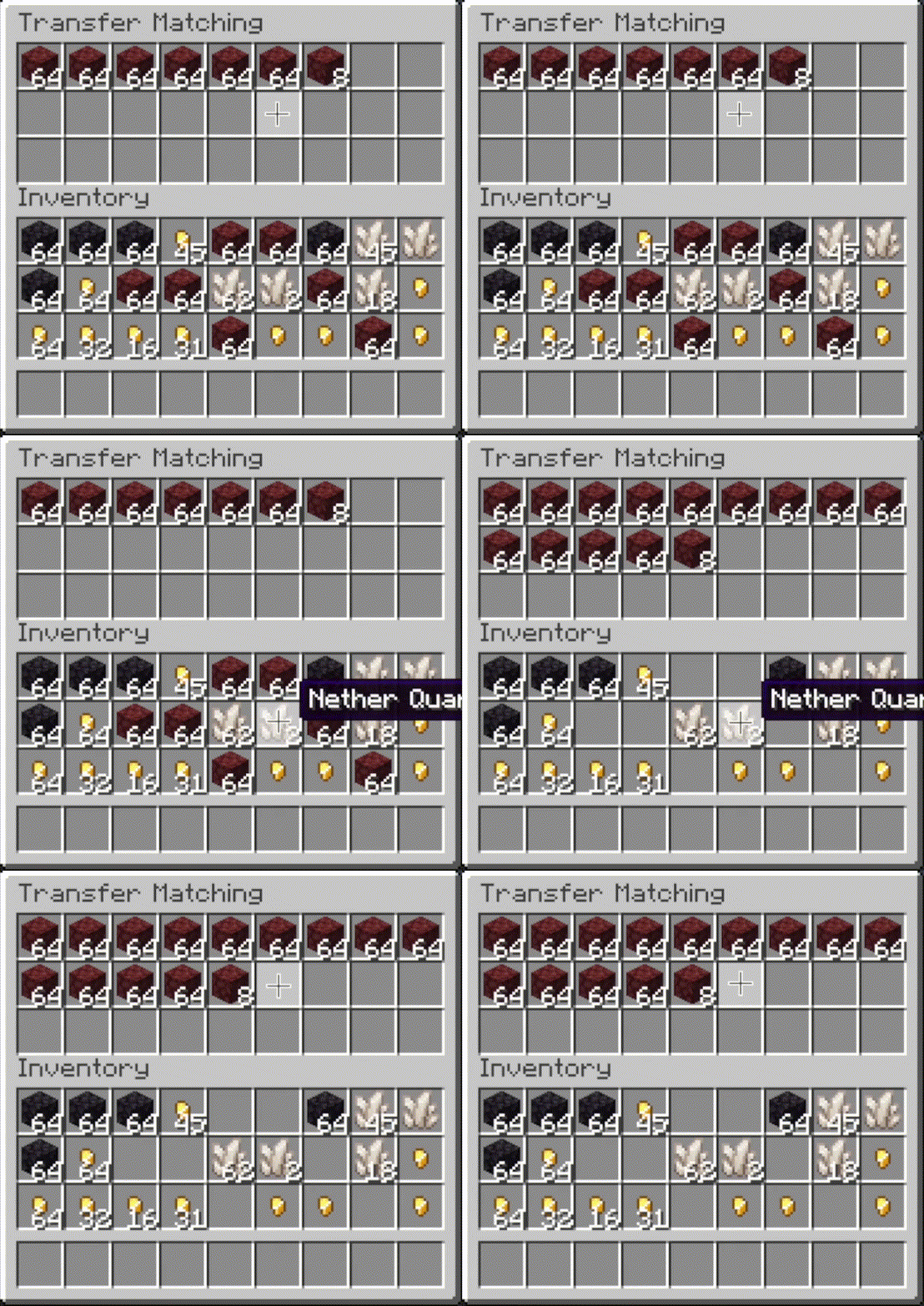
 Transfer
- Press the button, or hover over the
inventory that you want to move items out of and press the keybind (default: unbound).
- When activated, as many items as possible are moved from the origin inventory to the other
inventory.
Other Options
- Slot ignoring:
- Exclude slots from being processed by operations.
- Configurable via the editor screen.
- Auto operations:
- Automatically perform an operation (e.g. sorting) when opening an inventory.
- Configurable via the editor screen.
- Scoping:
- Include or exclude the hotbar and extra slots from being processed with the inventory.
- Configurable via mod config,
General tab.
- Sorting overrides:
- Always sort specific items to the start or end.
- Configurable via mod config,
Sorting tab.
- Matching overrides:
- Ignore NBT data (e.g. enchantments) when comparing items in sort or restock operations.
- Configurable via mod config,
Matching tab.
- Interaction sounds:
- Play a sound when clicking in client-side operations.
- Configurable via mod config,
Sounds tab.
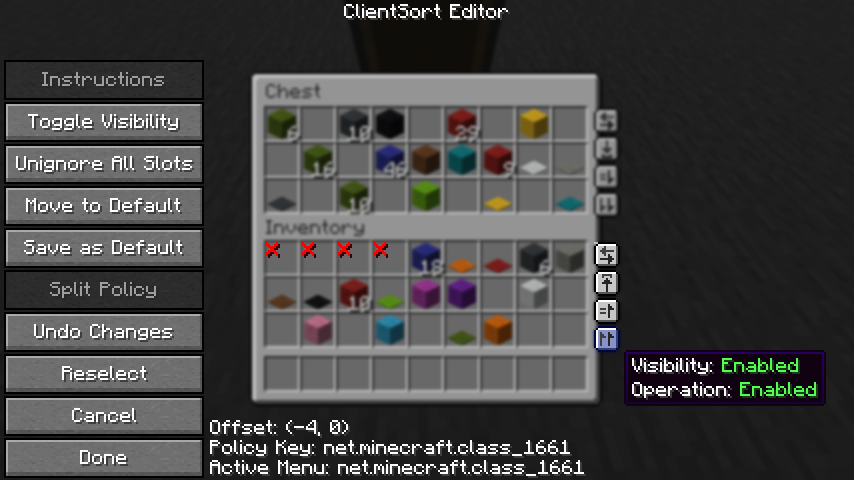
Editor Screen
- The editor can be opened in two ways:
- If a trigger button is visible, right-click on it.
- Otherwise, bind the
Open Editor keybind (unbound by default) and press it while viewing an
inventory.
- When you've opened the editor, hover over
Instructions for more information.
- Note: fill and transfer buttons are only shown if set to show on both the player inventory and
the container, so you can easily hide them everywhere by hiding them on just the player inventory.
Client-Side Policies
- ClientSort uses a policy system to determine when to allow operations, when to show the trigger
buttons, and when to ignore slots. The policy can be configured either via the editor screen or via
the Policies tab of the mod options.
- Read the in-game instructions for more information on editing policies.
Server-Side Policies
- If installed on a dedicated server, ClientSort can use policies to automatically disable
server-accelerated operations when it detects an incorrect state (such as item duplication).
- The policy list is stored in the
clientsort-server.json config file, which can be manually
edited and reloaded using the /clientsort reload command.
Serverside policies are not synced to clients, so if a client attempts to perform a
server-accelerated operation that the server does not allow, a warning message will be shown to the
client. The player can then opt to add a client-side policy to disable the operation entirely,
disable server acceleration, or enable automatically falling back to client operations.
Serverside Config File
{
  "options": {
    // Whether validation and automatic blacklisting should be enabled when the mod is used on a
    // dedicated server.
    "validationActiveServer": false,

    // Whether inventories should be blacklisted when the wrong type of item is found in a slot.
    "validateItemType": true,

    // Whether inventories should be blacklisted when the wrong number of items is found in a slot.
    "validateStackSize": true,
    // The minimum difference between expected and actual which should be considered invalid.
    "validateStackSizeThreshold": 32,

    // Whether to always log a message when the result is not exactly as expected (even if
    // validation is disabled, the difference is less than the threshold, etc.)
    "alwaysLogUnexpectedResults": true,

    // The list of policies for different inventory and container types.
    "classPolicies": {
      // An example entry.
      "com.simibubi.create.content.equipment.toolbox.ToolboxMenu": {
        "className": "com.simibubi.create.content.equipment.toolbox.ToolboxMenu",
        "sortEnabled": false,
        "stackFillEnabled": true,
        "transferEnabled": true,
        // Updated automatically when an inventory is blacklisted.
        "lastAutoEditTime": "2025-09-20T14:58:41.1620876+08:00",
        "lastAutoEditReason": "Sort operation failed at slot mapping 12->5: Expected '2 minecraft:spruce_slab' in destination after set, got '0 minecraft:air'!"
      }
    }
  }
}
Installation
Client Required, Server Optional
- As the name suggests, ClientSort is fully functional when it is only installed on the client.
However, if it is also installed on a server, connected clients with the mod will be able to use
server-accelerated (near-instant) operations instead of the normal rate-limited operations.
Dependencies
Credits
ClientSort uses code from the following mods, in both modified and unmodified form, in accordance
with their respective licenses.
Related Mods
- Mouse Tweaks - item scrolling, mouse dragging.
- More Mouse Tweaks - single-click crafting and trading,
quick-move and quick-drop.
- Tweakeroo - hand restock, auto tool-switch, tool break
prevention and more.
Contact



Project description from Modrinth.
Pick your setup
Client Sort by Minecraft version and loader
Choose the version and loader you play, then open the matching release.
Minecraft version
26.2-rc-2
1
loader build Minecraft version
26.2-rc-1
1
loader build Minecraft version
26.2-pre-5
1
loader build Minecraft version
26.2-pre-4
1
loader build Minecraft version
26.2-pre-3
1
loader build Minecraft version
26.2-pre-2
1
loader build Minecraft version
26.2
2
loader builds Minecraft version
26.1.2
2
loader builds Minecraft version
26.1.1
2
loader builds Minecraft version
26.1-rc-2
2
loader builds Minecraft version
26.1
2
loader builds Minecraft version
1.21.11
2
loader builds Showing the newest 12 of 25 game versions.
Older files are in the list below.
Check the dependencies, then try the file in a copied instance before changing a world you care about.
Recent files
Client Sort versions and loaders
clientsort-neoforge-3.103.1+26.2.jar
4 Jul 2026
Client Optional Server Optional Dependencies 1 required · matched Listed on Release listing
Check the 26.2 · NeoForge setup → clientsort-fabric-3.103.1+26.2.jar
4 Jul 2026
Client Optional Server Optional Dependencies 2 required · 2 unchecked Listed on Release listing
Check the 26.2 · Fabric setup → clientsort-fabric-3.102.5+26.1.2.jar
4 Jul 2026
Client Optional Server Optional Dependencies 2 required · 2 unchecked Listed on Release listing
Check the 26.1.2 · Fabric setup → 26.126.1.126.1.2Fabric release
clientsort-neoforge-3.102.5+26.1.2.jar
4 Jul 2026
Client Optional Server Optional Dependencies 1 required · 1 unchecked Listed on Release listing
Check the 26.1.2 · NeoForge setup → 26.126.1.126.1.2NeoForge release
clientsort-fabric-3.103.0+26.2.jar
19 Jun 2026
Client Optional Server Optional Dependencies 2 required · 2 unchecked Listed on Release listing
Check the 26.2 · Fabric setup → clientsort-neoforge-3.103.0+26.2.jar
19 Jun 2026
Client Optional Server Optional Dependencies 1 required · 1 unchecked Listed on Release listing
Check the 26.2 · NeoForge setup → clientsort-neoforge-3.102.4+26.1.2.jar
19 Jun 2026
Client Optional Server Optional Dependencies 1 required · 1 unchecked Listed on Release listing
Check the 26.1.2 · NeoForge setup → 26.126.1.126.1.2NeoForge release
clientsort-fabric-3.102.4+26.1.2.jar
19 Jun 2026
Client Optional Server Optional Dependencies 2 required · 2 unchecked Listed on Release listing
Check the 26.1.2 · Fabric setup → 26.126.1.126.1.2Fabric release
clientsort-neoforge-3.2.3+26.1.2.jar
31 May 2026
Client Optional Server Optional Dependencies 1 required · 1 unchecked Listed on Release listing
Check the 26.1.2 · NeoForge setup → 26.126.1.126.1.2NeoForge release
clientsort-fabric-3.2.3+26.1.2.jar
31 May 2026
Client Optional Server Optional Dependencies 2 required · 2 unchecked Listed on Release listing
Check the 26.1.2 · Fabric setup → 26.126.1.126.1.2Fabric release
clientsort-fabric-3.3.0-beta.1+26.2-pre-2.jar
31 May 2026
Client Optional Server Optional Dependencies 1 required · 1 unchecked Listed on Release listing
Check the 26.2-pre-5 · Fabric setup → 26.2-pre-226.2-pre-326.2-pre-426.2-pre-5 beta
clientsort-fabric-2.2.2+1.21.11.jar
31 May 2026
Client Optional Server Optional Dependencies 2 required · 2 unchecked Listed on Release listing
Check the 1.21.11 · Fabric setup → 

 mod
mod mod
mod mod
mod






