Minecraft version
Back to mods 
Modrinth · Minecraft mod
Better Compatibility Checker
Changes the default server compatibility check to compare modpack versions
Choose a version Pick your version below, then grab the matching file.
Quick answer
Which Better Compatibility Checker release should I use?
Latest stable file 26.2.0.1
Game version 26.2
Loader NeoForge
Better Compatibility Checker 26.2.0.1 targets 26.2 with NeoForge. Installation on the client is optional. Installation on the dedicated server is optional. No extra mods listed for this file.
Where it goes
Is Better Compatibility Checker required on the client, server, or both?
Installation on the client is optional. Installation on the dedicated server is optional.
Client Optional
Dedicated server Optional
Loader for this release NeoForge
Required install it here Optional supported, not mandatory Not supported do not install here Source doesn’t say do not assume
The source marks this as usable on both the client and server.
What else does Better Compatibility Checker 26.2.0.1 need?
26.2.0.1. Change the file and its required mods may change too.
This file does not list any required mods. Do not add a library just because a different file uses it.
This file does not list any required or optional mods.
Before you install it
Add Better Compatibility Checker without breaking your instance.
Built for Better Compatibility Checker 26.2.0.1. Pick another file and the loader, install side or required mods may change.
- 01
Stick to this file
Use 26.2.0.1. It targets 26.2 with NeoForge; another release may have different loader, side or dependency requirements.
- 02
Bring the mods it needs
This file does not list any required mods. Do not add a library just because a different file uses it.
- 03
Put it on the correct side
Installation on the client is optional. Installation on the dedicated server is optional.
- 04
Pick the file you checked
Use the “Get this file” button beside 26.2.0.1. It opens that exact file at the source.
About this project
What does Better Compatibility Checker add?
The forge server compatibility checker is not always accurate and can cause some issues with end-users of a modpack when they add a server, and it shows up as not compatible.
This mod fixes that issue when used by modpacks, as it will compare the modpack project ID and the modpack version ID set in a config file by the modpack author and display a tick if they match or an X if they do not match.
Both server and client are running the same version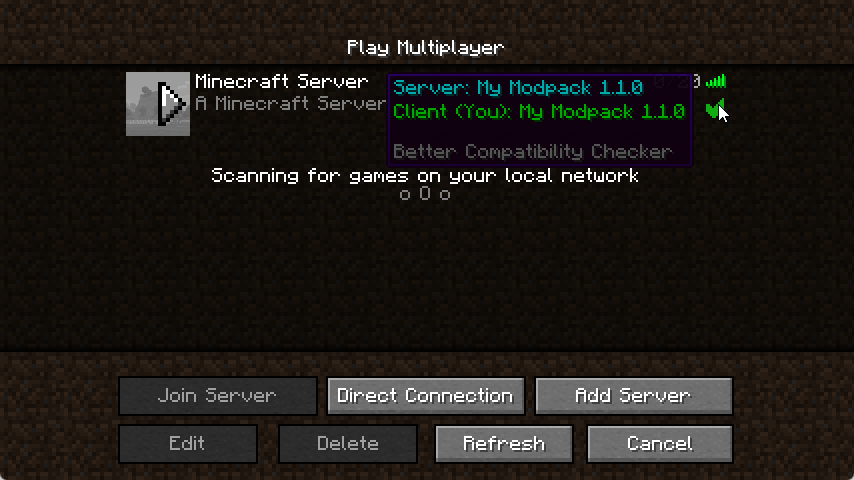
Incompatible server or client version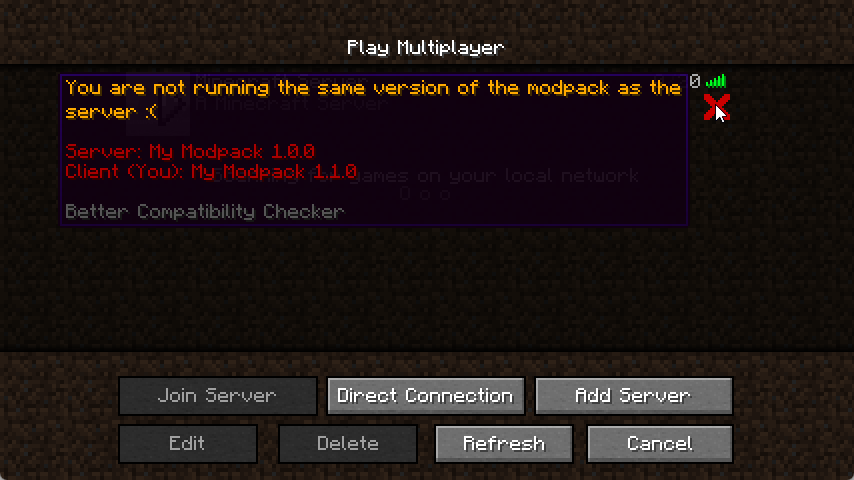
How do I configure the mod?
It's simple to configure the mod, first, you will need to open the bcc-common.toml in the config folder, then you will need to set the modpack name and the modpack version, click save, and you're done.
Just remember to update the version when you update the modpack.
Note: Fabric config is named bcc.json
What happens if the mod is not installed on the server, but is on the client?
This mod will check if the data needed is set first and if it's not it will fall back to using the default forge implementation
All Rights Reserved unless stated otherwise. Distribution permission is given to FeedTheBeast for use in modpacks
Project description from Modrinth.
Pick your setup
Better Compatibility Checker by Minecraft version and loader
Choose the version and loader you play, then open the matching release.
Minecraft version
26.1.2
2 loader buildsMinecraft version
26.1.1
2 loader buildsMinecraft version
26.1
2 loader buildsMinecraft version
1.21.11
2 loader buildsMinecraft version
1.21.10
2 loader buildsMinecraft version
1.21.9
2 loader buildsMinecraft version
1.21.8
2 loader buildsMinecraft version
1.21.7
2 loader buildsMinecraft version
1.21.6
2 loader buildsMinecraft version
1.21.5
2 loader buildsMinecraft version
1.21.4
2 loader buildsShowing the newest 12 of 28 game versions. Older files are in the list below.
Check the dependencies, then try the file in a copied instance before changing a world you care about.
Recent files
Better Compatibility Checker versions and loaders
26.2.0.1
better-compatability-checker-neoforge-26.2.0.1.jar
17 Jun 2026
Client Optional Server Optional Dependencies No extras listed Listed on Release listing
Check the 26.2 · NeoForge setup 26.2NeoForge release
26.2.0.1
better-compatability-checker-fabric-26.2.0.1.jar
17 Jun 2026
Client Optional Server Optional Dependencies 1 required · 1 unchecked Listed on Release listing
Check the 26.2 · Fabric setup 26.2Fabric release
26.1.2.1
better-compatability-checker-neoforge-26.1.2.1.jar
10 Apr 2026
Client Optional Server Optional Dependencies No extras listed Listed on Release listing
Check the 26.1.2 · NeoForge setup 26.126.1.126.1.2NeoForge release
26.1.2.1
better-compatability-checker-fabric-26.1.2.1.jar
10 Apr 2026
Client Optional Server Optional Dependencies 1 required · 1 unchecked Listed on Release listing
Check the 26.1.2 · Fabric setup 26.126.1.126.1.2Fabric release
26.1.2.0
better-compatability-checker-neoforge-26.1.2.0.jar
9 Apr 2026
Client Optional Server Optional Dependencies No extras listed Listed on Release listing
Check the 26.1.2 · NeoForge setup 26.126.1.126.1.2NeoForge release
26.1.2.0
better-compatability-checker-fabric-26.1.2.0.jar
9 Apr 2026
Client Optional Server Optional Dependencies 1 required · 1 unchecked Listed on Release listing
Check the 26.1.2 · Fabric setup 26.126.1.126.1.2Fabric release
26.1.0-0
better-compatability-checker-neoforge-26.1.0-0.jar
24 Mar 2026
Client Optional Server Optional Dependencies No extras listed Listed on Release listing
Check the 26.1.1 · NeoForge setup 26.126.1.1NeoForge release
26.1.0-0
better-compatability-checker-fabric-26.1.0-0.jar
24 Mar 2026
Client Optional Server Optional Dependencies 1 required · 1 unchecked Listed on Release listing
Check the 26.1.1 · Fabric setup 26.126.1.1Fabric release
21.11.0
better-compatability-checker-neoforge-21.11.0.jar
1 Jan 2026
Client Optional Server Optional Dependencies No extras listed Listed on Release listing
Check the 1.21.11 · NeoForge setup 1.21.91.21.11NeoForge release
21.11.0
better-compatability-checker-fabric-21.11.0.jar
1 Jan 2026
Client Optional Server Optional Dependencies 1 required · 1 unchecked Listed on Release listing
Check the 1.21.11 · Fabric setup 1.21.91.21.11Fabric release
21.10.0
better-compatability-checker-neoforge-21.10.0.jar
1 Jan 2026
Client Optional Server Optional Dependencies No extras listed Listed on Release listing
Check the 1.21.10 · NeoForge setup 1.21.91.21.10NeoForge release
21.10.0
better-compatability-checker-fabric-21.10.0.jar
1 Jan 2026
Client Optional Server Optional Dependencies 1 required · 1 unchecked Listed on Release listing
Check the 1.21.10 · Fabric setup 1.21.91.21.10Fabric release
Looking for an older file? The official Modrinth project page is in Resources.
 mod
mod CurseForge + Modrinth · Minecraft
Divine Workshop
Adding 25+ powerful enchantments across 5 tiers. Fully configurable, with in-game config terminal.
 mod
mod CurseForge + Modrinth · Minecraft
Jade 🔍
Shows information about what you are looking at. (Hwyla/WAILA fork for Minecraft 1.16+)
 mod
mod CurseForge + Modrinth · Minecraft
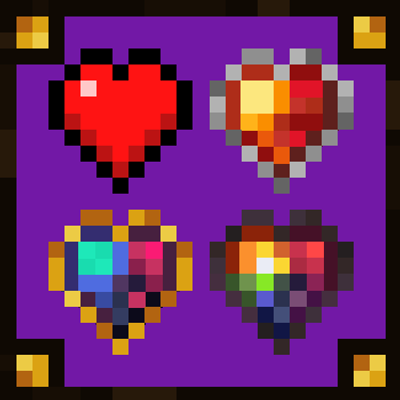
Progressive Hearts
A mini mod that adds three permanent progression apples that grant extra hearts forever. Inspired by the permanent improvements of Terraria's Calamity Mod and Infernum Mod