Minecraft version
Back to mods 
Modrinth · Minecraft mod
GalLab
General resource pack for all my datapacks.
Choose a version Pick your version below, then grab the matching file.
Quick answer
Which GalLab release should I use?
Latest stable file 1.2.04
Game version 1.20, 1.20.1, 1.20.2
Loader minecraft
GalLab 1.2.04 targets 1.20, 1.20.1, 1.20.2 with minecraft. It must be installed on the client. Do not install it on the dedicated server. No extra mods listed for this file.
Where it goes
Is GalLab required on the client, server, or both?
It must be installed on the client. Do not install it on the dedicated server.
Client Required
Dedicated server Not supported
Loader for this release minecraft
Required install it here Optional supported, not mandatory Not supported do not install here Source doesn’t say do not assume
This file is marked client-only.
What else does GalLab 1.2.04 need?
1.2.04. Change the file and its required mods may change too.
This file does not list any required mods. Do not add a library just because a different file uses it.
This file does not list any required or optional mods.
Before you install it
Add GalLab without breaking your instance.
Built for GalLab 1.2.04. Pick another file and the loader, install side or required mods may change.
- 01
Stick to this file
Use 1.2.04. It targets 1.20, 1.20.1, 1.20.2 with minecraft; another release may have different loader, side or dependency requirements.
- 02
Bring the mods it needs
This file does not list any required mods. Do not add a library just because a different file uses it.
- 03
Put it on the correct side
It must be installed on the client. Do not install it on the dedicated server.
- 04
Pick the file you checked
Use the “Get this file” button beside 1.2.04. It opens that exact file at the source.
About this project
What does GalLab add?
You don't need to install this resource pack without installing my datapacks.
This resource pack does not change any vanilla elements of the game!
This resourcepack is required for the correct work of some of my datapacks. You can still use datapacks without this resourcepack.
In addition to adding visual aspects, this resource pack also translates datapacks into these languages:
- English (Default)
- Spanish Espain
- Spanish Mexico
- Russian
You can help translate into other languages by contacting me on Reddit.
In addition to datapack resources, this resource pack adds color filters with which you can change the color of the entire screen, creating a simulation of a color filter in front of your eyes.
Usage:
title @a title {"text":"<opacity>","font":"filter:fill","color":"<color>"}
# <opacity> - char from 1 to a (1,2,3,4,5,6,7,8,9,a) is the opacity from 10% (1) to 100% (a).
# <color> - any color name or any HEX color code
Command result for example command: title @a title {"text":"3","font":"filter:fill","color":"#00FF00"}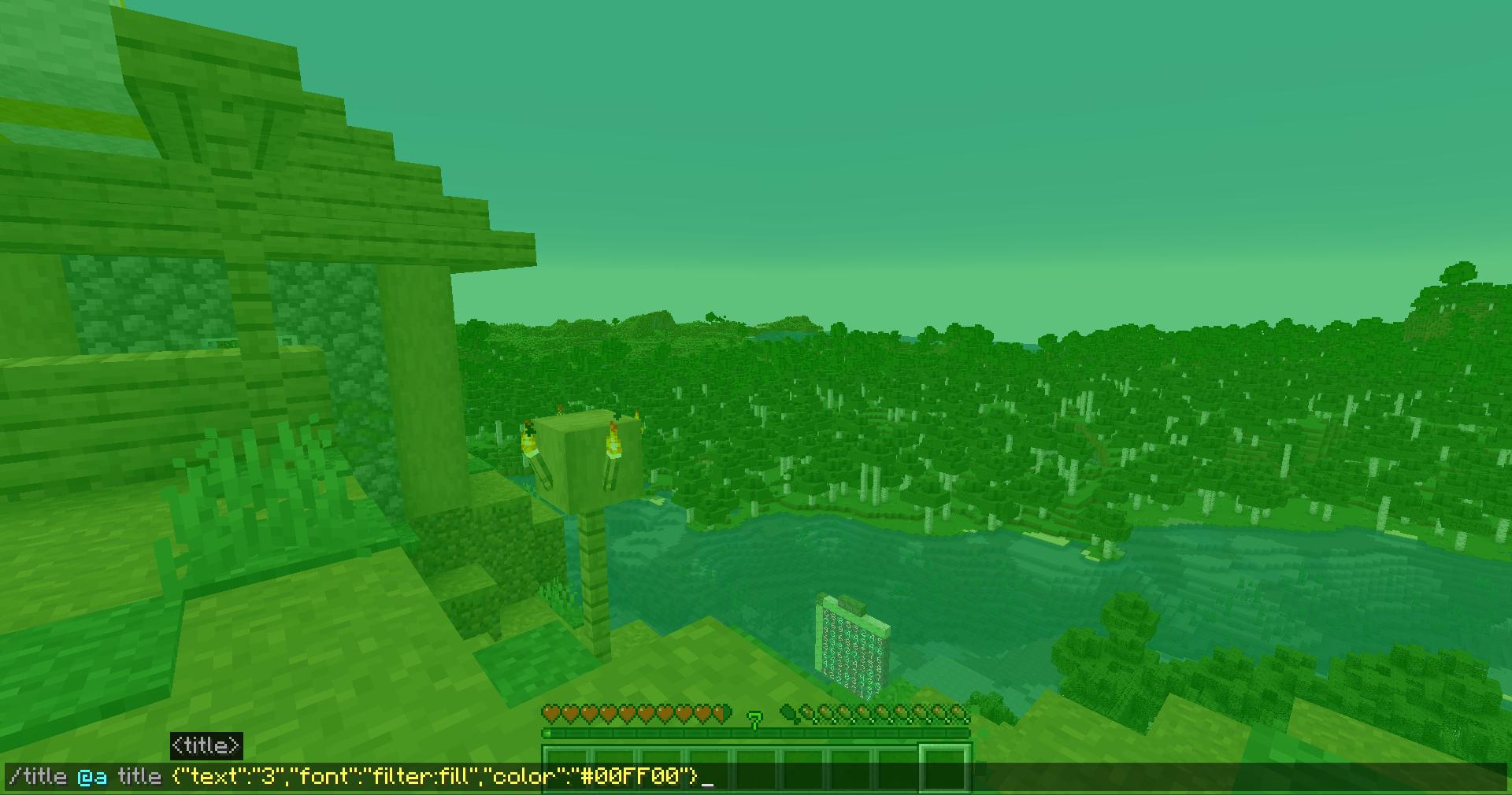
Project description from Modrinth.
Pick your setup
GalLab by Minecraft version and loader
Choose the version and loader you play, then open the matching release.
Minecraft version
26.2
1 loader buildMinecraft version
26.1.2
1 loader buildMinecraft version
26.1.1
1 loader buildMinecraft version
26.1
1 loader buildMinecraft version
24w46a
1 loader buildMinecraft version
24w45a
1 loader buildMinecraft version
24w44a
1 loader buildMinecraft version
24w40a
1 loader buildMinecraft version
24w39a
1 loader buildMinecraft version
24w38a
1 loader buildMinecraft version
24w37a
1 loader buildShowing the newest 12 of 69 game versions. Older files are in the list below.
Check the dependencies, then try the file in a copied instance before changing a world you care about.
Recent files
GalLab versions and loaders
1.2.04
GalLab.zip
14 Oct 2026
Client Required Server Not supported Dependencies No extras listed Listed on Release listing
Check the 26.3 · minecraft setup 1.201.20.11.20.21.20.3 release
1.2.03
GalLab.zip
23 Mar 2026
Client Required Server Not supported Dependencies No extras listed Listed on Release listing
Check the 24w46a · minecraft setup 1.201.20.123w31a23w32a release
1.2.02
GalLab.zip
6 Feb 2025
Client Required Server Not supported Dependencies No extras listed Listed on Release listing
Check the 1.21.4 · minecraft setup 1.201.20.11.20.21.20.3 release
1.2.01
GalLab v1.2.01.zip
19 Jan 2025
Client Required Server Not supported Dependencies No extras listed Listed on Release listing
Check the 1.21.4 · minecraft setup 1.201.20.11.20.21.20.3 release
1.2
GalLab v1.2.zip
12 Jan 2025
Client Required Server Not supported Dependencies No extras listed Listed on Release listing
Check the 1.21.4 · minecraft setup 1.201.20.11.20.21.20.3 release
1.0.1
GalLab v1.0.1 (1.20+).zip
25 Jun 2023
Client Required Server Not supported Dependencies No extras listed Listed on Release listing
Check the 1.20.1 · minecraft setup 1.201.20.1minecraft release
1.0
GalLab v1.0 (1.20+).zip
23 Jun 2023
Client Required Server Not supported Dependencies No extras listed Listed on Release listing
Check the 1.20.1 · minecraft setup 1.201.20.1minecraft release
Looking for an older file? The official Modrinth project page is in Resources.
 mod
mod CurseForge + Modrinth · Minecraft
Icarus
Adds a bunch of colourful and unique wings that can be worn in the Trinkets/Curios Cape slot.
 mod
mod Modrinth · Minecraft
ChatTranslator
This Fabric mod enables real-time chat translation in Minecraft using the DeepL API. It is designed to facilitate smooth communication on international servers, with specialized features for high-traffic environments.
 mod
mod Modrinth · Minecraft
YunbeiUC: Ocelot Sign
This mod focuses on road traffic guidance. It features standard road signs from the Chinese Mainland, public information symbols, custom sign blocks, and matching support pillars.