Minecraft version
Back to mods 
Modrinth · Minecraft mod
InventoryHUD+
Adds your main inventory, potion effects and your equipments to your HUD. And few other features.
Choose a version Pick your version below, then grab the matching file.
Quick answer
Which InventoryHUD+ release should I use?
Latest stable file 3.4.32
Game version 26.2
Loader Forge
InventoryHUD+ 3.4.32 targets 26.2 with Forge. It must be installed on the client. Do not install it on the dedicated server. No extra mods listed for this file.
Where it goes
Is InventoryHUD+ required on the client, server, or both?
It must be installed on the client. Do not install it on the dedicated server.
Client Required
Dedicated server Not supported
Loader for this release Forge
Required install it here Optional supported, not mandatory Not supported do not install here Source doesn’t say do not assume
This file is marked client-only.
What else does InventoryHUD+ 3.4.32 need?
3.4.32. Change the file and its required mods may change too.
This file does not list any required mods. Do not add a library just because a different file uses it.
This file does not list any required or optional mods.
Before you install it
Add InventoryHUD+ without breaking your instance.
Built for InventoryHUD+ 3.4.32. Pick another file and the loader, install side or required mods may change.
- 01
Stick to this file
Use 3.4.32. It targets 26.2 with Forge; another release may have different loader, side or dependency requirements.
- 02
Bring the mods it needs
This file does not list any required mods. Do not add a library just because a different file uses it.
- 03
Put it on the correct side
It must be installed on the client. Do not install it on the dedicated server.
- 04
Pick the file you checked
Use the “Get this file” button beside 3.4.32. It opens that exact file at the source.
About this project
What does InventoryHUD+ add?
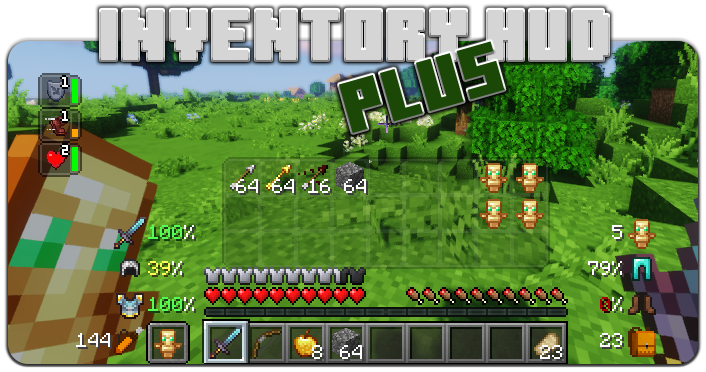

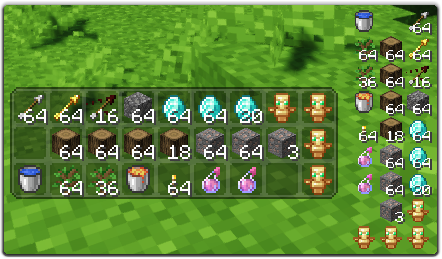
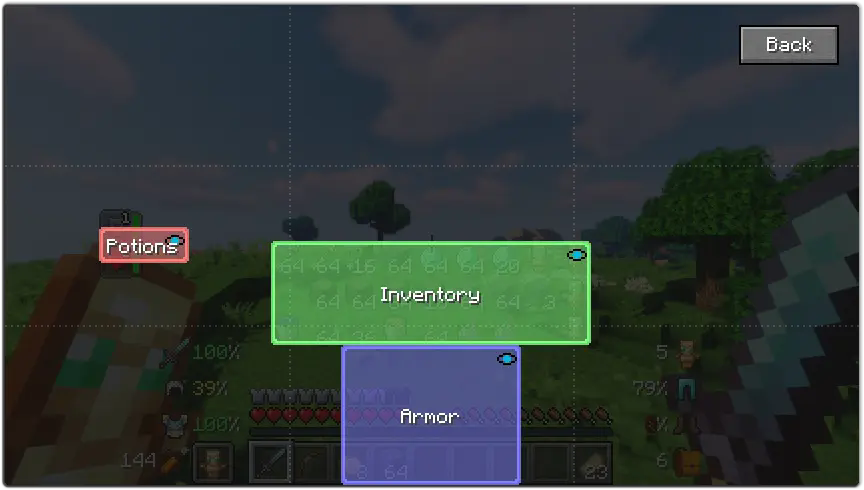
This mod contains a few features, first of all - Inventory HUD, it shows your inventory while you are playing, you can switch between mods (mini/normal and horizontal/vertical), also you can change background transparency and toggle animation on/off
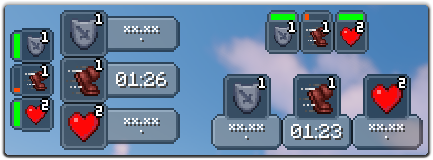
Next feature is PotionHUD, it shows your potion effects with timer or duration bar if you are using mini mode, you can change gap between effects and background transparency in config, and you can enable horizontal mode as well
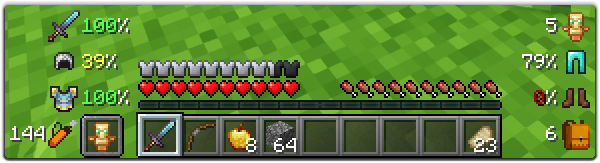
And last but not least feature is ArmorHUD, it shows durability of your armor and equipment, also shows how many free slots do you have in your inventory and how many arrows do you have. This HUD is fully customizable, you can change scale, type of damage indicator or turn on/off each part of your equipment
You can change a lot of options in config ("Mod" button in Main Menu, then "Config"), also you can change the position for each HUD by simply dragging and dropping them. To open ingame config screen you can use keybind ("O" by default)
If you want to help me to make this mod better, you can translate it to your language and send json file to me.
You can find original lang file here: en_us.json
Supported languages
- Chinese Simplified (Mainland China) (zh_cn) (thanks to Satxm)
- Chinese Traditional (Taiwan) (zh_tw) (thanks to yichifauzi)
- Czech (cs_cz) (thanks to Janys159)
- English (en_us)
- French (fr_fr) (thanks to Peperehobbits01)
- German (de_de) (thanks to arrowlevel)
- Hungarian (hu_hu) (thanks to Kalmix88)
- Italian (it_it) (thanks to cranos96)
- Japanese (ja_jp) (thanks to co_91)
- Korean (ko_kr) (thanks to gueso-gato1355)
- Portuguese - Brasil (pt_br) (thanks to VitorLeonardo)
- Russian (ru_ru)
- Spanish (es_es) (thanks to Zeedif)
- Turkish (tr_tr) (thanks to MefeBey)
- Ukrainian (uk_ua) (thanks to Elvis_Danger)
Project description from Modrinth.
Pick your setup
InventoryHUD+ by Minecraft version and loader
Choose the version and loader you play, then open the matching release.
Minecraft version
26.1.2
3 loader buildsMinecraft version
26.1.1
3 loader buildsMinecraft version
26.1
3 loader buildsMinecraft version
1.21.11
3 loader buildsMinecraft version
1.21.10
3 loader buildsMinecraft version
1.21.9
3 loader buildsMinecraft version
1.21.8
3 loader buildsMinecraft version
1.21.5
3 loader buildsMinecraft version
1.21.4
3 loader buildsMinecraft version
1.21.3
3 loader buildsMinecraft version
1.21.1
3 loader buildsShowing the newest 12 of 25 game versions. Older files are in the list below.
Check the dependencies, then try the file in a copied instance before changing a world you care about.
Recent files
InventoryHUD+ versions and loaders
3.4.32
inventoryhud.forge.26.2-3.4.32.jar
20 Jun 2026
Client Required Server Not supported Dependencies No extras listed Listed on Release listing
Check the 26.2 · Forge setup 26.2Forge release
3.4.32
inventoryhud.fabric.26.2-3.4.32.jar
20 Jun 2026
Client Required Server Not supported Dependencies No extras listed Listed on Release listing
Check the 26.2 · Fabric setup 26.2Fabric release
3.4.32
inventoryhud.neoforge.26.2-3.4.32.jar
20 Jun 2026
Client Required Server Not supported Dependencies No extras listed Listed on Release listing
Check the 26.2 · NeoForge setup 26.2NeoForge release
3.4.31
inventoryhud.forge.26.1.2-3.4.31.jar
19 Apr 2026
Client Required Server Not supported Dependencies No extras listed Listed on Release listing
Check the 26.1.2 · Forge setup 26.126.1.126.1.2Forge release
3.4.31
inventoryhud.fabric.26.1.2-3.4.31.jar
19 Apr 2026
Client Required Server Not supported Dependencies No extras listed Listed on Release listing
Check the 26.1.2 · Fabric setup 26.126.1.126.1.2Fabric release
3.4.31
inventoryhud.neoforge.26.1.2-3.4.31.jar
19 Apr 2026
Client Required Server Not supported Dependencies No extras listed Listed on Release listing
Check the 26.1.2 · NeoForge setup 26.126.1.126.1.2NeoForge release
3.4.30
inventoryhud.forge.26.1.2-3.4.30.jar
12 Apr 2026
Client Required Server Not supported Dependencies No extras listed Listed on Release listing
Check the 26.1.2 · Forge setup 26.126.1.126.1.2Forge release
3.4.30
inventoryhud.fabric.26.1.2-3.4.30.jar
12 Apr 2026
Client Required Server Not supported Dependencies No extras listed Listed on Release listing
Check the 26.1.2 · Fabric setup 26.126.1.126.1.2Fabric release
3.4.30
inventoryhud.neoforge.26.1.2-3.4.30.jar
12 Apr 2026
Client Required Server Not supported Dependencies No extras listed Listed on Release listing
Check the 26.1.2 · NeoForge setup 26.126.1.126.1.2NeoForge release
3.4.30
inventoryhud.forge.26.1.1-3.4.30.jar
7 Apr 2026
Client Required Server Not supported Dependencies No extras listed Listed on Release listing
Check the 26.1.1 · Forge setup 26.1.1Forge release
3.4.30
inventoryhud.fabric.26.1.1-3.4.30.jar
7 Apr 2026
Client Required Server Not supported Dependencies No extras listed Listed on Release listing
Check the 26.1.1 · Fabric setup 26.1.1Fabric release
3.4.30
inventoryhud.neoforge.26.1.1-3.4.30.jar
7 Apr 2026
Client Required Server Not supported Dependencies No extras listed Listed on Release listing
Check the 26.1.1 · NeoForge setup 26.1.1NeoForge release
Looking for an older file? The official Modrinth project page is in Resources.
 mod
mod CurseForge + Modrinth · Minecraft
Replication AE2 Bridge
Adds a system for integrating AE2 and Replication.
 mod
mod CurseForge + Modrinth · Minecraft
🔍 Create: Storage Terminal
Create: Storage Terminal makes large storage systems easier to search, manage, and access—without opening every container individually.
 mod
mod CurseForge + Modrinth · Minecraft
Resource Backpack's
Yet another Backpack's Mod