Mod Menu Optional for SpecSpoof 1.2
optionalNo matching file

Modrinth · Minecraft mod
Modify your hardware configuration strings in the F3 Menu with FPS Spoofer built in!
Quick answer
SpecSpoof 1.2 targets 1.14, 1.14.1, 1.14.2 with Fabric. It must be installed on the client. Do not install it on the dedicated server. No extra mods listed for this file.
Where it goes
It must be installed on the client. Do not install it on the dedicated server.
This file is marked client-only.
1.2 on 1.16.2. Every mod below is checked against that same setup.
This file does not list any required mods. Do not add a library just because a different file uses it.
We only count dependency files that match this setup. A file for another loader does not fill the gap.
Before you install it
Built for SpecSpoof 1.2 on 1.16.2. Pick another file and the loader, install side or required mods may change.
Use 1.2. It targets 1.14, 1.14.1, 1.14.2 with Fabric; another release may have different loader, side or dependency requirements.
This file does not list any required mods. Do not add a library just because a different file uses it.
It must be installed on the client. Do not install it on the dedicated server.
Use the “Get this file” button beside 1.2. It opens that exact file at the source.
About this project
SpecSpoof is a Fabric mod that allows you to modify the hardware string displayed in the F3 menu. With this mod, you can customize the hardware information shown in the F3 menu to your liking. Whether you want to show off your (fraud) high-end hardware or keep your specs private. Now depends on Roselib!
This mod should be highly compatible with other mods, but if you find any incompatibilities or bugs, just open up an issue in the GitHub repo. I'll probably try to implement a workaround.
ModMenu is recommended for easier config modification!
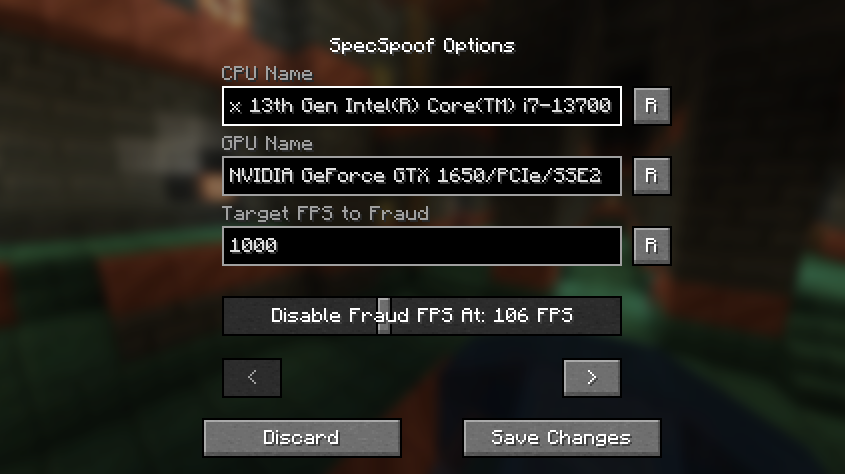
All options should be straightforward, so go nuts!
Quick Documentation JSON:
{
  "CPU": "your cpu name", //desired fake CPU name
  "GPU": ""your gpu name", // desired fake GPU name
  "FPS": 1000, // desired FPS to be faked as
  "disableFPSThreshold": 100 // The FPS Threshold for the fake fps to be deactivated, you see, to make it more believable, if your frames are dipping, the fps should actually reflect to that. imagine saying you have 1000 fps but your game runs like a slideshow, that just wouldn't work. (set to 999999 if you don't want this feature, set to 0 if you want to always fake your FPS)
  "GPUVendor": "the vendor", // This is what shows in the brackets right beside your resolution, you might want to change this to your desired GPU brand if you want to make it believable.
  "GPUDriver": "the driver" // This is the GPU driver string, which shows below the GPU string, you should also change this if you want to make your fake GPU believable.
}
The formatting is also your choice, you can make it actually believable or just put random nonsense on the string.
Examples:
{
  "CPU": "112x Intel(R) Xeon(R) w9-3495X",
  "GPU": "NVIDIA GeForce RTX 2080 SUPER/PCIe/SSE2",
  "FPS": 3400,
  "disableFPSThreshold": 100
  "GPUVendor": "NVIDIA Corporation",
  "GPUDriver": "3.2.0 NVIDIA 531.37"
}
{
  "CPU": "Rose Flowers",
  "GPU": "Pigeons",
  "FPS": 10,
  "disableFPSThreshold": 0
  "GPUVendor": "Eggs Inc",
  "GPUDriver": "1.2 months"
}
Project description from Modrinth.
Pick your setup
Choose the version and loader you play, then open the matching release.
Showing the newest 12 of 46 game versions. Older files are in the list below.
Check the dependencies, then try the file in a copied instance before changing a world you care about.
Recent files
SpecSpoof-1.2.jar
6 Sept 2023
SpecSpoof-1.1.jar
12 Aug 2023
SpecSpoof-1.0-SNAPSHOT.jar
4 Aug 2023
Looking for an older file? The official Modrinth project page is in Resources.
 mod
Improves your keys & controls setup by providing modifier keys and making multi-functional keys a thing.
 mod
Prevents Endermen from picking up blocks.
 mod
Two-way chat between your Minecraft server and a Discord channel, plus server status, whitelist and alerts. No open port needed. Companion plugin for the Minecraft Sync Discord bot.