Minecraft version
Back to mods 
Modrinth · Minecraft mod
Simple Block Randomizer
Randomizes which enabled hotbar slot is used on every block placement. Pick your slots once, then just click - no more scrolling between block variants mid-build.
Choose a version Pick your version below, then grab the matching file.
Quick answer
Which Simple Block Randomizer release should I use?
Latest stable file 2.0.0
Game version 26.3
Loader Fabric
Simple Block Randomizer 2.0.0 targets 26.3 with Fabric. It must be installed on the client. Do not install it on the dedicated server. No extra mods listed for this file.
Where it goes
Is Simple Block Randomizer required on the client, server, or both?
It must be installed on the client. Do not install it on the dedicated server.
Client Required
Dedicated server Not supported
Loader for this release Fabric
Required install it here Optional supported, not mandatory Not supported do not install here Source doesn’t say do not assume
This file is marked client-only.
What else does Simple Block Randomizer 2.0.0 need?
2.0.0. Change the file and its required mods may change too.
This file does not list any required mods. Do not add a library just because a different file uses it.
This file does not list any required or optional mods.
Before you install it
Add Simple Block Randomizer without breaking your instance.
Built for Simple Block Randomizer 2.0.0. Pick another file and the loader, install side or required mods may change.
- 01
Stick to this file
Use 2.0.0. It targets 26.3 with Fabric; another release may have different loader, side or dependency requirements.
- 02
Bring the mods it needs
This file does not list any required mods. Do not add a library just because a different file uses it.
- 03
Put it on the correct side
It must be installed on the client. Do not install it on the dedicated server.
- 04
Pick the file you checked
Use the “Get this file” button beside 2.0.0. It opens that exact file at the source.
About this project
What does Simple Block Randomizer add?
Block Randomizer
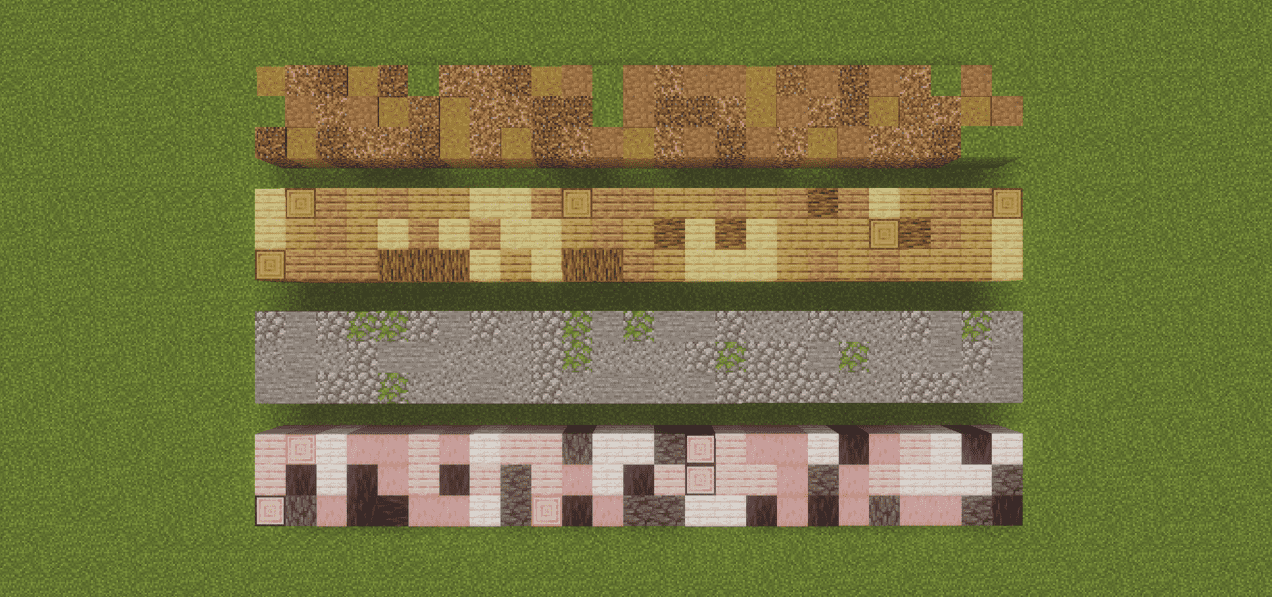
Building a stone wall out of four different variants usually means scrolling your
hotbar between every single click. Block Randomizer does the scrolling for you:
enable the slots you want to build with, and every placement picks one of them at
random.
Client-side only. Works on any server, no server install needed.
Features
- Random block placement - every placement uses a uniformly random enabled
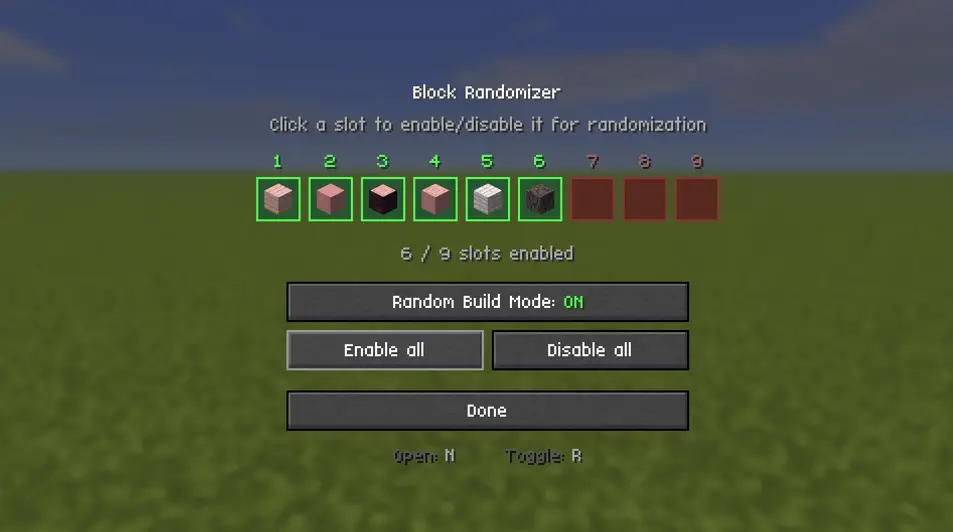
hotbar slot. Truly random, so the same block can come up twice in a row. - Pick your slots visually - a settings screen shows your live hotbar as nine
cells. Click a cell to enable or disable that slot - Enable all / Disable all buttons for quick setup.
- Toggle on the fly with a single key, without opening any menu.
- Mod Menu support - open the settings straight from the mod list. The screen
also shows your current keybinds, so there is no need to hunt through Controls. - HUD indicator - a small marker in the top-left shows the mode is
on and how many slots are in the pool. - Settings persist across restarts.
- No server install. It only changes which slot you have selected before a
completely normal vanilla placement.
How to use
- Put the blocks you want to mix into your hotbar.
- Press N to open the settings screen.
- Click the slots that should take part. Green = enabled, red = disabled.
- Press R (or the button on the screen) to turn Random Build Mode on.
- Build. Every click places a random one of your enabled slots.
Default keybinds
| Key | Action |
|---|---|
N |
Open the randomizer settings screen |
R |
Toggle Random Build Mode on / off |
Both are rebindable under Options → Controls → Block Randomizer.
Requirements
- Fabric Loader 0.19.3 or newer
Multiplayer
Safe on servers. The mod only swaps your own selected hotbar slot right before a
normal vanilla placement - it never places blocks you do not have, and it does not
bypass any placement rules. No server-side installation.
Made by Sebi. Licensed under MIT.
Project description from Modrinth.
Pick your setup
Simple Block Randomizer by Minecraft version and loader
Choose the version and loader you play, then open the matching release.
Minecraft version
26.2
1 loader buildCheck the dependencies, then try the file in a copied instance before changing a world you care about.
Recent files
Simple Block Randomizer versions and loaders
2.0.0
blockrandomizer-2.0.0.jar
3 Nov 2026
Client Required Server Not supported Dependencies No extras listed Listed on Release listing
Check the 26.3 · Fabric setup 26.3Fabric release
1.0.1
blockrandomizer-1.0.1.jar
8 Aug 2026
Client Required Server Not supported Dependencies No extras listed Listed on Release listing
Check the 26.2 · Fabric setup 26.2Fabric release
1.0.0
blockrandomizer-1.0.0.jar
31 Jul 2026
Client Required Server Not supported Dependencies 1 required · 1 unchecked Listed on Release listing
Check the 26.2 · Fabric setup 26.2Fabric release
Looking for an older file? The official Modrinth project page is in Resources.
 mod
Modrinth · Minecraft
Midnight Nightmares
Bring dread to every bed in your horror modpack
 mod
Modrinth · Minecraft
Perfect Light (Survival Light Blocks)
Full control of invisible light blocks: craft, level change by right-click, remove
 mod
Modrinth · Minecraft
Wister
A mod that adds many new item materials and various items made from them