Minecraft version
Back to mods 
Modrinth · Minecraft mod
DECOBEACONS
Adds decorative beacons
Choose a version Pick your version below, then grab the matching file.
Quick answer
Which DECOBEACONS release matches 1.19.2?
Best match for your filters 0.0.1-1.19.2-Fabric
Game version 1.19.2
Loader Fabric
DECOBEACONS 0.0.1-1.19.2-Fabric targets 1.19.2 with Fabric. Installation on the client is optional. Installation on the dedicated server is optional. No extra mods listed for this file.
Where it goes
Is DECOBEACONS required on the client, server, or both?
Installation on the client is optional. Installation on the dedicated server is optional.
Client Optional
Dedicated server Optional
Loader for this release Fabric
Required install it here Optional supported, not mandatory Not supported do not install here Source doesn’t say do not assume
The source marks this as usable on both the client and server.
What else does DECOBEACONS 0.0.1-1.19.2-Fabric need?
0.0.1-1.19.2-Fabric on 1.19.2. Every mod below is checked against that same setup.
This file does not list any required mods. Do not add a library just because a different file uses it.
This file does not list any required or optional mods.
Before you install it
Add DECOBEACONS without breaking your instance.
Built for DECOBEACONS 0.0.1-1.19.2-Fabric on 1.19.2. Pick another file and the loader, install side or required mods may change.
- 01
Stick to this file
Use 0.0.1-1.19.2-Fabric. It targets 1.19.2 with Fabric; another release may have different loader, side or dependency requirements.
- 02
Bring the mods it needs
This file does not list any required mods. Do not add a library just because a different file uses it.
- 03
Put it on the correct side
Installation on the client is optional. Installation on the dedicated server is optional.
- 04
Pick the file you checked
Use the “Get this file” button beside 0.0.1-1.19.2-Fabric. It opens that exact file at the source.
About this project
What does DECOBEACONS add?
DECO BEACONS
Adds decorative beacons


DECO BEACON

Beam collides with block
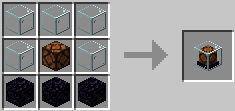
GHOST DECO BEACON

Beam passes thru blocks
Block has no collision itself
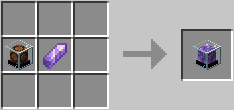
OMNI BEACON
Beam can be redirected
also has ghost variant
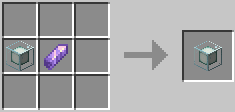
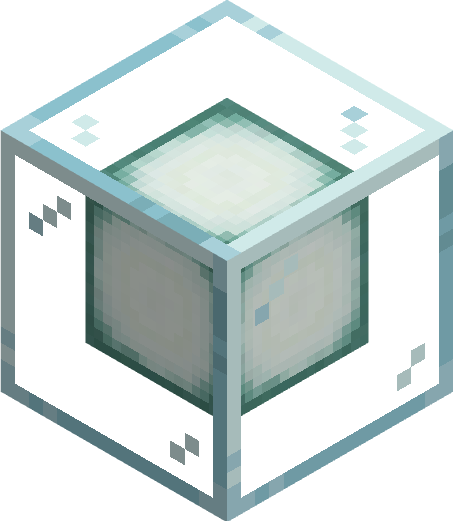
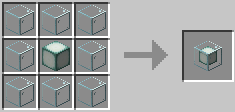
FAKE BEACON

Looks like an actual beacon...
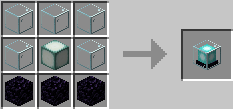
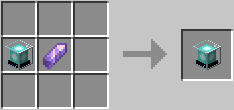
Also has ghost variant
HOW TO
TURN ON/OFF
give it a redstone signal to activate the beacon. Toggle ActiveLow mode by R-Clicking it with a redstone torch
SET COLOR
Cycle thru the colors by R-Clicking the beacon with an empty hand. Shift R-Clicking it cycles thru the colors in reverse. R-Clicking it with a dye changes the color. It does not consume the dye.
SET BEACON TRANSPARENCY
DecoBeacon light beams can pass thru other decobeacons and change the beams color. R-clicking with a Sand block makes the surface abrasive and stops the light beam from passing thru. Applying sand to a ghost beacon doesn't stop any light beam from passing thru however it does stop the ghost beacon from affecting the light beam's color
USE GHOSTS
Each beacon has a ghost variant. They work the same way with a few exceptions. Light beams from Ghost beacons pass thru blocks (except opaque beacons). As "ghosts" these blocks don't have collision letting you walk thru them.
USE BOOK SETTINGS
We can write down beacon settings in a Book-&-Quill and apply it to a beacon by R-Clicking.
Make sure to separate each setting with a comma "," and recheck what we type in.
The beacon will "calmly" point out what we did wrong
General Settings:
activeLow:true/false
- if set to true, the beacon is "ACTIVE" when the redstone signal you give it is "LOW"
isTransparent:true/false
- if set to false, decobeacon light beams cannot pass thru this decobeacon... except if this decobeacon is a ghost variant.
- setting this to false on a ghost variant beacon stops the beacon from affecting the passing light beam's color
color:white/orange/magenta/light_blue/yellow/lime/pink/gray/light_gray/cyan/purple/blue/brown/green/red/black
- set beacon color
OmniBeacon Exclusive Settings:
The following settings only work with omni beacons
direction: north/south/east/west/up/down
- sets the direction of the light beam
maxBeamLenght: integer
- sets the max length of the light beam
Examples:
DECOBEACON SETTINGS: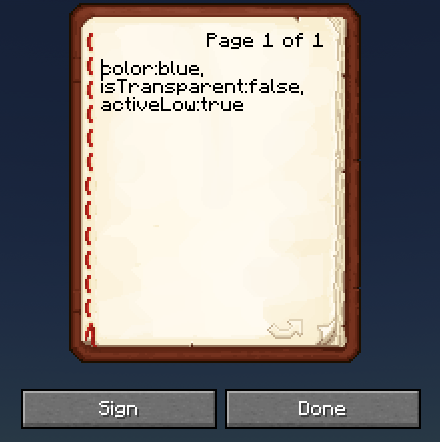
OMNIBEACON SETTINGS: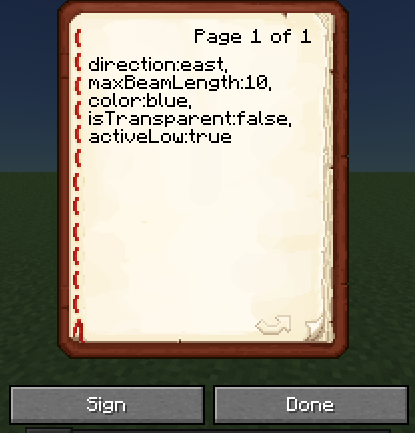


Project description from Modrinth.
Pick your setup
DECOBEACONS by Minecraft version and loader
Choose the version and loader you play, then open the matching release.
Minecraft version
1.19.2
2 loader buildsMinecraft version
1.18.2
2 loader buildsCheck the dependencies, then try the file in a copied instance before changing a world you care about.
Recent files
DECOBEACONS versions and loaders
0.0.1-1.19.2-Fabric
decobeacons-0.0.1-1.19.2-Fabric.jar
22 Mar 2024
Client Optional Server Optional Dependencies No extras listed Listed on Release listing
Check the 1.19.2 · Fabric setup 1.19.2Fabric release
0.0.1-1.19.2-Forge
decobeacons-0.0.1-1.19.2-Forge.jar
22 Mar 2024
Client Optional Server Optional Dependencies No extras listed Listed on Release listing
Check the 1.19.2 · Forge setup 1.19.2Forge release
Looking for an older file? The official Modrinth project page is in Resources.
 mod
CurseForge + Modrinth · Minecraft
Runeborn | Soulslike RPG progression
A soulslike RPG overhaul: earn runes, level eight attributes at Ember Shrines, wield 74 scaling armaments and hunt seven Sovereigns.
 mod
Modrinth · Minecraft
FangSu MTR Addon 方速MTR扩展
Added blocks such as OBJ-format ticket gates, and provided a set of interfaces to simplify the creation of MTR extensions. 添加了OBJ格式的检票闸机等方块,且添加了一系列接口使得你可以更方便的创建MTR扩展
 mod
CurseForge · Minecraft
XP Hopper
Adds the XP Hopper, an upgraded hopper that collects nearby experience orbs and furnace XP to automatically fill glass bottles into Bottles o' Enchanting.