Minecraft version
Back to mods 
Modrinth · Minecraft mod
Gate Keep
Allows restricting and scheduling dimension access based on date/time.
Choose a version Pick your version below, then grab the matching file.
Quick answer
Which Gate Keep release matches 25w15a?
Best match for your filters 1.0.0
Game version 1.21.1, 1.21.10, 1.21.2
Loader Fabric, Quilt
Gate Keep 1.0.0 targets 1.21.1, 1.21.10, 1.21.2 with Fabric, Quilt. Do not install it on the client. It must be installed on the dedicated server. No extra mods listed for this file.
Where it goes
Is Gate Keep required on the client, server, or both?
Do not install it on the client. It must be installed on the dedicated server.
Client Not supported
Dedicated server Required
Loader for this release Fabric, Quilt
Required install it here Optional supported, not mandatory Not supported do not install here Source doesn’t say do not assume
This file is marked server-only.
What else does Gate Keep 1.0.0 need?
1.0.0 on 25w15a. Every mod below is checked against that same setup.
This file does not list any required mods. Do not add a library just because a different file uses it.
This file does not list any required or optional mods.
Before you install it
Add Gate Keep without breaking your instance.
Built for Gate Keep 1.0.0 on 25w15a. Pick another file and the loader, install side or required mods may change.
- 01
Stick to this file
Use 1.0.0. It targets 1.21.1, 1.21.10, 1.21.2 with Fabric, Quilt; another release may have different loader, side or dependency requirements.
- 02
Bring the mods it needs
This file does not list any required mods. Do not add a library just because a different file uses it.
- 03
Put it on the correct side
Do not install it on the client. It must be installed on the dedicated server.
- 04
Pick the file you checked
Use the “Get this file” button beside 1.0.0. It opens that exact file at the source.
About this project
What does Gate Keep add?
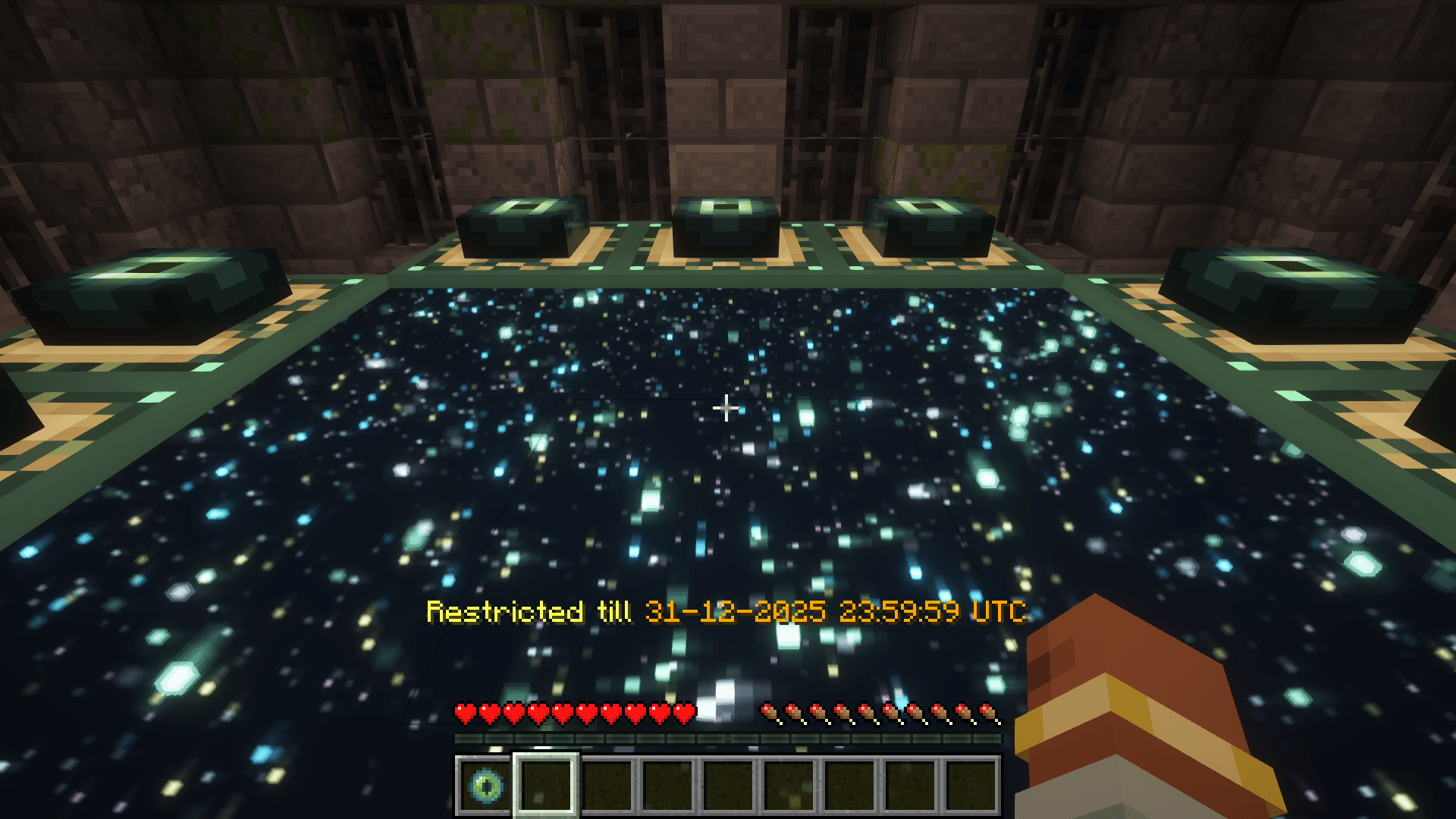
Gate Keep
Allows server admins to control access to dimensions. With GateKeep, you can completely restrict dimensions or set up time-based restrictions that automatically unlock at specific dates and times.
Features
- Dimension Restriction: Completely block access to any dimension
- Time-Based Restrictions: Schedule dimensions to unlock at specific dates and times
- Customizable Messages: Configure the messages players receive when attempting to access restricted dimensions
- Automated Announcements: Server-wide announcements when time-restricted dimensions become available
Configuration
GateKeep uses a JSON configuration file located at config/gatekeep.json. The config file is created automatically when the mod is first loaded (in-case of a crash or mis-behavior re-check the config and deleting it and generating a fresh one)
Configuration Options
{
  "disabledDimensions": [
    "minecraft:the_end"
  ],
  "announce": true,
  "restrictedDimensionMessage": "&c%dimension% dimension is restricted",
  "timedDimensionRestrictedMessage": "&eRestricted till &6%time%",
  "unrestrictedAnnouncementMessage": "&a%dimension% dimension is now open!",
  "timeRestrictions": {
    "minecraft:the_end": {
      "enabled": true,
      "timeZone": "UTC",
      "unlockDateTime": "2024-12-31T23:59:59"
    }
  }
}
Configuration Explanation
- disabledDimensions: List of dimensions that are completely disabled
- announce: Whether to announce when time-restricted dimensions unlock
- restrictedDimensionMessage: Message displayed when a player tries to access a disabled dimension
- timedDimensionRestrictedMessage: Message displayed when a player tries to access a time-restricted dimension
- unrestrictedAnnouncementMessage: Message announced when a time-restricted dimension becomes available
- timeRestrictions: List of dimensions with time-based restrictions
- enabled: Whether the time restriction is active
- timeZone: Time zone for the unlock time (uses standard time zone IDs)
- unlockDateTime: Date and time when the dimension will unlock (ISO format)
Message Formatting
Messages support Minecraft color codes using the & character:
&0to&9,&ato&f: Colors&k: Obfuscated&l: Bold&m: Strikethrough&n: Underline&o: Italic&r: Reset
In the configuration messages, you can use the following variables:
%dimension%: Will be replaced with the formatted dimension name%time%: Will be replaced with the formatted unlock time (for time-restricted dimensions)
Examples
Basic Setup: Disable The End
{
  "disabledDimensions": ["minecraft:the_end"],
  "announce": true,
  "timeRestrictions": {}
}
Time-Restricted Nether
{
  "disabledDimensions": [],
  "announce": true,
  "timeRestrictions": {
    "minecraft:the_nether": {
      "enabled": true,
      "timeZone": "America/New_York",
      "unlockDateTime": "2024-06-01T12:00:00"
    }
  }
}
Multiple Restrictions
{
  "disabledDimensions": ["minecraft:the_end"],
  "announce": true,
  "timeRestrictions": {
    "minecraft:the_nether": {
      "enabled": true,
      "timeZone": "UTC",
      "unlockDateTime": "2024-05-15T18:00:00"
    },
    "twilightforest:twilight_forest": {
      "enabled": true,
      "timeZone": "UTC",
      "unlockDateTime": "2024-07-22T15:06:20"
    }
  }
}
How It Works
- When a player or entity attempts to change dimensions including through commands or other means that use minecrafts internal code to travel through dimensions, the mod checks if the destination dimension is restricted
- If the dimension is in the
disabledDimensionslist, access is denied - If the dimension has a time restriction that hasn't passed its unlock time, access is denied
- Players with permission level 4 (operators) can bypass all restrictions when in creative mode
- The mod regularly checks if time-restricted dimensions have reached their unlock time, these checks run on a background thread to minimize performance impact
- When a time-restricted dimension becomes available, an announcement is sent to all online players (if enabled)
Compatibility
GateKeep should be compatible with most modded dimensions and forms of dimensional travel.
Project description from Modrinth.
Pick your setup
Gate Keep by Minecraft version and loader
Choose the version and loader you play, then open the matching release.
Minecraft version
25w16a
3 loader buildsMinecraft version
25w15a
3 loader buildsMinecraft version
25w14craftmine
3 loader buildsMinecraft version
1.21.10
3 loader buildsMinecraft version
1.21.9
3 loader buildsMinecraft version
1.21.8
3 loader buildsMinecraft version
1.21.7
3 loader buildsMinecraft version
1.21.6
3 loader buildsMinecraft version
1.21.5
3 loader buildsMinecraft version
1.21.4
3 loader buildsMinecraft version
1.21.3
3 loader buildsShowing the newest 12 of 14 game versions. Older files are in the list below.
Check the dependencies, then try the file in a copied instance before changing a world you care about.
Recent files
Gate Keep versions and loaders
1.0.0
GateKeep-1.21.x-fabric-1.0.0.jar
26 Apr 2025
Client Not supported Server Required Dependencies No extras listed Listed on Release listing
Check the 25w15a · Fabric setup 1.21.11.21.101.21.21.21.3 release
1.0.0
GateKeep-1.21.x-neoforge-1.0.0.jar
26 Apr 2025
Client Not supported Server Required Dependencies No extras listed Listed on Release listing
Check the 25w15a · NeoForge setup 1.21.11.21.101.21.21.21.3 release
Looking for an older file? The official Modrinth project page is in Resources.
 mod
Modrinth · Minecraft
Almanac
Almanac is a library used by my mods with mostly loader independent shared code between multiple mods to avoid duplication of code.
 mod
Modrinth · Minecraft
Let Me Despawn
Improves performance by tweaking mob despawn rules. Say bye to pesky unintentional persistent mobs.
 mod
Modrinth · Minecraft
Better Crafts
Better Crafts is a datapack that improves a lifetime [1.21.11 - 26.3]