Minecraft version
Back to mods 
Modrinth · Minecraft mod
Animal Garden - Mouse
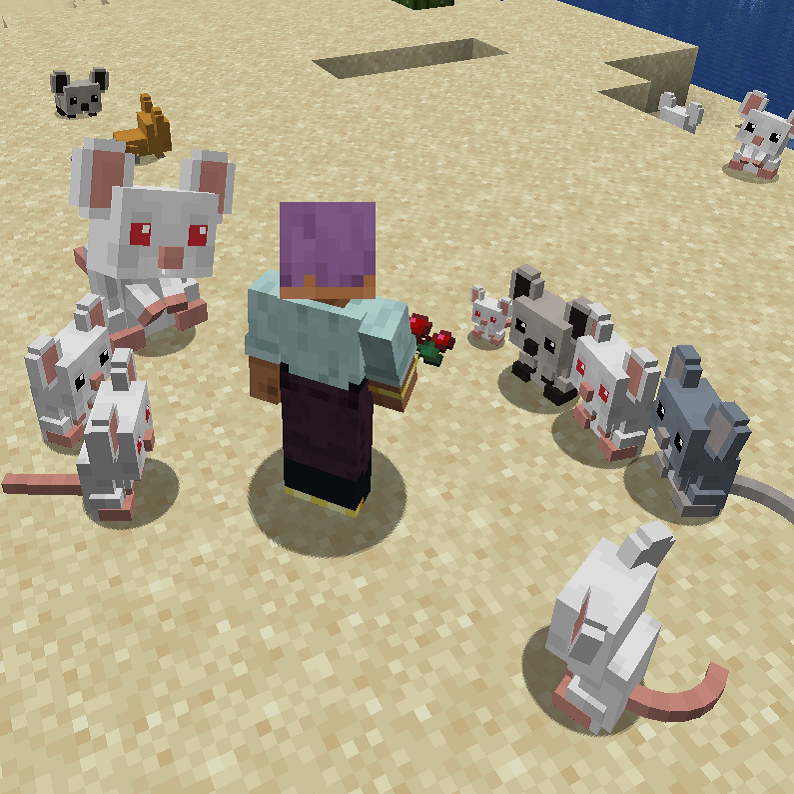
Adds tamable mice into the game, that will fight and protect you.
Choose a version Pick your version below, then grab the matching file.
Quick answer
Which Animal Garden - Mouse release should I use?
Latest stable file 1.0.6-forge-1.20.1-47.4.0
Game version 1.20.1
Loader Forge
Animal Garden - Mouse 1.0.6-forge-1.20.1-47.4.0 targets 1.20.1 with Forge. Installation on the client is optional. Installation on the dedicated server is optional. No extra mods listed for this file.
Where it goes
Is Animal Garden - Mouse required on the client, server, or both?
Installation on the client is optional. Installation on the dedicated server is optional.
Client Optional
Dedicated server Optional
Loader for this release Forge
Required install it here Optional supported, not mandatory Not supported do not install here Source doesn’t say do not assume
The source marks this as usable on both the client and server.
What else does Animal Garden - Mouse 1.0.6-forge-1.20.1-47.4.0 need?
1.0.6-forge-1.20.1-47.4.0. Change the file and its required mods may change too.
This file does not list any required mods. Do not add a library just because a different file uses it.
This file does not list any required or optional mods.
Before you install it
Add Animal Garden - Mouse without breaking your instance.
Built for Animal Garden - Mouse 1.0.6-forge-1.20.1-47.4.0. Pick another file and the loader, install side or required mods may change.
- 01
Stick to this file
Use 1.0.6-forge-1.20.1-47.4.0. It targets 1.20.1 with Forge; another release may have different loader, side or dependency requirements.
- 02
Bring the mods it needs
This file does not list any required mods. Do not add a library just because a different file uses it.
- 03
Put it on the correct side
Installation on the client is optional. Installation on the dedicated server is optional.
- 04
Pick the file you checked
Use the “Get this file” button beside 1.0.6-forge-1.20.1-47.4.0. It opens that exact file at the source.
About this project
What does Animal Garden - Mouse add?
Adds cute tamable mice into the game, that will fight and protect you when in need.
And they are cute.
By default they spawn in forest, desert and badlands biomes.
(You can change this and other spawn settings by editing the json files in the data -> biome tags and biome modifier folders or via resource pack)
There is 10% chance that an alpha mouse will spawn. (Bigger and stronger, but still cute though...)
They have 8 color variants.
Sometimes they will beg you to give them some food.
You can tame or breed them with any food item
and if you give them rotten flesh then their attack will poison their target for 15 sec.
(This buff lasts for 15 min)
Mod Currently Supports:
Forge 26.x | 1.21.11 | 1.21.10 | 1.21.9 | 1.21.8 | 1.21.7 | 1.21.6 | 1.21.5 | 1.21.4 | 1.21.1 | 1.20.1
Fabric 26.x | 1.21.11 | 1.21.10 | 1.21.9 | 1.21.8 | 1.21.7 | 1.21.6 | 1.21.5 | 1.21.4 | 1.21.1 | 1.20.1
Neoforge 26.x | 1.21.11 | 1.21.10 | 1.21.9 | 1.21.8 | 1.21.7 | 1.21.6 | 1.21.4 | 1.21.1
SEND ME A PRIVATE MESSAGE IF YOU NEED THE MOD IN A DIFFERENT VERSION OR IF YOU ENCOUNTER ANY BUGS AT CURSEFORGE
https://legacy.curseforge.com/members/aquarius_playz/projects
Follow me on X (twitter)

Project description from Modrinth.
Pick your setup
Animal Garden - Mouse by Minecraft version and loader
Choose the version and loader you play, then open the matching release.
Minecraft version
26.1.2
3 loader buildsMinecraft version
26.1.1
3 loader buildsMinecraft version
26.1
3 loader buildsMinecraft version
1.21.11
3 loader buildsMinecraft version
1.21.10
3 loader buildsMinecraft version
1.21.9
3 loader buildsMinecraft version
1.21.8
3 loader buildsMinecraft version
1.21.7
3 loader buildsMinecraft version
1.21.6
3 loader buildsMinecraft version
1.21.5
2 loader buildsMinecraft version
1.21.4
3 loader buildsShowing the newest 12 of 14 game versions. Older files are in the list below.
Check the dependencies, then try the file in a copied instance before changing a world you care about.
Recent files
Animal Garden - Mouse versions and loaders
1.0.6-forge-1.20.1-47.4.0
animal-garden-mouse-1.0.6-forge-1.20.1-47.4.0.jar
1 Jun 2026
Client Optional Server Optional Dependencies No extras listed Listed on Release listing
Check the 1.20.1 · Forge setup 1.20.1Forge release
1.0.6-neoforge-26.1.2.4
animalgarden-mouse-1.0.6-neoforge-26.1.2.4.jar
11 Apr 2026
Client Optional Server Optional Dependencies 1 required · 1 unchecked Listed on Release listing
Check the 26.2 · NeoForge setup 26.126.1.126.1.226.2 release
1.0.6-forge-26.1.2-64.0.0
animalgarden-mouse-1.0.6-forge-26.1.2-64.0.0.jar
11 Apr 2026
Client Optional Server Optional Dependencies 1 required · 1 unchecked Listed on Release listing
Check the 26.2 · Forge setup 26.126.1.126.1.226.2 release
1.0.6-fabric-26.1.2-0.145.4
animalgarden_mouse-1.0.6-fabric-26.1.2-0.145.4.jar
11 Apr 2026
Client Optional Server Optional Dependencies 1 required · 1 unchecked Listed on Release listing
Check the 26.2 · Fabric setup 26.126.1.126.1.226.2 release
1.0.5-fabric-1.21.11-0.140.0
animalgarden_mouse-1.0.5-fabric-1.21.11-0.140.0.jar
18 Dec 2025
Client Optional Server Optional Dependencies No extras listed Listed on Release listing
Check the 1.21.11 · Fabric setup 1.21.11Fabric release
1.0.5-neoforge-1.21.11-21.11.10-
animalgarden-mouse-1.0.5-neoforge-1.21.11-21.11.10-b.jar
18 Dec 2025
Client Optional Server Optional Dependencies No extras listed Listed on Release listing
Check the 1.21.11 · NeoForge setup 1.21.11NeoForge release
1.0.5-forge-1.21.11-61.0.2
animalgarden-mouse-1.0.5-forge-1.21.11-61.0.2.jar
18 Dec 2025
Client Optional Server Optional Dependencies No extras listed Listed on Release listing
Check the 1.21.11 · Forge setup 1.21.11Forge release
1.0.5-forge-1.21.8-58.1.7
animalgarden-mouse-1.0.5-forge-1.21.8-58.1.7.jar
22 Nov 2025
Client Optional Server Optional Dependencies No extras listed Listed on Release listing
Check the 1.21.8 · Forge setup 1.21.61.21.71.21.8Forge release
1.0.3-neoforge-1.21.1-21.1.213
animalgarden-mouse-1.0.3-neoforge-1.21.1-21.1.213.jar
23 Oct 2025
Client Optional Server Optional Dependencies No extras listed Listed on Release listing
Check the 1.21.1 · NeoForge setup 1.21.1NeoForge release
1.0.3-neoforge-1.21.4-21.4.155
animalgarden-mouse-1.0.3-neoforge-1.21.4-21.4.155.jar
23 Oct 2025
Client Optional Server Optional Dependencies No extras listed Listed on Release listing
Check the 1.21.4 · NeoForge setup 1.21.4NeoForge release
1.0.4-forge-1.21.9-59.0.5
animalgarden-mouse-1.0.4-forge-1.21.9-59.0.5.jar
9 Oct 2025
Client Optional Server Optional Dependencies No extras listed Listed on Release listing
Check the 1.21.10 · Forge setup 1.21.91.21.10Forge release
1.0.3-forge-1.21.9-59.0.1
animalgarden-mouse-1.0.3-forge-1.21.9-59.0.1.jar
3 Oct 2025
Client Optional Server Optional Dependencies No extras listed Listed on Release listing
Check the 1.21.9 · Forge setup 1.21.9Forge release
Looking for an older file? The official Modrinth project page is in Resources.
 mod
mod CurseForge + Modrinth · Minecraft
Easy Mob Farm
The easy mob farm is a server friendly way to capture different kind of animals and mobs to gather their loot. This mod provides several catching items and mob farms to make it more entertaining.
 mod
mod CurseForge · Minecraft
Generic FNAF Modification
This is a project that adds multiple Blocks and Decorative items from the Five Nights at Freddy's franchise
 mod
mod CurseForge · Minecraft
Armageddon
A highly configurable overhaul of Minecraft's way of progressing through the game : bosses, RPG-like, new mechanics, multiplayer compatibility, weapons, ores... !