Minecraft version
Back to mods 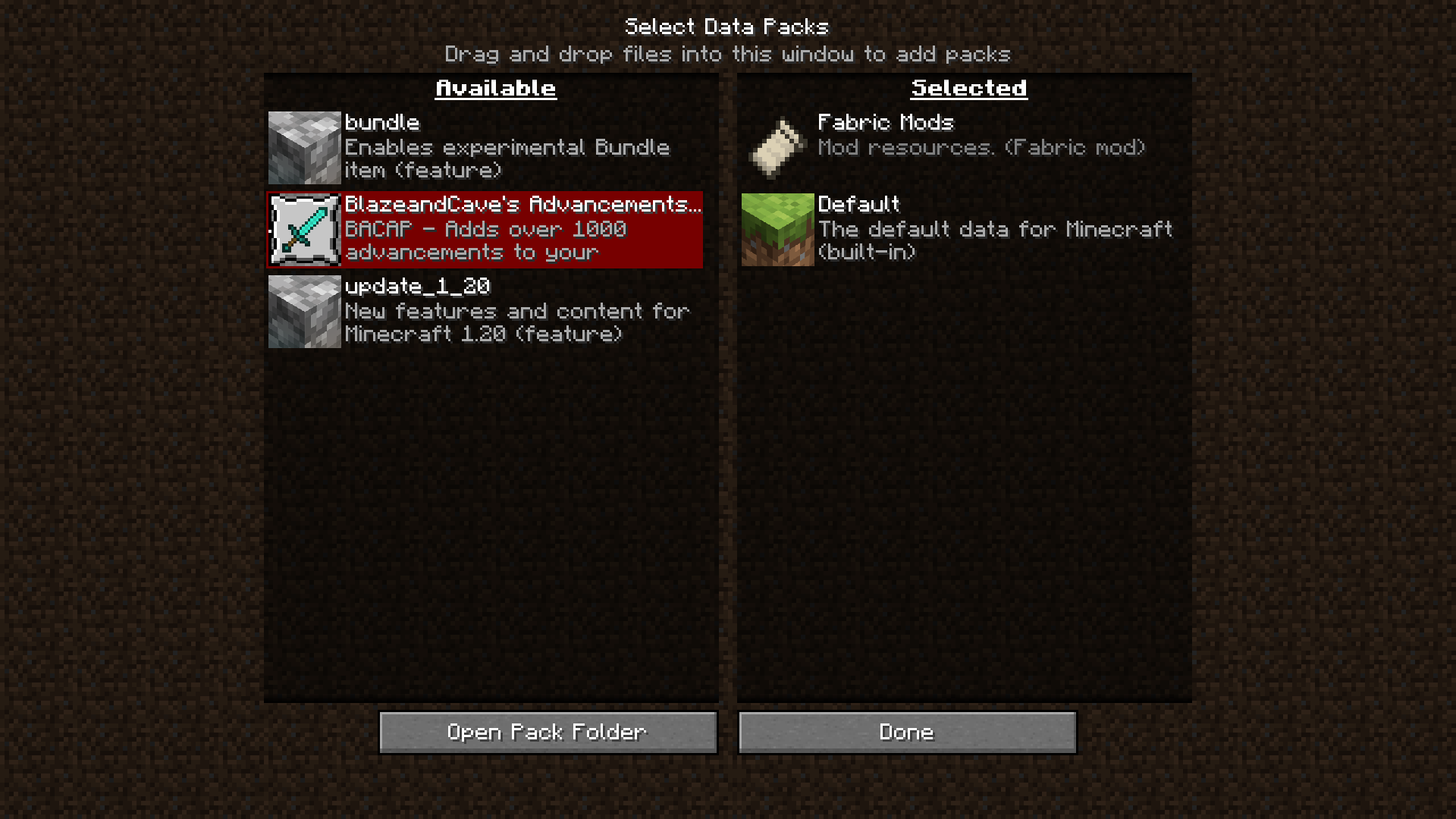
Modrinth · Minecraft mod
Datapack Installer
A mod which allows you to select datapacks, compressed or as a folder, inside a folder during world creation without having to copy them.
Choose a version Pick your version below, then grab the matching file.
Quick answer
Which Datapack Installer release should I use?
Latest stable file 2.0.0
Game version 1.20.5, 1.20.6, 1.21
Loader Fabric
Datapack Installer 2.0.0 targets 1.20.5, 1.20.6, 1.21 with Fabric. It must be installed on the client. Do not install it on the dedicated server. No extra mods listed for this file.
Where it goes
Is Datapack Installer required on the client, server, or both?
It must be installed on the client. Do not install it on the dedicated server.
Client Required
Dedicated server Not supported
Loader for this release Fabric
Required install it here Optional supported, not mandatory Not supported do not install here Source doesn’t say do not assume
This file is marked client-only.
What else does Datapack Installer 2.0.0 need?
2.0.0. Change the file and its required mods may change too.
This file does not list any required mods. Do not add a library just because a different file uses it.
This file does not list any required or optional mods.
Before you install it
Add Datapack Installer without breaking your instance.
Built for Datapack Installer 2.0.0. Pick another file and the loader, install side or required mods may change.
- 01
Stick to this file
Use 2.0.0. It targets 1.20.5, 1.20.6, 1.21 with Fabric; another release may have different loader, side or dependency requirements.
- 02
Bring the mods it needs
This file does not list any required mods. Do not add a library just because a different file uses it.
- 03
Put it on the correct side
It must be installed on the client. Do not install it on the dedicated server.
- 04
Pick the file you checked
Use the “Get this file” button beside 2.0.0. It opens that exact file at the source.
About this project
What does Datapack Installer add?
Datapack Installer
A Minecraft (Fabric) mod. When installed on the client, data packs put into the
data pack folder will be available for selection during world creation as well
as while paused in Singleplayer. When installed on the server, data packs put
into the data pack folder will be copied to the active world when the server
starts.
Advantages
On the client, this mod works with the ingame resource and data pack selector.
While creating a world, or while paused in Singleplayer, you can choose which
data packs to enable or disable with an interactive screen.
On the server, all that happens is that the data packs are copied from the
mod's data pack folder to the world data pack folder whenever the server
starts. If you are switching worlds or deleting them to regenerate often, all
you will need to do is switch or delete the world, and the data packs will
carry on if you leave the mod's folder intact.
Disadvantages
This mod cannot keep data packs that require feature flags enabled or disabled.
For example, if you did not create a world with the built-in bundle data pack
enabled, and you enable the data pack with the mod, the data pack will only be
temporarily enabled until you quit the world.
Usage
Client
- Insert your desired data pack(s) into
datapacksin the game's data folder- If you have started the game with this mod installed, it should already
be present.
- If you have started the game with this mod installed, it should already
- Begin world creation
- In the game, click Singleplayer, then click Create New World.
- Alternatively, if you already have a world, open and pause the game.
- Manage data packs
- Click the Data Packs button. On later versions, you may need to check
the 'More' tab. - The data packs should be available on the selector!
- Click the Data Packs button. On later versions, you may need to check
Server
- Insert your desired data pack(s) into
datapacksin the server data folder.- This is probably the root, where eula.txt and server.properties are
located.
- This is probably the root, where eula.txt and server.properties are
- Start the server
- The data packs will be copied to the active world.
Project description from Modrinth.
Pick your setup
Datapack Installer by Minecraft version and loader
Choose the version and loader you play, then open the matching release.
Minecraft version
1.21.2
1 loader buildMinecraft version
1.21.1
1 loader buildMinecraft version
1.21
1 loader buildMinecraft version
1.20.6
1 loader buildMinecraft version
1.20.5
1 loader buildMinecraft version
1.20.4
1 loader buildMinecraft version
1.20.3
1 loader buildMinecraft version
1.20.2
1 loader buildMinecraft version
1.20.1
1 loader buildMinecraft version
1.20
1 loader buildMinecraft version
1.19.4
1 loader buildShowing the newest 12 of 27 game versions. Older files are in the list below.
Check the dependencies, then try the file in a copied instance before changing a world you care about.
Recent files
Datapack Installer versions and loaders
2.0.0
DatapackInstaller-2.0.0.jar
5 Aug 2024
Client Required Server Not supported Dependencies No extras listed Listed on Release listing
Check the 1.21.3 · Fabric setup 1.20.51.20.61.211.21.1 release
2.0.0
DatapackInstaller-2.0.0+1.20.3.jar
5 Aug 2024
Client Required Server Not supported Dependencies No extras listed Listed on Release listing
Check the 1.21 · Fabric setup 1.20.31.20.41.20.51.20.6 release
2.0.0
DatapackInstaller-2.0.0+1.16.jar
5 Aug 2024
Client Required Server Not supported Dependencies No extras listed Listed on Release listing
Check the 1.21 · Fabric setup 1.161.16.11.16.21.16.3 release
1.1.0
DatapackInstaller-1.1.0+1.16.jar
25 Jun 2024
Client Required Server Not supported Dependencies No extras listed Listed on Release listing
Check the 1.20.2 · Fabric setup 1.161.16.11.16.21.16.3 release
1.1.0
DatapackInstaller-1.1.0+1.20.3.jar
25 Jun 2024
Client Required Server Not supported Dependencies No extras listed Listed on Release listing
Check the 1.20.4 · Fabric setup 1.20.31.20.4Fabric release
1.1.0
DatapackInstaller-1.1.0.jar
25 Jun 2024
Client Required Server Not supported Dependencies No extras listed Listed on Release listing
Check the 1.21 · Fabric setup 1.20.51.20.61.21Fabric release
1.0.0
DatapackInstaller-1.0.0+1.20.5.jar
22 May 2024
Client Required Server Not supported Dependencies No extras listed Listed on Release listing
Check the 1.20.6 · Fabric setup 1.20.51.20.6Fabric release
1.0.0
DatapackInstaller-1.0.0+1.20.3.jar
22 May 2024
Client Required Server Not supported Dependencies No extras listed Listed on Release listing
Check the 1.20.4 · Fabric setup 1.20.31.20.4Fabric release
1.0.0
DatapackInstaller-1.0.0+1.16.jar
22 May 2024
Client Required Server Not supported Dependencies No extras listed Listed on Release listing
Check the 1.20.2 · Fabric setup 1.161.16.11.16.21.16.3 release
v1.0.0.2-SNAPSHOT
DatapackInstaller-1.0.0.2-SNAPSHOT.jar
13 Apr 2023
Client Required Server Not supported Dependencies 1 required · 1 unchecked Listed on Release listing
Check the 1.19.4 · Fabric setup 1.19.4Fabric alpha
v1.0.0.2-SNAPSHOT
DatapackInstaller-1.0.0.2-SNAPSHOT.jar
3 Jan 2023
Client Required Server Not supported Dependencies 1 required · 1 unchecked Listed on Release listing
Check the 1.19.3 · Fabric setup 1.19.3Fabric alpha
1.0.0.1-SNAPSHOT
DatapackInstaller-1.0.0.1-SNAPSHOT.jar
17 Jul 2022
Client Required Server Not supported Dependencies 1 required · 1 unchecked Listed on Release listing
Check the 1.19 · Fabric setup 1.19Fabric alpha
Looking for an older file? The official Modrinth project page is in Resources.
 mod
CurseForge + Modrinth · Minecraft
Brightness Aura
Darkness? Never heard of it
 mod
CurseForge + Modrinth · Minecraft
Remnants | RPG Stats, Skills & Progression
Soulslike leveling for Minecraft: stage attribute points, preview every stat before and after, and confirm your build in one press.
 mod
CurseForge + Modrinth · Minecraft
OmniVault
All-in-one storage that grows from a chest network on day one to channel-free cell drives, autocrafting and quantum bridges, plus vaults, drawers and backpacks.