
Minecraft version
Back to mods 
CurseForge · Minecraft mod
PPE Essentials
A lightweight mod that adds useful commands (like /tpa /repeat) and tweaks
Choose a version Pick your version below, then grab the matching file.
Quick answer
Which PPE Essentials release matches 26.3?
Best match for your filters ppe_essentials-neoforge-26.3-1.8.0.jar
Game version 26.3
Loader NeoForge
PPE Essentials ppe_essentials-neoforge-26.3-1.8.0.jar targets 26.3 with NeoForge. The project page does not say whether this file belongs on the client, dedicated server, or both. No extra mods listed for this file.
Where it goes
Is PPE Essentials required on the client, server, or both?
The project page does not say whether this file belongs on the client, dedicated server, or both.
Client Source doesn’t say
Dedicated server Source doesn’t say
Loader for this release NeoForge
Required install it here Optional supported, not mandatory Not supported do not install here Source doesn’t say do not assume
The source does not explicitly classify this release as client-only or server-only.
What else does PPE Essentials ppe_essentials-neoforge-26.3-1.8.0.jar need?
ppe_essentials-neoforge-26.3-1.8.0.jar on 26.3. Every mod below is checked against that same setup.
This file does not list any required mods. Do not add a library just because a different file uses it.
This file does not list any required or optional mods.
Before you install it
Add PPE Essentials without breaking your instance.
Built for PPE Essentials ppe_essentials-neoforge-26.3-1.8.0.jar on 26.3. Pick another file and the loader, install side or required mods may change.
- 01
Stick to this file
Use ppe_essentials-neoforge-26.3-1.8.0.jar. It targets 26.3 with NeoForge; another release may have different loader, side or dependency requirements.
- 02
Bring the mods it needs
This file does not list any required mods. Do not add a library just because a different file uses it.
- 03
Put it on the correct side
The project page does not say whether this file belongs on the client, dedicated server, or both.
- 04
Pick the file you checked
Use the “Get this file” button beside ppe_essentials-neoforge-26.3-1.8.0.jar. It opens that exact file at the source.
About this project
What does PPE Essentials add?
PPE Essentials


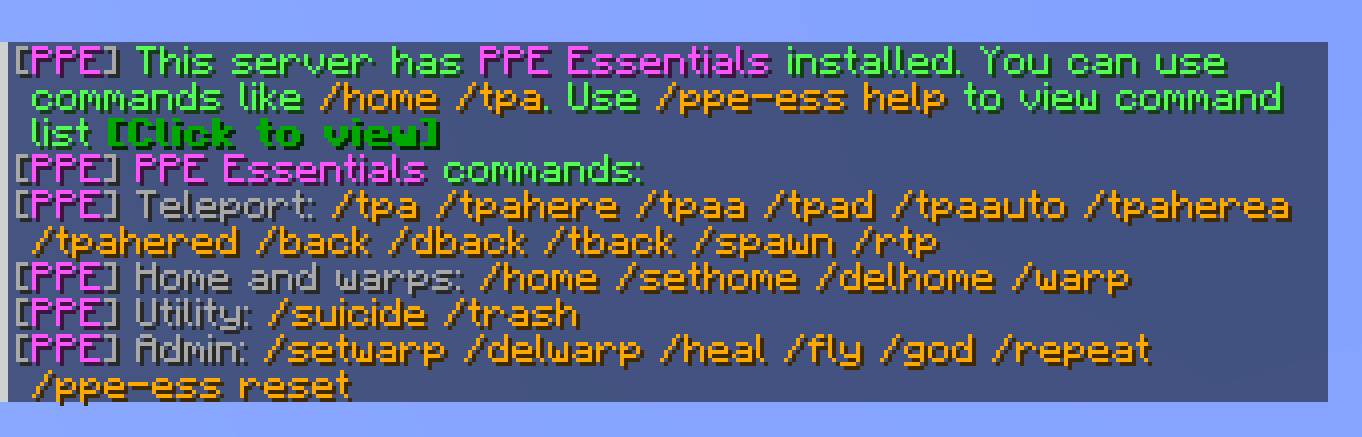
PPE Essentials is a lightweight mod that adds useful commands (like /tpa /repeat) and tweaks, with highly configurable options.
Features
- Server-side only mod (Can still be installed on your client for singleplayer use.)
- Configurable command toggles, permission levels and more.
- Configurable protection against creeper, enderman, and ravager block damage.
- Ready out of the box; Fabric only requires Fabric API.
- Polished messages with clickable buttons, titles, and sounds.
- Player-selection menus for
/tpaand/tpaherewhen no target is provided. - Multilingual support with automatic client language detection and a configurable
fallbackLanguage. - Persistent player data for homes, warps, back locations, fly, god mode, and notice triggers.
Supported Versions
- NeoForge 1.21.1, 26.1.2, 26.3
- Fabric 1.21.1, 26.1.2, 26.3
Commands
Teleport
| Command | Description |
|---|---|
/tpa [player] |
Request to teleport to another player, or open the player menu when omitted. |
/tpaa |
Accept a pending TPA request. |
/tpad |
Deny a pending TPA request. |
/tpaauto |
Toggle automatic TPA acceptance. |
/tpahere [player] |
Request another player to teleport to you, or open the player menu when omitted. |
/tpaherea |
Accept a pending TPAhere request. |
/tpahered |
Deny a pending TPAhere request. |
/rtp |
Randomly teleport nearby. |
/spawn |
Teleport to world spawn. |
/back or /dback |
Return to your last death location. |
/tback |
Return to your previous teleport location. |
Homes And Warps
| Command | Description |
|---|---|
/home [tp] |
Teleport home. |
/home set |
Set your home at your current location. |
/home del |
Delete your home. |
/warp [tp] <name> |
Teleport to a server warp. |
/warp set <name> |
Create or update a server warp at your current location. |
/warp delete <name> |
Delete a server warp. |
Warp names support Unicode and spaces. Tab completion inserts a double-quoted name with any embedded quotes or backslashes escaped. For example, /warp tp "主城 广场".
Utility And Admin
| Command | Description |
|---|---|
/trash |
Open a temporary trash inventory that clears on close. |
/suicide |
Kill yourself. |
/heal [player] |
Heal yourself or another player. |
/fly [player] |
Toggle persistent flight for yourself or another player. |
/god [player] |
Toggle god mode for yourself or another player. |
/repeat <times> [command] |
Repeat a specified command or the initiating player's last command, using the current command context. |
/ppe-ess help |
Show the command list. Disabled or unavailable commands are shown in red. |
/ppe-ess reset all |
Clear all player data. |
/ppe-ess reset notice |
Clear notice trigger data. |
Player actions use the player selected by execute as. Permissions and command feedback use the original source. The console can specify a target for /heal, /fly, and /god.
Configuration
All configuration options are located in config/ppe_essentials-common.toml. The existing sethome, delhome, setwarp, and delwarp settings control their corresponding subcommands.
Project description from CurseForge.
Pick your setup
PPE Essentials by Minecraft version and loader
Choose the version and loader you play, then open the matching release.
Minecraft version
26.1.2
2 loader buildsMinecraft version
1.21.11
2 loader buildsMinecraft version
1.21.1
2 loader buildsCheck the dependencies, then try the file in a copied instance before changing a world you care about.
Recent files
PPE Essentials versions and loaders
ppe_essentials-neoforge-26.3-1.8.0.jar
22 Nov 2026
Client Source doesn’t say Server Source doesn’t say Dependencies No extras listed Listed on Release listing
Check the 26.3 · NeoForge setup NeoForge26.3 release
ppe_essentials-fabric-26.3-1.8.0.jar
22 Nov 2026
Client Source doesn’t say Server Source doesn’t say Dependencies 2 required · 2 unchecked Listed on Release listing
Check the 26.3 · Fabric setup Fabric26.3 release
ppe_essentials-neoforge-26.3-1.7.0.jar
13 Nov 2026
Client Source doesn’t say Server Source doesn’t say Dependencies No extras listed Listed on Release listing
Check the 26.3 · NeoForge setup NeoForge26.3 release
ppe_essentials-fabric-26.3-1.7.0.jar
13 Nov 2026
Client Source doesn’t say Server Source doesn’t say Dependencies 2 required · 2 unchecked Listed on Release listing
Check the 26.3 · Fabric setup Fabric26.3 release
Looking for an older file? The official CurseForge project page is in Resources.
 mod
CurseForge + Modrinth · Minecraft
Horseman
Improved horses: faster hitching, smooth riding, QOL features and more...
 mod
CurseForge + Modrinth · Minecraft
Countered's Terrain Slabs
A mod designed to enhance world generation and elevate the gameplay experience by smoothing out terrain with custom slabs, making exploration more seamless!
mod
Modrinth · Minecraft
Debrand
Convinces Minecraft it is unmodded