Minecraft version
Back to mods 
Modrinth · Minecraft mod
Selectable Painting
Adds the Selectable Painting, with which the painting to be placed can be selected.
Choose a version Pick your version below, then grab the matching file.
Quick answer
Which Selectable Painting release should I use?
Latest stable file 26.2-4.0.2
Game version 26.2, 26.3
Loader NeoForge
Selectable Painting 26.2-4.0.2 targets 26.2, 26.3 with NeoForge. Installation on the client is optional. Installation on the dedicated server is optional. No extra mods listed for this file.
Where it goes
Is Selectable Painting required on the client, server, or both?
Installation on the client is optional. Installation on the dedicated server is optional.
Client Optional
Dedicated server Optional
Loader for this release NeoForge
Required install it here Optional supported, not mandatory Not supported do not install here Source doesn’t say do not assume
The source marks this as usable on both the client and server.
What else does Selectable Painting 26.2-4.0.2 need?
26.2-4.0.2. Change the file and its required mods may change too.
This file does not list any required mods. Do not add a library just because a different file uses it.
This file does not list any required or optional mods.
Before you install it
Add Selectable Painting without breaking your instance.
Built for Selectable Painting 26.2-4.0.2. Pick another file and the loader, install side or required mods may change.
- 01
Stick to this file
Use 26.2-4.0.2. It targets 26.2, 26.3 with NeoForge; another release may have different loader, side or dependency requirements.
- 02
Bring the mods it needs
This file does not list any required mods. Do not add a library just because a different file uses it.
- 03
Put it on the correct side
Installation on the client is optional. Installation on the dedicated server is optional.
- 04
Pick the file you checked
Use the “Get this file” button beside 26.2-4.0.2. It opens that exact file at the source.
About this project
What does Selectable Painting add?
Version 4.X.X
For older versions of the mod, check the wiki.
Mod adds the Selectable Painting, that can select the painting, that should be placed.
The Mod is need on server and client side.
You need a server to play with friends? You don't know how to set up one? Just rent an already configured server!

Click on the picture above, select a plan (with recommended at least 6 GB),
use my code agent to get 25% off your first month and enjoy playing with your friends!
Support
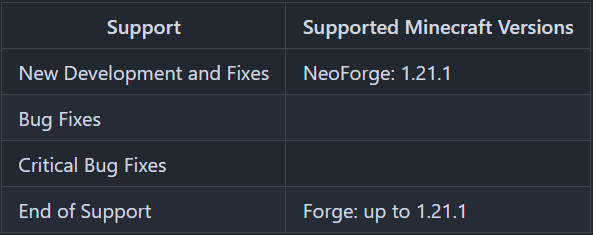
Minecraft versions, for which the mod is not released, are not supported.
You can find a text version here.
How to use the Selectable Painting?
With a right-click on a block, you place the painting.
If you hang the painting down, you get the painting item with the size and painting selected, that you hang up.
With a right click into the air, you can open a GUI, where you can select the painting size and the painting.
If you tick "Random Painting", a random painting with the selected size will be placed.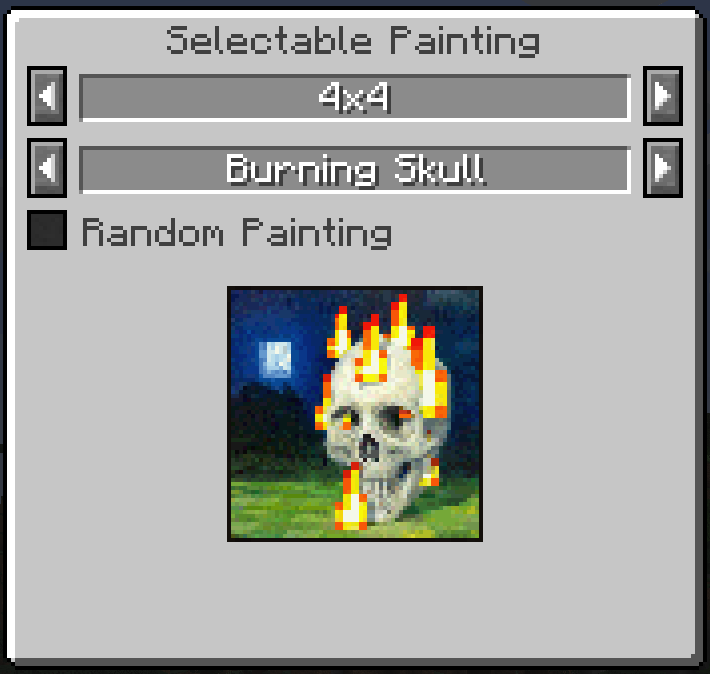
The current size and the selected painting is shown in the tooltip.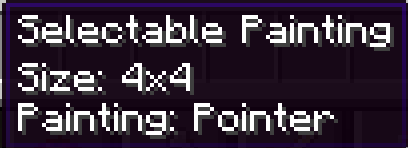
If the painting is too big for the place to place on, you get an error message.
Recipes
Selectable Painting Recipe
Recipe: Painting in any slot of the crafting table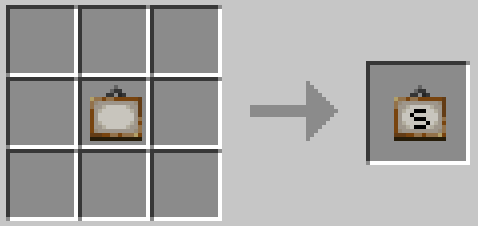
Painting Recipe
Recipe: Selectable Painting in any slot of the crafting table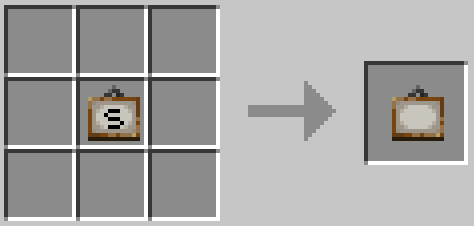
Thanks for the logo to Muse31.
You can use this mod in non-commercial modpacks without asking.
You can find more mods from me on CurseForge and Modrinth.

Project description from Modrinth.
Pick your setup
Selectable Painting by Minecraft version and loader
Choose the version and loader you play, then open the matching release.
Minecraft version
26.2
1 loader buildMinecraft version
26.1.2
1 loader buildMinecraft version
26.1.1
1 loader buildMinecraft version
26.1
1 loader buildMinecraft version
1.21.11
1 loader buildMinecraft version
1.21.10
1 loader buildMinecraft version
1.21.9
1 loader buildMinecraft version
1.21.8
1 loader buildMinecraft version
1.21.7
1 loader buildMinecraft version
1.21.6
1 loader buildMinecraft version
1.21.5
1 loader buildShowing the newest 12 of 25 game versions. Older files are in the list below.
Check the dependencies, then try the file in a copied instance before changing a world you care about.
Recent files
Selectable Painting versions and loaders
26.2-4.0.2
SelectablePainting-26.2-4.0.2.jar
10 Oct 2026
Client Optional Server Optional Dependencies No extras listed Listed on Release listing
Check the 26.3 · NeoForge setup 26.226.3NeoForge release
26.1-4.0.2
SelectablePainting-26.1-4.0.2.jar
10 Oct 2026
Client Optional Server Optional Dependencies No extras listed Listed on Release listing
Check the 26.1.2 · NeoForge setup 26.126.1.126.1.2NeoForge release
1.21.11-4.0.2
SelectablePainting-1.21.11-4.0.2.jar
10 Oct 2026
Client Optional Server Optional Dependencies No extras listed Listed on Release listing
Check the 1.21.11 · NeoForge setup 1.21.11NeoForge release
1.21.9-4.0.2
SelectablePainting-1.21.9-4.0.2.jar
10 Oct 2026
Client Optional Server Optional Dependencies No extras listed Listed on Release listing
Check the 1.21.10 · NeoForge setup 1.21.101.21.9NeoForge release
1.21.6-4.0.2
SelectablePainting-1.21.6-4.0.2.jar
10 Oct 2026
Client Optional Server Optional Dependencies No extras listed Listed on Release listing
Check the 1.21.8 · NeoForge setup 1.21.61.21.71.21.8NeoForge release
1.21.5-4.0.2
SelectablePainting-1.21.5-4.0.2.jar
10 Oct 2026
Client Optional Server Optional Dependencies No extras listed Listed on Release listing
Check the 1.21.5 · NeoForge setup 1.21.5NeoForge release
1.21.2-4.0.2
SelectablePainting-1.21.2-4.0.2.jar
10 Oct 2026
Client Optional Server Optional Dependencies No extras listed Listed on Release listing
Check the 1.21.4 · NeoForge setup 1.21.21.21.31.21.4NeoForge release
1.21.1-4.0.2
SelectablePainting-1.21.1-4.0.2.jar
10 Oct 2026
Client Optional Server Optional Dependencies No extras listed Listed on Release listing
Check the 1.21.1 · NeoForge setup 1.21.1NeoForge release
1.20.1-2.0.4
SelectablePainting-1.20.1-2.0.4.jar
10 Oct 2026
Client Optional Server Optional Dependencies No extras listed Listed on Release listing
Check the 1.20.1 · Forge setup 1.20.1Forge release
26.2-4.0.1
SelectablePainting-26.2-4.0.1.jar
2 Oct 2026
Client Optional Server Optional Dependencies No extras listed Listed on Release listing
Check the 26.3 · NeoForge setup 26.226.3NeoForge release
26.1-4.0.1
SelectablePainting-26.1-4.0.1.jar
2 Oct 2026
Client Optional Server Optional Dependencies No extras listed Listed on Release listing
Check the 26.1.2 · NeoForge setup 26.126.1.126.1.2NeoForge release
1.21.11-4.0.1
SelectablePainting-1.21.11-4.0.1.jar
2 Oct 2026
Client Optional Server Optional Dependencies No extras listed Listed on Release listing
Check the 1.21.11 · NeoForge setup 1.21.11NeoForge release
Looking for an older file? The official Modrinth project page is in Resources.
 mod
CurseForge + Modrinth · Minecraft
Mishang Urban Construction 迷上城建
An amount of blocks and items that make a beautiful city!
 mod
CurseForge + Modrinth · Minecraft
Muffin's Thai's Delight
Cooking expansion focus on Thai's Food. An addon mod for Farmer's Delight.
 mod
Modrinth · Minecraft
Custom Capes
This Mod adds the ability to add custom capes to your player including gifs and normal images with a resolution up to 2048x1024 you can also see other capes and vice versa and it also works with elytra models and wavey capes