Minecraft version
Back to mods 
CurseForge · Minecraft mod
PingNameTags
Adds colored ping inside player's nametag
Choose a version Pick your version below, then grab the matching file.
Quick answer
Which PingNameTags release should I use?
Latest stable file pingnametags-26.3.0.jar
Game version 26.3
Loader Fabric
pingnametags-26.3.0.jar targets 26.3 with Fabric. The project page does not say whether this file belongs on the client, dedicated server, or both. No extra mods listed for this file.
Where it goes
Is PingNameTags required on the client, server, or both?
The project page does not say whether this file belongs on the client, dedicated server, or both.
Client Source doesn’t say
Dedicated server Source doesn’t say
Loader for this release Fabric
Required install it here Optional supported, not mandatory Not supported do not install here Source doesn’t say do not assume
The source does not explicitly classify this release as client-only or server-only.
What else does pingnametags-26.3.0.jar need?
pingnametags-26.3.0.jar. Change the file and its required mods may change too.
This file does not list any required mods. Do not add a library just because a different file uses it.
This file does not list any required or optional mods.
Before you install it
Add PingNameTags without breaking your instance.
Built for pingnametags-26.3.0.jar. Pick another file and the loader, install side or required mods may change.
- 01
Stick to this file
Use pingnametags-26.3.0.jar. It targets 26.3 with Fabric; another release may have different loader, side or dependency requirements.
- 02
Bring the mods it needs
This file does not list any required mods. Do not add a library just because a different file uses it.
- 03
Put it on the correct side
The project page does not say whether this file belongs on the client, dedicated server, or both.
- 04
Pick the file you checked
Use the “Get this file” button beside pingnametags-26.3.0.jar. It opens that exact file at the source.
About this project
What does PingNameTags add?
PingNameTags
Displays the ping next to player name tags ingame.
Numbers change colour based on ping
Configurable through Mod Menu
Requirements/Installation
Install the Fabric Loader:
- Download the Fabric Loader from the Fabric website.
- Run the Fabric Loader installer and follow the on-screen instructions to install it for your Minecraft version.
Install the Fabric API and Cloth Config API:
- Download the Fabric API and Cloth Config API
- Place the downloaded JAR file into your Minecraft
modsfolder (located in the.minecraftdirectory).
Configuration
The configuration can be edited in-game if Mod Menu is installed.
| Option | Type | Default Value | Description |
|---|---|---|---|
enabled |
boolean |
true |
Whether ping nametags are enabled or not. |
togglepingnametags |
Key |
G |
The key that toggles ping nametags on and off. |
pingTextPosition |
`Left \ | Right` | Right |
pingTextFormatString |
String |
"(%dms)" |
The format string for ping text. Must include a %d, which will be replaced dynamically by the actual ping value. |
Demo
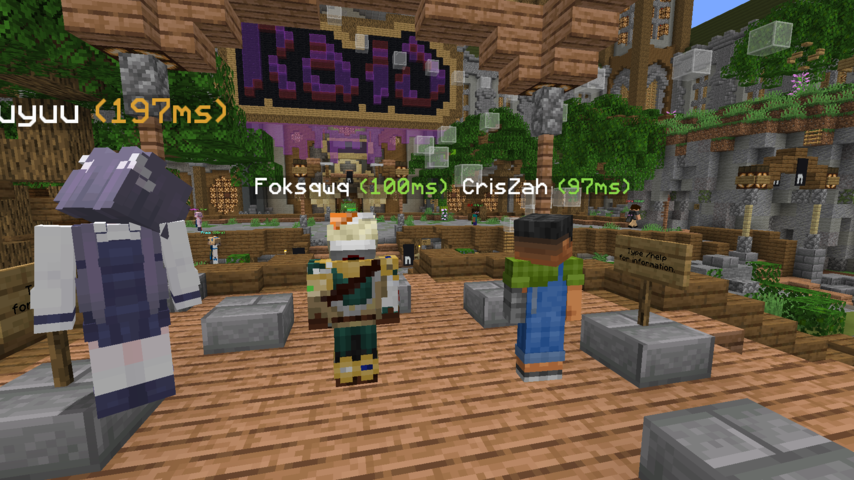

Project description from CurseForge.
Pick your setup
PingNameTags by Minecraft version and loader
Choose the version and loader you play, then open the matching release.
Minecraft version
26.2
2 loader buildsMinecraft version
26.1.2
2 loader buildsMinecraft version
26.1.1
2 loader buildsMinecraft version
26.1
2 loader buildsMinecraft version
1.21.11
1 loader buildMinecraft version
1.21.10
1 loader buildMinecraft version
1.21.9
1 loader buildMinecraft version
1.21.8
1 loader buildMinecraft version
1.21.7
1 loader buildMinecraft version
1.21.6
1 loader buildMinecraft version
1.21.5
1 loader buildShowing the newest 12 of 23 game versions. Older files are in the list below.
Check the dependencies, then try the file in a copied instance before changing a world you care about.
Recent files
PingNameTags versions and loaders
pingnametags-26.3.0.jar
30 Sept 2026
Client Source doesn’t say Server Source doesn’t say Dependencies No extras listed Listed on Release listing
Check the 26.3 · Fabric setup Fabric26.3 release
pingnametags-26.1.1-neoforge.jar
30 Sept 2026
Client Source doesn’t say Server Source doesn’t say Dependencies 1 required · 1 unchecked Listed on Release listing
Check the 26.2 · NeoForge setup NeoForge26.126.1.126.1.2 release
pingnametags-26.1.1.jar
30 Sept 2026
Client Source doesn’t say Server Source doesn’t say Dependencies No extras listed Listed on Release listing
Check the 26.2 · Fabric setup Fabric26.126.1.126.1.2 release
NameTagPing-3.0.1.jar
30 Sept 2026
Client Source doesn’t say Server Source doesn’t say Dependencies 3 required · 3 unchecked Listed on Release listing
Check the 1.21.11 · Fabric setup Fabric1.21.91.21.101.21.11 release
pingnametags-3.0.0.jar
30 Sept 2026
Client Source doesn’t say Server Source doesn’t say Dependencies 3 required · 3 unchecked Listed on Release listing
Check the 1.21.8 · Fabric setup Fabric1.21.81.21.51.21.4 release
pingnametags-1.1.1.jar
30 Sept 2026
Client Source doesn’t say Server Source doesn’t say Dependencies 2 required · 2 unchecked Listed on Release listing
Check the 1.21.1 · Fabric setup 1.21Fabric1.20.51.20.6 release
pingnametags-1.0.0.jar
30 Sept 2026
Client Source doesn’t say Server Source doesn’t say Dependencies 2 required · 2 unchecked Listed on Release listing
Check the 1.20.4 · Fabric setup Fabric1.20.4 release
pingnametags-1.0.0.jar
30 Sept 2026
Client Source doesn’t say Server Source doesn’t say Dependencies 2 required · 2 unchecked Listed on Release listing
Check the 1.20.3 · Fabric setup Fabric1.20.3 release
pingnametags-1.0.0.jar
30 Sept 2026
Client Source doesn’t say Server Source doesn’t say Dependencies 2 required · 2 unchecked Listed on Release listing
Check the 1.20.2 · Fabric setup 1.20.2Fabric release
pingnametags-1.0.0.jar
30 Sept 2026
Client Source doesn’t say Server Source doesn’t say Dependencies 2 required · 2 unchecked Listed on Release listing
Check the 1.20.1 · Fabric setup Fabric1.20.1 release
26.1.0
pingnametags-26.1.0.jar
27 Mar 2026
Client Required Server Not supported Dependencies No extras listed Listed on Release listing
Check the 26.1.2 · Fabric setup 26.126.1.126.1.2Fabric release
1.1.0
pingnametags-1.1.0.jar
12 Aug 2024
Client Required Server Not supported Dependencies 2 required · 2 unchecked Listed on Release listing
Check the 1.21 · Fabric setup 1.20.51.20.61.21Fabric release
Looking for an older file? The official CurseForge project page is in Resources.
 mod
mod CurseForge · Minecraft
Shift Left Click Totem
Equip a Totem of Undying in your offhand by holding Shift and left-clicking.
 mod
mod CurseForge · Minecraft
Emerald Exchange
A modern payment method including payment terminals and cards based on using emeralds as currency. It also has vending machines!
 mod
mod CurseForge · Minecraft
Command Block UI Overhaul
Enlarge the input box of the command block interface and add an automatic line wrap function.