Minecraft version
Back to mods 
CurseForge · Minecraft mod
AnkiNBT
Your next-generation NBT editor, suitable for novice/advanced users.(Even if you have no prior experience, you can easily edit it.)
Choose a version Pick your version below, then grab the matching file.
Quick answer
Which AnkiNBT release should I use?
Latest stable file AnkiNBT-NeoForge-mc26.2-2.0.0.jar
Game version 26.2
Loader NeoForge
AnkiNBT-NeoForge-mc26.2-2.0.0.jar targets 26.2 with NeoForge. The project page does not say whether this file belongs on the client, dedicated server, or both. No extra mods listed for this file.
Where it goes
Is AnkiNBT required on the client, server, or both?
The project page does not say whether this file belongs on the client, dedicated server, or both.
Client Source doesn’t say
Dedicated server Source doesn’t say
Loader for this release NeoForge
Required install it here Optional supported, not mandatory Not supported do not install here Source doesn’t say do not assume
The source does not explicitly classify this release as client-only or server-only.
What else does AnkiNBT-NeoForge-mc26.2-2.0.0.jar need?
AnkiNBT-NeoForge-mc26.2-2.0.0.jar. Change the file and its required mods may change too.
This file does not list any required mods. Do not add a library just because a different file uses it.
This file does not list any required or optional mods.
Before you install it
Add AnkiNBT without breaking your instance.
Built for AnkiNBT-NeoForge-mc26.2-2.0.0.jar. Pick another file and the loader, install side or required mods may change.
- 01
Stick to this file
Use AnkiNBT-NeoForge-mc26.2-2.0.0.jar. It targets 26.2 with NeoForge; another release may have different loader, side or dependency requirements.
- 02
Bring the mods it needs
This file does not list any required mods. Do not add a library just because a different file uses it.
- 03
Put it on the correct side
The project page does not say whether this file belongs on the client, dedicated server, or both.
- 04
Pick the file you checked
Use the “Get this file” button beside AnkiNBT-NeoForge-mc26.2-2.0.0.jar. It opens that exact file at the source.
About this project
What does AnkiNBT add?
A modern client-side Minecraft editor for items, entities, and villager trades.
Supports Fabric and NeoForge for Minecraft 1.21–1.21.11 and 26.1–26.2.
Features
- Simple Mode and Advanced NBT tree editing
- Redesigned tabs, field groups, controls, and status feedback
- Main-hand and inventory-hover item editing
- Spawn-egg, live-entity, and villager-trade editing
- Searchable localized selectors and Chinese IME support
- Configurable size, scale, opacity, theme, and key bindings
- NBT import, export, categories, aliases, and custom save paths
- Creative Mode saving and view-only item editing in other modes
Editing Features
Items:
- General: Name, count, durability, maximum stack size, repair cost, rarity, fire resistance, unbreakable state, nutrition, and saturation
- Enchantments: Localized search, add, remove, level editing, item filtering, and clear all
- Lore: Multi-line editing, reordering, color codes, palette, live preview, keyboard selection, and mouse drag selection
- Attributes: Localized search, modifier values, operations, equipment slots, and optional notes
- Potions and Appearance: Base potions, custom effects, colors, duration, amplifier, particles, icons, glint, dye color, name color, and tooltip visibility
- Tools: Copy NBT, copy
/givecommands, reset, import, and export
Entities: Edit spawn eggs and live entities; modify names, health, and common states; undo changes; save asynchronously; read final data from the server.
Villager Trades: Add, copy, move, delete, and undo offers; configure two buy items and one sell item; edit uses, XP, price multiplier, demand, special price, profession, level, and villager type.
Editing Modes
Simple Mode
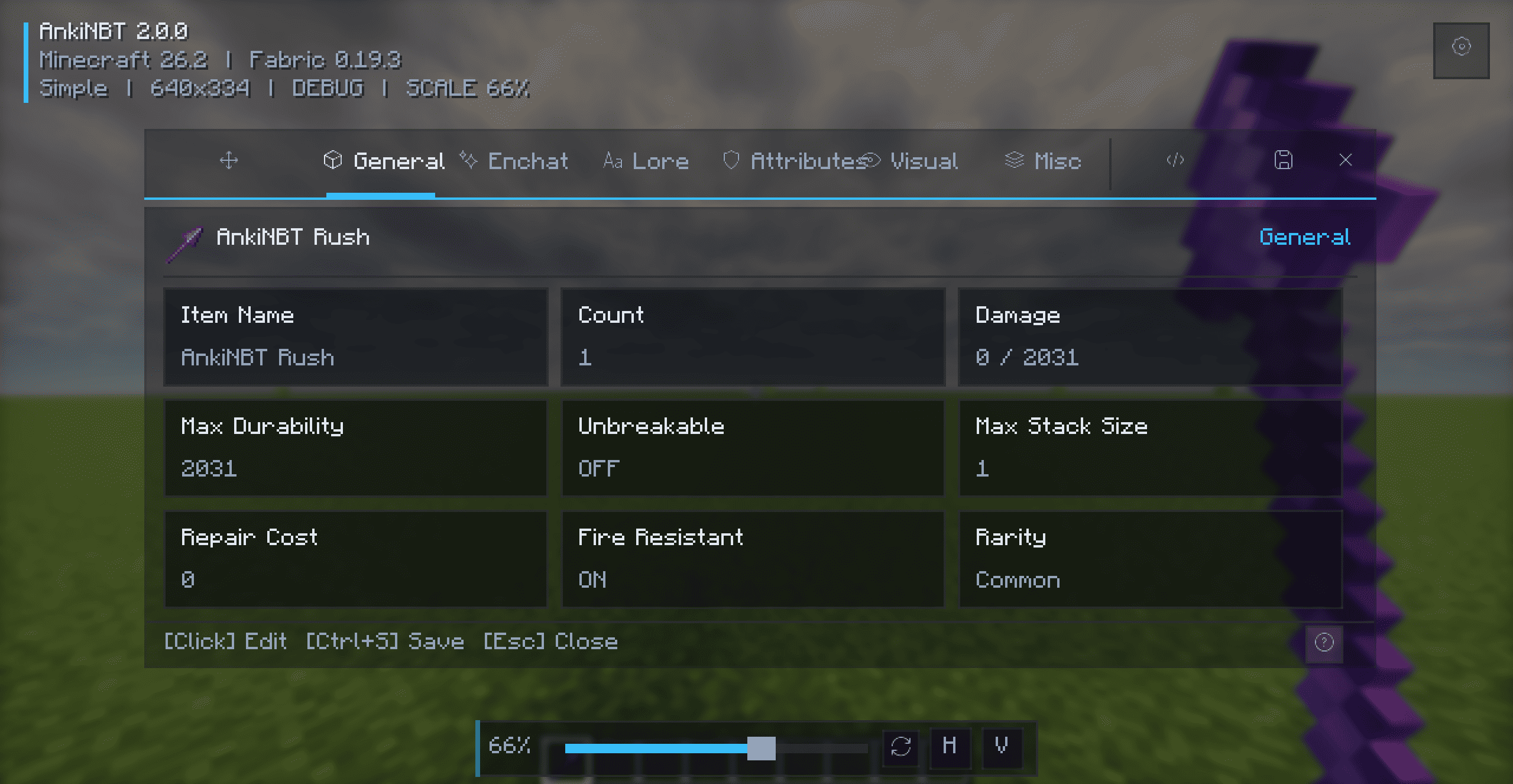
A visual editor organized into focused tabs with searchable selectors, grouped fields, row actions, and immediate feedback. No NBT knowledge is required.
Advanced Mode
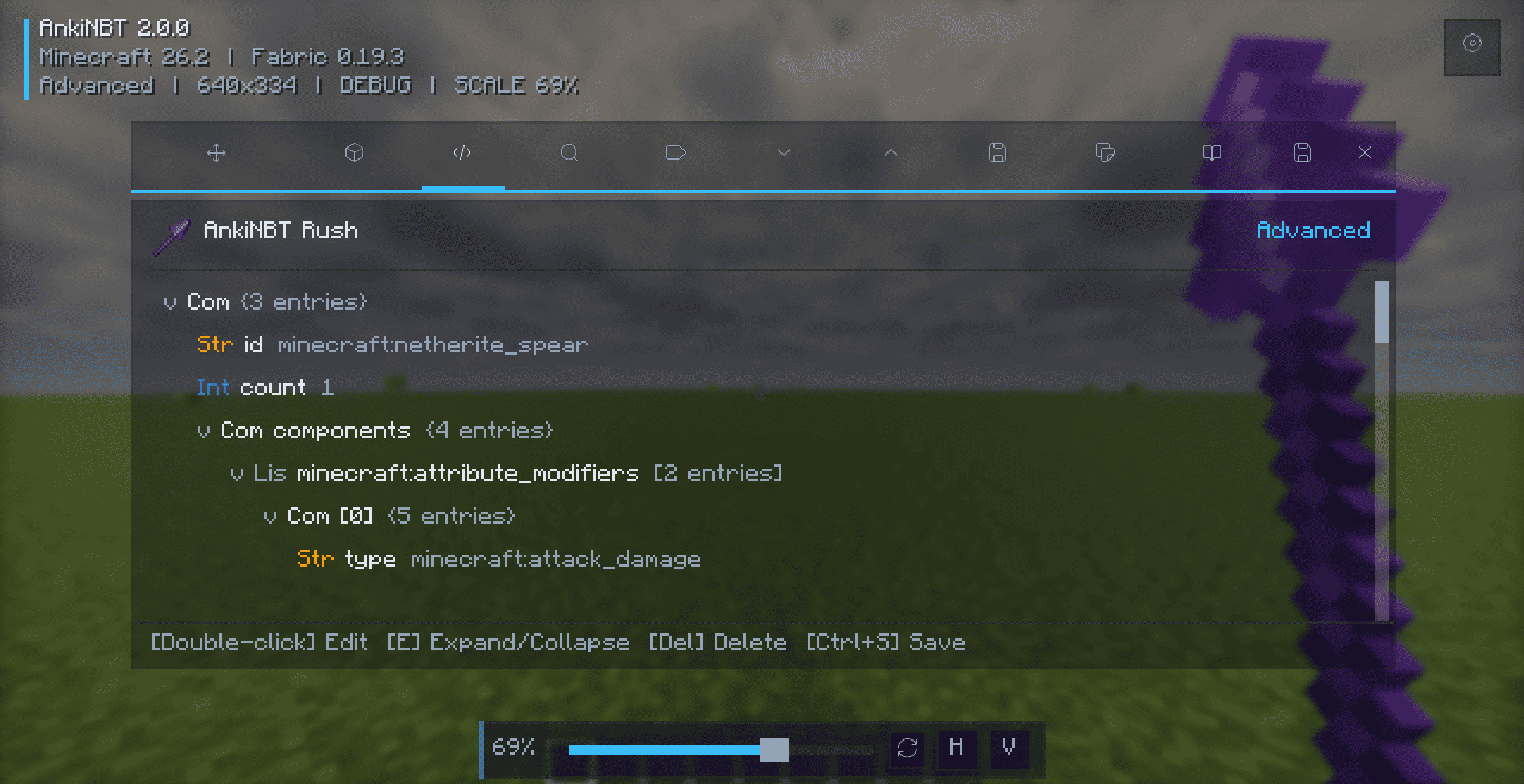
A complete NBT tree editor with color-coded types, key/value/type search, expand and collapse controls, tag creation, automatic type validation, and node removal.
Installation
- Install the matching Fabric or NeoForge loader.
- Install Fabric API when using Fabric.
- Download the JAR matching your loader and Minecraft version.
- Place the JAR in
.minecraft/mods/and launch the game.
Do not install Fabric and NeoForge builds together.
Usage and Shortcuts
Hold an item and press N, or hover over an inventory item and press N. Press Ctrl+S to save and Esc to close.
| Key | Action |
|---|---|
N |
Open the item editor |
Ctrl+S |
Save changes |
Esc |
Close the editor |
Ctrl+A |
Select all text |
| Double-click | Edit a value or expand/collapse a node |
E |
Expand or collapse the selected node |
Enter |
Edit the selected value |
Delete |
Remove the selected tag |
| Arrow keys | Navigate lists and NBT trees |
The editor key can be changed under Controls → AnkiNBT.
Compatibility
- Fabric: Minecraft 1.21–1.21.11, 26.1, 26.1.1, 26.1.2, and 26.2
- NeoForge: Minecraft 1.21–1.21.11, 26.1, 26.1.1, 26.1.2, and 26.2
- Java: Java 21 for Minecraft 1.21–1.21.11; Java 25 for Minecraft 26.1–26.2
- Fabric API: Required for Fabric builds
Always download the JAR matching your loader and Minecraft version.
Documentation
Full documentation, installation guides, feature descriptions, compatibility information, and changelogs:
Project description from CurseForge.
Pick your setup
AnkiNBT by Minecraft version and loader
Choose the version and loader you play, then open the matching release.
Minecraft version
26.1.2
2 loader buildsMinecraft version
26.1.1
2 loader buildsMinecraft version
26.1
2 loader buildsMinecraft version
1.21.11
2 loader buildsMinecraft version
1.21.10
2 loader buildsMinecraft version
1.21.9
2 loader buildsMinecraft version
1.21.8
2 loader buildsMinecraft version
1.21.7
2 loader buildsMinecraft version
1.21.6
2 loader buildsMinecraft version
1.21.5
2 loader buildsMinecraft version
1.21.4
2 loader buildsShowing the newest 12 of 16 game versions. Older files are in the list below.
Check the dependencies, then try the file in a copied instance before changing a world you care about.
Recent files
AnkiNBT versions and loaders
AnkiNBT-NeoForge-mc26.2-2.0.0.jar
21 Aug 2026
Client Source doesn’t say Server Source doesn’t say Dependencies No extras listed Listed on Release listing
Check the 26.2 · NeoForge setup NeoForge26.2 release
AnkiNBT-NeoForge-mc26.1.2-2.0.0.jar
21 Aug 2026
Client Source doesn’t say Server Source doesn’t say Dependencies No extras listed Listed on Release listing
Check the 26.1.2 · NeoForge setup NeoForge26.1.2 release
AnkiNBT-NeoForge-mc26.1.1-2.0.0.jar
21 Aug 2026
Client Source doesn’t say Server Source doesn’t say Dependencies No extras listed Listed on Release listing
Check the 26.1.1 · NeoForge setup NeoForge26.1.1 release
AnkiNBT-NeoForge-mc26.1-2.0.0.jar
21 Aug 2026
Client Source doesn’t say Server Source doesn’t say Dependencies No extras listed Listed on Release listing
Check the 26.1 · NeoForge setup NeoForge26.1 release
AnkiNBT-NeoForge-mc1.21.11-2.0.0.jar
21 Aug 2026
Client Source doesn’t say Server Source doesn’t say Dependencies No extras listed Listed on Release listing
Check the 1.21.11 · NeoForge setup NeoForge1.21.11 release
AnkiNBT-NeoForge-mc1.21.10-2.0.0.jar
21 Aug 2026
Client Source doesn’t say Server Source doesn’t say Dependencies No extras listed Listed on Release listing
Check the 1.21.10 · NeoForge setup NeoForge1.21.10 release
AnkiNBT-NeoForge-mc1.21.9-2.0.0.jar
21 Aug 2026
Client Source doesn’t say Server Source doesn’t say Dependencies No extras listed Listed on Release listing
Check the 1.21.9 · NeoForge setup NeoForge1.21.9 release
AnkiNBT-NeoForge-mc1.21.8-2.0.0.jar
21 Aug 2026
Client Source doesn’t say Server Source doesn’t say Dependencies No extras listed Listed on Release listing
Check the 1.21.8 · NeoForge setup 1.21.8NeoForge release
AnkiNBT-NeoForge-mc1.21.7-2.0.0.jar
21 Aug 2026
Client Source doesn’t say Server Source doesn’t say Dependencies No extras listed Listed on Release listing
Check the 1.21.7 · NeoForge setup 1.21.7NeoForge release
AnkiNBT-NeoForge-mc1.21.6-2.0.0.jar
21 Aug 2026
Client Source doesn’t say Server Source doesn’t say Dependencies No extras listed Listed on Release listing
Check the 1.21.6 · NeoForge setup 1.21.6NeoForge release
AnkiNBT-NeoForge-mc1.21.5-2.0.0.jar
21 Aug 2026
Client Source doesn’t say Server Source doesn’t say Dependencies No extras listed Listed on Release listing
Check the 1.21.5 · NeoForge setup 1.21.5NeoForge release
AnkiNBT-NeoForge-mc1.21.4-2.0.0.jar
21 Aug 2026
Client Source doesn’t say Server Source doesn’t say Dependencies No extras listed Listed on Release listing
Check the 1.21.4 · NeoForge setup 1.21.4NeoForge release
Looking for an older file? The official CurseForge project page is in Resources.
 mod
mod CurseForge · Minecraft
Bye?Pregen!
Reduce MSPT spikes and server freezes caused by chunk generation and speed it up.
 mod
mod CurseForge · Minecraft
Phrix, Phrox
A mod about curses and the like.
 mod
mod CurseForge · Minecraft
CobbleGacha Expanded (Cobblemon Gacha System)
CobbleGacha Expanded is a Cobblemon gacha mod featuring rotating limited banners, rate-up Pokémon, pity and 50/50 guarantees, pull history, and configurable server-side banner management.