Minecraft version
Back to mods 
Modrinth · Minecraft mod
Classic Minecraft Icon
Bring back the classic crafting table window icon of Minecraft
Choose a version Pick your version below, then grab the matching file.
Quick answer
Which Classic Minecraft Icon release should I use?
Latest stable file v1.1.10-mc1.21.11-neoforge
Game version 1.21, 1.21.1, 1.21.2
Loader NeoForge
Classic Minecraft Icon v1.1.10-mc1.21.11-neoforge targets 1.21, 1.21.1, 1.21.2 with NeoForge. It must be installed on the client. Do not install it on the dedicated server. No extra mods listed for this file.
Where it goes
Is Classic Minecraft Icon required on the client, server, or both?
It must be installed on the client. Do not install it on the dedicated server.
Client Required
Dedicated server Not supported
Loader for this release NeoForge
Required install it here Optional supported, not mandatory Not supported do not install here Source doesn’t say do not assume
This file is marked client-only.
What else does Classic Minecraft Icon v1.1.10-mc1.21.11-neoforge need?
v1.1.10-mc1.21.11-neoforge. Change the file and its required mods may change too.
This file does not list any required mods. Do not add a library just because a different file uses it.
This file does not list any required or optional mods.
Before you install it
Add Classic Minecraft Icon without breaking your instance.
Built for Classic Minecraft Icon v1.1.10-mc1.21.11-neoforge. Pick another file and the loader, install side or required mods may change.
- 01
Stick to this file
Use v1.1.10-mc1.21.11-neoforge. It targets 1.21, 1.21.1, 1.21.2 with NeoForge; another release may have different loader, side or dependency requirements.
- 02
Bring the mods it needs
This file does not list any required mods. Do not add a library just because a different file uses it.
- 03
Put it on the correct side
It must be installed on the client. Do not install it on the dedicated server.
- 04
Pick the file you checked
Use the “Get this file” button beside v1.1.10-mc1.21.11-neoforge. It opens that exact file at the source.
About this project
What does Classic Minecraft Icon add?
The icon for the Minecraft game window was changed from a crafting table to a grass / dirt block during the 1.20 release.
This change affects all Minecraft versions, not just 1.20, which breaks how Minecraft should feel like
Here's a simple client-side mod to revert that change. Yes, the classic Minecraft icon is back!
This mod is client-side only and requires no extra dependency. It supports all Minecraft versions since 1.14 (fabric) or since 1.15 (forge)
| Icon File | Source |
|---|---|
icon_16x16.png |
Asset bdf48ef6b5d0d23bbb02e17d04865216179f510a |
icon_32x32.png |
Asset 92750c5f93c312ba9ab413d546f32190c56d6f1f |
icon_48x48.png |
Extracted from minecraft.icns |
icon_128x128.png |
Scaled from icon_256x256.png |
icon_256x256.png |
Extracted from minecraft.icns |
minecraft.icns |
Asset 991b421dfd401f115241601b2b373140a8d78572 |
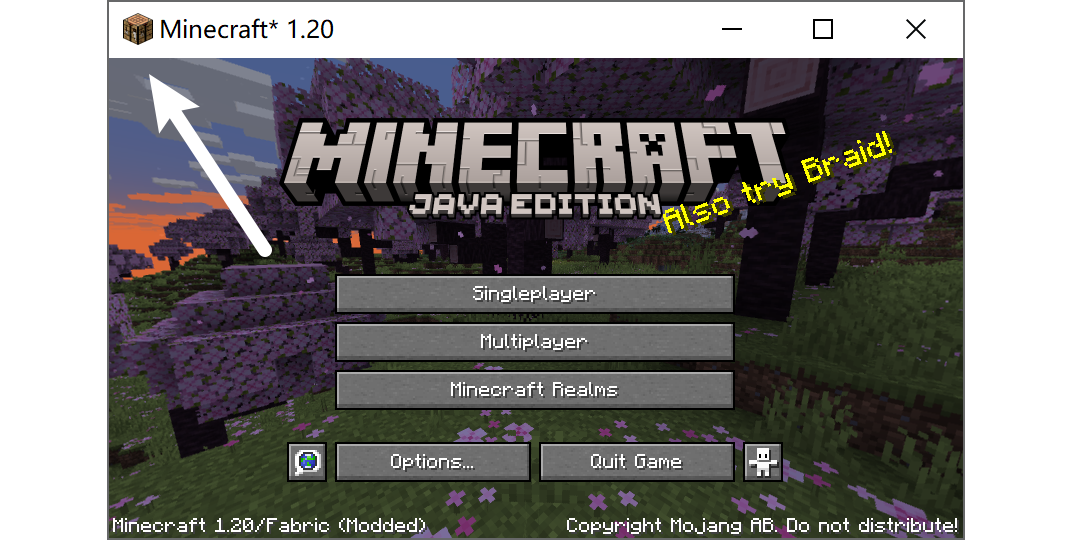
Project description from Modrinth.
Pick your setup
Classic Minecraft Icon by Minecraft version and loader
Choose the version and loader you play, then open the matching release.
Minecraft version
26.2
3 loader buildsMinecraft version
26.1.2
3 loader buildsMinecraft version
26.1.1
3 loader buildsMinecraft version
26.1
3 loader buildsMinecraft version
1.21.11
3 loader buildsMinecraft version
1.21.10
3 loader buildsMinecraft version
1.21.9
3 loader buildsMinecraft version
1.21.8
3 loader buildsMinecraft version
1.21.7
3 loader buildsMinecraft version
1.21.6
3 loader buildsMinecraft version
1.21.5
3 loader buildsShowing the newest 12 of 48 game versions. Older files are in the list below.
Check the dependencies, then try the file in a copied instance before changing a world you care about.
Recent files
Classic Minecraft Icon versions and loaders
v1.1.10-mc1.21.11-neoforge
classic-minecraft-icon-v1.1.10-mc1.21.11-neoforge.jar
26 Sept 2026
Client Required Server Not supported Dependencies No extras listed Listed on Release listing
Check the 1.21.11 · NeoForge setup 1.211.21.11.21.21.21.3 release
v1.1.10-mc1.20.4-forge
classic-minecraft-icon-v1.1.10-mc1.20.4-forge.jar
26 Sept 2026
Client Required Server Not supported Dependencies No extras listed Listed on Release listing
Check the 1.20.4 · Forge setup 1.201.20.11.20.21.20.3 release
v1.1.10-mc1.20.6-neoforge
classic-minecraft-icon-v1.1.10-mc1.20.6-neoforge.jar
26 Sept 2026
Client Required Server Not supported Dependencies No extras listed Listed on Release listing
Check the 1.20.6 · NeoForge setup 1.20.51.20.6NeoForge release
v1.1.10-mc1.19.4-forge
classic-minecraft-icon-v1.1.10-mc1.19.4-forge.jar
26 Sept 2026
Client Required Server Not supported Dependencies No extras listed Listed on Release listing
Check the 1.19.4 · Forge setup 1.19.31.19.4Forge release
v1.1.10-mc1.18.2-forge
classic-minecraft-icon-v1.1.10-mc1.18.2-forge.jar
26 Sept 2026
Client Required Server Not supported Dependencies No extras listed Listed on Release listing
Check the 1.18.2 · Forge setup 1.181.18.11.18.2Forge release
v1.1.10-mc1.19.2-forge
classic-minecraft-icon-v1.1.10-mc1.19.2-forge.jar
26 Sept 2026
Client Required Server Not supported Dependencies No extras listed Listed on Release listing
Check the 1.19.2 · Forge setup 1.191.19.11.19.2Forge release
v1.1.10-mc1.17.1-forge
classic-minecraft-icon-v1.1.10-mc1.17.1-forge.jar
26 Sept 2026
Client Required Server Not supported Dependencies No extras listed Listed on Release listing
Check the 1.17.1 · Forge setup 1.171.17.1Forge release
v1.1.10-mc1.16.5-forge
classic-minecraft-icon-v1.1.10-mc1.16.5-forge.jar
26 Sept 2026
Client Required Server Not supported Dependencies No extras listed Listed on Release listing
Check the 1.16.5 · Forge setup 1.161.16.11.16.21.16.3 release
v1.1.10-mc26.2
classic-minecraft-icon-v1.1.10-mc26.2.jar
26 Sept 2026
Client Required Server Not supported Dependencies No extras listed Listed on Release listing
Check the 26.2 · Fabric setup 26.2FabricForgeNeoForge release
v1.1.10-mc26.3
classic-minecraft-icon-v1.1.10-mc26.3.jar
26 Sept 2026
Client Required Server Not supported Dependencies No extras listed Listed on Release listing
Check the 26.3 · Fabric setup 26.3FabricForgeNeoForge release
v1.1.10-mc26.1.2
classic-minecraft-icon-v1.1.10-mc26.1.2.jar
26 Sept 2026
Client Required Server Not supported Dependencies No extras listed Listed on Release listing
Check the 26.1.2 · Fabric setup 26.126.1.126.1.2Fabric release
v1.1.10-mc1.20.6-fabric
classic-minecraft-icon-v1.1.10-mc1.20.6-fabric.jar
26 Sept 2026
Client Required Server Not supported Dependencies No extras listed Listed on Release listing
Check the 1.20.6 · Fabric setup 1.20.51.20.6Fabric release
Looking for an older file? The official Modrinth project page is in Resources.
 mod
mod CurseForge + Modrinth · Minecraft
BBL Utility
Various useful items and blocks including block breakers and placers. fluid placers and collectors and resource generators
 mod
mod CurseForge + Modrinth · Minecraft
Living Sponge
Drain and Fill the Oceans with Living Sponges!
 mod
mod Modrinth · Minecraft
Beyond Dimensions
Beyond Dimensions is a mod that provides storage solutions. It introduces a virtual storage system obtainable in the late-game of vanilla game