Minecraft version
Back to mods 
Modrinth · Minecraft mod
CableMod
A mod that adds cables for cost-effective redstone signal transportation over long distances.
Choose a version Pick your version below, then grab the matching file.
Quick answer
Which CableMod release should I use?
Latest stable file 1.0.7
Game version 1.17, 1.17.1
Loader Fabric
CableMod 1.0.7 targets 1.17, 1.17.1 with Fabric. Installation on the client is optional. Installation on the dedicated server is optional. No extra mods listed for this file.
Where it goes
Is CableMod required on the client, server, or both?
Installation on the client is optional. Installation on the dedicated server is optional.
Client Optional
Dedicated server Optional
Loader for this release Fabric
Required install it here Optional supported, not mandatory Not supported do not install here Source doesn’t say do not assume
The source marks this as usable on both the client and server.
What else does CableMod 1.0.7 need?
1.0.7. Change the file and its required mods may change too.
This file does not list any required mods. Do not add a library just because a different file uses it.
This file does not list any required or optional mods.
Before you install it
Add CableMod without breaking your instance.
Built for CableMod 1.0.7. Pick another file and the loader, install side or required mods may change.
- 01
Stick to this file
Use 1.0.7. It targets 1.17, 1.17.1 with Fabric; another release may have different loader, side or dependency requirements.
- 02
Bring the mods it needs
This file does not list any required mods. Do not add a library just because a different file uses it.
- 03
Put it on the correct side
Installation on the client is optional. Installation on the dedicated server is optional.
- 04
Pick the file you checked
Use the “Get this file” button beside 1.0.7. It opens that exact file at the source.
About this project
What does CableMod add?
CableMod adds fiber and copper cables for cost-effective redstone signal transportation over long distances. Cables are also waterproof (and waterloggable)!
CableMod is my entry for the Modfest 1.17 modding event.

Introduction
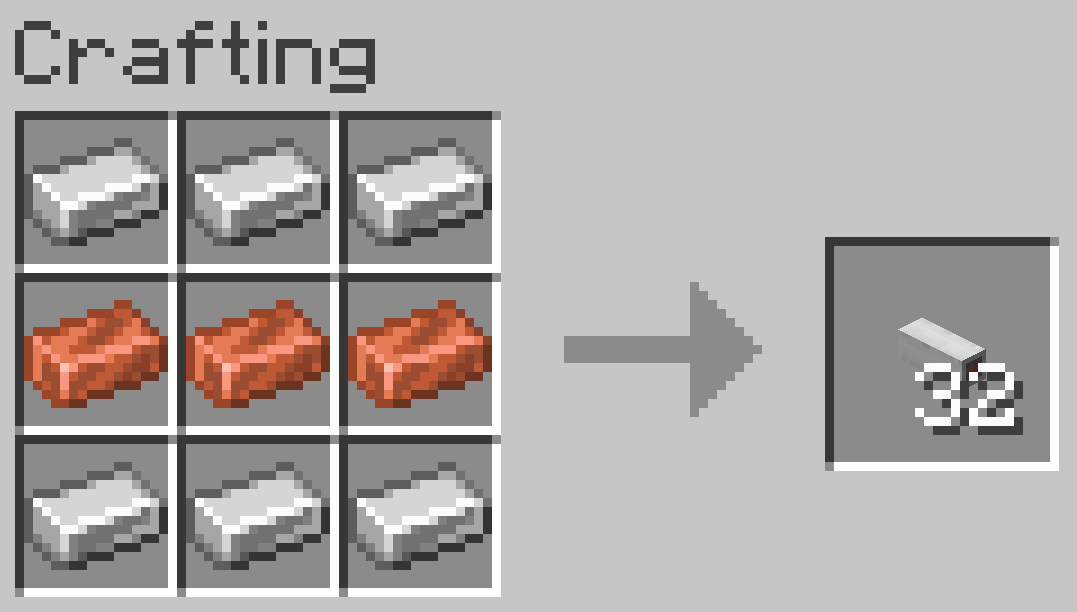
Copper cables are cheaper than fiber cables, but the signal strength will decrease based on the distance.
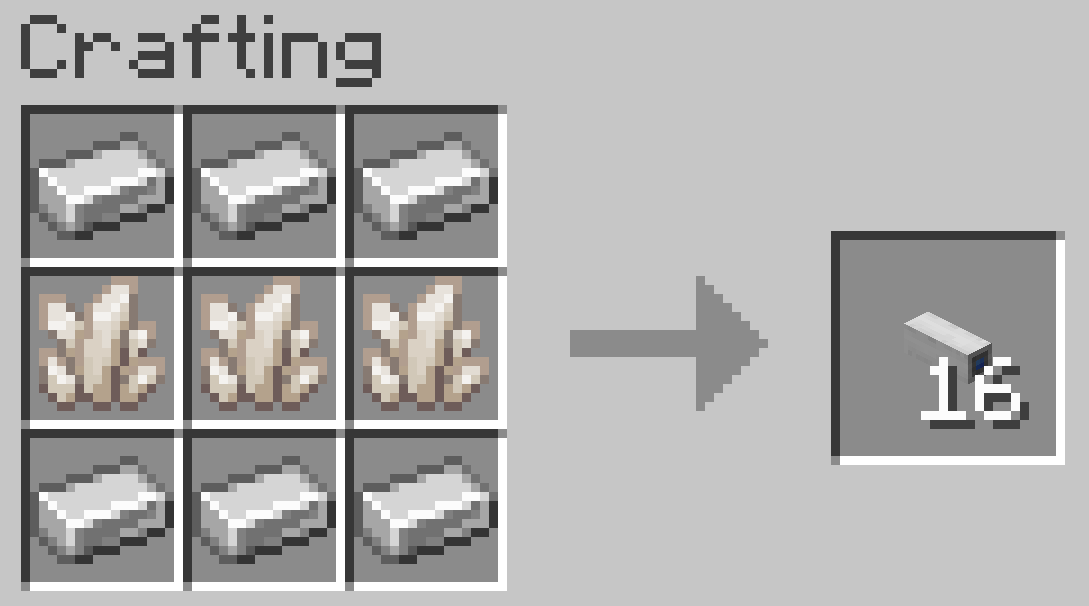
Fiber cables are more expensive (but still cost-effective). Signal strength is the same on both ends of the cable.
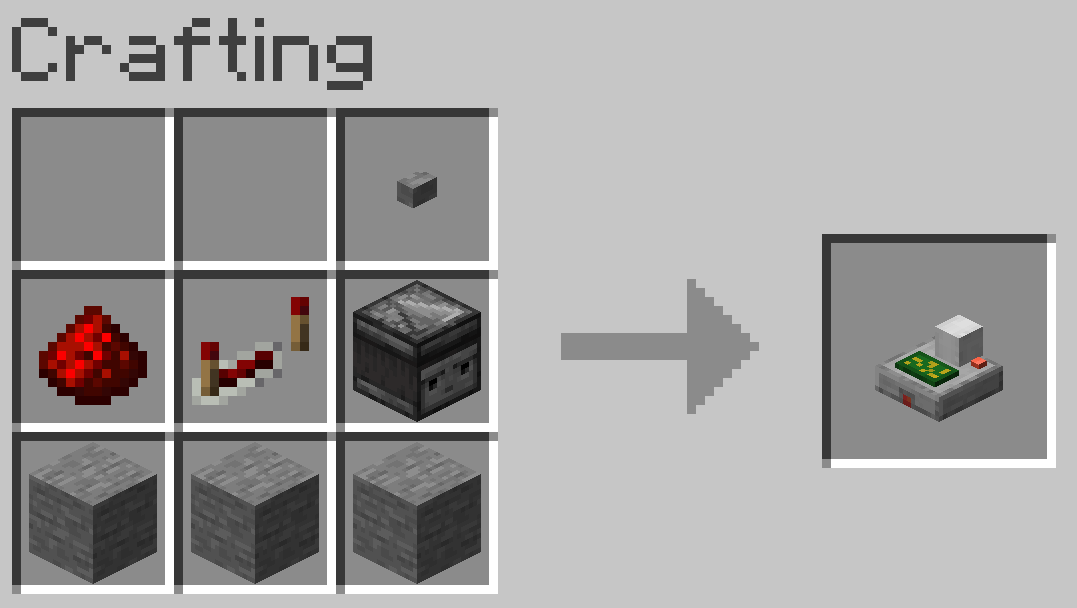
To send and receive redstone signal to/from a cable, you need a transmitter. Once you have placed transmitters on both ends of the cable, you need to pair the transmitters. You can do this by clicking on the red button on the transmitter you wish to be the sender. The button will turn green if pairing has been successful. Now you can send signals!
Project description from Modrinth.
Pick your setup
CableMod by Minecraft version and loader
Choose the version and loader you play, then open the matching release.
Minecraft version
1.17
1 loader buildCheck the dependencies, then try the file in a copied instance before changing a world you care about.
Recent files
CableMod versions and loaders
1.0.7
cablemod-1.0.7.jar
1 Aug 2021
Client Optional Server Optional Dependencies No extras listed Listed on Release listing
Check the 1.17.1 · Fabric setup 1.171.17.1Fabric release
1.0.6
cablemod-1.0.6.jar
31 Jul 2021
Client Optional Server Optional Dependencies No extras listed Listed on Release listing
Check the 1.17.1 · Fabric setup 1.171.17.1Fabric release
1.0.5
cablemod-1.0.5.jar
31 Jul 2021
Client Optional Server Optional Dependencies No extras listed Listed on Release listing
Check the 1.17.1 · Fabric setup 1.171.17.1Fabric release
1.0.4
cablemod-1.0.4.jar
30 Jul 2021
Client Optional Server Optional Dependencies No extras listed Listed on Release listing
Check the 1.17.1 · Fabric setup 1.171.17.1Fabric release
1.0.3
cablemod-1.0.3.jar
18 Jul 2021
Client Optional Server Optional Dependencies No extras listed Listed on Release listing
Check the 1.17.1 · Fabric setup 1.171.17.1Fabric release
1.0.2
cablemod-1.0.2.jar
9 Jul 2021
Client Optional Server Optional Dependencies No extras listed Listed on Release listing
Check the 1.17.1 · Fabric setup 1.171.17.1Fabric release
1.0.1
cablemod-1.0.1.jar
8 Jul 2021
Client Optional Server Optional Dependencies No extras listed Listed on Release listing
Check the 1.17.1 · Fabric setup 1.171.17.1Fabric release
1.0.0
cablemod-1.0.0.jar
4 Jul 2021
Client Optional Server Optional Dependencies No extras listed Listed on Release listing
Check the 1.17 · Fabric setup 1.17Fabric release
Looking for an older file? The official Modrinth project page is in Resources.
 mod
CurseForge + Modrinth · Minecraft
NEEPMeat
A tech mod with pipes, computers, guns, rusty machinery and meat.
 mod
Modrinth · Minecraft
Neo ECO Prototype
Storage, computation and crafting extensions for Neo ECO AE Extension, with KubeJS integration for custom infinite matrices.
 mod
Modrinth · Minecraft
peyaj's CustomDiscs
Custom music disc plugin for Paper servers. Upload any audio file, get a playable disc.